Introduction
Gemini Review 2026 is worth reading if you are looking for an AI assistant that goes beyond basic chatbot conversations. Developed by Google, Gemini has evolved into a broader AI platform for writing, research, coding, image generation, file analysis, and everyday productivity. Google’s current Gemini experience also includes features such as Gemini Live, Deep Research, Canvas, Gems, and image generation and editing.What makes Gemini particularly interesting in 2026 is its growing connection with Google’s ecosystem. Gemini can work alongside Google services and is increasingly designed to help users complete more complex tasks rather than simply answer questions. Google has also been adding more agentic capabilities, including Gemini Spark, while continuing to expand Gemini’s capabilities across products and platforms.The Gemini platform has also continued to evolve rapidly throughout 2026. Google has introduced new Gemini models and updates focused on reasoning, coding, multimodal tasks, and AI agents. This means that Gemini today is significantly more capable than the early versions of the product.But is Gemini actually worth using in 2026? Is the free version good enough? Which paid plan offers the best value? And how does Gemini compare with ChatGPT and Claude?In this Gemini Review 2026, we’ll take an in-depth look at Gemini’s features, latest models, pricing, performance, strengths, weaknesses, and real-world use cases. We’ll also compare Gemini with other leading AI assistants to help you decide whether Google Gemini is the right AI tool for your needs.Whether you’re a student, blogger, content creator, developer, researcher, or business owner, this review will help you understand what Gemini can do and whether it deserves a place in your daily workflow.
What Is Google Gemini?
Google Gemini is Google’s family of advanced AI models and AI assistant products, developed by Google DeepMind. It is designed to understand and work with multiple types of information—including text, images, audio, and video—rather than being limited to text-only conversations.Unlike a simple chatbot, Gemini has grown into a broader AI ecosystem. Depending on the model and product, it can help with writing, research, coding, problem-solving, image generation and editing, multimodal analysis, and more complex multi-step tasks. Google DeepMind currently describes its Gemini 3.5 family as combining advanced intelligence with action, including capabilities for agentic coding, multimodal understanding, long-horizon tasks, and multi-step problem-solving.One of Gemini’s biggest advantages is its connection to Google’s wider technology ecosystem. Users can access Gemini through the Gemini app, while developers can work with Gemini through platforms such as Google AI Studio and the Gemini API. Google is also expanding Gemini into more specialized experiences and AI-powered tools.In 2026, Gemini is no longer represented by a single model. Google’s current lineup includes models such as Gemini 3.6 Flash, Gemini 3.5 Flash-Lite, Gemini 3.1 Pro, and Gemini 3.1 Deep Think, each designed for different types of workloads.This makes Gemini particularly interesting for people who want one AI platform for everyday productivity, content creation, research, programming, and advanced AI workflows.In simple terms, Google Gemini is Google’s AI ecosystem for understanding information, generating content, solving problems, and helping users complete increasingly complex tasks.
Why Gemini Matters in 2026
Gemini matters in 2026 because Google is no longer positioning it as just another AI chatbot. The Gemini ecosystem is expanding toward advanced reasoning, multimodal AI, coding, research, and AI agents that can handle more complex, multi-step tasks.One of the biggest reasons Gemini is important is the rapid development of its model family. Google DeepMind’s current lineup includes Gemini 3.6 Flash, Gemini 3.5 Flash-Lite, Gemini 3.1 Pro, and Gemini 3.1 Deep Think, with different models designed for tasks ranging from everyday work to complex reasoning, coding, and scientific research.Gemini is also becoming more capable at agentic workflows. Instead of simply responding to a prompt, newer Gemini models are designed to work through longer tasks, use tools, solve problems in multiple steps, and assist with more sophisticated coding and knowledge-work workflows.Another major development is Gemini’s growing role in the wider Google ecosystem. Google is integrating Gemini across products and platforms while also offering access through tools such as Google AI Studio, the Gemini API, Gemini Enterprise Agent Platform, and Google Antigravity. This gives both everyday users and developers more ways to use Gemini.Google has also continued expanding Gemini’s multimodal capabilities. Current Gemini models are designed to work with text, images, video, and audio, allowing users to perform more complex tasks without relying only on text-based prompts.The pace of development is another reason Gemini deserves attention in 2026. Google introduced Gemini 3.6 Flash and Gemini 3.5 Flash-Lite in July 2026, showing that the company continues to update its models for efficiency, coding, knowledge work, and multimodal tasks.For users, this means Gemini is becoming more than a tool for answering questions. It is increasingly being positioned as an AI assistant that can help with content creation, research, programming, productivity, creative work, and complex workflows.That’s why Gemini is an important product to evaluate in 2026. In this Gemini Review 2026, the key question isn’t simply whether Gemini can answer questions—it is whether its expanding capabilities, Google integration, and available plans make it a better choice for your specific needs.
Quick Overview
| Feature | Gemini Review 2026 |
|---|---|
| Developer | Google DeepMind |
| AI Assistant | Gemini |
| Free Plan | Yes |
| Multimodal AI | Yes |
| Writing & Content | Yes |
| Coding | Yes |
| Deep Research | Yes |
| Image Generation | Yes |
| Video Generation | Yes |
| Gemini Live | Yes |
| Google Apps Integration | Yes |
| Best For | Google users, research, productivity, coding & creative work |
Google Gemini has developed into a broad AI assistant rather than a simple text chatbot. In 2026, Gemini offers features for writing, research, coding, image and video generation, file analysis, live conversations, and more. Google is also expanding Gemini toward AI agents and more complex multi-step workflows.For users already invested in Google’s ecosystem, Gemini can be particularly useful because it works with Google services and offers features across products such as Gmail, Docs, Drive, Search, and other Google experiences, depending on availability and plan.
Who Should Use Gemini?
Gemini can be useful for a wide range of users, but it is especially appealing to people who want an AI assistant that connects closely with Google’s ecosystem.
Students
Students can use Gemini to understand difficult topics, summarize information, brainstorm ideas, organize study materials, and assist with research. Google’s Gemini ecosystem also includes tools designed for learning and research workflows.
Bloggers and Content Creators
Gemini can help with content ideas, outlines, rewriting, research, image generation, and other creative tasks. Its growing multimodal capabilities make it useful for creators working with both text and visual content.
Developers
Developers can use Gemini for coding, debugging, technical problem-solving, and agentic development workflows. Google has also expanded Gemini’s availability through developer platforms and tools for building AI-powered applications.
Researchers and Professionals
Gemini’s research and long-context capabilities can be useful for analyzing information, working with documents, exploring complex topics, and handling knowledge-intensive tasks. Google’s current Gemini experience includes Deep Research and other productivity-focused features.
Google Workspace Users
If you regularly use Gmail, Google Docs, Drive, or other Google services, Gemini can be especially convenient. Gemini can connect information across supported Google apps and help with tasks such as finding information in emails, organizing information, and planning activities.
Business Users
Businesses and teams can benefit from Gemini’s expanding AI capabilities for productivity, coding, research, and more advanced agent-based workflows. Google is also developing Gemini solutions for enterprise environments.
What Is Google Gemini?
Google Gemini is Google’s family of advanced AI models and AI assistant products, developed by Google DeepMind. It is designed to understand and work with different types of information, including text, images, audio, and video.Unlike a traditional text-only chatbot, Gemini is built around multimodal AI, allowing it to handle different forms of information and support a wide range of tasks. Google describes Gemini as an AI assistant that can help users write, plan, learn, research, create, and solve problems.Gemini is also closely connected to Google’s wider ecosystem. Depending on the user’s plan and region, Gemini can work with supported Google services and provide features such as Deep Research, Gemini Live, Canvas, image generation, video generation, Gems, and other AI-powered experiences.The Gemini family has also expanded beyond a single model. Google has introduced different models and versions designed for different workloads, including fast everyday interactions, advanced reasoning, coding, multimodal tasks, and AI-agent workflows. In 2026, Google introduced Gemini 3.5 and continued expanding its model lineup and agent capabilities.In simple terms, Google Gemini is Google’s AI ecosystem for understanding information, generating content, solving problems, and helping users complete everyday and advanced tasks.For this Gemini Review 2026, the important question is not simply what Gemini can do. We also need to look at its latest features, pricing, performance, limitations, and how it compares with alternatives such as ChatGPT and Claude.
A Brief History of Gemini
Google’s Gemini story began before the Gemini name itself. In February 2023, Google introduced Bard, an experimental conversational AI service designed to help users with brainstorming, writing, learning, and other everyday tasks. Bard was initially powered by a lightweight version of Google’s LaMDA language model.Later in 2023, Google began moving toward a more advanced generation of AI models. In December 2023, Google DeepMind introduced Gemini 1.0, describing it as a multimodal model built to understand and combine different types of information, including text, code, audio, images, and video. Gemini 1.0 was released in three sizes: Ultra, Pro, and Nano, designed for different levels of complexity and different devices.
From Bard to Gemini
One of the biggest changes came in February 2024, when Google officially changed the Bard name to Gemini. Google explained that the new name better represented the technology powering the product. At the same time, Google introduced Gemini Advanced, giving users access to its more capable Ultra model and additional advanced AI capabilities.
Gemini 1.5 and the Expansion of Multimodal AI
Google continued improving Gemini throughout 2024 with the introduction of the Gemini 1.5 generation. These models focused heavily on improved performance, multimodal understanding, and the ability to work with much larger amounts of information.During this period, Gemini also expanded beyond simple question-and-answer interactions. Google introduced features such as Deep Research, which was designed to use AI to investigate complex topics and produce structured research reports. Google also introduced Gemini 2.0 Flash as an experimental model in December 2024.
Gemini’s Evolution Into a Broader AI Platform
As Google’s models became more capable, Gemini evolved from a chatbot into a broader AI ecosystem. Google continued developing Gemini for writing, research, coding, multimodal tasks, productivity, and more advanced AI workflows.This evolution is important when looking at Gemini Review 2026. Today’s Gemini is not simply the same chatbot that replaced Bard in 2024. It is the result of several generations of Google’s AI model development, with newer models and features designed to handle increasingly complex tasks.In 2026, Google continues to expand the Gemini family and its capabilities across consumer products, developer tools, and AI-powered workflows. This ongoing development is one of the main reasons Gemini remains one of the most important AI platforms to consider today.
How Gemini Has Evolved
Gemini has evolved significantly since Google first introduced it as a new generation of multimodal AI. What started as a family of AI models has gradually become a broader ecosystem covering everyday assistance, advanced reasoning, coding, research, creative work, and AI-powered agents.The first major step was Gemini 1.0, which introduced Google’s approach to multimodal AI across different model sizes. Google then continued improving the technology through subsequent generations, increasing its ability to understand longer and more complex inputs and perform more demanding tasks.With the Gemini 3 generation, Google placed greater emphasis on advanced reasoning and practical problem-solving. The introduction of Gemini 3.1 Pro in February 2026 brought improved capabilities for complex tasks and was made available across consumer and developer products.Google then pushed Gemini further toward AI agents and multi-step workflows. At Google I/O 2026, the company introduced Gemini 3.5, describing the new generation as combining advanced intelligence with action. This shift means Gemini is increasingly designed not only to answer questions but also to help users complete more complicated tasks.Another important development in 2026 was the expansion of Gemini’s multimodal capabilities. Google introduced Gemini Omni, a model designed to create different types of output from different forms of input, starting with video. This represents Google’s broader move toward AI systems that can understand and generate content across multiple formats.The Gemini family continued evolving in July 2026 with the introduction of Gemini 3.6 Flash and Gemini 3.5 Flash-Lite. These models focus on improving efficiency, speed, coding, knowledge work, and large-scale agentic workflows. Google also introduced a specialized Gemini 3.5 Flash Cyber model for cybersecurity applications. (Google )Today, Gemini is no longer simply a chatbot. Google’s current model ecosystem includes models and specialized systems for reasoning, coding, multimodal understanding, image and video generation, real-time audio, and agentic workflows. Google DeepMind’s current model lineup reflects this broader direction.This evolution is important for our Gemini Review 2026 because the product has changed from a basic conversational AI into a much broader AI platform. For users, the main question is now not simply whether Gemini can answer questions, but how effectively it can help with real-world tasks such as research, content creation, coding, productivity, and complex multi-step workflows.
Gemini vs Traditional AI Chatbots
Traditional AI chatbots are generally designed around text-based conversations. You type a question or instruction, and the chatbot responds with generated text. While modern chatbots have become much more capable, Gemini takes a broader approach by being designed as a multimodal AI system.Gemini can work with different types of information, including text, images, audio, video, and code. This allows users to combine different inputs in a single workflow instead of relying only on written prompts. Google describes Gemini as a multimodal model designed to reason across these different types of information.Another major difference is Gemini’s growing ability to handle complex, multi-step tasks. Google’s newer Gemini models are designed not only to generate answers but also to support tool use, coding, agentic workflows, and more advanced problem-solving. For example, Google describes Gemini 3.5 as a model family that combines advanced intelligence with action and is designed for complex workflows.Gemini also goes beyond the traditional chatbot experience through features such as Deep Research, Gemini Live, image generation and editing, and integrations with Google’s ecosystem. Depending on the product and plan, these capabilities can make Gemini useful for research, productivity, content creation, and creative work.
| Capability | Traditional AI Chatbots | Gemini |
|---|---|---|
| Text conversations | ✅ | ✅ |
| Image understanding | Varies | ✅ |
| Audio understanding | Limited/varies | ✅ |
| Video understanding | Limited/varies | ✅ |
| Multimodal reasoning | Varies | ✅ |
| Advanced coding | Varies | ✅ |
| Deep Research | Varies | ✅ |
| Agentic workflows | Limited/varies | ✅ |
| Google ecosystem integration | Usually limited | ✅ |
However, this does not mean Gemini is automatically better than every other AI chatbot. Different AI assistants have different strengths, and performance can vary depending on the task, model, and plan.The main advantage of Gemini is that Google is building it as a broader AI platform rather than simply a conversational chatbot. In 2026, that distinction is becoming increasingly important as AI tools move toward multimodal interaction, reasoning, tool use, and autonomous multi-step workflows.For this Gemini Review 2026, Gemini’s multimodal capabilities and growing agentic features are therefore important factors to consider when comparing it with alternatives such as ChatGPT and Claude.
Gemini Features in 2026
Gemini has evolved into much more than a traditional AI chatbot. In 2026, Google’s AI assistant combines advanced models with features for research, writing, coding, image and video creation, productivity, and increasingly complex multi-step tasks. The exact features and usage limits can vary by plan, country, language, and device.
AI Writing and Content Creation
Gemini can help users write, rewrite, summarize, brainstorm, and improve different types of content. It can be useful for blog posts, emails, social media content, outlines, reports, and other everyday writing tasks.For content creators, Gemini can also combine text and visual capabilities, making it easier to move from an idea to a finished piece of content.
Advanced AI Reasoning
One of Gemini’s major strengths in 2026 is its focus on more advanced reasoning. Google’s newer Gemini models are designed to handle complex questions, problem-solving, coding, and knowledge-intensive tasks more effectively.Different Gemini models are optimized for different workloads, so users may receive different levels of access depending on their plan and the task they are performing.
Deep Research
Gemini’s Deep Research feature is designed to help users investigate complex topics. Instead of simply answering a question from a short prompt, it can research information and organize findings into a more structured response.This can be particularly useful for students, researchers, professionals, and content creators who need to explore a topic before writing or making a decision. Deep Research is included among the current Gemini features, although access and limits depend on the user’s plan.
Gemini Live
Gemini Live allows users to interact with Gemini through a more natural conversational experience. Users can speak with Gemini and switch between talking and typing while working through a task.Google has continued integrating Live more deeply into the Gemini experience, making it useful for brainstorming, asking follow-up questions, discussing what you see, and getting real-time assistance.
Image Generation and Editing
Gemini also includes AI-powered image generation and editing capabilities. Users can create images from text prompts and make changes to existing images.Google’s current Gemini experience includes advanced image-generation technology such as Nano Banana, while newer updates have expanded personalized image creation and editing capabilities.
Video Generation
Video creation has become another important part of Gemini’s ecosystem in 2026. Google’s Gemini experience can use newer video-generation models to turn text, images, and other inputs into video content.Google’s current Gemini page highlights Gemini Omni for creating and editing videos, while Google’s AI plans also provide access to video-generation capabilities with different limits depending on the subscription.
Coding and Programming
Gemini can assist developers with writing code, explaining programming concepts, debugging, generating solutions, and working through complex development tasks.Google is also moving Gemini toward more agentic coding workflows, allowing developers to use AI for longer and more complicated programming tasks rather than relying only on individual code-generation prompts.
Canvas
Gemini Canvas provides an interactive workspace where users can create and refine content, documents, and other projects with AI assistance.Instead of receiving only a traditional chat response, Canvas allows users to work with Gemini in a more interactive environment and refine the result as they go.
Gems
Gems allow users to create customized versions of Gemini for specific tasks. For example, a user could create a Gem designed to help with writing, studying, brainstorming, or another repeated workflow.This can make Gemini more useful for users who regularly perform the same type of task and want a more personalized AI experience.
Google Apps and Personal Intelligence
One of Gemini’s biggest advantages is its connection with Google’s ecosystem. Depending on availability and plan, Gemini can work with supported Google services and provide more personalized assistance.Google’s Personal Intelligence feature can connect Gemini with selected Google apps such as Gmail, Photos, YouTube, and Search to provide more relevant responses. The feature is optional and controlled through user settings.
AI Agents and Multi-Step Tasks
A major direction for Gemini in 2026 is the move from answering questions to taking action.Google has introduced features such as Gemini Spark, described as a personal AI agent that can handle multi-step tasks under the user’s direction. Gemini is also being developed to perform more complex tasks across applications and devices.On supported Android devices, Google has also demonstrated multi-step task automation, allowing Gemini to perform certain tasks inside apps while keeping the user informed and in control.
Daily Brief and Personal Assistance
Gemini is increasingly designed to become a more proactive assistant rather than something users only open when they have a question.Google’s Daily Brief feature can provide a personalized summary of important information and priorities to help users start their day. Availability depends on the user’s location, language, account, and plan.
Gemini Notebook
Gemini’s ecosystem also includes Gemini Notebook, designed to support research and writing workflows. It can help users organize information and work with research materials in a more structured environment.
Long-Context AI
Another important capability is Gemini’s ability to work with large amounts of information. Higher-tier plans provide access to larger context capabilities, which can be useful when analyzing lengthy documents, research materials, or complex projects.This makes Gemini particularly interesting for users who need to work with large amounts of information rather than short individual prompts.
Gemini on Android and Desktop
Gemini is also becoming more deeply integrated into users’ devices. Google is expanding Gemini’s capabilities across Android, while a native macOS experience provides another way to access Gemini during desktop workflows.Overall, the biggest change in Gemini Review 2026 is that Gemini is becoming an increasingly complete AI ecosystem. It combines conversational AI with research, coding, multimodal creation, Google app integration, and agentic capabilities.For users who want an AI assistant that can help with both simple everyday questions and more complex workflows, Gemini’s expanding feature set makes it one of the most interesting AI platforms to consider in 2026.
AI Image Generation
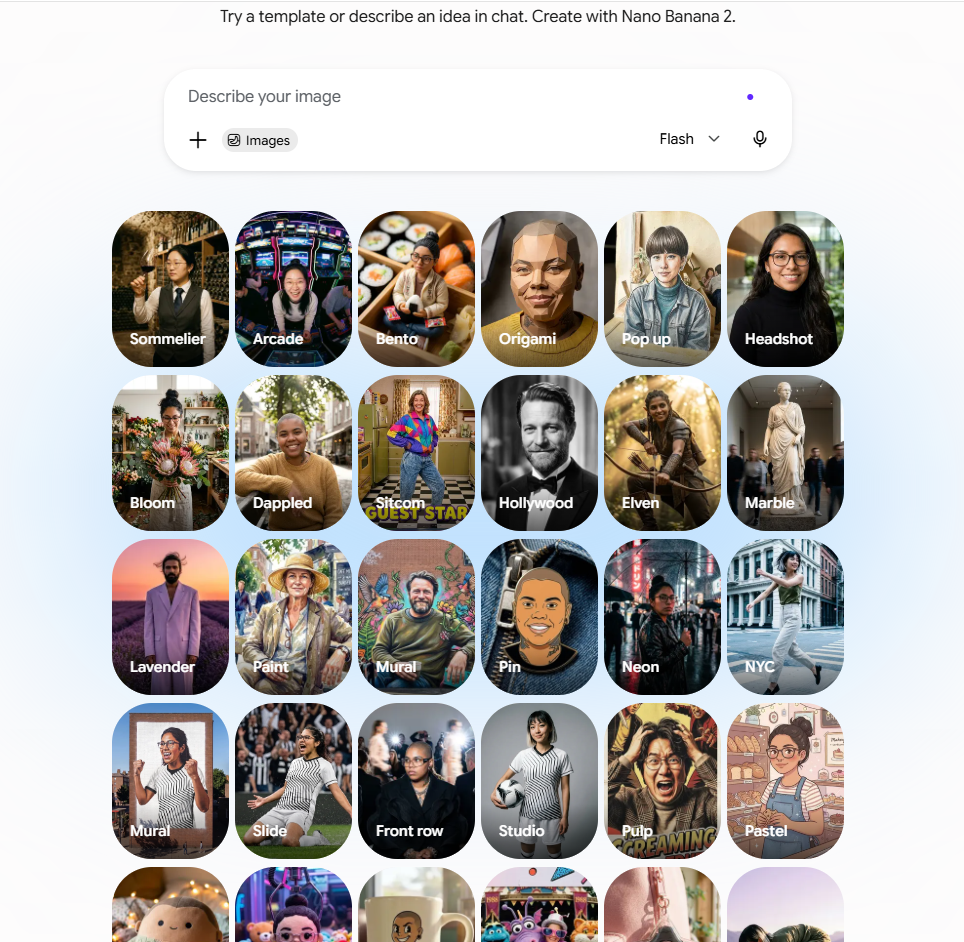
One of the standout features in Gemini Review 2026 is Google’s AI image generation and editing capability. Gemini can create images from text prompts and also edit existing images, making it useful for bloggers, marketers, designers, social media creators, and everyday users who need visuals without using traditional design software.Google’s latest image-generation experience is powered by Nano Banana 2, which Google describes as its latest state-of-the-art image model. It is designed to combine strong image quality, world knowledge, and reasoning with fast generation. (Google Gemini)
Create Images From Text Prompts
Users can describe what they want to create using a natural-language prompt. Gemini can then generate an image based on the subject, environment, composition, style, and other details included in the prompt.For example, you could ask Gemini to create a professional technology illustration for a blog article, a social media graphic, a product concept, or a creative scene.The more specific the prompt, the more control you generally have over the final result. Google recommends including details such as the subject, action, scene, composition, style, image quality, and aspect ratio when creating an image.
AI Image Editing
Gemini is not limited to creating new images from scratch. You can also upload an existing image and ask Gemini to make changes.
For example, you can ask it to:
- Replace or remove an object
- Change the background
- Adjust the lighting
- Change the atmosphere
- Modify clothing or other visual elements
- Change the camera angle or focus
- Apply a different visual style
- Combine multiple images
One useful advantage is that you can make changes through natural-language instructions instead of manually editing every element. Google says Gemini’s image editing model can make changes while preserving important details from the original image. (Google Gemini)
Reference Images and Style Transfer
Gemini can also use reference images to guide the look of a new creation. Users can provide an image and ask Gemini to apply its texture, color, mood, or visual style to another subject.This can be useful for creators who want to experiment with different visual styles without starting the design process from scratch. (Google Gemini)
Better Text in Images
A common weakness of AI image generators has been producing accurate text inside images. Gemini’s latest image-generation experience is designed to handle clear text within generated visuals, making it more useful for logos, posters, invitations, comics, and other designs that require readable words. (Google Gemini)For website owners and content creators, this can be particularly useful when creating featured images, promotional graphics, social media visuals, and other marketing materials.
Image Resizing and Different Formats
Gemini’s latest image tools can also adapt a visual to different sizes and formats. This is useful when the same creative needs to be used across different platforms, such as a website, Pinterest, Facebook, or other social media channels. (Google Gemini)
AI Transparency and SynthID
Google also uses SynthID technology to help identify content created with Google AI. Gemini-generated images include an invisible SynthID watermark, and Google also uses a visible watermark to indicate AI-generated visuals in relevant experiences.This is an important consideration as AI-generated images become more common across websites and social media.
Is Gemini Good for AI Image Generation?
For users who want both image creation and image editing inside an AI assistant, Gemini is a strong option in 2026. Its ability to create images from prompts, edit uploaded images, work with reference visuals, handle text within designs, and adapt images to different formats makes it useful for a wide range of creative workflows.However, image-generation availability, model access, and usage limits can vary depending on the user’s country, account, and Google AI plan. Google also notes that limits and compatibility can change over time. Overall, Gemini’s image-generation capabilities make it much more than a text-based AI assistant. For bloggers, marketers, and content creators, it can become a practical part of the entire workflow—from generating an idea to creating and refining the visual that goes with it.
Deep Research
Deep Research is one of Gemini’s most useful features for users who need to investigate complex topics rather than simply ask a quick question. Instead of producing a short answer from a single prompt, Gemini can create a research plan, gather information from multiple sources, and organize the findings into a detailed report.This makes Deep Research particularly useful for students, researchers, bloggers, marketers, professionals, and business owners who regularly need to explore a topic before making a decision or creating content.
How Gemini Deep Research Works
When you provide Gemini with a research question, Deep Research can break the task into multiple steps. It develops a research plan, searches for relevant information, analyzes the results, and then produces a structured report.Users can review the research plan before Gemini begins the full research process and can also provide additional instructions to guide the investigation. Google says Deep Research can use information from the web and, depending on the experience and settings, other connected sources.
Useful for Content Research
For website owners and bloggers, Deep Research can be especially valuable during the content-planning stage.For example, if you are writing a Gemini Review 2026, you could use Deep Research to investigate:
- Gemini’s latest features
- Current pricing and plans
- New model releases
- Competitor comparisons
- Industry trends
- Common user questions
- Supporting facts and sources
However, AI research should not be treated as automatically accurate. Important facts, statistics, pricing information, and claims should always be checked against the original source before publishing.
Deep Research for Students and Professionals
Students can use Deep Research to explore academic or general-interest topics, organize information, and build a better understanding of complicated subjects.Professionals can use it for tasks such as market research, competitor research, industry analysis, product research, and preparing reports.The biggest advantage is that Deep Research can save time by handling much of the initial information-gathering process while presenting the results in a more organized format.
Gemini Deep Research vs a Normal AI Answer
A normal AI response is usually designed to answer a question quickly. Deep Research is designed for a different purpose: investigating a topic more thoroughly.
| Feature | Normal Gemini Response | Deep Research |
|---|---|---|
| Quick questions | ✅ | ✅ |
| Multi-step research | Limited | ✅ |
| Research planning | ❌ | ✅ |
| Multiple sources | Limited | ✅ |
| Detailed report | Sometimes | ✅ |
| Best for complex topics | Good | Better |
This makes Deep Research particularly useful when the goal is not simply to get an answer, but to understand a subject in greater depth.
Is Gemini Deep Research Worth Using?
For people who frequently perform research, Deep Research is one of Gemini’s most valuable productivity features. It can reduce the time required for initial research and help organize large amounts of information into a readable report.However, it should be viewed as a research assistant rather than a replacement for human verification. Gemini can still make mistakes or misunderstand information, so important claims should be checked against trustworthy primary sources.Overall, Deep Research adds significant value to Gemini in 2026 and helps distinguish it from a basic conversational chatbot. For bloggers, researchers, students, and professionals, it can be one of the most useful features in the Gemini ecosystem.
Coding and Programming
Coding and programming have become important parts of the Gemini experience in 2026. Google’s newer Gemini models are designed not only to generate code but also to help developers solve complex programming problems, debug applications, understand existing code, and work through longer development tasks.Gemini’s latest models include capabilities specifically aimed at agentic coding. Google describes Gemini 3.6 Flash as being optimized for coding, knowledge work, and multimodal tasks, while Gemini 3.5 and Gemini 3.1 Pro are designed to handle more demanding development and reasoning workflows.
Code Generation
Gemini can generate code from natural-language instructions. You can describe what you want to build and ask Gemini to produce the relevant code.For example, developers can use Gemini to create:
- HTML and CSS layouts
- JavaScript functionality
- Python scripts
- React components
- API integrations
- Database queries
- Automation scripts
- Website features
This can be particularly useful when building a project from scratch or when you need a quick starting point for a new feature.
Debugging and Code Explanation
Gemini can also help identify potential problems in existing code. You can provide a code snippet, describe an error, or share a programming problem and ask Gemini to explain what is wrong and suggest a solution.It can also explain complicated code in simpler language, which can be useful for beginners who are learning programming.
Agentic Coding
One of the biggest developments in Gemini’s coding capabilities is the move toward agentic coding.Instead of asking an AI to generate one function at a time, newer Gemini models are designed to handle more complex development tasks involving multiple steps. Google describes Gemini’s agentic coding capabilities as being designed for complex development tasks with advanced reasoning.This can allow an AI coding workflow to involve activities such as understanding a codebase, planning changes, modifying multiple files, testing solutions, and iterating on the result.
Coding With Google AI Studio and Gemini API
Developers can also build applications using Gemini through Google AI Studio and the Gemini API. These tools allow developers to experiment with Gemini models, create prototypes, and integrate AI capabilities into their own applications. Google’s current Gemini platform also includes developer-focused environments such as Google Antigravity and the Gemini Enterprise Agent Platform.
Gemini for Web Development
For website developers, Gemini can be useful for creating and improving web projects. It can help generate front-end code, explain HTML/CSS/JavaScript, troubleshoot problems, and suggest improvements to a website’s structure or functionality.For example, a developer could ask Gemini to create a responsive navigation menu, improve a CSS layout, build a JavaScript interaction, or troubleshoot an error in an existing website.
Gemini’s Coding Performance
Google’s current model evaluations include coding and agentic software-engineering benchmarks. For example, Gemini 3.5 Flash was evaluated on benchmarks such as SWE-Bench Pro and Terminal-Bench 2.1, while newer Gemini 3.6 Flash is positioned by Google as a model for efficient coding and longer development workflows.However, benchmark results should not be treated as a guarantee that Gemini will always produce correct code. Real-world performance can vary depending on the programming language, project complexity, codebase, and instructions provided to the model.
Is Gemini Good for Coding?
Overall, Gemini is a strong coding assistant in 2026, especially for developers who want help with code generation, debugging, code explanation, software development, and agentic programming workflows.Its biggest advantage is the direction Google is taking with newer Gemini models: moving beyond simple code completion toward AI systems that can reason through complex development tasks and work across longer workflows.However, developers should still review, test, and validate AI-generated code before using it in production. Gemini can make programming mistakes, introduce bugs, or misunderstand the requirements of a project.For this Gemini Review 2026, coding is one of the areas where Google’s newer models show how Gemini is evolving from a conversational AI assistant into a more capable development partner.
Gemini Live
Gemini Live is Google’s conversational voice feature that allows users to have a natural, back-and-forth conversation with Gemini without constantly typing prompts. Instead of interacting with AI through text alone, you can speak naturally, interrupt Gemini, ask follow-up questions, and change the direction of the conversation as you go.In 2026, Gemini Live has become more closely integrated with the main Gemini chat experience. Users can switch between typing and talking within the same conversation, allowing them to continue a task without starting a completely separate chat. Google says Gemini Live is rolling out to Android and iOS users as part of this integrated experience.
Natural Voice Conversations
Gemini Live is designed to feel more like a real conversation than a traditional voice assistant. You can speak naturally, pause, interrupt Gemini, provide additional details, or change the subject while the conversation is happening.This makes it useful for situations where typing is inconvenient, such as brainstorming ideas, practicing for an interview, preparing for a presentation, or asking questions while working on another task.
Camera and Screen Sharing
One of Gemini Live’s most useful capabilities is its ability to understand what you are seeing.On supported mobile devices, you can share your camera feed or your screen with Gemini and ask questions about what is displayed. For example, you can show Gemini an object, a document, a room, a product, or something on your phone screen and ask for help understanding or analyzing it.This turns Gemini Live into more than a voice chatbot. It becomes a real-time assistant that can combine voice, vision, and conversation.
Connected Google Apps
Gemini Live can also work with supported Google apps and connected tools. Depending on availability and account settings, users can ask Gemini to find information in Gmail or Drive, check information through Google services, or help with tasks involving apps such as Calendar, Maps, and YouTube.This integration is particularly useful for people who already rely heavily on Google’s ecosystem.
Switch Between Voice and Text
A major advantage of the current Gemini Live experience is that users do not have to choose between voice and text.You can start a conversation by typing, switch to Gemini Live when you want to speak, and then return to text when necessary. Google says the conversation context remains within the same thread, making it easier to move between different interaction styles.
Background Conversations
On supported devices, Gemini Live can continue running while you use other apps. Users can also continue an active Live conversation after locking the phone when the required settings are enabled.This can be useful when you want Gemini to act as a hands-free assistant while walking, preparing something, or working on another task.
What Can You Use Gemini Live For?
Gemini Live can be useful for many everyday and professional situations, including:
- Brainstorming ideas
- Practicing interviews and presentations
- Learning and asking follow-up questions
- Discussing images or objects through the camera
- Getting help with what’s displayed on your screen
- Planning events or trips
- Getting hands-free assistance
- Working with supported Google apps
- Having more natural AI conversations
Gemini Live Limitations
Gemini Live is powerful, but it is not available in exactly the same way on every device or platform. Google’s current documentation notes that availability and features can vary, and some capabilities may be released gradually. For example, Gemini Live is currently available through the Gemini mobile apps, while availability in the Gemini web app can differ by platform and region.Some Gemini features are also not available while an active Live conversation is running. Google currently notes that Gems and Notebooks are not available in Gemini Live, while certain newer capabilities may also require returning to the standard Gemini chat experience.
Is Gemini Live Worth Using?
For users who prefer speaking rather than typing, Gemini Live is one of the most useful features in Gemini in 2026. Its combination of natural voice conversation, camera and screen sharing, Google app connections, and seamless switching between voice and text makes the experience much closer to having an interactive AI assistant.For this Gemini Review 2026, Gemini Live is particularly important because it shows how Google is moving Gemini beyond traditional text-based AI toward a more natural, multimodal, and context-aware assistant.
Google Workspace Integration
One of Gemini’s biggest advantages in 2026 is its integration with the Google Workspace ecosystem. For users who already rely on Gmail, Google Docs, Google Drive, Calendar, Tasks, and Google Keep, Gemini can help bring information from these services into a single AI-powered workflow.With the Google Workspace connection enabled, Gemini can find information from Gmail, Docs, and Drive, summarize documents, help manage tasks and reminders, create or manage Calendar events, and work with notes and lists in Google Keep.
Gemini in Gmail
Gemini can make Gmail more useful by helping users understand and manage their inbox.Depending on the available plan and feature, Gemini can:
- Summarize long email conversations
- Draft new emails
- Suggest replies
- Find information from previous emails
- Find relevant information from Google Drive
- Help with Calendar-related information
- Assist with scheduling and tasks
For example, instead of manually searching through a long email thread, you can ask Gemini to summarize the conversation or find a specific piece of information.
Gemini in Google Docs
Gemini can also assist directly inside Google Docs. Users can use it to write, rewrite, summarize, shorten, expand, or change the tone of existing content.It can also use information from connected files and other supported Workspace sources to help create or refine a document. This can be particularly useful for bloggers, students, marketers, and business professionals who spend a significant amount of time writing documents.For example, you could ask Gemini to make an introduction more professional, turn a paragraph into bullet points, summarize a long document, or rewrite content in a different style.
Gemini in Google Drive
Gemini in Drive can help users search, understand, and organize information stored in their files.Google currently describes features that allow Gemini in Drive to summarize files and folders, perform research across multiple files, find information using natural-language searches, and generate content, image, and audio overviews.This can save time when working with a large collection of documents because you can ask questions in natural language instead of manually opening and reviewing every file.
Gemini and Google Calendar
Gemini can also work with supported Calendar functionality. Users can ask about their schedule and, where the feature is available, create or manage Calendar events through Gemini.This makes Gemini more useful as a productivity assistant because it can combine information from conversations, emails, and schedules.
Google Tasks and Google Keep
Gemini can also connect with Google Tasks and Google Keep. You can ask Gemini to create or manage tasks and save ideas, notes, or lists in Keep.For example, after planning a project with Gemini, you could turn the resulting action items into Tasks or save useful ideas in Keep.
Why Google Workspace Integration Matters
The biggest advantage of this integration is context.Instead of treating your emails, documents, files, notes, and calendar as completely separate sources, Gemini can use supported Workspace information to help answer questions and complete productivity tasks.For example, you could ask Gemini to find information from an email, check a related document in Drive, and help organize the next step in your Calendar. This type of workflow is one reason Gemini is becoming more than a traditional chatbot.However, Workspace integration is not unlimited. Google notes that Gemini Apps cannot access certain types of content, such as comments or images in Docs or Gmail, and it cannot perform some Drive management actions. Availability also depends on your Google AI plan, Workspace edition, account type, region, and administrator settings.Another important point is accuracy. Google warns that Gemini can sometimes provide outdated or incorrect information when working with connected Workspace data, so users should review the sources and verify important information.
Is Google Workspace Integration Worth It?
For people who use Google services every day, Workspace integration is one of Gemini’s strongest advantages. It can reduce the need to switch between different applications and make everyday tasks such as email management, document writing, file research, scheduling, and note-taking more efficient.For this Gemini Review 2026, Google Workspace integration is an important reason to consider Gemini—especially if your daily workflow already depends heavily on Google’s ecosystem.
Multimodal AI Capabilities
One of the defining features of Gemini is its multimodal AI capability. Unlike a traditional chatbot that primarily works with text, Gemini is designed to understand and combine different types of information, including text, images, audio, video, and code. Google’s current Gemini models are built with native multimodal understanding, allowing them to process different forms of input as part of the same AI workflow.
Understanding Text, Images, Audio, and Video
Gemini can work across multiple input formats. For example, you can provide written instructions together with an image, audio recording, or video and ask Gemini to analyze the information.This can be useful for tasks such as:
- Analyzing images and screenshots
- Understanding charts and diagrams
- Summarizing videos
- Working with audio
- Analyzing documents
- Understanding code
- Combining text and visual information
The ability to reason across different modalities makes Gemini particularly useful for users who work with more than just written content.
Multimodal Reasoning
Gemini’s multimodal capabilities are not limited to simply recognizing an image or transcribing audio. Google’s newer models are designed to reason across different types of information.
For example, a user could provide an image containing a chart and ask Gemini to explain the key trends. Similarly, a developer could combine text instructions with screenshots or code and ask Gemini to identify a problem.
Google describes its latest Gemini models as having advanced multimodal understanding that can transform text, images, video, and audio into rich interactive experiences.
Image Understanding and Creation
Gemini can understand images and use visual information as part of a conversation. This makes it useful for analyzing photographs, screenshots, diagrams, product images, and other visual content.
Gemini’s ecosystem also includes specialized image-generation models, allowing users to move from understanding images to creating and editing images within the broader Gemini experience.
Video Understanding and Creation
Video is another important part of Gemini’s multimodal capabilities. Gemini can analyze video inputs, while Google’s newer Gemini Omni models are designed to create and edit video using combinations of text, images, video, and audio.
Gemini Omni can take different types of references and turn them into video, while also allowing users to make changes through natural-language instructions. This represents a significant step toward conversational multimedia creation.
Audio and Real-Time Interaction
Gemini’s multimodal ecosystem also includes specialized audio capabilities. Google’s Gemini 3.5 Audio model supports real-time audio experiences, including live translation, showing how Gemini is expanding beyond text-based interaction.
This can make AI interaction more natural for users who prefer speaking rather than typing or who need assistance with multilingual conversations.
Why Multimodal AI Matters
The real advantage of multimodal AI is that users do not have to convert everything into text before working with an AI assistant.
You can show Gemini an image, provide a document, share a video, or give a spoken instruction and ask it to work with that information. This can make AI more useful for research, education, coding, content creation, design, business, and everyday productivity.
For example, a content creator could provide a written idea, reference images, and a video clip and then ask Gemini to help develop the concept. A student could provide a diagram and ask for an explanation. A developer could share a screenshot of an error together with code and ask for help troubleshooting it.
Is Gemini Truly Multimodal?
Yes. Multimodality is one of the core design principles of the Gemini model family rather than simply an optional add-on. Google’s current Gemini models are described as natively multimodal and are designed to understand combinations of text, images, audio, and video.
However, the exact capabilities available to users depend on the specific Gemini model, product, subscription plan, device, and region. Not every Gemini feature is available to every user.
Overall, multimodal understanding is one of the strongest reasons Gemini stands out in Gemini Review 2026. Its ability to work across text, images, audio, video, and code makes it more flexible than a traditional text-only chatbot and moves Gemini closer to becoming a complete AI assistant for both everyday and professional workflows.
Latest Gemini Models in 2026
Google’s Gemini model family has expanded significantly in 2026. Instead of relying on a single model, Google now offers different Gemini models designed for different workloads, including everyday tasks, advanced reasoning, coding, multimodal work, high-volume processing, image generation, audio, and AI agents.
The latest Gemini lineup includes Gemini 3.6 Flash, Gemini 3.5 Flash, Gemini 3.5 Flash-Lite, Gemini 3.1 Pro, and Gemini 3.1 Deep Think. Google also offers specialized Gemini models for image, audio, video, and other AI applications.
Gemini 3.6 Flash
Gemini 3.6 Flash is currently one of Google’s newest general-purpose Gemini models. Google describes it as a workhorse model designed for token-efficient coding, knowledge work, multimodal tasks, advanced reasoning, and agentic workflows.
It supports text, images, video, audio, and PDF inputs and has a 1-million-token input context window. Google also lists function calling, Search as a tool, and computer use among its capabilities.
For users who want a combination of speed, efficiency, coding ability, and strong reasoning, Gemini 3.6 Flash is one of the most important models to consider in this Gemini Review 2026.
Gemini 3.5 Flash
Gemini 3.5 Flash is a reasoning-focused model designed to balance intelligence, quality, cost, and latency. Google describes it as a natively multimodal reasoning model and has evaluated it across coding, reasoning, agentic tool use, multimodal capabilities, multilingual performance, and long-context tasks.
It is particularly useful for developers and users who need strong reasoning and coding performance without always requiring Google’s larger or more specialized models.
Gemini 3.5 Flash-Lite
Gemini 3.5 Flash-Lite is designed for high-volume tasks that require efficiency and intelligence.
The model is useful when speed, scalability, and cost efficiency are more important than using the most powerful model available. Google highlights use cases such as large-scale processing, translation, summarization, and other repetitive AI workloads.
For businesses and developers processing large numbers of requests, Flash-Lite can be a practical choice.
Gemini 3.1 Pro
Gemini 3.1 Pro is designed for more complex tasks and advanced problem-solving. Google describes it as a model for complex workloads and for bringing creative concepts to life.
Compared with faster Flash models, Gemini 3.1 Pro is positioned toward users who need stronger reasoning and more capable performance for demanding tasks such as advanced coding, research, analysis, and complex knowledge work.
Gemini 3.1 Deep Think
Gemini 3.1 Deep Think is designed for particularly challenging problems in science, research, and engineering.
Rather than focusing primarily on speed, Deep Think is aimed at deeper reasoning for difficult problems where spending more computation on the reasoning process can be valuable. Google currently lists it as one of its latest specialized Gemini models.
This makes Deep Think more relevant to advanced researchers, engineers, scientists, and users working on highly complex problems.
Gemini Omni
Gemini Omni represents another direction in Google’s Gemini ecosystem. It is designed to create and edit different types of content from different types of input, starting with video.
Google describes Gemini Omni as combining Gemini’s intelligence with generative media capabilities, allowing more natural conversational video creation and editing.
This makes Omni particularly interesting for content creators, video producers, marketers, and other users working with multimedia content.
Gemini Image Models
Google also has specialized Gemini image models for image generation and editing. The Gemini model family includes models such as Gemini 3.1 Flash Image, while Google’s broader Gemini ecosystem also includes newer image-generation technology such as Nano Banana 2.
These models are designed for tasks such as generating images, editing existing visuals, and combining text and visual information.
Gemini Audio
Google’s Gemini ecosystem also includes specialized audio models. Gemini 3.5 Audio is designed for advanced real-time audio experiences, while Gemini 3.1 Flash Audio supports capabilities such as Live and text-to-speech workflows.
These models are particularly relevant to voice assistants, real-time conversations, translation, and other audio-based AI applications.
Gemini 3.5 Flash Cyber
For cybersecurity applications, Google introduced Gemini 3.5 Flash Cyber in July 2026. It is a specialized model built on Gemini 3.5 Flash and fine-tuned to help identify, validate, and patch software vulnerabilities.
This shows how Google’s Gemini family is moving beyond general-purpose chat and into specialized professional applications.
Which Gemini Model Is Best?
There is no single Gemini model that is best for every user. The right model depends on what you need to accomplish.
| Gemini Model | Best For |
|---|---|
| Gemini 3.6 Flash | Coding, knowledge work, multimodal tasks, agentic workflows |
| Gemini 3.5 Flash | Advanced reasoning, coding, and general AI tasks |
| Gemini 3.5 Flash-Lite | High-volume and efficiency-focused workloads |
| Gemini 3.1 Pro | Complex tasks and advanced problem-solving |
| Gemini 3.1 Deep Think | Science, research, and engineering |
| Gemini Omni | Video creation and multimedia editing |
| Gemini Image models | Image generation and editing |
| Gemini Audio models | Voice, audio, and real-time interaction |
| Gemini 3.5 Flash Cyber | Cybersecurity and vulnerability analysis |
Overall, Google’s 2026 model strategy is clear: instead of creating one AI model for everything, the company is building a family of specialized and general-purpose models optimized for different tasks.
For this Gemini Review 2026, Gemini 3.6 Flash is particularly important for everyday advanced work, coding, and multimodal tasks, while Gemini 3.1 Pro and Deep Think are better suited to more demanding reasoning and specialized workloads. The exact model available to you can depend on the Gemini product, subscription plan, region, and Google’s current rollout.
Gemini Pricing 2026
Gemini is available with both free and paid options in 2026. The free version is suitable for users who want to try Gemini for everyday questions and basic AI tasks, while Google’s paid Google AI plans provide higher usage limits, access to more advanced models, larger file limits, and additional AI-powered tools.Google currently offers three main consumer AI subscription tiers: Google AI Plus, Google AI Pro, and Google AI Ultra. Pricing and availability can vary by country, so users should check Google’s official pricing page before subscribing.
Gemini Free
The free Gemini experience allows users to access Google’s AI assistant without paying for a subscription. It is a good starting point for people who want to ask questions, write content, brainstorm ideas, use multimodal features, and explore Gemini before committing to a paid plan.However, free users have lower usage limits and may not receive the highest access levels to Google’s newest models and premium features.For casual users, the free version may be enough. But users who regularly perform advanced research, coding, file analysis, or creative work may benefit from a paid Google AI plan.
Google AI Plus
Google AI Plus is Google’s entry-level paid AI plan. It provides more access to Gemini and additional Google AI features compared with the free experience.According to Google’s current plan information, AI Plus includes 400 GB of storage, higher access to Gemini, more file-upload capacity, access to Gemini in Gmail and other Google apps, and access to features such as Gemini Notebook.This plan is aimed at users who want more AI access without paying for the higher-priced Pro or Ultra tiers.
Google AI Pro
Google AI Pro is the more advanced subscription designed for users who regularly use AI for productivity, research, coding, and content creation.Google currently lists benefits including:
- Expanded access to advanced Gemini models
- Higher limits for Deep Research
- More file-upload capacity
- Access to Gemini in Gmail, Docs, and other Google apps
- Gemini Notebook with expanded access
- Expanded access to AI Studio
- Google Antigravity access and higher limits
- 5 TB of Google storage
- YouTube Premium Lite in eligible markets
- Additional AI-powered features across Google’s ecosystem
Google originally introduced Google AI Pro at $19.99 per month, although current pricing and promotional offers can vary by country and over time.For bloggers, developers, researchers, and professionals who use Gemini frequently, Pro is likely to be the most balanced paid option.
Google AI Ultra
Google AI Ultra is Google’s highest-tier consumer AI subscription. It is designed for advanced users who want the highest usage limits and access to Google’s most capable AI tools.The current Ultra offering includes benefits such as:
- The highest access levels to Gemini
- Higher limits for advanced Gemini models
- Deep Think access
- Higher Deep Research limits
- Gemini Spark
- Higher limits in Google Antigravity
- Access to advanced creative AI tools
- 20 TB or more of Google storage depending on the Ultra tier
- YouTube Premium
- Early access to selected Google AI features
Google introduced a $100/month Ultra tier in 2026 and also reduced the price of its highest Ultra tier from $250 to $200/month while retaining its higher usage limits.For most everyday users, however, Ultra is likely to be unnecessary because its main advantage is much higher usage and access to advanced features.
Gemini Pricing Comparison
| Plan | Best For | Storage | AI Access |
|---|---|---|---|
| Gemini Free | Casual users | Standard | Basic/free access |
| Google AI Plus | Everyday AI users | 400 GB | More AI access |
| Google AI Pro | Creators, professionals & developers | 5 TB | Expanded access |
| Google AI Ultra | Advanced users & heavy AI workflows | 20 TB+ depending on tier | Highest access |
Google’s current plan comparison shows that higher tiers mainly increase access to advanced Gemini models, usage limits, file uploads, Deep Research, video generation, and other premium AI features.
Is Gemini Worth Paying For in 2026?
Whether Gemini is worth paying for depends on how frequently you use it.If you only need an AI assistant for occasional questions, basic writing, brainstorming, or simple tasks, the free Gemini experience may be sufficient.If you regularly use AI for content creation, research, coding, large-file analysis, Google Workspace, or advanced reasoning, Google AI Pro offers a much more capable package.The Ultra plans are mainly aimed at users who need very high usage limits or want access to Google’s most advanced AI tools and experimental features.For this Gemini Review 2026, Google AI Pro is likely the best overall value for most serious users, while AI Ultra is better suited to professionals, developers, advanced creators, and heavy AI users who can justify the substantially higher cost.
Important: Google changes Gemini features, usage limits, pricing, and availability over time. Prices can also differ by country. Always check the current Google AI plan page before making a purchase.
Gemini Free vs Paid Plans
Gemini offers both free and paid options in 2026, making it accessible to casual users as well as people who need more advanced AI capabilities. The main difference between the free experience and Google’s paid AI plans is how much access you get to Gemini’s models, features, context, and usage limits.For occasional users, the free version may be enough. However, users who regularly perform research, coding, file analysis, content creation, or other demanding AI tasks may benefit from a Google AI subscription.
Gemini Free
The free Gemini experience is a good starting point for users who want to try Google’s AI assistant without paying for a subscription.Free users can access Gemini models and features such as Canvas, although usage limits are lower than those available with paid plans. Google currently describes the standard Gemini Apps experience as having lower usage limits than Google AI subscribers.The free option can be useful for:
- Everyday questions
- Brainstorming
- Basic writing assistance
- Summarization
- Simple coding help
- Basic image and multimodal tasks
- Exploring Gemini before subscribing
However, frequent users may eventually encounter usage limits, especially when using more demanding models or features.
Google AI Plus
Google AI Plus is an entry-level paid option that provides higher access than the standard free experience.Google currently lists AI Plus as providing 2× higher Gemini usage limits than the standard experience, along with additional Google AI features and 2 TB of storage on its current U.S. plan page.This makes AI Plus suitable for users who want more access without moving to the higher-priced Pro or Ultra tiers.
Google AI Pro
Google AI Pro is designed for users who use AI more frequently and need access to more advanced capabilities.Google currently lists 4× higher Gemini usage limits than the standard experience for AI Pro. Pro also provides access to advanced Gemini models, Deep Research, expanded Gemini features in Google apps, and a larger context window.Google currently lists 5 TB of storage with the standard AI Pro offering, although storage and other benefits can vary by specific membership or market.AI Pro is particularly useful for:
- Bloggers and content creators
- Developers
- Researchers
- Students
- Professionals
- Heavy Gemini users
Google AI Ultra
Google AI Ultra is Google’s highest-access consumer AI subscription. It is designed for users who want the highest usage limits and access to Google’s most advanced AI capabilities.Google says Ultra can provide 5× or 20× the AI Pro Gemini usage quota, depending on the specific Ultra subscription. It also includes higher access to advanced features such as Deep Think, Gemini Spark, Google AI Studio, Google Antigravity, Gemini Notebook, and Google’s creative AI tools.Ultra is mainly aimed at advanced users such as professional developers, filmmakers, researchers, and heavy AI users who can benefit from substantially higher limits.
Free vs Paid: Key Differences
| Feature | Gemini Free | Google AI Plus | Google AI Pro | Google AI Ultra |
|---|---|---|---|---|
| Gemini access | ✅ | ✅ | ✅ | ✅ |
| Standard usage | Standard | 2× | 4× | 5× or 20× Pro quota |
| Advanced models | Limited access | Expanded | Higher access | Highest access |
| Deep Research | Limited/varies | Expanded | More access | Highest access |
| Context window | 32K tokens | 128K tokens | 1M tokens | 1M tokens |
| Canvas | ✅ | ✅ | ✅ | ✅ |
| Google app integration | Limited/varies | Expanded | Expanded | Highest access |
| AI Studio | Limited | — | Expanded | Highest access |
| Gemini Notebook | Limited | More access | Expanded | Highest access |
| Advanced AI tools | Limited | More | More | Highest |
Google’s current Gemini Apps documentation lists a 32K-token context window without a Google AI plan, 128K for AI Plus, and 1 million tokens for AI Pro and AI Ultra. This can make a significant difference when working with long documents, large files, or lengthy conversations.
Which Gemini Plan Should You Choose?
The best plan depends on how you use Gemini.Choose Gemini Free if:You only use AI occasionally for questions, brainstorming, basic writing, or simple tasks.Choose Google AI Plus if:You want more usage than the free version and want additional AI features and storage without paying for the higher Pro tier.
Choose Google AI Pro if:
You regularly use Gemini for content creation, research, coding, file analysis, and productivity. For most serious individual users, Pro offers a strong balance between capabilities and cost.Choose Google AI Ultra if:You are a heavy AI user who needs the highest usage limits, advanced reasoning, and access to Google’s most powerful AI tools.
Is Gemini Free Enough?
For many casual users, yes. You do not necessarily need a paid subscription to get value from Gemini.The free version is particularly useful for trying Gemini before deciding whether you need more. If you frequently hit usage limits or need larger context, advanced research, higher model access, or professional AI tools, upgrading can make sense.For this Gemini Review 2026, the most important point is that paying for Gemini is not simply about getting a completely different chatbot. The main benefit is greater access, higher limits, larger context, and additional premium capabilities.Google also notes that Gemini usage limits can change over time and depend on factors such as the model, feature, prompt complexity, and conversation length. Therefore, users should check Google’s current plan information before subscribing.
Gemini Pros and Cons
Like any AI platform, Gemini has both strengths and limitations. Its biggest advantages come from Google’s ecosystem, multimodal capabilities, advanced research and reasoning tools, and integration with services such as Gmail, Docs, and Drive. At the same time, usage limits, feature availability, and the accuracy of AI-generated information are important factors to consider.
Pros of Gemini
1. Strong Multimodal Capabilities
Gemini can work with different types of information, including text, images, audio, video, and code. This makes it useful for users who need more than a traditional text-based chatbot.
2. Excellent Google Ecosystem Integration
One of Gemini’s biggest advantages is its connection with Google’s ecosystem. Eligible users can use Gemini with supported Google services and apps, making it particularly convenient for people who already use Gmail, Google Docs, Drive, Calendar, and other Google products.
3. Powerful Research Features
Gemini’s Deep Research capability can help users investigate complicated topics and organize information into detailed reports. This can be particularly useful for students, researchers, bloggers, and professionals.
4. Useful for Coding
Gemini has become a strong coding assistant, with capabilities for code generation, debugging, code explanation, and more advanced agentic development workflows. Google’s latest models are increasingly focused on complex coding and software-engineering tasks.
5. AI Image Generation and Editing
Gemini can create and edit images using natural-language instructions. This is useful for content creators, bloggers, marketers, and social media users who need custom visuals.
6. Gemini Live
Gemini Live provides a more natural way to interact with AI through voice. Users can also use supported camera and screen-sharing capabilities, making Gemini useful for real-time assistance.
7. Free Version Available
Users can try Gemini without purchasing a subscription. Google’s current free tier provides access to everyday AI assistance, while paid plans increase usage and provide access to additional capabilities.
8. Multiple Models for Different Tasks
Google has developed different Gemini models for different workloads, including fast models, advanced reasoning models, coding-focused capabilities, and specialized multimodal models. This gives users more flexibility depending on the task.
Cons of Gemini
1. Usage Limits Can Be Restrictive
Free and paid Gemini plans have different usage limits. Users who frequently use advanced models or demanding features may reach their limits, after which they may need to wait for access to reset or move to a higher plan.
2. Some Advanced Features Require a Paid Plan
Several of Gemini’s most advanced capabilities are available with Google AI subscriptions or have higher limits on paid plans. This means serious users may need to pay to get the best overall experience.
3. Feature Availability Varies
Not every Gemini feature is available to every user. Availability can depend on the country, language, device, Google account, subscription, and product. Google’s AI ecosystem is also updated frequently, so available features can change over time.
4. AI Can Still Make Mistakes
Gemini can sometimes produce inaccurate information, misunderstand a question, or generate incorrect details. This is particularly important when using Gemini for research, professional decisions, or factual content.Users should verify important information against reliable and preferably primary sources before publishing or acting on it.
5. Pricing Can Become Expensive for Heavy Users
The free version is useful for casual users, but users who need the highest limits and advanced capabilities may need a higher-tier Google AI plan. For some people, the cost may be difficult to justify if they only use AI occasionally.
6. The Gemini Ecosystem Can Feel Complex
Google offers multiple Gemini models, AI plans, tools, and specialized features. While this provides flexibility, it can also make it difficult for beginners to understand which model, plan, or feature they actually need.
Gemini Pros and Cons at a Glance
| Pros | Cons |
|---|---|
| Strong multimodal AI | Usage limits |
| Excellent Google integration | Some features require paid plans |
| Deep Research | Availability varies by region and account |
| Powerful coding capabilities | AI can make factual mistakes |
| Image generation and editing | Higher plans can be expensive |
| Gemini Live | Large ecosystem can be confusing |
| Free version available | Features change frequently |
| Multiple specialized models | Not every feature is available everywhere |
Is Gemini Worth It in 2026?
Overall, Gemini is one of the most versatile AI assistants available in 2026, particularly for users who already depend on Google’s ecosystem.Its combination of multimodal capabilities, Deep Research, coding assistance, image generation, Gemini Live, and Google Workspace integration makes it much more than a basic chatbot.However, Gemini is not automatically the best choice for everyone. Casual users may find the free version sufficient, while professional users may need a paid plan to get the most from the platform.For this Gemini Review 2026, the biggest reason to choose Gemini is its combination of AI capabilities and Google’s ecosystem. The biggest drawbacks are usage limits, varying feature availability, subscription costs, and the possibility of AI-generated errors.The right choice ultimately depends on what you use AI for and how frequently you need advanced features.
Who Should Use Google Gemini?
Google Gemini is designed to support a wide range of users, from students and bloggers to developers, researchers, content creators, and businesses. Because Gemini combines text, image, audio, video, research, coding, and productivity capabilities, its usefulness depends largely on what you need to accomplish.The free version can already handle many everyday tasks, while Google AI paid plans provide higher usage limits and access to additional features. (Google Gemini)
Gemini for Students
Gemini can be a useful study assistant for students who need help understanding difficult concepts, preparing for exams, organizing notes, or improving their writing.Students can upload class notes, slides, images, and other study materials and ask Gemini to explain difficult topics step by step. Gemini can also create quizzes, flashcards, study guides, and practice questions based on uploaded materials. (Gemini for Students)Students can use Gemini for:
- Explaining difficult subjects
- Summarizing lecture notes
- Creating study guides
- Generating practice quizzes
- Creating flashcards
- Reviewing essays
- Brainstorming project ideas
- Preparing for interviews
- Understanding images, diagrams, and documents
However, students should use Gemini as a learning assistant rather than simply copying AI-generated answers. Understanding the material and checking important information is still essential.
Gemini for Bloggers
Gemini can be particularly useful for bloggers because it can assist with almost every stage of the content workflow.A blogger can use Gemini to brainstorm topics, create article outlines, research subjects, improve introductions, rewrite sections, summarize research, and generate ideas for supporting visuals.For example, a blogger writing a product review could use Gemini to organize the article structure, analyze research material, generate questions readers may have, and improve the readability of the final draft.Gemini’s Deep Research, Canvas, file analysis, and multimodal capabilities can make it useful for longer-form content workflows.However, bloggers should not publish AI-generated content without reviewing it. Facts, statistics, product information, pricing, and claims should be verified against reliable sources.
Gemini for Content Creators
Content creators can use Gemini for both text and visual content.Gemini can help generate ideas for YouTube videos, social media posts, scripts, captions, thumbnails, blog content, and creative campaigns. Its image-generation and editing capabilities can also help creators develop visual assets.Google’s current Gemini ecosystem includes image and video generation, while Gemini Omni can create and edit videos using combinations of text, images, and video.Content creators can use Gemini to:
- Generate content ideas
- Write video scripts
- Create social media captions
- Develop story concepts
- Generate and edit images
- Create video concepts
- Research trending topics
- Repurpose existing content
- Improve headlines and descriptions
For creators who need to produce content regularly, Gemini can reduce the amount of time spent on repetitive creative tasks.
Gemini for Developers
Developers are another major audience for Gemini. Google’s current Gemini models are designed to assist with coding, debugging, reasoning, and more complex development workflows.Developers can use Gemini to generate code, explain unfamiliar code, find potential bugs, create documentation, troubleshoot errors, and work through software-development tasks.Google AI Pro also provides higher access to developer-focused tools such as Jules and Google Antigravity, while Gemini’s broader developer ecosystem provides access to tools for building AI applications. (Google Gemini)Gemini can be useful for:
- Code generation
- Debugging
- Code explanation
- Refactoring
- Documentation
- API development
- Web development
- Software architecture
- AI application development
- Agentic coding workflows
AI-generated code should always be reviewed and tested before being used in a production environment.
Gemini for Researchers
Researchers can benefit from Gemini’s ability to work with large amounts of information and perform structured research.Deep Research can help investigate complex topics, while file analysis allows users to work with documents and other supported materials. Gemini’s long-context capabilities can also be useful when working with large research materials.Researchers can use Gemini for:
- Exploring research topics
- Summarizing documents
- Comparing information
- Analyzing research materials
- Generating research questions
- Organizing notes
- Extracting important information
- Creating preliminary reports
- Understanding complex concepts
Gemini can significantly speed up the early stages of research, but researchers should verify important claims against original papers, official datasets, and other primary sources.
Gemini for Businesses
Businesses can use Gemini to improve productivity across communication, research, content creation, software development, and day-to-day operations.For organizations already using Google’s ecosystem, Gemini can be particularly attractive because Google offers Gemini across Gmail, Docs, Drive, Vids, and other Workspace-related workflows. Paid Google AI plans also provide higher access to Gemini and additional AI capabilities. (Google Gemini)Businesses can use Gemini for:
- Writing and summarizing emails
- Creating business documents
- Analyzing files and information
- Research and market analysis
- Creating presentations and content
- Customer communication
- Brainstorming
- Software development
- Meeting and productivity workflows
Google is also expanding Gemini toward more agentic capabilities, allowing AI to handle increasingly complex multi-step tasks. This could make Gemini more useful for businesses looking to automate parts of their workflows. (Google Blog)Businesses should still consider privacy, security, access controls, and organizational policies before using AI with sensitive company information.
Who Is Gemini Best For?
Overall, Gemini is a strong choice for people who want an AI assistant that can work across research, writing, coding, visual creation, productivity, and Google’s ecosystem.
| User Type | Gemini Usefulness | Best Uses |
|---|---|---|
| Students | ⭐⭐⭐⭐⭐ | Study help, quizzes, notes, exam preparation |
| Bloggers | ⭐⭐⭐⭐⭐ | Research, outlines, writing, content planning |
| Content Creators | ⭐⭐⭐⭐⭐ | Scripts, images, videos, creative ideas |
| Developers | ⭐⭐⭐⭐⭐ | Coding, debugging, development workflows |
| Researchers | ⭐⭐⭐⭐⭐ | Deep Research, document analysis, information gathering |
| Businesses | ⭐⭐⭐⭐⭐ | Productivity, Workspace, research, automation |
For this Gemini Review 2026, the biggest advantage is its versatility. Gemini is not limited to one type of user or one type of task. Whether you’re a student preparing for an exam, a blogger creating an article, a developer building software, or a business improving productivity, Gemini can potentially become part of your everyday workflow.The most important factor is choosing the right Gemini plan and features for your needs. Casual users may be comfortable with the free version, while heavy users and professionals may benefit from the higher limits and additional capabilities offered by Google AI subscriptions.
Who Should Not Use Gemini?
Although Gemini is a powerful AI platform, it is not necessarily the right choice for everyone. The best AI assistant depends on your workflow, budget, preferred ecosystem, and the type of tasks you perform.For some users, the free version may be enough. Others may find that Gemini’s advanced features are unnecessary or that another AI tool better matches their needs.
Users Who Only Need Basic AI Assistance
If you only need an AI assistant occasionally for simple questions, basic writing, brainstorming, or quick summaries, you may not need Gemini’s advanced capabilities.The free version can handle many everyday tasks, but if you rarely use AI, there may be little reason to pay for a premium Google AI plan.
Users Who Want the Simplest Possible AI Experience
Gemini has grown into a large AI ecosystem with multiple models, plans, research tools, creative features, developer tools, and Google integrations.This is powerful, but it can also feel complicated for beginners.If you simply want a straightforward chatbot with minimal features and configuration, Gemini’s growing ecosystem may feel like more than you need.
Users Who Do Not Use Google’s Ecosystem
One of Gemini’s biggest advantages is its integration with Google’s ecosystem.If you rarely use services such as Gmail, Google Docs, Google Drive, Google Calendar, or other Google products, you may not benefit as much from these integrations.In that situation, another AI assistant that fits more naturally into your existing workflow could be a better choice.
Users on a Very Limited Budget
Gemini has a free option, so you do not need to pay to try it.However, users who want the highest usage limits and access to Google’s most advanced features may need a paid Google AI plan.If you are working with a very limited budget and only need occasional AI assistance, the free version—or another free AI tool—may provide better value than paying for a premium subscription.
Users Who Need Guaranteed Factual Accuracy
Gemini can be extremely useful for research, writing, and information gathering, but no generative AI system should be treated as an infallible source of truth.AI can sometimes produce incorrect information, misunderstand context, or present inaccurate claims with confidence.If you work in areas where accuracy is critical, such as legal, financial, medical, scientific, or professional decision-making, Gemini should be used as an assistant rather than the final authority.Important information should always be verified using reliable primary or authoritative sources.
Users Who Need Highly Specialized Software
Gemini is a broad AI platform rather than a dedicated tool for every professional workflow.If your work depends on highly specialized software, industry-specific databases, or advanced professional tools, Gemini may not provide everything you need.In these cases, a specialized application combined with AI assistance may be more appropriate.
Users Who Need a Specific Competitor’s Workflow
Different AI platforms have different strengths.Some users may prefer another AI assistant because of its particular writing style, coding environment, integrations, research workflow, or other specialized capabilities.Therefore, choosing Gemini simply because it is popular is not necessarily the best approach. The right choice should depend on the user’s actual requirements.
Who Should Skip Paid Gemini Plans?
You probably do not need a paid Gemini plan if:
- You use AI only occasionally
- You mainly ask simple questions
- You rarely upload large files
- You do not need advanced research
- You do not use Google’s ecosystem heavily
- You do not need advanced coding features
- You are satisfied with the free usage limits
For these users, Gemini Free may be more than enough.
Final Verdict
Gemini is a strong all-purpose AI platform, but it is not automatically the best choice for every person.If you want deep Google integration, multimodal AI, research tools, coding assistance, content creation, and advanced productivity features, Gemini can be an excellent option.However, if you only need simple AI assistance, want to minimize subscription costs, or rely on a different ecosystem, you may not need Gemini’s premium features.For this Gemini Review 2026, the key takeaway is simple: choose Gemini based on your workflow—not simply because it is one of the most popular AI platforms available.
Gemini vs ChatGPT vs Claude
Gemini, ChatGPT, and Claude are three of the most popular AI assistants in 2026. All three can help with writing, research, coding, brainstorming, and everyday tasks, but they have different strengths.Instead of asking which AI is universally the best, a better question is: Which AI assistant is best for your specific workflow?
Gemini vs ChatGPT vs Claude: Quick Comparison
| Feature | Google Gemini | ChatGPT | Claude |
|---|---|---|---|
| Best Overall Use | Google ecosystem & multimodal AI | General-purpose AI & productivity | Writing, reasoning & coding |
| AI Writing | ⭐⭐⭐⭐⭐ | ⭐⭐⭐⭐⭐ | ⭐⭐⭐⭐⭐ |
| Coding | ⭐⭐⭐⭐⭐ | ⭐⭐⭐⭐⭐ | ⭐⭐⭐⭐⭐ |
| Research | ⭐⭐⭐⭐⭐ | ⭐⭐⭐⭐⭐ | ⭐⭐⭐⭐ |
| Multimodal AI | ⭐⭐⭐⭐⭐ | ⭐⭐⭐⭐⭐ | ⭐⭐⭐⭐ |
| Image Generation | ⭐⭐⭐⭐⭐ | ⭐⭐⭐⭐⭐ | Limited |
| Voice Interaction | ⭐⭐⭐⭐⭐ | ⭐⭐⭐⭐⭐ | ⭐⭐⭐⭐ |
| Google Integration | ⭐⭐⭐⭐⭐ | ⭐⭐⭐ | ⭐⭐ |
| Long Documents | ⭐⭐⭐⭐⭐ | ⭐⭐⭐⭐⭐ | ⭐⭐⭐⭐⭐ |
| Best For Beginners | ⭐⭐⭐⭐⭐ | ⭐⭐⭐⭐⭐ | ⭐⭐⭐⭐ |
Features, model availability, and limits can vary by plan, region, and product.
Gemini vs ChatGPT
Gemini has a major advantage for users who already rely heavily on Google’s ecosystem. Its integration with services such as Gmail, Docs, Drive, and other Google products can make it particularly useful for productivity.Gemini also stands out for its multimodal capabilities, Deep Research, large-context workflows, and integration with Google’s broader AI ecosystem.ChatGPT, on the other hand, is a highly versatile general-purpose AI assistant with a broad ecosystem of tools and applications. It is useful for writing, coding, brainstorming, research, data analysis, and many other everyday tasks.If your workflow revolves around Google services, Gemini may have the advantage. If you want a broadly capable AI assistant with a large range of tools and workflows, ChatGPT may be the better fit.Choose Gemini if:
- You use Gmail, Docs, and Drive heavily
- You need strong multimodal capabilities
- You want Google’s AI ecosystem
- You regularly use Deep Research
- You want advanced Google integrations
Choose ChatGPT if:
- You want a versatile all-purpose AI assistant
- You need a broad range of productivity tools
- You frequently work with coding and data
- You want a large ecosystem of AI workflows and integrations
Gemini vs Claude
Gemini and Claude are both strong choices for writing, reasoning, coding, and long-form work.Gemini’s major advantage is its connection to Google’s ecosystem and its broad multimodal capabilities. It is particularly attractive to users who want AI integrated into Google’s productivity services.Claude, developed by Anthropic, is particularly well regarded for writing, reasoning, document analysis, and coding workflows. Its interface and conversational style can also appeal to users who prefer a more focused AI experience.
Choose Gemini if:
- You rely on Google’s ecosystem
- You need image, audio, and video understanding
- You want Google Workspace integration
- You want Google’s research and multimodal tools
Choose Claude if:
- Writing quality is a major priority
- You work extensively with long-form documents
- You want a focused AI workspace
- You frequently use AI for coding and reasoning
Gemini vs ChatGPT vs Claude for Writing
All three platforms are capable writing assistants, but they can feel different in practice.Gemini is particularly useful when writing needs to be combined with Google Workspace, research, or information from connected Google services.ChatGPT is a strong all-purpose writing assistant and can adapt to many different writing styles, formats, and workflows.Claude is often a strong choice for long-form writing, editing, and maintaining a consistent tone across large amounts of text.For bloggers and content marketers, the best option may depend on the complete workflow rather than writing quality alone.
Gemini vs ChatGPT vs Claude for Coding
All three platforms can assist with programming, debugging, code explanation, and software-development tasks.Gemini has increasingly strong coding and agentic development capabilities, particularly when combined with Google’s developer ecosystem.ChatGPT is a strong general-purpose coding assistant with extensive support for explaining, generating, debugging, and reasoning about code.Claude is also highly capable for software development, especially when working through large coding tasks and complex codebases.For developers, it is worth testing all three with the same real-world project before choosing one. Coding performance can vary significantly depending on the programming language, task, codebase, and model being used.
Gemini vs ChatGPT vs Claude for Research
Research is another area where all three platforms are useful.Gemini has a strong advantage through Deep Research, large-context capabilities, multimodal understanding, and connections to Google’s information ecosystem.ChatGPT also provides powerful research and analysis capabilities, while Claude can be useful for analyzing large amounts of provided information and producing structured explanations.However, none of these AI assistants should replace primary sources. AI-generated research can contain errors, so important facts should always be checked against original or authoritative sources.
Gemini vs ChatGPT vs Claude: Which One Should You Choose?
There is no universal winner.Choose Gemini if your workflow is heavily connected to Google services and you want strong multimodal AI, research capabilities, and Google Workspace integration.Choose ChatGPT if you want a highly versatile general-purpose AI assistant that can handle a wide variety of writing, coding, research, and productivity tasks.Choose Claude if your priorities are long-form writing, document analysis, reasoning, and coding workflows.
Final Comparison
| If Your Priority Is… | Recommended AI |
|---|---|
| Google Workspace | Gemini |
| General-purpose AI | ChatGPT |
| Long-form writing | Claude |
| Multimodal AI | Gemini |
| Broad productivity | ChatGPT |
| Coding | Gemini / ChatGPT / Claude |
| Research | Gemini / ChatGPT |
| Document analysis | Gemini / Claude |
| Google ecosystem | Gemini |
| Creative workflows | ChatGPT / Gemini |
For this Gemini Review 2026, the biggest takeaway is that Gemini competes extremely well with ChatGPT and Claude, but its strongest differentiator is the combination of Google integration, multimodal capabilities, research tools, and advanced AI models.Rather than replacing every other AI assistant, Gemini is best viewed as a powerful alternative that may be the better choice for users already invested in Google’s ecosystem.
Which AI Assistant Is Best?
There is no single AI assistant that is best for everyone. Gemini, ChatGPT, and Claude each have different strengths, so the right choice depends on your goals, workflow, and the tools you already use.Choose Google Gemini if you use Google services heavily and want strong multimodal capabilities, Google Workspace integration, Deep Research, and access to Google’s latest AI models.Choose ChatGPT if you want a versatile all-purpose AI assistant for writing, coding, research, brainstorming, data analysis, and a wide range of productivity tasks.Choose Claude if your priorities are long-form writing, document analysis, reasoning, and coding, particularly when you prefer a focused AI workspace.
| Your Main Need | Best Choice |
|---|---|
| Google Workspace & Gmail | Gemini |
| General-purpose AI | ChatGPT |
| Long-form writing | Claude |
| Multimodal AI | Gemini |
| Coding & development | ChatGPT / Claude / Gemini |
| Research | Gemini / ChatGPT |
| Large document analysis | Gemini / Claude |
| Google ecosystem | Gemini |
| Creative & productivity tasks | ChatGPT / Gemini |
Our Verdict
For Gemini Review 2026, our overall recommendation is that Gemini is an excellent choice for users who are already invested in Google’s ecosystem. Its combination of multimodal AI, Google Workspace integration, research capabilities, coding tools, and large-context workflows makes it a powerful competitor.However, that does not mean Gemini is automatically better than ChatGPT or Claude. If your main priority is general-purpose AI, ChatGPT may be a better fit; if you prioritize long-form writing and certain coding workflows, Claude may be preferable.The best AI assistant is ultimately the one that fits your specific workflow—not necessarily the one with the longest feature list.
Gemini for Content Creation
Gemini can be a powerful content creation assistant for bloggers, YouTubers, marketers, social media creators, and businesses. Instead of using AI only to generate text, creators can use Gemini throughout the content workflow—from research and brainstorming to writing, visual creation, editing, and repurposing.Because Gemini supports text, images, audio, video, and file analysis, it can be useful for creators working across multiple content formats.
Content Ideas and Brainstorming
One of the easiest ways to use Gemini is for generating content ideas.You can give Gemini your niche, target audience, and content goals and ask it to suggest topics, headlines, content angles, or campaign ideas.For example, a technology blogger could ask Gemini to generate article ideas around AI tools, web hosting, WordPress, or emerging technology.Gemini can help create:
- Blog topic ideas
- YouTube video ideas
- Social media content ideas
- Newsletter topics
- Content series
- Campaign concepts
- Headlines and hooks
- FAQ ideas
- Content calendars
The key is to provide Gemini with enough context about your audience and goals rather than simply asking for generic ideas.
Blog Writing
Gemini can assist with different stages of writing a blog post.You can use it to create an outline, develop individual sections, improve readability, rewrite awkward sentences, generate FAQs, and suggest alternative headlines.For example, a blogger could provide research notes and ask Gemini to organize them into a logical article structure before writing the final draft.However, AI-generated content should not be published without human review. A strong article should include original insights, accurate information, real examples, and appropriate fact-checking.
YouTube and Video Content
Gemini can also help YouTube creators develop video content.It can assist with:
- Video topic research
- Video outlines
- Scripts
- Introductions and hooks
- Video titles
- Descriptions
- Chapter ideas
- Thumbnail concepts
- Short-form video ideas
- Content repurposing
Creators can also combine Gemini’s text capabilities with Google’s broader AI video and image-generation tools to develop visual concepts.
Social Media Content
Creating content consistently across multiple social platforms can be time-consuming. Gemini can help creators adapt one piece of content into several formats.For example, a long-form blog post could be transformed into:
- Facebook posts
- X posts
- LinkedIn posts
- Pinterest descriptions
- Instagram captions
- YouTube Shorts ideas
- Email newsletter content
This can help creators maintain a consistent publishing schedule without starting every piece of content from scratch.
Image Generation and Visual Content
Gemini’s image-generation capabilities can help creators produce and edit visual content using natural-language instructions.Depending on the available model and product, creators can generate images from descriptions, modify existing images, create different visual concepts, and produce graphics for content projects.This can be useful for:
- Blog illustrations
- Social media graphics
- Thumbnail concepts
- Product visuals
- Marketing creatives
- Concept art
- Website images
Creators should still pay attention to branding, originality, and image quality rather than relying entirely on automatically generated visuals.
Research and Content Accuracy
Gemini can also assist with the research stage of content creation.Its Deep Research capability can help investigate topics and organize information into structured reports. File analysis can also be useful when creators have research papers, PDFs, spreadsheets, or other source material.For serious content publishing, however, Gemini should be treated as a research assistant—not the final source of truth.Important claims, statistics, pricing information, product specifications, and quotations should be checked against reliable and preferably primary sources.
Content Repurposing
One of the biggest productivity benefits of Gemini is content repurposing.A creator can start with one long-form piece of content and ask Gemini to develop multiple supporting assets.For example:
One blog post → YouTube script → LinkedIn post → X thread → Pinterest description → email newsletter → short-video ideas
This approach can help creators get more value from every piece of original content.
Gemini for SEO Content
Gemini can also support SEO content workflows by helping with:
- Keyword-related topic ideas
- Search intent analysis
- Article outlines
- FAQ ideas
- Title variations
- Meta description drafts
- Internal linking ideas
- Content briefs
- Featured snippet ideas
However, AI should not be used simply to produce large amounts of keyword-stuffed content.For better long-term SEO results, creators should focus on search intent, helpful information, originality, first-hand experience, accurate sources, and genuine value for readers.
Is Gemini Good for Content Creators?
Overall, Gemini is a strong content creation assistant because it can support multiple stages of the creative process rather than focusing only on text generation.Its combination of research, writing, multimodal understanding, image capabilities, file analysis, and Google’s broader AI ecosystem makes it particularly useful for creators who produce content across several formats.For this Gemini Review 2026, the biggest advantage for content creators is not that Gemini can automatically create everything for you. Its real value is helping you research faster, develop ideas, create drafts, repurpose content, and reduce repetitive work while keeping human creativity and judgment at the center.
Gemini for Coding
Gemini has become a powerful coding assistant for developers, programmers, students, and people who are learning software development. It can help with everything from writing small code snippets to understanding large codebases, debugging errors, explaining unfamiliar code, and working through complex programming problems.Google’s latest Gemini models are designed to handle advanced coding and software-engineering workflows, making coding one of the most important use cases to consider in this Gemini Review 2026.
Code Generation
Gemini can generate code from natural-language instructions.Instead of writing every line manually, you can describe what you want to build and ask Gemini to create an initial implementation.For example, you can ask Gemini to create:
- HTML and CSS
- JavaScript
- Python scripts
- PHP code
- SQL queries
- React components
- API integrations
- WordPress snippets
- Automation scripts
You can then ask Gemini to modify or improve the generated code based on your requirements.
Code Explanation
Gemini can explain code in simple language, which is particularly useful for beginners and developers working with unfamiliar projects.You can paste a piece of code and ask Gemini:
- What does this code do?
- Explain this function step by step.
- Which part is causing the problem?
- Can you make this code easier to understand?
- Are there potential security issues?
- How could this code be improved?
This makes Gemini useful not only for creating code but also for learning programming and understanding existing projects.
Debugging and Error Fixing
Debugging is another area where Gemini can be useful.Developers can provide an error message, code snippet, or description of unexpected behavior and ask Gemini to identify possible causes and suggest solutions.
For example, Gemini can help troubleshoot:
- JavaScript errors
- Python errors
- PHP errors
- API problems
- Database queries
- WordPress code
- Front-end layout issues
- Logic errors
For more complex problems, giving Gemini the relevant code, error message, expected behavior, and actual behavior usually produces better results than providing only the error message.
Working With Large Codebases
One of Gemini’s important advantages is its ability to work with large amounts of information.Google’s Gemini ecosystem supports large-context workflows, allowing developers to provide substantial amounts of code and project information for analysis. Depending on the model and plan, Gemini can work with large codebases and supported GitHub repositories.This can be useful when you need to understand an unfamiliar project or identify how different files interact.For example, a developer could ask Gemini to:
- Explain the project architecture
- Find where a specific feature is implemented
- Identify related files
- Explain dependencies
- Suggest refactoring opportunities
- Locate potential bugs
- Generate documentation
Coding and Agentic Workflows
Google is increasingly positioning Gemini for more advanced software-development workflows rather than simple question-and-answer coding.Newer Gemini models are designed to support agentic coding, where AI can reason through multi-step development tasks and work with developer tools.Google AI Pro and Ultra plans also provide access to developer-focused tools and higher limits, although exact availability depends on the user’s plan and region.This direction could make Gemini more useful for developers who want AI to assist with larger development tasks rather than simply generate isolated code snippets.
Gemini for Web Development
Gemini can be particularly useful for web developers.You can use it to build or improve:
- Websites
- Landing pages
- HTML/CSS layouts
- JavaScript functionality
- WordPress customizations
- PHP snippets
- Responsive designs
- Forms
- Navigation menus
- API integrations
For example, you could describe a website component in plain English and ask Gemini to generate the initial HTML, CSS, and JavaScript.You can then continue the conversation and request changes such as:
Make the navigation responsive on mobile.
or:
Change the dropdown animation and improve accessibility.
This conversational approach can make development easier for beginners.
Gemini for Learning to Code
Gemini can also act as a personal programming tutor.Instead of simply asking it to provide the answer, beginners can ask Gemini to explain the concept first and then guide them through the solution.For example, you could ask:
- Explain JavaScript variables like I’m a beginner.
- Give me a simple Python exercise.
- Don’t give me the answer immediately; guide me step by step.
- Review my code and tell me what I should improve.
This approach can help learners understand programming concepts rather than simply copying AI-generated code.
Limitations of Gemini for Coding
Despite its capabilities, Gemini is not a replacement for an experienced developer.AI-generated code can contain:
- Bugs
- Security vulnerabilities
- Incorrect assumptions
- Outdated approaches
- Performance problems
- Incomplete implementations
Developers should always review, test, and validate AI-generated code before using it in production.This is especially important for authentication, payment systems, database operations, security-sensitive applications, and code that handles private or sensitive information.
Is Gemini Good for Coding?
Yes. Gemini is a strong coding assistant in 2026, particularly for code generation, debugging, explanation, large-context analysis, and modern software-development workflows.Its biggest advantage is that coding can be combined with Gemini’s broader capabilities, including multimodal understanding and large-context reasoning.For this Gemini Review 2026, we would consider Gemini a strong option for both beginners and experienced developers. Beginners can use it as a programming tutor, while experienced developers can use it to accelerate development, understand codebases, debug problems, and automate repetitive coding tasks.However, the best results come when Gemini is treated as a coding assistant rather than an autonomous replacement for human developers. Always review and test important code before deploying it.
Gemini for Research
Gemini can be a powerful research assistant for students, bloggers, journalists, professionals, and researchers who need to collect, understand, organize, and summarize large amounts of information.One of Gemini’s most useful research features is Deep Research, which can help investigate complex topics and produce structured research reports. Combined with Gemini’s ability to analyze files, understand multiple types of information, and work with long contexts, it can significantly speed up the research process.
Deep Research
Gemini’s Deep Research feature is designed for questions that require more than a quick answer.Instead of simply responding from the information available in a normal conversation, Deep Research can investigate a topic across multiple sources and organize the findings into a detailed report.This can be useful when researching:
- Technology and AI
- Business and markets
- Products and services
- Academic topics
- Competitors
- Industry trends
- Travel
- Historical topics
- Current events
For bloggers and affiliate marketers, Deep Research can be particularly useful for understanding a product or industry before writing a detailed article.
Researching Complex Topics
Gemini can break a complicated subject into smaller questions and help organize the information into a logical structure.For example, instead of asking:
What is AI?
you could ask Gemini to research the development of generative AI, major AI companies, current applications, important technologies, and future trends.Gemini can then help organize the information so that you can understand the subject more efficiently.
Summarizing Research Materials
Researchers often have to work through lengthy documents, reports, PDFs, and other materials.Gemini can analyze supported files and help:
- Summarize long documents
- Extract important information
- Identify key arguments
- Compare multiple documents
- Find specific details
- Create notes
- Generate questions
- Explain complicated sections
This can save considerable time when the goal is to understand a large amount of information quickly.
Research With Large Context
One of Gemini’s strengths is its ability to work with large amounts of information.Depending on the model and subscription plan, Gemini can provide access to a very large context window. This can be especially useful when analyzing long documents, research materials, or large codebases.Instead of splitting a large project into many small conversations, users may be able to provide much more information within a single workflow.This is particularly valuable for researchers who regularly work with lengthy reports or collections of source material.
Research With Images, Audio, and Video
Gemini’s multimodal capabilities also make it useful for research involving more than written documents.Depending on the supported feature and model, users can work with:
- Images
- Charts
- Diagrams
- Audio
- Videos
- PDFs
- Spreadsheets
- Code
For example, a researcher could provide a chart and ask Gemini to explain the trends, or upload a document containing tables and ask it to extract specific information.
Comparing Information
Gemini can also help compare information from multiple sources or documents.For example, you could provide two reports and ask Gemini to identify:
- Similarities
- Differences
- Contradictory claims
- Important statistics
- Different conclusions
- Missing information
This can make the early stages of research much more efficient.However, comparison results should still be checked against the original sources because AI can misunderstand context or overlook important details.
Gemini for Academic Research
Students and academic researchers can use Gemini to explore topics, understand difficult concepts, summarize papers, generate research questions, and organize preliminary notes.It can also help explain complex technical material in simpler language.However, Gemini should not replace the academic research process. Researchers should consult original papers, books, official datasets, and authoritative sources when accuracy matters.AI-generated citations and factual claims should also be verified before they are included in academic work.
Gemini for Market and Competitor Research
Gemini can be useful for business and market research as well.For example, a marketer could use Gemini to research:
- Competitor positioning
- Product features
- Industry trends
- Customer needs
- Market opportunities
- Content gaps
- Business ideas
For an affiliate website, this can help during the research stage before creating product reviews and comparison articles.However, pricing, product features, statistics, and other time-sensitive information should always be checked against the company’s official website or other reliable sources before publication.
Limitations of Gemini for Research
Gemini can make research faster, but it should not be treated as a perfect research database.AI systems can sometimes:
- Provide incorrect information
- Misinterpret a source
- Miss important context
- Produce outdated information
- Make unsupported conclusions
- Misrepresent a source
This means fact-checking is essential, particularly for scientific, financial, medical, legal, or other high-stakes research.The best approach is to use Gemini to accelerate research while keeping human judgment and primary sources at the center of the process.
Is Gemini Good for Research?
Yes. Research is one of Gemini’s strongest use cases in 2026.Its combination of Deep Research, large-context capabilities, file analysis, multimodal understanding, and Google ecosystem integration makes it a useful research assistant for both casual and professional users.For this Gemini Review 2026, Gemini is particularly attractive to bloggers, students, researchers, and professionals who regularly need to investigate complicated topics and work through large amounts of information.The important distinction is that Gemini should be used to assist the research process—not replace it. Use AI to find, organize, explain, and summarize information, but verify important claims using reliable primary sources before making decisions or publishing the final content.
Gemini for Google Workspace
One of Gemini’s biggest advantages is its integration with Google Workspace. For people who already use Gmail, Google Docs, Google Drive, Google Sheets, Google Slides, and Google Meet, Gemini can bring AI assistance directly into everyday productivity workflows.Instead of switching between a separate AI chatbot and your Workspace apps, eligible users can use Gemini features within supported Google products to write, summarize, analyze, organize, and create content.
Gemini in Gmail
Gemini can help users manage their email more efficiently.Depending on the available plan and Workspace setup, Gemini can help with:
- Summarizing long email conversations
- Drafting emails
- Improving email wording
- Creating suggested replies
- Finding relevant information
- Summarizing important messages
For professionals who receive a large number of emails every day, these features can reduce the time spent reading and writing routine messages.
Gemini in Google Docs
Gemini can act as an AI writing assistant inside Google Docs.You can use it to:
- Create a first draft
- Rewrite existing content
- Summarize documents
- Improve clarity
- Change the writing tone
- Expand or shorten sections
- Brainstorm ideas
- Create outlines
This is particularly useful for bloggers, students, marketers, and business professionals who regularly work with long documents.
Gemini in Google Drive
Google Drive contains documents, spreadsheets, presentations, PDFs, and other files that can be difficult to search manually.Gemini can help users find and understand information across supported Drive content. Depending on the available features, users can ask questions about files, summarize documents, and research information contained in multiple files.For example, instead of opening several documents to find a specific piece of information, you can ask Gemini to help locate and summarize the relevant information.
Gemini in Google Sheets
Gemini can also assist with spreadsheet-related tasks.It can help users understand data, create tables, generate formulas, identify patterns, and create charts from supported information.This can be useful for:
- Business reports
- Marketing data
- Financial tracking
- Content calendars
- Website analytics
- Project management
- Data organization
Users should still review formulas and important calculations before relying on the results.
Gemini in Google Slides
Gemini can help users create and improve presentations.Depending on the available Workspace features, it can assist with:
- Creating presentation content
- Generating slide ideas
- Summarizing information
- Writing speaker notes
- Improving presentation text
- Creating or suggesting visuals
This can save time when turning research or business information into a presentation.
Gemini in Google Meet
Gemini can also assist with meetings through supported Google Meet features.AI-powered meeting capabilities can help users capture important information, summarize discussions, and make it easier to keep track of what was discussed.This can be particularly useful for teams that have frequent meetings and need to keep organized records of conversations and action items.
Gemini and Google Workspace for Businesses
For businesses already using Google Workspace, Gemini can provide a significant productivity advantage.Employees can use AI assistance across their existing workflow instead of moving information between multiple applications.For example:
Gmail → Google Docs → Google Drive → Google Sheets → Google Meet
Gemini can help connect different parts of this workflow, depending on the organization’s Workspace edition and enabled features.This makes Gemini particularly attractive to businesses that already depend heavily on Google’s productivity ecosystem.
Gemini for Bloggers and Content Teams
Google Workspace integration can also be useful for content teams.A team could use Gmail for communication, Drive for research files, Docs for writing, and Sheets for content planning. Gemini can assist with several of these tasks within the same ecosystem.For a website like FutureToolsHQ, this type of workflow could help with content research, article planning, editing, email communication, and organizing content projects.
Workspace Integration Limitations
Google Workspace integration is powerful, but it is not identical for every user.Available Gemini features can depend on your Google Workspace edition, Google AI plan, administrator settings, country, language, and specific Google application.
Some advanced features may also require a paid plan.Users should therefore check Google’s current Workspace and Gemini documentation before assuming that a particular feature is available on their account.
Is Gemini Good for Google Workspace?
If you already use Google Workspace every day, Gemini can be one of the most convenient AI assistants available.Its biggest advantage is not simply that it can write or answer questions. The real benefit is that AI assistance can be integrated into familiar tools such as Gmail, Docs, Drive, Sheets, Slides, and Meet.For this Gemini Review 2026, Google Workspace integration is one of Gemini’s strongest selling points—especially for professionals, businesses, bloggers, students, and teams that already rely heavily on Google’s ecosystem.
Is Google Gemini Worth It in 2026?
Yes, Google Gemini is worth considering in 2026, but whether it is worth paying for depends on how you use AI.Gemini has developed far beyond a basic chatbot. Google’s current Gemini ecosystem includes advanced reasoning models, multimodal capabilities, Deep Research, coding tools, image and video creation, Gemini Live, and integration with Google services. Google’s latest model lineup includes Gemini 3.6 Flash, Gemini 3.5 Flash-Lite, Gemini 3.5 Flash, Gemini 3.1 Pro, and specialized models such as Gemini Omni.
Is Gemini Free Worth It?
For casual users, Gemini Free can be a very good option.If you mainly use AI for questions, brainstorming, basic writing, summarization, learning, and occasional content creation, you may not need a paid subscription.Google’s free Gemini experience has lower usage limits than its paid AI plans, but it still provides access to useful AI capabilities. Google states that Gemini usage limits depend on factors such as the model, feature, prompt complexity, and conversation length.For someone who only uses AI occasionally, paying for a premium plan may not provide enough additional value to justify the cost.
Is Google AI Pro Worth It?
For frequent AI users, Google AI Pro is probably the best-value premium Gemini option.Google currently lists AI Pro at $19.99 per month in the U.S. and includes 5 TB of storage, higher Gemini usage limits, access to advanced models, Deep Research, Gemini in Gmail and other Google apps, and expanded access to several AI tools.AI Pro makes the most sense for:
- Bloggers
- Content creators
- Developers
- Researchers
- Students
- Freelancers
- Professionals
- Heavy Google Workspace users
If Gemini is part of your daily workflow, the additional limits and Google integrations can make the subscription worthwhile.
Is Google AI Ultra Worth It?
Google AI Ultra is aimed at heavy and professional AI users.Google currently lists Ultra starting at $99.99 per month, with higher usage limits than Pro and access to Google’s most advanced AI capabilities. Google also offers a $199.99/month Ultra tier with 20× the AI Pro usage limits.Ultra can make sense for users who regularly work with advanced AI models, high-volume workflows, sophisticated research, coding, or Google’s latest creative AI tools.For most casual users, however, Ultra is unnecessary. The price is significantly higher than Pro, so you should only consider it if you can genuinely use the additional capabilities and limits.
Why Gemini Is Worth It in 2026
There are several reasons Gemini has become a strong AI choice.Strong Multimodal AI-Gemini is designed to work across text, images, audio, video, and code. This makes it useful for users who work with multiple content formats.
Google Workspace Integration-If you already use Gmail, Docs, Drive, and other Google services, Gemini can fit naturally into your existing workflow.
Advanced Research-Deep Research makes Gemini particularly useful for investigating complicated subjects and organizing information.
Strong Coding Capabilities-Google’s latest Gemini models continue to improve coding, reasoning, and agentic development workflows. Gemini 3.6 Flash, for example, is specifically positioned for coding, reasoning, multimodal tasks, and agentic workflows.
Rapid Model Development-Google is continuing to release new Gemini models and capabilities. In July 2026, Google introduced Gemini 3.6 Flash and Gemini 3.5 Flash-Lite, showing how quickly the Gemini ecosystem is evolving.
Why Gemini May Not Be Worth It
Gemini is not automatically the best choice for everyone.You may not need a paid Gemini plan if:
- You rarely use AI
- You only need simple answers
- You do not use Google Workspace
- You rarely analyze large files
- You do not need advanced research
- You are happy with free AI tools
You should also remember that AI can make mistakes. Gemini should not be treated as a completely reliable source of truth, especially for important professional, financial, legal, medical, or research decisions.
Gemini Value for Different Users
| User | Is Gemini Worth It? | Best Option |
|---|---|---|
| Casual AI user | ⭐⭐⭐⭐ | Free |
| Student | ⭐⭐⭐⭐⭐ | Free / Pro |
| Blogger | ⭐⭐⭐⭐⭐ | Pro |
| Content creator | ⭐⭐⭐⭐⭐ | Pro |
| Developer | ⭐⭐⭐⭐⭐ | Pro / Ultra |
| Researcher | ⭐⭐⭐⭐⭐ | Pro / Ultra |
| Google Workspace user | ⭐⭐⭐⭐⭐ | Pro |
| Heavy AI professional | ⭐⭐⭐⭐⭐ | Ultra |
Our Final Verdict
Google Gemini is one of the strongest AI assistants to consider in 2026.Its biggest advantage is not one individual feature. Instead, it combines advanced Gemini models, multimodal AI, research, coding, content creation, Google Workspace integration, and a growing ecosystem of AI tools.For casual users, the free version is enough to get started.For serious individual users, Google AI Pro offers the best balance of price and capability. At $19.99/month in the U.S., it provides significantly more access and useful Google ecosystem benefits without the very high cost of Ultra.Google AI Ultra is best reserved for professionals and heavy AI users who genuinely need the highest limits and advanced features.
Final Rating for Gemini Review 2026
Overall Rating: 4.7/5
- Features: 5/5
- Multimodal AI: 5/5
- Research: 5/5
- Coding: 4.8/5
- Google Integration: 5/5
- Ease of Use: 4.5/5
- Value for Money: 4.5/5
Bottom line: If you already live inside Google’s ecosystem or want a powerful multimodal AI assistant for research, writing, coding, and productivity, Gemini is absolutely worth trying in 2026. If you only need occasional AI assistance, start with the free version before considering a paid plan.
Gemini Review 2026: Final Verdict
After testing Gemini across writing, research, coding, content creation, multimodal tasks, and Google Workspace, it is clear that Google Gemini has become one of the strongest AI assistants to consider in 2026.Gemini is no longer just a chatbot for answering questions. Google’s current ecosystem includes advanced Gemini models, Deep Research, coding capabilities, multimodal tools, video generation, Gemini Live, Google Workspace integration, and increasingly agentic features. Google’s latest updates also include newer models such as Gemini 3.6 Flash and Gemini 3.5 Flash-Lite.
What We Like About Gemini
The biggest strength of Gemini is its combination of AI capabilities and Google’s ecosystem.It can help with:
- Writing and editing
- Research and Deep Research
- Coding and debugging
- Image and video creation
- File and document analysis
- Voice conversations
- Content creation
- Google Workspace productivity
- Large-context tasks
- Advanced AI workflows
For people who already use Gmail, Google Docs, Drive, and other Google services, Gemini can fit naturally into their existing workflow. Google’s current AI plans also provide Gemini access directly within supported Google apps.
What We Don’t Like About Gemini
Gemini is powerful, but it is not perfect.Usage limits still exist, and the amount of access can depend on the model, feature, plan, prompt complexity, and other factors. Google states that Gemini usage limits can refresh periodically and that weekly limits may also apply.Some advanced features also require a paid plan. Google AI Pro currently provides higher usage limits and additional capabilities, while AI Ultra is designed for users who need the highest levels of access.Like other generative AI systems, Gemini can also make mistakes. Important information should always be checked before it is used for professional decisions or published as factual content.
Who Should Use Gemini?
Gemini is particularly well suited for:
- Students who need help learning and researching
- Bloggers who need research and content assistance
- Content creators working with text, images, and video
- Developers who need coding and debugging assistance
- Researchers working with large amounts of information
- Businesses already using Google’s ecosystem
- Professionals who want AI integrated into their daily workflow
Who Should Not Pay for Gemini?
You probably do not need a paid Gemini plan if you only use AI occasionally for simple questions, basic writing, or brainstorming.In that situation, the free experience may be sufficient.A paid plan becomes more interesting when you regularly need higher limits, advanced models, Deep Research, large-context workflows, coding capabilities, or additional Google AI features.
Our Final Rating
For this Gemini Review 2026, we give Google Gemini an overall rating of:
4.7/5
| Category | Rating |
|---|---|
| Features | ⭐⭐⭐⭐⭐ |
| Multimodal AI | ⭐⭐⭐⭐⭐ |
| Research | ⭐⭐⭐⭐⭐ |
| Coding | ⭐⭐⭐⭐⭐ |
| Google Integration | ⭐⭐⭐⭐⭐ |
| Ease of Use | ⭐⭐⭐⭐½ |
| Value for Money | ⭐⭐⭐⭐½ |
| Overall | 4.7/5 |
Final Recommendation
Yes—Google Gemini is worth trying in 2026.If you want an AI assistant that combines research, writing, coding, multimodal capabilities, content creation, and Google Workspace integration, Gemini is an excellent option.For most serious individual users, Google AI Pro is likely the more practical premium choice, while AI Ultra is better suited to advanced creators, developers, technical professionals, and heavy AI users who can make use of its much higher limits and additional features. Google’s current plans list Pro at $19.99/month and Ultra starting at $99.99/month in the U.S., although pricing and availability can vary by market.Our final conclusion is simple:
Gemini is not necessarily the best AI assistant for everyone—but in 2026, it is absolutely one of the AI tools worth having on your shortlist.If you already depend on Google’s ecosystem, Gemini becomes an even more compelling choice because its AI capabilities are increasingly integrated into the tools you already use.Bottom Line: For users who value Google integration + multimodal AI + research + coding + content creation, Gemini is a powerful and highly capable AI assistant in 2026.
Frequently Asked Questions
Is Google Gemini Free?
Yes. Google Gemini has a free version that users can use without subscribing to a paid Google AI plan. However, the free experience has lower usage limits than paid plans, and access to some advanced models and features is more limited. Google says Gemini usage limits can depend on the model, feature, prompt complexity, and conversation length.For casual users who mainly need AI for questions, brainstorming, writing, and everyday tasks, the free version may be enough.
Is Gemini Better Than ChatGPT?
There is no single winner for everyone.Gemini can be better for users who rely heavily on Google’s ecosystem, including Gmail, Docs, Drive, and other Google services. It also offers strong multimodal capabilities and Google’s research and creative AI tools.ChatGPT may be a better fit for users who want a broad general-purpose AI assistant with a wide range of productivity, writing, coding, and creative workflows.The best choice depends on your specific needs rather than simply choosing the AI with the most features.
Is Gemini Good for Writing?
Yes. Gemini is a capable writing assistant for bloggers, students, marketers, professionals, and content creators.It can help with:
- Blog posts
- Article outlines
- Emails
- Social media posts
- Scripts
- Summaries
- Rewriting and editing
- Brainstorming
- Headlines and content ideas
Gemini can also work inside supported Google apps such as Gmail and Docs, which can make writing and editing more convenient for Google Workspace users.However, AI-generated writing should be reviewed and edited by a human to ensure accuracy, originality, and the right tone.
Is Gemini Good for Coding?
Yes. Gemini is a strong coding assistant in 2026.Developers can use Gemini for code generation, debugging, code explanation, refactoring, documentation, and more advanced software-development workflows.Google’s current Gemini ecosystem also focuses heavily on coding and agentic development, with higher access to developer tools available through some paid plans.However, developers should always review and test AI-generated code before using it in production, particularly when security or sensitive data is involved.
Can Gemini Generate Images?
Yes. Gemini supports AI image generation and image editing.Users can describe what they want in natural language and generate or modify images. Google’s newer Gemini image capabilities also support more advanced conversational editing and image creation workflows.Google has continued expanding Gemini’s creative capabilities in 2026, including newer multimodal systems such as Gemini Omni, which Google says is designed to create outputs from different types of inputs, beginning with video.Feature availability and usage limits can vary depending on the user’s country, account, model, and Google AI plan.
Is Gemini Worth Paying For?
For some users, yes—but not everyone needs a paid plan.If you only use AI occasionally, the free Gemini experience may be enough.A paid Google AI plan becomes more valuable if you regularly need:
- Higher usage limits
- Advanced Gemini models
- Deep Research
- Large-context workflows
- Coding tools
- Image and video generation
- Gemini in Google apps
- Additional Google AI features
Google currently offers Google AI Plus, Pro, and Ultra plans, with progressively higher access and additional features.For most serious individual users, Google AI Pro is likely to provide a better balance of features and cost than Ultra. Heavy professional users who need the highest limits and newest capabilities may have a reason to consider Ultra.
Which Gemini Plan Is Best?
The best Gemini plan depends on how frequently you use AI.Gemini Free is best for casual users who only need basic AI assistance.Google AI Plus is suitable for users who want higher limits and additional AI features without moving to the higher Pro tier.Google AI Pro is the best overall choice for many serious users, including bloggers, developers, researchers, students, content creators, and professionals. Google currently lists higher Gemini usage limits, expanded access to advanced models and Deep Research, Gemini in supported Google apps, and 5 TB of storage with Pro.Google AI Ultra is designed for heavy AI users who want the highest access levels, advanced capabilities, and early access to Google’s newest AI features. Google currently lists Ultra with up to 20× the Gemini limits of Pro, depending on the specific offering.For most users, the simplest recommendation is:
Free → Casual use
Plus → More frequent use
Pro → Serious daily use
Ultra → Heavy professional AI use
Because Google frequently changes Gemini features, limits, and plan benefits, users should check Google’s current plan information before subscribing.
Conclusion
Google Gemini has evolved into much more than a traditional AI chatbot. In 2026, it combines advanced AI models with research, coding, content creation, multimodal capabilities, file analysis, and deep integration with Google’s ecosystem.For students, bloggers, developers, researchers, content creators, and businesses, Gemini can save time and make many everyday tasks easier. Its integration with Google apps such as Gmail, Docs, Sheets, Slides, and Drive is especially valuable for people who already depend on Google for their daily workflow.Gemini is not perfect, and you do not necessarily need a paid plan to benefit from it. Casual users can start with the free experience, while users who need higher limits and more advanced capabilities can consider Google AI Pro or Ultra. Google’s current plans provide different levels of access to Gemini, Deep Research, creative AI tools, and other features.After reviewing its features, pricing, research capabilities, coding performance, content-creation tools, and Google Workspace integration, our conclusion is simple:Gemini is one of the most capable AI assistants worth trying in 2026.If you already use Google’s ecosystem or want one AI platform that can help with writing, research, coding, productivity, and creative work, Gemini is a strong choice.
Try Google Gemini
Ready to see what Gemini can do for yourself?Start with the free version and explore its core features. If you regularly use advanced AI capabilities and need higher limits, you can then decide whether a Google AI plan is worth the investment.👉 Try Google Gemini and see how it fits your workflow.
Note: Gemini features, usage limits, pricing, and availability can change over time and may vary by country, language, account, and subscription plan. Always check Google’s latest plan information before subscribing.
My Opinion
After reviewing Gemini’s features, pricing, research capabilities, coding tools, content-creation features, and Google Workspace integration, I think Gemini is one of the strongest AI assistants available in 2026.What I like most about Gemini is its versatility. It can help with writing, research, coding, image generation, document analysis, and everyday productivity from one ecosystem. Its connection with Google services is also a major advantage for people who already use Gmail, Google Docs, Drive, and other Google products regularly.I also think Gemini is particularly valuable for bloggers, content creators, developers, students, and researchers because it can reduce repetitive work and help turn ideas into finished projects faster.However, I would not recommend paying for a premium Gemini plan to everyone. If you only need AI occasionally, the free version may be enough. I would consider Google AI Pro when Gemini becomes part of your daily workflow and you regularly need higher limits or advanced features.One thing I would always keep in mind is that Gemini can still make mistakes. I would use it as an AI assistant—not as a replacement for human judgment or fact-checking.
My final take: If you already use Google’s ecosystem or want a powerful all-in-one AI assistant, Gemini is absolutely worth trying in 2026. For my overall Gemini Review 2026, I would rate it 4.7/5.