
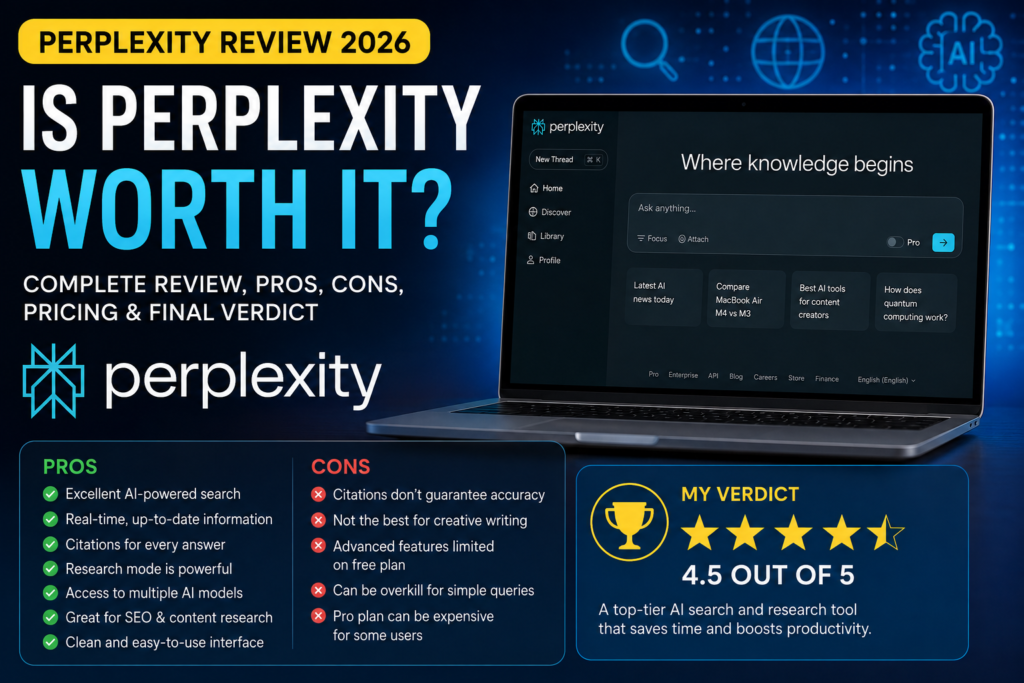
Introduction
AI search has changed a lot in the past few years. Instead of opening multiple Google results, comparing different pages, and trying to figure out which information is still current, users can now ask an AI to research a topic and explain the answer in seconds.
That is where Perplexity stands out.
Unlike a traditional search engine, Perplexity combines web search with AI-generated answers and citations, making it particularly useful when you want to understand a topic rather than simply find a webpage. But in 2026, Perplexity is no longer just an AI search tool. With advanced research features, access to multiple AI models, file analysis, and its Comet browser, it has become a much broader productivity platform.
But does all of that actually make Perplexity worth using?
In this Perplexity Review 2026, we’ll look beyond the feature list and examine how well it performs in real-world use. We’ll cover its AI search, Research mode, Pro Search, model selection, Comet browser, pricing, strengths and weaknesses, and how it compares with ChatGPT and Claude.
Most importantly, we’ll look at who should use Perplexity, who probably shouldn’t pay for it, and whether Perplexity Pro is actually worth the money.
If you’re a content creator, SEO professional, researcher, student, or simply someone who wants faster access to reliable information, this review will help you decide whether Perplexity belongs in your AI toolkit.
Perplexity Review 2026: Is It Worth It for Research, Search, and AI Work?
AI search has changed a lot over the past few years, but Perplexity has taken a different approach from traditional chatbots. Instead of simply generating an answer, it is built around searching the web, bringing information together, and showing sources that readers can check for themselves.
That approach makes Perplexity especially interesting in 2026. The platform has expanded beyond basic AI search with deeper research capabilities, access to multiple AI models, file and app creation, and its Comet AI browser. For people who regularly research products, technology, companies, or current events, these features can make a real difference.But more features don’t automatically mean better value.
The real question is whether Perplexity can save you enough time, provide reliable enough research, and fit naturally into your daily workflow to justify using it—or paying for it.In this Perplexity Review 2026, we’ll look beyond the feature list. We’ll examine what Perplexity actually does well, where it falls short, how its free and paid plans compare, and how it stacks up against alternatives such as ChatGPT and Claude.
By the end, you’ll have a clearer idea of whether Perplexity is the right AI tool for your needs—or simply another subscription you don’t need.
Perplexity Review 2026: What You Need to Know
Perplexity has grown well beyond the idea of being simply an AI alternative to Google. At its core, it is an AI-powered search engine that searches the live web, combines information from multiple sources, and presents the result as a conversational answer with citations and links to the original material.
That source-first approach is what makes Perplexity particularly useful for research. Instead of opening a long list of search results and piecing together the information yourself, you can ask a question in plain English and let Perplexity handle much of the initial searching and summarization.In 2026, the platform also offers more advanced search modes, including Pro Search and Research. Pro Search is designed for questions that require deeper searching and can work across multiple sources, while Research can conduct dozens of searches, analyze a large number of sources, and turn the findings into a more comprehensive report.
Another important part of the Perplexity experience is model choice. Depending on the plan and current availability, users can work with Perplexity’s own Sonar models as well as advanced models from providers such as OpenAI, Anthropic, and Google.For a U.S. content creator, marketer, student, or professional, that combination can be useful when the information you’re looking for changes frequently—such as product pricing, software features, market trends, company news, or current industry developments.
But there’s an important distinction: Perplexity is a research tool, not a guarantee that every answer is correct. Its citations make it easier to verify information, but important claims should still be checked against the original sources before you rely on them.So, the real question isn’t whether Perplexity has impressive AI features. It does. The more useful question is whether its research-focused workflow actually saves you enough time and improves your work enough to justify using it regularly.
What Is Perplexity and How Does It Work?
Perplexity is an AI-powered search and answer engine designed to help you find, understand, and verify information from the web. Instead of simply showing a page of search results, it searches the web and generates a conversational answer based on information it finds across multiple sources. Each response includes citations and links to the original sources, so you can check where the information came from.That makes Perplexity different from a traditional search engine—and also somewhat different from a general-purpose chatbot.
With Google, for example, you typically receive a collection of links and decide which pages to open. With a standard AI chatbot, you may get a detailed response without seeing exactly which sources were used unless web search is enabled. Perplexity combines these two steps by searching first, then synthesizing what it finds into an answer with sources attached.
How Perplexity Works
The process is relatively straightforward from a user’s perspective.
You type a question in natural language, such as:
“What are the best AI writing tools for a small U.S. business in 2026?”
Perplexity interprets the question, searches relevant information on the web, analyzes the material it finds, and produces a summarized response. Depending on the search mode and question, it can pull information from different types of sources, including websites, news, academic material, and other online content.The result is designed to give you the answer and the research trail behind it in the same place.
That’s particularly useful when you’re researching something that changes frequently—such as software pricing, product features, company announcements, technology trends, or current market information.
Perplexity Is More Than a Search Box
Another important part of Perplexity is that you can continue asking follow-up questions without starting the research from scratch. Its search experience maintains the context of the conversation, allowing you to narrow down or expand your original question.For example, you could start with:
“Compare the best AI meeting assistants in 2026.”
Then follow up with:
“Which one is best for a 20-person U.S. company?”
And then:
“Compare their pricing and integrations.”
Instead of treating each query as completely separate, Perplexity can use the previous context to refine the research.For more complicated questions, Pro Search goes further by conducting multiple searches, analyzing information from a wider range of sources, and synthesizing the findings into a more detailed response. Perplexity says Pro Search can use multiple advanced AI models and search across sources such as articles, academic papers, forums, and other web content.
Why This Matters
The biggest advantage of Perplexity isn’t simply that it can answer questions.It’s that it can shorten the distance between a question and useful, source-backed information.
That can be valuable for a U.S. marketer researching competitors, a student investigating a topic, an affiliate publisher checking current product information, or a professional trying to understand a new technology.Still, citations should not be treated as a guarantee of accuracy. Perplexity itself recommends checking the linked sources when accuracy matters.In short, Perplexity works best when you don’t just want an AI-generated answer—you want an AI-assisted research process that shows you where the answer came from.
What’s New in Perplexity in 2026?
Perplexity has changed significantly in 2026. The biggest shift is that the platform is no longer focused only on answering questions with web citations. It is moving toward a broader AI research and agent platform, where Perplexity can research information, work with files, create projects, browse the web, and increasingly perform tasks on the user’s behalf.
One of the most important additions is Perplexity Computer, introduced in February 2026. Computer is designed to handle multi-step tasks by orchestrating different AI models instead of relying on a single model for everything. Perplexity says Computer can select the appropriate combination of models for a task and work across research, files, and web-based workflows.
Advanced Deep Research Goes Further
Perplexity also expanded its research capabilities with Advanced Deep Research. The updated system is designed to search more broadly, cross-check information from more sources, work directly with uploaded documents, and use an improved coding sandbox for calculations and data analysis.
For someone researching a complicated topic, that is a more meaningful upgrade than simply getting another chatbot feature. The goal is to reduce the amount of manual work required to collect, compare, and organize information.
Comet Has Become a Bigger Part of the Product
Another major development is Comet, Perplexity’s Chromium-based AI browser. Rather than keeping AI search separate from browsing, Comet brings AI assistance directly into the browser.
It can help users understand webpages, research across tabs, and automate certain browser-based tasks. Perplexity has also expanded Comet for enterprise users, where organizations can manage browser policies and control what AI agents are allowed to do.
That makes Comet particularly interesting for people who spend much of their working day inside a browser.
Perplexity Is Moving Toward AI Agents
Perhaps the biggest change in 2026 is the shift from answering questions to completing tasks.Perplexity’s Computer can operate across multiple steps, while Comet’s Agent is designed to handle tasks such as finding suitable flights, filling out forms, scheduling meetings, and managing certain web workflows. Important or sensitive actions still require user oversight.
This changes how Perplexity should be evaluated.A few years ago, the main question was:How good is Perplexity at answering my search query?In 2026, the more interesting question is:How much of my research and routine computer work can Perplexity actually handle for me?
Personal Computer Brings Perplexity to the Mac
Perplexity has also introduced Personal Computer, a Mac application built around its Computer technology. It can work with local files and native Mac applications, includes voice control, and can run continuously on a Mac mini. Perplexity says Computer can orchestrate teams of agents across more than 20 frontier models for different tasks.
This is a significant step away from the traditional chatbot interface.Instead of opening a website and asking a question, the AI can increasingly become part of the user’s actual computing environment.
A New Memory Layer: Brain
Perplexity’s Max plan now includes access to Brain, currently in Research Preview. Brain is designed as a self-improving memory system that builds working context around a user’s projects, people, and files so Computer can use previous work when handling new requests.
For professionals working on long-running projects, this could eventually be more valuable than simply having access to another powerful language model.
The Bigger Picture
Taken together, these changes show where Perplexity is heading.It started with AI-powered search.Then it added deeper research and access to multiple models.Now it is moving toward AI agents that can research, browse, create, remember context, and perform multi-step work.That makes Perplexity considerably more ambitious in 2026 than the “AI search engine” label suggests.
For casual users, many of these additions may not matter. But for researchers, content creators, marketers, analysts, and professionals who spend hours working with information online, they could fundamentally change how Perplexity fits into the daily workflow.
Perplexity Features: What Actually Matters
Perplexity has accumulated a long list of AI features, but not all of them are equally useful. Some are genuinely valuable for everyday research, while others are better viewed as supporting features or tools for specific workflows.
The important thing isn’t how many features Perplexity offers. It’s which features actually make research faster, easier, or more reliable.
Here are the ones that matter most in 2026.
1. Real-Time Web Search With Citations
This remains the foundation of Perplexity.
When you ask a question, Perplexity searches the web and generates an answer based on information it finds. Responses include citations and links to the underlying sources, making it easier to investigate where a claim came from.
This is particularly useful for information that changes frequently, such as software pricing, product features, company announcements, market developments, and current technology trends.
The practical advantage is simple: you don’t have to manually search through several pages before getting a starting point for your research.
2. Pro Search for Complex Questions
Regular search is fine when you need a quick fact. Pro Search becomes more useful when the question requires multiple sources or several steps of analysis.
Perplexity says Pro Search can perform multiple web searches, work across different source types, synthesize information from dozens of sources, and provide more extensive citations. It also supports specialized search areas such as Web, Academic, Finance, and Files.
For example, instead of asking:
“What is the price of Shopify?”
you might ask:
“Compare Shopify’s current pricing, transaction fees, key features, and limitations for a small U.S. ecommerce business.”
That’s the kind of question where deeper search actually adds value.
3. Research Mode
Research is arguably one of Perplexity’s most useful features for people who regularly work with complex topics.
According to Perplexity, Research can conduct dozens of searches, examine hundreds of sources, reason through the information, and produce a comprehensive report. The final research can also be exported or shared.
This makes it useful for:
- Market research
- Technology research
- Competitive analysis
- Content research
- Academic topics
- Travel planning
- Current affairs
For a content publisher, the real benefit is not that it writes an article for you. It’s that it can compress hours of initial research into a much shorter workflow.
You should still verify important claims against the original sources.
4. Multiple AI Models
One of Perplexity’s biggest advantages for advanced users is that you aren’t limited to a single AI model.
Depending on your plan and current availability, Perplexity supports models including its own Sonar as well as models from OpenAI, Anthropic, Google, and other providers. Current supported options include GPT-5.2, Claude Sonnet 4.6, Gemini 3.1 Pro, and other models.
This matters because different models can have different strengths.
Instead of maintaining several subscriptions purely to access different models, some users can use Perplexity as a single research interface.
The downside is that model availability and limits can change, so this shouldn’t be the only reason you choose a subscription.
5. File Uploads and Analysis
Perplexity is also useful when your information isn’t publicly available on the web.
You can upload documents and other files, then ask questions about their contents. Current supported formats include text files, code, PDFs, images, audio, and video, with a stated 40 MB file-size limit. Audio and video can also be transcribed and searched.
For example, you could upload:
- A PDF report
- A CSV dataset
- A research paper
- A technical document
- A draft article
- A code file
- An audio recording
This makes Perplexity more useful as a research workspace, rather than simply a web search tool.
6. Create Files and Apps
This is one of the more interesting newer capabilities.
Perplexity can now create documents, spreadsheets, presentations, and other assets using information gathered during your research. It can also build simple apps and dashboards in supported workflows.
For example, you could research a market and then turn the findings into a presentation instead of copying the information manually into another application.
For most casual users, this won’t be a daily requirement.
For professionals and content teams, however, it can remove several steps from the research-to-output process.
7. Projects for Organizing Research
Perplexity also provides Projects that let users organize related research, prompts, and files around a specific topic or ongoing task.
This becomes useful when a single search session isn’t enough.
For example, an affiliate publisher could create a project around web hosting research and keep relevant files, research questions, and previous work together instead of starting from zero every time.
The value here isn’t flashy AI generation. It’s organization and continuity.
8. Comet and AI-Powered Browsing
Comet takes Perplexity outside the traditional search interface by bringing AI directly into a Chromium-based browser.
This matters if much of your work already happens online. Instead of researching in one application and browsing in another, AI assistance can be integrated into the browsing workflow.
For heavy web users, this could eventually be more important than another improvement to chatbot responses.
But if you only use AI occasionally, you probably don’t need an AI browser just to answer a few questions.
Which Perplexity Features Matter Most?
If I had to reduce Perplexity’s feature list to the capabilities that actually influence my buying decision, I’d rank them like this:
| Feature | Real-World Value | Best For |
|---|---|---|
| Web Search + Citations | ⭐⭐⭐⭐⭐ | Everyday research |
| Pro Search | ⭐⭐⭐⭐⭐ | Complex questions |
| Research | ⭐⭐⭐⭐⭐ | Deep research |
| Multiple AI Models | ⭐⭐⭐⭐ | Advanced users |
| File Analysis | ⭐⭐⭐⭐ | Documents & data |
| Projects | ⭐⭐⭐⭐ | Long-term research |
| Create Files & Apps | ⭐⭐⭐⭐ | Professionals & creators |
| Comet | ⭐⭐⭐⭐ | Heavy browser users |
The important takeaway is that Perplexity’s strongest features work together.
Search finds the information.
Pro Search digs deeper.
Research handles larger investigations.
File analysis brings your own information into the workflow.
Multiple models give you more flexibility.
Projects keep everything organized.
And newer agentic features extend that workflow beyond simply answering questions.
That’s why I wouldn’t evaluate Perplexity based on one feature alone. Its real advantage is the research workflow created by combining several of these capabilities in one platform.
How Good Is Perplexity at AI Search?
AI search is where Perplexity has its clearest advantage. Unlike a traditional search engine that mainly gives you a list of pages to explore, Perplexity searches the web and turns information from multiple sources into a conversational answer with citations. Perplexity says its search system is designed to provide current information from the live web while keeping the underlying sources visible for verification.
But that doesn’t mean every Perplexity answer is automatically accurate. The real strength is the research workflow: finding relevant information, summarizing it, and giving you a path back to the original sources.
Where Perplexity Search Performs Well
For straightforward questions, Perplexity can be extremely convenient.
Suppose you’re researching:
“What are the best web hosting options for a small business in the U.S. in 2026?”
Instead of manually opening dozens of results, Perplexity can search across relevant webpages and produce an initial comparison. You can then ask follow-up questions about pricing, features, limitations, or specific providers without restarting the research process.
This becomes even more useful when the subject changes frequently. Software pricing, product specifications, company announcements, AI developments, and market trends are all areas where current web information matters.
Perplexity’s own search documentation says its system can search across sources such as articles, academic papers, forums, and videos, depending on the search focus.
Pro Search Is Where the Difference Becomes Clearer
For simple queries, standard search may be enough. The bigger advantage appears when a question requires several searches and some judgment.
Perplexity’s Pro Search can break a complicated question into multiple searches, gather information from different sources, analyze the material, and synthesize the findings into a structured response. It also allows users to select different search focuses, including Web, Academic, Finance, and Files.
That makes it much more useful for questions such as:
“Compare the current features, pricing, integrations, and limitations of the leading project-management platforms for a 20-person U.S. company.”
That’s not really a single search query. It’s a research task.
And that’s where Perplexity is at its best.
The Citations Are a Major Advantage
One of Perplexity’s strongest features is that citations are integrated directly into the answer.
If Perplexity tells you that a company changed its pricing or launched a new feature, you can open the cited source instead of simply trusting the AI’s summary. Perplexity describes its answers as being backed by links to original sources specifically so users can verify information and investigate further.
For content creators and affiliate publishers, this is particularly valuable.
You can use Perplexity to discover a claim, open the underlying source, verify it, and then decide whether that information belongs in your article.
That’s a much safer workflow than copying an AI-generated answer directly into published content.
But Citations Don’t Make Perplexity Infallible
This is where expectations need to be realistic.
A citation can show where information came from, but it doesn’t necessarily prove that Perplexity interpreted the source correctly. Search systems can also encounter conflicting information, outdated pages, or sources that are less authoritative than they initially appear.
Perplexity itself emphasizes source verification, and its research systems are designed around improving factual accuracy, citation quality, and source coverage.
So for high-stakes information—especially financial, legal, medical, or business decisions—you should still open the original sources and verify the important claims yourself.
How Perplexity Compares With Traditional Search
The biggest difference is how much work happens before the result reaches you.
With traditional search, the workflow is generally:
Search → scan results → open pages → read → compare → form your own answer
With Perplexity, it becomes:
Ask → search → synthesize → inspect citations → refine
That doesn’t make traditional search obsolete. Sometimes you want to browse the actual search results, discover unfamiliar websites, or visit a specific source directly.
But when your goal is to understand a topic quickly, Perplexity can remove a substantial amount of the manual research.
My Verdict on Perplexity Search
Perplexity is excellent at AI search, particularly for research-heavy questions where freshness, source visibility, and synthesis matter.
I wouldn’t call it a replacement for every search engine. Instead, I’d think of it as a research layer on top of the web.
For a quick fact, regular search may be faster.
For a complicated question that requires several sources, Perplexity becomes much more compelling.
And for writers, marketers, researchers, and professionals who regularly need to turn scattered web information into something understandable, this is probably the feature that makes Perplexity worth using in the first place.
Perplexity Pro Search vs Regular Search
Perplexity’s regular search and Pro Search are built for different situations. The basic search experience is designed to give you a quick answer with minimal waiting, while Pro Search is intended for questions that require deeper research, multiple sources, and more detailed analysis. Perplexity itself describes Standard Search as best for quick facts and Pro Search as better suited to research, analysis, and complex queries.
The difference becomes much clearer when you stop thinking about them as two versions of the same search feature.
Regular Search is for finding an answer. Pro Search is for investigating a question.
Regular Search: Best for Speed
If you need a straightforward answer, regular search is usually the better choice.
For example:
“When was the iPhone first released?”
or:
“What is the current population of Texas?”
These questions don’t require a lengthy investigation. You want a useful answer quickly, along with enough source information to verify it.
Perplexity’s default search experience is optimized for fast searches and web browsing, and its standard mode is available to both free and Pro users.
Regular Search also makes sense when you’re casually exploring a topic and don’t yet know whether you need deeper research.
Pro Search: Built for Complex Questions
Pro Search takes a different approach.
Instead of relying on a quick search and short synthesis, it can conduct multiple searches across the web, examine a broader range of sources, and combine the findings into a more comprehensive answer. Perplexity says Pro Search can draw from articles, academic papers, forums, videos, and other sources depending on the selected search focus.
Consider the difference between these two questions:
Simple:
“What’s the price of Shopify?”
Complex:
“Compare Shopify’s current pricing, transaction fees, key ecommerce features, and limitations for a small U.S. business, and explain which plan makes the most sense.”
The second question requires research rather than a single fact.
That’s where Pro Search becomes more useful.
The Main Differences
| Feature | Regular Search | Pro Search |
|---|---|---|
| Speed | Faster | Slower |
| Research depth | Basic | Deep |
| Sources | Usually fewer | Multiple sources |
| Complex questions | Limited | Strong |
| Advanced models | Limited | Available |
| Search focus | General | Web, Academic, Finance, Files, etc. |
| Source transparency | Basic citations | More extensive citations |
| Best for | Quick facts | Research and analysis |
Perplexity’s current documentation specifically describes Standard Search as providing fast, basic answers, while Pro Search can synthesize information from dozens of sources and provide more extensive source links.
Pro Search Also Gives You More Model Choice
Another important difference is access to advanced AI models.
With Pro Search, eligible users can select from advanced models such as Perplexity’s Sonar, GPT-5.2, Claude Sonnet 4.6, and Gemini 3.1 Pro, depending on current availability and subscription.
That matters when the task requires more than simple web summarization.
For example, a technical research question, competitive analysis, or complicated product comparison may benefit from a more capable reasoning model.
Regular search is optimized more heavily around speed and efficient browsing.
When Should You Use Regular Search?
Use regular search when:
- You need a quick fact
- You’re checking a simple definition
- You want a short explanation
- You’re casually exploring a topic
- The question doesn’t require comparing many sources
- Speed matters more than research depth
For everyday questions, there is little reason to use a deeper search mode every time.
When Should You Use Pro Search?
Pro Search makes more sense when:
- You’re researching a product before buying it
- You’re comparing competing software
- You’re writing a detailed article
- You’re conducting market research
- You’re researching an academic topic
- You need information from multiple types of sources
- The question has several parts
- You need a more detailed source trail
For a content publisher, this distinction is particularly useful.
If you’re checking “What is Perplexity?”, regular search is probably enough.
If you’re researching “How has Perplexity changed in 2026, what features were introduced, how do its plans compare, and which features actually matter for U.S. content creators?”, Pro Search is the more appropriate tool.
Is Pro Search Always Better?
No.
That’s an important point.
Pro Search is more powerful, but more research isn’t automatically better for every question. If you only need a simple fact, waiting for a deeper investigation can add unnecessary complexity.
The best workflow is to match the search mode to the question.
Think of regular search as your everyday tool and Pro Search as the tool you reach for when the question deserves a proper investigation.
What About Free Users?
Perplexity’s current Standard plan includes practically unlimited basic searches but only a limited number of Pro Searches. Perplexity currently lists 3 Pro Searches per day for free users, while Pro subscribers receive extended Pro Search access.
That makes the free plan perfectly reasonable for casual users.
If you’re regularly hitting the Pro Search limit because you’re doing research every day, that’s when upgrading starts to make more sense.
My Verdict
Regular Search is the better default. Pro Search is the better research tool.
You don’t need Pro Search for every question, and using it constantly would be unnecessary.
But when you’re dealing with a complicated topic where accuracy, source coverage, and context matter, the additional research depth can save you from opening dozens of tabs and manually piecing everything together.
For writers, SEO professionals, affiliate marketers, students, researchers, and business users, Pro Search is probably one of the most valuable reasons to consider Perplexity Pro.
The simple rule is:
How Perplexity Research Works
Perplexity Research is designed for questions that are too complicated for a quick search. Instead of running one search and producing an immediate answer, Research can perform dozens of searches, read hundreds of sources, and reason through the information before producing a comprehensive report. Perplexity says most research tasks can be completed in a few minutes, although the exact time depends on the complexity of the request.
That makes Research fundamentally different from simply asking Perplexity a longer question.
Research Starts by Building a Search Strategy
When you submit a Research query, Perplexity doesn’t just look for one webpage that appears to answer your question.
It uses search and reasoning capabilities to investigate the topic iteratively. As it learns more from the sources it finds, it can refine what it searches for next.
For example, suppose you’re researching:
“How is AI changing SEO for U.S. businesses in 2026?”
A useful research process might need to examine search trends, Google’s documentation, industry reports, company announcements, expert analysis, and recent developments.
Research is designed to handle that broader investigation rather than expecting you to create every individual search query yourself.
It Searches, Reads, and Reasons in Multiple Steps
This is the part that makes Research different from regular search.
Perplexity says Research can repeatedly search, read documents, and reason about what to investigate next. In other words, the system can adjust its research plan as it discovers new information.
That matters because complex research rarely follows a perfectly predictable path.
One source may introduce a new company or statistic. Another may contradict the first source. A third may provide the original data behind a claim.
A deeper research workflow needs to respond to those discoveries rather than simply summarizing the first few search results.
Research Synthesizes the Findings
After gathering and evaluating the information, Perplexity turns the findings into a structured report.
The goal isn’t simply to give you hundreds of links. It’s to connect the information and explain what the sources collectively suggest. Perplexity describes this as synthesizing the research into a clear and comprehensive report.
That’s particularly useful when you’re dealing with topics where the answer isn’t available on a single webpage.
For example:
- Comparing several competing products
- Researching an emerging technology
- Investigating a market
- Studying a complex business topic
- Planning a detailed trip
- Analyzing current events
You Can Bring Your Own Files Into the Research
Research doesn’t have to rely entirely on public web information.
Perplexity also supports workflows where users upload their own documents and ask the system to analyze them alongside web sources. Its own guidance specifically recommends combining uploaded PDFs, documents, or data with current web research when you want a broader analysis.
For a content creator, that could mean uploading an existing report or competitor data and asking Perplexity to compare it with the latest information available online.
That’s much more useful than treating Research as a simple web-search replacement.
Research Automatically Selects the Models
One thing worth knowing is that Research doesn’t work like ordinary model selection.
Perplexity says Research uses a specific combination of models and automatically selects the appropriate models for the research task. Users therefore cannot manually choose a specific model while Research is running.
This makes sense for the way Research is designed.
The goal isn’t necessarily to give you control over which model writes the answer. It’s to let the system decide how to approach a complicated research problem.
Sources Remain Part of the Report
One of the most important aspects of Perplexity Research is source visibility.
The final report includes citations, allowing you to trace important information back to its sources. You can then open those sources and decide whether they actually support the conclusion.
That’s especially important for professional or publishing work.
A research report should be your starting point—not your final source of truth.
If you’re writing an affiliate article, for example, you can use Research to discover current pricing or product changes, then open the official company page and verify those details before publishing.
Research Can Be Exported and Shared
Once the research is complete, Perplexity allows users to export the result as a PDF or document, or convert it into a Perplexity Page for sharing.
That makes the feature more practical for people who need to turn research into something they can review later or share with a team.
Research vs Pro Search
It’s easy to confuse the two.
Pro Search is designed for complex questions and can search across multiple sources to produce a detailed answer. Research goes further by conducting a more autonomous, iterative investigation and producing a comprehensive report.
A simple way to think about it:
Regular Search → quick answer
Pro Search → deeper answer
Research → research project
That distinction makes it easier to decide which mode to use.
Is Perplexity Research Actually Useful?
Yes—especially when the question doesn’t have a simple answer.
For a quick fact, Research is unnecessary. But if you’re spending an hour opening tabs, comparing sources, taking notes, and trying to understand a complicated subject, Research can potentially eliminate much of that manual work.
For writers, affiliate marketers, SEO professionals, students, researchers, and business users, that’s where the feature becomes genuinely valuable.
The key is to use it as a research accelerator, not as an excuse to stop verifying information yourself.
My take: Perplexity Research is one of the platform’s most useful features because it changes the experience from “ask an AI a question” to “give an AI a research problem and let it investigate.”
Perplexity’s AI Model Selection: GPT, Claude, Gemini, and More
One of Perplexity’s biggest advantages in 2026 is that you don’t have to rely on a single AI model.
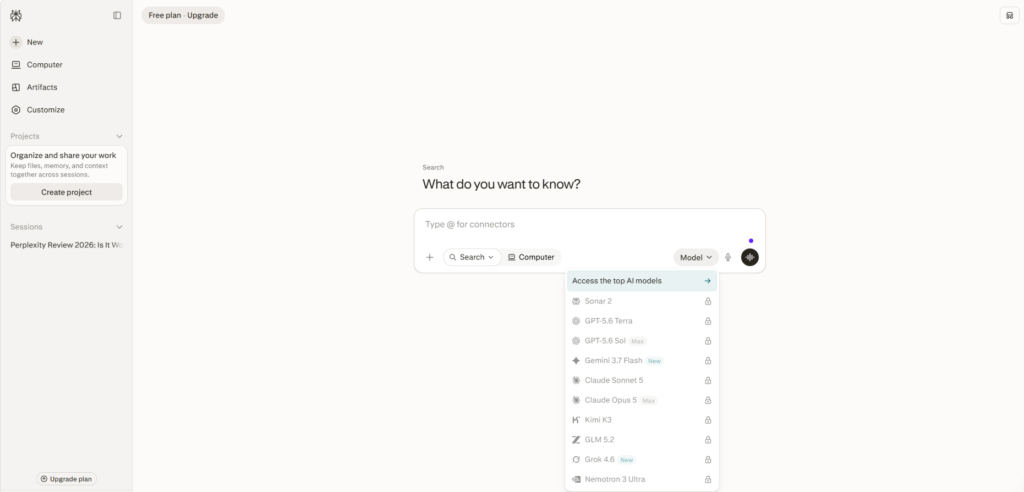
Depending on your plan and the search mode you’re using, Perplexity lets you choose from models developed by OpenAI, Anthropic, Google, Perplexity itself, and several other AI companies. The exact lineup can change as new models are released, so Perplexity’s model selector is the most reliable place to see what is currently available for your account.
That sounds impressive, but model choice only matters if you understand why you would choose one model over another.
Perplexity’s “Best” Mode
If you don’t want to think about model selection, Perplexity’s Best option is probably the easiest starting point.
Best is not a separate AI model. It is an automatic selection system inside Search that chooses a suitable model for your query. Perplexity recommends starting with Best for everyday questions rather than manually switching models every time.
For casual research, this is actually a useful approach.
You can simply ask your question and let Perplexity decide which model is appropriate.
The manual model selector becomes more valuable when you’re doing specialized work.
GPT Models
OpenAI’s GPT models are available within Perplexity’s paid plans, with the current lineup changing over time. Perplexity’s July 2026 documentation lists GPT-5.6 Terra for Pro and Max users, while GPT-5.6 Sol is available to Max users.
GPT is a strong choice when your task involves:
- Complex reasoning
- Coding
- Structured analysis
- Multi-step problem solving
- General-purpose content work
The important point is that you’re not using GPT exactly as you would inside ChatGPT.
Perplexity combines the model with its own search system, citations, prompts, and tools. Perplexity explicitly notes that third-party models can behave differently on its platform because of this integration.
So having GPT inside Perplexity doesn’t mean you’re simply getting the ChatGPT experience inside another app.
Claude Models
Anthropic’s Claude models are another major part of Perplexity’s model lineup.
As of July 2026, Perplexity lists Claude Sonnet 5 for Pro and Max users, while Claude Opus 5 is available to Max users.
Claude can be particularly appealing for:
- Long-form writing
- Detailed reasoning
- Technical work
- Coding
- Complex analysis
For example, if you’re researching a technical topic and want a detailed explanation rather than a short summary, Claude can be a useful option within Perplexity’s research workflow.
Again, however, the advantage isn’t simply “Claude is better.”
The real advantage is that you can use Claude’s capabilities while keeping Perplexity’s web-search and citation layer around them.
Gemini
Google’s Gemini 3.1 Pro is also available on Perplexity’s Pro and Max plans. Perplexity lists Gemini 3.1 Pro as a model with reasoning always enabled.
Gemini can be useful when you’re working with:
- Complex research
- Multimodal information
- Technical questions
- Large amounts of context
- Coding and analysis
Having Gemini alongside GPT and Claude gives Perplexity users something that a single-model AI subscription cannot easily provide: multiple model perspectives inside the same research environment.
Perplexity’s Own Sonar Models
Perplexity isn’t simply an interface for other companies’ AI.
It also develops its own Sonar models, designed specifically around real-time web search and answer generation. The current documentation lists Sonar 2 as available to Pro and Max users.
This is important because Perplexity can optimize its own models around the platform’s core purpose: searching the web and producing useful, sourced answers quickly.
For everyday research, you may find that the model selected automatically by Perplexity is already good enough.
Other Models Are Available Too
Perplexity’s model selection has expanded beyond the three major names most people recognize.
Its current Pro and Max lineup also includes models such as Kimi K3, GLM 5.2, Grok 4.5, and NVIDIA Nemotron 3 Ultra, although availability depends on the plan and current rollout.
That gives advanced users considerably more flexibility than a typical AI search product.
However, having ten different models doesn’t necessarily mean you’ll use ten different models.
For most people, a small number of reliable choices will cover the majority of their work.
What About Model Council?
One of Perplexity’s more interesting developments is Model Council.
Instead of asking one model to answer your question, Model Council sends the same query to multiple models and then synthesizes their responses into one answer. Perplexity says the feature is designed to surface areas where models agree or disagree and potentially expose blind spots.
As of 2026, Model Council is available exclusively to Max and Enterprise Max subscribers on the web.
This is particularly interesting for research where you don’t want to depend entirely on one model’s interpretation.
For example, if you’re evaluating a complicated business decision, getting perspectives from GPT, Claude, and Gemini before the final synthesis can provide a broader view.
Which Perplexity Model Should You Choose?
You don’t need to memorize the strengths of every model.
A practical approach is:
| Task | Good Starting Choice |
|---|---|
| Everyday web questions | Best / automatic selection |
| General reasoning | GPT |
| Long-form analysis | Claude |
| Multimodal or complex research | Gemini |
| Fast web research | Sonar |
| Comparing multiple AI perspectives | Model Council |
These aren’t absolute rankings. AI models change quickly, and the best model for a particular task can change with them.
Perplexity itself recommends testing the same query across different models and comparing the results rather than assuming one model is always superior.
The Real Advantage Isn’t the Model List
This is the part that matters most.
If you subscribe to Perplexity simply because it says GPT + Claude + Gemini, you may be missing the bigger picture.
The real advantage is the combination of multiple models + web search + citations + research tools.
For example, you could use one model for a research-heavy query, another for deeper reasoning, and then use the resulting sources to verify the final information.
That gives Perplexity a different value proposition from subscribing separately to several AI chatbots.
There is one important limitation, though: Perplexity Pro is not the same thing as having subscriptions to ChatGPT, Claude, and Gemini directly. Perplexity’s integration uses its own interface, search infrastructure, prompts, tools, and usage limits.
My Take
For most users, I wouldn’t spend much time manually switching models.
Start with Best and let Perplexity handle the selection.
Switch manually when you have a specific reason—such as wanting a particular model’s reasoning style, testing different answers, or working on a task where one model performs better for you.
And if you’re considering Perplexity Pro mainly because it gives you access to several leading models, that’s a legitimate benefit—but the web-first research environment is what makes those models significantly more useful inside Perplexity.
That’s ultimately the strongest argument for Perplexity’s model selection: you aren’t just choosing an AI model; you’re choosing which AI model you want working inside a research engine.
Perplexity Comet: Is the AI Browser Worth Using?
Perplexity Comet is more ambitious than a browser with a chatbot attached to it. Built on Chromium, Comet combines a conventional web browser with Perplexity’s AI search, contextual assistance, browsing history search, and task automation. It also supports most Chrome extensions, bookmarks, translation, and other familiar browser features.
The interesting part is what happens when AI becomes part of the browsing experience instead of living in a separate tab.
Imagine you’re reading a long industry report. Instead of copying sections into an AI chatbot, you can open the Assistant panel and ask Comet to summarize the page, extract important dates, explain a technical section, or identify the main conclusions. The assistant can use the content of your current tab as context.
For people who spend hours researching online, that can remove a surprising amount of friction.
What Makes Comet Different?
Traditional browsers are essentially passive tools. You open websites, search for information, switch between tabs, and perform actions yourself.
Comet attempts to make the browser more interactive.
Its Assistant can work alongside your browsing session, while features such as Personal Search can help retrieve information from your previous browsing activity. Comet also supports natural-language commands for managing tabs and can connect with services such as Gmail and Google Calendar.
That means you can ask questions such as:
“What was that article I read about AI search last week?”
or:
“Summarize the important points from these tabs.”
Instead of manually searching your browser history and reopening pages one by one, Comet is designed to help you find and understand that information through natural language.
Comet Can Do More Than Summarize Pages
This is where the browser becomes more interesting.
Comet can perform certain multi-step browser tasks, including clicking, typing, navigating websites, filling forms, researching across several pages, and organizing information. Perplexity describes these capabilities as supervised automation, meaning users can delegate parts of a workflow while retaining oversight.
For example, a user could ask Comet to compare products across several websites, summarize the reviews, and organize the findings.
For an affiliate marketer, that could be useful during competitor or product research.
For a professional, it could mean spending less time jumping between websites and more time evaluating the information.
Voice Mode Makes Comet More Hands-Free
Comet has also expanded its voice capabilities.
Its Voice Mode can understand what you’re viewing, answer questions about the current page, navigate the web by voice, and maintain context as you move between tabs.
This isn’t necessarily a feature everyone will use every day, but it demonstrates where Perplexity is taking the browser: toward an interface where you can talk to the web instead of constantly clicking through it.
Privacy Deserves Serious Attention
The convenience comes with an important trade-off: an AI browser can potentially interact with much more personal information than a standalone search tool.
Comet can work with browsing activity, connected services, open tabs, and other contextual information. Perplexity provides privacy controls for cookies, site permissions, ad and script blocking, passwords, and browsing data.
That doesn’t mean you should avoid Comet, but it does mean you should review its privacy settings before giving it access to sensitive accounts.
I would be particularly careful about granting AI agents permission to perform actions involving financial accounts, private communications, purchases, or other irreversible activities.
The convenience of automation isn’t worth losing control over an important action.
Is Comet Better Than Chrome?
Not necessarily.
If you mainly want a fast, familiar browser with a huge extension ecosystem, Chrome remains a perfectly reasonable choice.
Comet makes more sense when you specifically want AI integrated into the browsing workflow.
Its Chromium foundation means the transition should feel relatively familiar, and Comet supports most Chrome extensions. You can also import bookmarks, history, passwords, and other browser data during setup.
The difference is that Comet puts AI much closer to the center of the browsing experience.
Who Should Actually Use Comet?
I’d consider Comet particularly useful for people who spend a large portion of their workday online:
- Content creators
- SEO professionals
- Affiliate marketers
- Researchers
- Students
- Business professionals
- People who regularly work across many browser tabs
For these users, the ability to summarize pages, research across tabs, retrieve previous browsing activity, and automate certain repetitive tasks can provide genuine time savings.
For someone who mostly checks email, watches YouTube, reads news, and occasionally searches Google, the difference may be much less meaningful.
Is Comet Worth Using in 2026?
Yes, but I wouldn’t recommend switching browsers purely because it has AI.
Comet becomes compelling when you actually use its AI capabilities as part of your daily workflow.
If you’re constantly researching topics, comparing websites, summarizing documents, managing dozens of tabs, or performing repetitive browser tasks, Comet has a practical advantage over a conventional browser.
But if you already have a browser setup that works perfectly and rarely need AI assistance while browsing, there’s no urgent reason to replace it.
My Verdict
Comet is one of the more interesting parts of the Perplexity ecosystem, but its value depends heavily on how you use the web.
For research-heavy users, the combination of browser + AI search + contextual assistant + automation is genuinely useful. For casual browsing, many of its advanced capabilities may simply sit unused.
For a content creator or affiliate publisher, I’d definitely test it. The ability to research several sources, summarize pages, retrieve previous research, and keep an AI assistant beside your browser can fit naturally into an editorial workflow.
My recommendation is simple:
Try Comet before making it your default browser.
If it saves you time during your actual work—not just during a five-minute demo—then it’s worth keeping.
Perplexity Pricing in 2026: Free vs Pro vs Max
Perplexity’s pricing has become more complicated in 2026 because the platform is no longer selling access to AI search alone. The paid plans now include deeper research, advanced AI models, file analysis, image and video generation, Comet features, and access to Perplexity Computer.
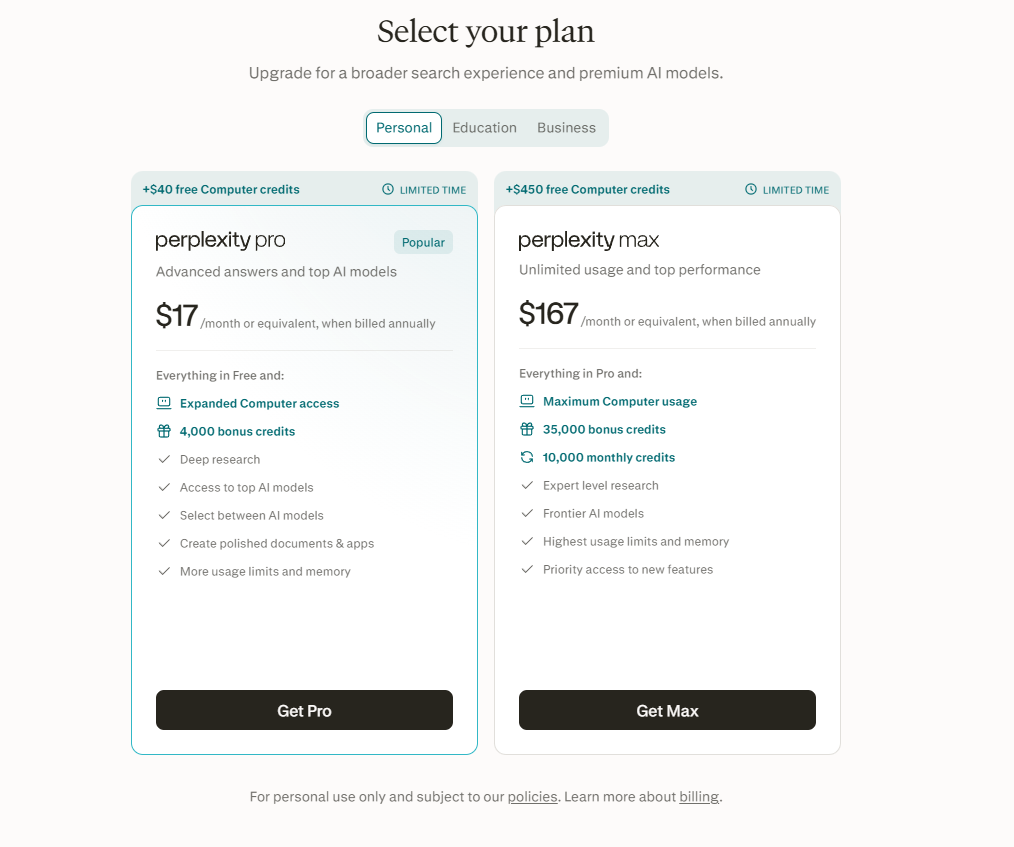
For most users, the decision comes down to three consumer options: Free, Pro, or Max.
The good news is that you don’t necessarily need a paid subscription to get value from Perplexity. The free plan still provides practically unlimited basic searches, while the paid tiers are aimed at people who need more research capacity and advanced AI capabilities.
Perplexity Free: Best for Casual Users
The Free plan is a surprisingly capable starting point.
You get:
- Practically unlimited basic searches
- Search history
- Limited Pro Searches
- Limited file uploads
- Automatic model selection through Best
- Limited Research access
The current free plan provides 3 Pro Searches per day and 1 Research query per month. However, free users don’t get manual access to Perplexity’s advanced AI models, image generation, or premium support.
For someone who occasionally researches products, checks current information, or asks a few questions each day, that’s probably enough.
In fact, I’d recommend starting with Free before paying for anything.
Perplexity Pro: The Sweet Spot for Most Serious Users
Perplexity Pro is where the platform starts becoming a serious productivity tool.
Pro includes extended access to Pro Search, advanced AI models, image and video generation, higher file-upload and analysis limits, and access to Create files and apps.
This is also where you get access to models from multiple providers. Perplexity’s current model lineup includes models from OpenAI, Anthropic, Google, and other providers, although the exact models available can change over time.
For a content creator, researcher, SEO professional, or affiliate marketer, Pro is arguably the most balanced option.
You aren’t simply paying for more searches. You’re paying for a broader research and content-production workflow.
Perplexity Max: For Power Users
Max is designed for users who regularly push Perplexity’s advanced capabilities.
It includes everything in Pro, along with higher access to advanced models, more generous Create files and apps usage, early access to new features, Brain in Research Preview, and higher-level support.
Max is much easier to justify for someone who uses Perplexity as a core work platform rather than as an occasional research assistant.
For example, if you’re constantly conducting deep research, creating reports, generating presentations, building apps, or using Perplexity Computer, the additional limits can become meaningful.
For a casual user, however, Max is likely unnecessary.
Perplexity Pricing Comparison
| Feature | Free | Pro | Max |
|---|---|---|---|
| Basic Search | Yes | Yes | Yes |
| Pro Search | 3/day | Higher limits | Higher limits |
| Research | 1/month | Higher limits | Higher limits |
| Advanced AI Models | No | Yes | Yes |
| Image Generation | No | Yes | Yes |
| Video Generation | No | Yes | Yes |
| File Analysis | Limited | Higher limits | Higher limits |
| Create Files & Apps | No | Limited | Much higher limits |
| Comet Assistant | No | Yes | Yes |
| Computer | No | Available | Available |
| Brain | No | No | Research Preview |
| Support | Basic | Priority | Dedicated |
Perplexity’s official plan comparison notes that the exact usage limits are structured around average and advanced use, rather than simply giving every paid user an unlimited number of queries.
One Important Change: Computer Uses Credits
If you’re interested in Perplexity Computer, there’s another pricing detail worth understanding.
Computer uses a separate credit system for multi-step tasks. Perplexity currently defines 100 credits as equivalent to $1 for usage purposes. Task costs vary significantly depending on complexity.
Consumer Pro users may receive a one-time promotional credit allocation, but Pro does not currently include a recurring monthly Computer credit allowance. Max includes 10,000 Computer credits per month.
That makes the difference between Pro and Max more important for people who intend to use Computer heavily.
If you’re only interested in AI search and research, this credit system may barely matter to you.
If you plan to delegate large multi-step tasks to Computer, it becomes something you should consider before subscribing.
Which Perplexity Plan Should You Choose?
I’d break it down this way:
Choose Free if:
- You use AI occasionally
- You mainly need basic web search
- You don’t need advanced models
- You want to test Perplexity before spending money
Choose Pro if:
- You research regularly
- You want access to advanced models
- You analyze documents frequently
- You create content professionally
- You use image or video generation
- You want deeper access to Perplexity’s research tools
Choose Max if:
- Perplexity is part of your daily professional workflow
- You frequently use deep research
- You create lots of files, reports, or apps
- You want the highest access to advanced models
- You plan to use Computer heavily
- You want early access to new Perplexity features
Is Perplexity Free Good Enough?
For many people, yes.
This is important because AI companies increasingly push users toward premium subscriptions, but Perplexity’s free tier still covers the fundamental reason people use the service: web search with AI-generated answers and citations.
If you’re only asking a handful of questions each day, paying for Pro may not dramatically change your experience.
The upgrade becomes more compelling when you repeatedly encounter the free plan’s limits or need features that aren’t available on Free.
Is Perplexity Pro Worth the Upgrade?
For regular researchers, I’d say yes.
The value isn’t simply in getting more searches. Pro gives you access to advanced models, deeper research capabilities, higher file limits, and additional creation tools.
For someone running an affiliate or content website, this can be particularly useful because research is an ongoing activity rather than a once-in-a-while task.
You can research a product, verify current information, compare competitors, analyze documents, and then use the same platform to help turn that research into useful content.
That makes Pro much easier to justify than it would be for a casual user.
Is Perplexity Max Worth It?
For most people, probably not.
Max is aimed at power users who need significantly more access to Perplexity’s advanced ecosystem. Its biggest advantages become apparent when you’re regularly using features such as advanced models, Create files and apps, Computer, and Brain.
If you’re simply looking for better AI search, Pro is likely the more sensible choice.
Max makes sense when Perplexity itself has become an important part of your workday.
My Recommendation
For most users, I’d follow this progression:
Start with Free → use it regularly → upgrade to Pro when you hit its limitations → consider Max only when you genuinely need the additional capacity.
That approach is better than choosing a subscription based on the longest feature list.
Perplexity’s own guidance follows a similar logic: Free is aimed at light users, Pro at people who want advanced AI and frequent research, and Max at power users who want the highest access to advanced research and creation capabilities.
My pick for most serious individual users: Perplexity Pro.
My pick for casual users: Free.
My pick for heavy AI researchers and power users: Max.
The important thing is not which plan has the most features. It’s which plan gives you enough capability without paying for tools you won’t actually use.
Is Perplexity Pro Worth It?
Whether Perplexity Pro is worth paying for depends less on how impressive its feature list looks and more on how often you actually use Perplexity for research.
The free version is already useful for casual searches. But Pro is designed for people who want deeper research, more advanced AI models, greater file and image-upload capacity, and access to additional productivity features. Perplexity currently positions Pro as its premium plan for users who need more power and productivity from search and research.
That makes the upgrade easier to justify for some users than others.
When Perplexity Pro Is Worth It
Pro makes the most sense when Perplexity is becoming part of your regular workflow rather than something you open occasionally.
For example, if you regularly research:
- Software and AI tools
- Competitor websites
- Product pricing and features
- Industry trends
- Market developments
- Technical topics
- Long-form content
- Business reports
the additional research capacity can save a meaningful amount of time.
Perplexity Pro currently includes extended access to Research, advanced models, increased file and photo uploads, enhanced image generation, limited video generation, and access to Create files and apps. Pro also provides significantly more citations per answer than the free experience.
For a professional user, those aren’t simply extra features. They can reduce the number of separate tools needed to complete a research task.
When the Free Version Is Enough
If you only use Perplexity to answer a few questions each day, I wouldn’t rush to subscribe.
The free plan is still capable enough for basic AI search, quick research, and occasional exploration. In that situation, paying for Pro may give you more capabilities than you actually need.
A good approach is to use Free until you repeatedly encounter a limitation.
That’s a better buying signal than upgrading simply because Pro has a longer feature list.
Pro Is Particularly Useful for Content Research
For publishers and marketers, the calculation is slightly different.
Suppose you’re preparing an article about a software product. You may need to check its current pricing, features, competitors, recent announcements, user-facing changes, and official documentation.
Instead of researching each piece separately, Pro gives you access to deeper research tools and advanced models within the same environment. Perplexity has also expanded Deep Research and Computer capabilities during 2026, making the platform increasingly useful for multi-step workflows.
That can make the subscription worthwhile if it consistently saves you research time.
What About Max?
For most individual users, I wouldn’t jump directly from Free to Max.
Perplexity Max currently costs $200 per month or $2,000 per year, and is aimed at power users who need the highest usage levels, advanced research access, memory features, and priority access to newer capabilities.
Unless Perplexity is a major part of your professional workflow, Pro is the more sensible middle ground.
My Verdict
Perplexity Pro is worth it for regular researchers, writers, marketers, SEO professionals, and professionals who use AI search frequently.
For casual users, stay with Free.
For serious individual users, Pro is the plan I’d choose.
For extremely heavy users who rely on Perplexity’s advanced research and Computer capabilities every day, Max may eventually make sense.
The key is simple:
Don’t pay for Perplexity Pro because it has more features. Pay for it because those features save you time or improve the quality of your work.
Perplexity for Students, Researchers, and Professionals
Perplexity can be useful well beyond everyday web searches. For students, researchers, and working professionals, its biggest advantage is the ability to combine web research, citations, document analysis, and AI-assisted reasoning in one workflow.
That doesn’t make it a replacement for academic databases, official documentation, or professional expertise. Instead, it can act as a faster starting point for finding information, understanding unfamiliar topics, and organizing research.
For Students: Faster Research Without Losing the Sources
Students can use Perplexity to get an initial understanding of a difficult subject without spending hours opening unrelated search results.
For example, instead of searching separately for definitions, background information, recent developments, and opposing viewpoints, a student can ask Perplexity to explain the topic and provide sources for further reading.
This is particularly useful when starting a research assignment.
The important part is what happens after the answer.
Students should open the cited sources, read the original material, and use authoritative academic or institutional sources when writing their final work. Perplexity can help locate those sources, but an AI-generated summary shouldn’t automatically become the student’s evidence.
Research Papers and Academic Work
Perplexity becomes more useful when a project involves multiple sources.
Its Research capabilities can investigate a topic across many web sources and produce a structured report, while its file-upload tools allow users to work with documents alongside web information.
For example, a researcher could provide several papers or reports and ask questions such as:
- What conclusions do these sources share?
- Where do the researchers disagree?
- Which methodology did each study use?
- What limitations are mentioned?
- What questions remain unanswered?
That can make the initial literature-review process more efficient.
However, researchers should still verify citations against the original papers. A useful summary is not the same thing as a reliable scholarly interpretation.
Analyzing Documents and Data
Perplexity isn’t limited to webpages.
Users can upload files and ask questions about documents, datasets, images, and other supported formats.
This can be particularly useful for professionals who regularly work with information that isn’t publicly searchable.
For example, you could upload a company report and ask Perplexity to identify:
- Revenue changes
- Important trends
- Key risks
- Major strategic developments
- Differences between two reports
The benefit is that you can combine your own information with current web research, rather than treating the public web as your only source of knowledge.
For Professionals: Research Before Making a Decision
Professionals often don’t need an AI to write something for them. They need to understand a subject quickly enough to make a decision.
That’s where Perplexity can fit naturally into a workday.
A marketing professional might research a competitor.
A product manager might investigate a new technology.
A consultant might gather industry information.
A developer might investigate documentation and technical discussions.
A business owner might compare software vendors.
In each case, the value comes from reducing the amount of manual information gathering.
Comparing Products, Companies, and Markets
Perplexity is especially useful when the answer requires comparison.
Instead of asking:
“What is the best CRM?”
a professional could ask:
“Compare the current pricing, major features, integrations, and limitations of the leading CRM platforms for a 25-person U.S. company.”
That creates a much more useful research task.
Perplexity can gather information from multiple sources, while the user can then inspect the citations and decide which findings actually matter.
This is one reason its research workflow can be more valuable than simply asking an AI chatbot for an opinion.
Researching Technical Topics
Professionals working in technology can also use Perplexity to get up to speed on unfamiliar subjects.
For example:
“Explain how vector databases work, compare the major approaches, and cite the technical documentation and research papers behind the explanation.”
That gives you both an accessible explanation and a path toward deeper technical material.
For developers and engineers, however, official documentation should remain the authority for implementation details. AI-generated explanations can occasionally simplify or misinterpret technical information.
Perplexity Can Help With Research, Not Replace Judgment
This distinction becomes increasingly important as AI research tools become more capable.
Perplexity can help answer:
“What information can I find about this?”
It cannot automatically answer:
“What should I believe?”
Those are different tasks.
A professional still needs to evaluate the quality of the sources, recognize conflicting evidence, understand the context, and make the final decision.
This is particularly important for legal, medical, financial, academic, and other high-stakes work.
Where Perplexity Fits Best
| User | Most Useful Perplexity Capabilities |
|---|---|
| Students | Topic research, explanations, source discovery |
| Researchers | Multi-source research, document analysis, source comparison |
| Developers | Technical research, documentation discovery, current information |
| Marketers | Competitor and market research |
| Business professionals | Product comparisons and decision research |
| Consultants | Industry research and report preparation |
| Executives | Fast background research and information synthesis |
Is Perplexity Worth Using for Students and Professionals?
For students, the free version may already be enough for occasional research.
For researchers and professionals who regularly investigate complicated subjects, the deeper research capabilities and larger access to advanced tools can make Perplexity more useful as part of a daily workflow.
But I wouldn’t recommend treating it as an answer machine.
The better approach is to treat Perplexity as a research assistant:
Ask → investigate → inspect sources → verify → analyze → decide.
That’s where the platform provides the most practical value.
My take: Perplexity is particularly useful for people who deal with information all day. Students can use it to get oriented, researchers can use it to accelerate source discovery, and professionals can use it to reduce the time spent gathering background information. The final judgment, however, should remain with the human.
Perplexity vs ChatGPT vs Claude: Which Is Better?
Perplexity, ChatGPT, and Claude are no longer competing for exactly the same job. All three can answer questions, write content, analyze information, and work with files, but their strongest use cases are different.
In 2026, Perplexity is strongest as a research-first AI, ChatGPT is the most versatile all-around assistant, and Claude is particularly compelling for writing, coding, and long-form analytical work. That doesn’t mean one is universally better. The right choice depends on what you actually want the AI to do.
Perplexity is built around web search and cited answers, while its Pro plan also gives users access to models from OpenAI, Anthropic, Google, and other providers. ChatGPT has increasingly expanded into research, coding, file work, memory, and agent-style workflows, while Claude continues to focus heavily on reasoning, writing, coding, and agentic work.
Perplexity: Best for Research and Current Information
Perplexity is the easiest choice when your first question is:
“What does the web currently say about this?”
Its core experience searches the web and produces conversational answers with citations and links to sources.
That makes it particularly useful for:
- Product research
- AI and SaaS research
- Competitor analysis
- Current news and developments
- Pricing and feature comparisons
- Market research
- SEO research
- Source discovery
Its Pro Search goes deeper by conducting more extensive searches and synthesizing information from multiple sources.
Another unusual advantage is model choice. Perplexity Pro can give users access to models such as GPT-5.2, Claude Sonnet 4.6, and Gemini 3.1 Pro within its own search environment.
So you’re not necessarily choosing Perplexity instead of GPT or Claude. In some cases, you’re using GPT or Claude inside Perplexity’s research system.
ChatGPT: Best All-Around AI Assistant
ChatGPT is broader.
Its strength isn’t limited to web research. It can handle writing, brainstorming, learning, coding, data analysis, file work, image generation, memory, and increasingly complex agent-style tasks.
OpenAI’s 2026 updates have expanded ChatGPT with features such as improved memory and ChatGPT Work, which can research information, work across connected apps and files, and create finished documents, spreadsheets, presentations, reports, and sites.
That makes ChatGPT particularly attractive if you want one AI that can handle many different types of work.
For example, you might use it to:
- Write and edit an article
- Analyze a spreadsheet
- Brainstorm business ideas
- Learn a technical subject
- Debug code
- Work with connected applications
- Create documents or presentations
- Continue long-running projects
If you don’t want to maintain separate AI tools for different tasks, ChatGPT is probably the safest all-purpose choice.
Claude: Best for Writing and Technical Work
Claude has a different appeal.
Anthropic continues to emphasize reasoning, coding, and agentic work, with Claude Sonnet 5 positioned for demanding tasks across areas such as coding, research, and computer use.
Claude can be particularly appealing when the task involves:
- Long-form writing
- Editing
- Complex explanations
- Coding
- Technical analysis
- Large documents
- Careful reasoning
For a writer, the difference can be noticeable in the way the model approaches a long piece of content. Claude is often a strong choice when you already have the research and want to turn it into polished, coherent prose.
The Real Difference
Here’s how I’d think about the three:
| Category | Perplexity | ChatGPT | Claude |
|---|---|---|---|
| Web research | Excellent | Excellent | Good |
| Source citations | Excellent | Good | Good |
| Current information | Excellent | Excellent | Good |
| Writing | Very good | Excellent | Excellent |
| Coding | Very good | Excellent | Excellent |
| Long documents | Excellent | Excellent | Excellent |
| General productivity | Very good | Excellent | Very good |
| Model choice | Excellent | Good | Limited |
| Research workflow | Excellent | Excellent | Very good |
| Best for SEO research | Excellent | Very good | Good |
| Best all-around choice | Very good | Excellent | Very good |
These aren’t benchmark scores. They’re practical recommendations based on how the products are positioned and where their workflows are strongest.
Perplexity vs ChatGPT
This is probably the most important comparison for most users.
If you’re researching:
“What changed in AI search in 2026?”
I’d start with Perplexity because citations and current web research are central to the experience.
If you’re asking:
“Turn this research into a polished 3,500-word article with a consistent editorial voice.”
I’d lean toward ChatGPT or Claude.
And if you want to do both in one place, ChatGPT has become much more capable of combining research with writing and longer-running work.
Perplexity vs Claude
This is a different kind of comparison.
Perplexity has the advantage when finding and verifying current information is the primary task.
Claude becomes more attractive when working with the information is the primary task.
For example:
Research a competitor’s latest product changes → Perplexity
Analyze those changes and write a detailed strategic assessment → Claude
Of course, Perplexity can also use Claude models within its own platform, which makes the distinction less absolute.
Which One Is Best for Content Creators?
For an editorial workflow, I wouldn’t necessarily choose only one.
A particularly effective setup is:
Perplexity → research and source discovery
ChatGPT → article structure, analysis, editing, and workflow
Claude → alternative writing/editing perspective when needed
That doesn’t mean you need three paid subscriptions.
If you want to keep costs down, start with one platform and add another only when you can identify a specific limitation.
Which One Is Best for SEO?
For SEO professionals, Perplexity has a particularly strong role at the research stage.
It can help you investigate:
- Search intent
- Competitor topics
- Current product information
- Industry developments
- Supporting sources
- Frequently asked questions
- Content gaps
But don’t confuse AI research with SEO strategy.
The AI can help you discover information. You still need to decide what is worth publishing and what makes your article genuinely better than competing pages.
That’s especially important for affiliate content. A page that simply summarizes what Perplexity, ChatGPT, or another AI already knows isn’t necessarily valuable.
Which One Should You Pay For?
For a typical individual user:
Choose Perplexity Pro if research is your main priority.
Perplexity Pro currently includes extended Pro Search, deeper Research access, more citations, advanced models, increased file uploads, and additional creation tools.
Choose ChatGPT if you want the broadest all-purpose AI workspace.
Its current ecosystem covers writing, reasoning, coding, files, memory, research, and agent-style workflows.
Choose Claude if writing, coding, and detailed analytical work are your primary priorities.
My Verdict
There isn’t a single winner.
If I had to assign each one a clear role:
🥇 Perplexity — Best for research and cited web search
🥇 ChatGPT — Best overall AI assistant
🥇 Claude — Best for writing and technical/analytical work
And there’s an important twist: Perplexity’s ability to use models from OpenAI, Anthropic, Google, and others makes it less of a direct “model vs model” competitor than it first appears.
For someone building a content and affiliate website, I’d personally prioritize Perplexity for research and source verification, then use whichever writing environment produces the strongest final article for your particular style.
The best tool isn’t the one with the most impressive feature list.
It’s the one that fits the job you’re actually trying to finish.
What Perplexity Does Better
Perplexity isn’t better than ChatGPT or Claude at everything. Its real advantage is more specific: it is exceptionally good at turning web research into a usable answer while keeping the sources visible.
That difference becomes important when the goal isn’t simply to generate text, but to find current information, compare sources, and understand a topic before making a decision.
1. Web Research Is at the Center of the Experience
Perplexity was built around AI-powered search rather than adding search as just another feature.
It searches the web in real time and produces conversational answers with citations and links to the original sources. That makes the research process much more direct than opening multiple search results and manually combining the information yourself.
This is particularly useful for topics that change frequently:
- AI tools and software
- Product pricing
- Company announcements
- Technology developments
- Market trends
- Current events
- Competitor research
For these tasks, fresh information matters more than having the most creative writing style.
2. Citations Are More Central to the Workflow
Perplexity doesn’t simply attach a source list at the end of an answer. Citations are integrated directly into the response, allowing you to follow a claim back to the underlying source.
That makes a big difference when you’re researching something for publication.
For example, if Perplexity tells you that a SaaS company changed its pricing, you can immediately open the cited source and check whether the claim is actually supported.
This doesn’t mean every citation is automatically correct. You still need to verify important claims, particularly when writing commercial or high-stakes content.
But the source-first workflow is one of Perplexity’s clearest strengths.
3. Complex Search Is More Than Just “Ask a Question”
Perplexity’s Pro Search can perform multiple searches across the web, pull information from different source types, and synthesize the findings into a single answer. It can also focus searches on areas such as Web, Academic, Finance, or Files.
That’s useful when the answer isn’t sitting on one webpage.
For example:
“Compare the current pricing, features, limitations, and target customers of the leading AI writing tools for small U.S. businesses.”
That’s really a research assignment disguised as a search query.
Perplexity is particularly good at handling that kind of request.
4. Research Mode Takes This Even Further
Perplexity’s Research mode is another area where its research-first design becomes obvious.
According to Perplexity, Research can perform dozens of searches, examine hundreds of sources, and iteratively refine its research approach before producing a comprehensive report.
That makes it useful for questions such as:
“What are the biggest changes in AI search during 2026, and what do they mean for SEO?”
Instead of manually creating ten or twenty separate searches, you can give Perplexity the broader research problem and let it investigate.
That’s a different experience from ordinary chatbot prompting.
5. Multiple AI Models Without Leaving the Research Environment
This is another major advantage.
Perplexity can provide access to models from different AI companies, including OpenAI, Anthropic, Google, and Perplexity’s own models. Its current Pro documentation lists models such as GPT-5.2, Claude Sonnet 4.6, and Gemini 3.1 Pro.
That creates an unusual combination:
Multiple AI models + web search + citations + research tools
You don’t necessarily have to decide between using GPT or Claude and using Perplexity’s research capabilities.
You can use different models within the same research environment.
6. It Is Particularly Strong for Fact-Finding
Perplexity’s biggest practical advantage may be how quickly it gets you from:
“I don’t know anything about this topic.”
to:
“I understand the main points, and I know where to verify them.”
That’s extremely useful for content research.
Suppose you’re writing a review of an AI product you’ve never used before. Perplexity can help you discover the product’s current features, pricing, recent updates, competitors, and official documentation.
Then you can go to the primary sources and do your own verification.
That makes it a strong research accelerator.
7. It Can Combine Your Files With Web Research
Perplexity also supports file uploads, including PDFs, CSVs, audio, video, and images. Pro users get increased file and photo upload capabilities.
This allows a more interesting workflow:
Your document + current web information + AI analysis
For example, you could upload an older market report and ask Perplexity to compare its findings with current developments online.
That’s much more useful than simply asking an AI chatbot to summarize the document.
8. It Is Strong for Content and SEO Research
For content creators, Perplexity’s strengths line up particularly well with the research stage of SEO.
You can use it to investigate:
- Search intent
- Competitor topics
- Current product information
- Supporting statistics
- Industry developments
- Frequently discussed questions
- Content gaps
- Primary sources
Perplexity itself lists marketing and SEO optimization among its use cases.
But there’s an important distinction:
Perplexity can improve your research. It cannot automatically create a better SEO strategy.
You still need to decide what information deserves attention, what your audience actually needs, and what original analysis you can add.
9. The Multi-Model Approach Is More Useful Than It Sounds
Perplexity’s model selection isn’t just a marketing feature.
Different tasks can benefit from different models, and Perplexity allows users to switch models in supported search workflows. Its Best mode can also automatically select a suitable model based on the query.
That means you don’t have to build your entire workflow around one AI model.
For example:
Search → Claude for detailed analysis → GPT for another perspective → verify the sources
That flexibility is difficult to reproduce inside a single-model product.
Where Perplexity Isn’t Necessarily Better
This is important for a fair review.
If your main goal is long-form writing, coding, creative brainstorming, personal productivity, or maintaining a broad all-purpose AI workspace, ChatGPT or Claude may be a better fit depending on the task.
Perplexity’s biggest strength isn’t that it produces the most beautiful prose or wins every reasoning benchmark.
It’s that it makes research feel like a conversation while keeping the web close to the answer.
My Verdict
If I had to summarize Perplexity’s strongest advantages in one sentence:
Perplexity is better when the job starts with “find out what’s true and current” rather than “create something from what I already know.”
Its strongest areas are:
🥇 Web research
🥇 Source discovery and citations
🥇 Current information
🥇 Multi-source comparisons
🥇 Deep research
🥇 Research-focused workflows
🥇 Access to multiple AI models
For a content creator or SEO professional, that’s a powerful combination.
I wouldn’t use Perplexity simply because it’s “another AI chatbot.” I’d use it when research is the hard part of the job.
And that’s ultimately what Perplexity does better: it reduces the distance between a question, the information on the web, and a source-backed understanding of the answer.
Where Perplexity Falls Short
Perplexity is one of the strongest AI tools for web research, but it isn’t the best choice for every task. Its research-first approach is also where some of its limitations become more noticeable.
If you’re considering Perplexity Pro, it’s worth understanding these weaknesses before deciding whether it deserves a place in your daily workflow.
1. Citations Don’t Guarantee Accuracy
This is probably the most important limitation to understand.
Perplexity provides citations, but a citation doesn’t automatically mean that the AI interpreted the source correctly. A response can sometimes connect a claim to a source that only partially supports it, or combine information from several sources in a way that loses important context.
That’s why Perplexity itself encourages users to verify information and check the underlying sources.
For casual research, this may not be a major issue.
For an article you’re publishing, it’s different.
If you’re writing about pricing, product specifications, financial information, or company policies, open the original source before treating the claim as confirmed.
2. It Can Still Produce Confidently Wrong Answers
Perplexity’s polished presentation can sometimes make an answer feel more authoritative than it really is.
The combination of a fluent explanation and several citations can create the impression that everything has been thoroughly verified.
But AI systems can still misunderstand a source, overlook contradictory information, or rely on an outdated webpage.
This is particularly important for fast-changing topics such as AI software.
A feature described on a third-party review from several months ago may no longer exist, while an official product page may contain the current information.
The source matters more than the confidence of the answer.
3. Search Results Can Be Influenced by Source Quality
Perplexity can search a large amount of information, but not every webpage has the same editorial quality.
You may encounter:
- Affiliate websites
- Outdated articles
- SEO-generated content
- Forums
- Company marketing pages
- Secondary reporting
- Pages repeating information from other websites
A large number of sources doesn’t necessarily mean a high-quality evidence base.
For important research, I recommend prioritizing primary sources such as official documentation, government websites, research papers, company announcements, and original datasets whenever they’re available.
4. It Isn’t Always the Best Writing Tool
Perplexity can write, summarize, and generate content, but writing isn’t necessarily the reason I’d choose it.
If your main objective is to develop a distinctive editorial voice, rewrite complicated material, brainstorm creatively, or work through several drafts, a general-purpose AI assistant such as ChatGPT or Claude may be more comfortable for that workflow.
Perplexity’s biggest advantage is what happens before the writing:
Research → sources → information → analysis
You can then take that research into your preferred writing environment.
5. Advanced Features Can Become Complicated
Perplexity has expanded significantly beyond basic AI search.
You now have features such as Pro Search, Research, multiple AI models, file analysis, Comet, Computer, Create files and apps, and other agent-style capabilities.
That’s powerful, but it also creates a learning curve.
A new user may reasonably wonder:
“Should I use Search, Pro Search, Research, or a particular model?”
For simple questions, that can feel like unnecessary complexity.
The good news is that Perplexity’s automatic model selection and standard search make it possible to ignore most of these options until you actually need them.
6. Pro Doesn’t Mean Unlimited Everything
It’s easy to see “Pro” and assume that every advanced feature is unlimited.
That’s not how Perplexity’s current plans work.
Different capabilities have different usage limits, and some newer features operate under separate limits or credit systems. For example, Perplexity Computer uses credits for certain multi-step tasks, with costs depending on the complexity of the task.
That matters if you’re planning to use Perplexity heavily.
A subscription can give you significantly more access without meaning that every feature is unlimited.
7. The Multiple-Model Advantage Has a Catch
Having access to GPT, Claude, Gemini, and other models sounds like a huge advantage.
It is—but there’s an important distinction.
Using Claude through Perplexity isn’t identical to using Claude directly through Anthropic. Likewise, using an OpenAI model inside Perplexity isn’t the same experience as using ChatGPT.
The surrounding interface, system instructions, search tools, context, integrations, and usage limits are different.
So if you specifically want the full native experience of ChatGPT or Claude, Perplexity doesn’t completely replace those services.
Its advantage is bringing multiple models into a research-focused environment.
8. Comet Isn’t Necessary for Everyone
Perplexity’s Comet browser is interesting, especially for people who spend much of their day researching online.
But not everyone needs an AI browser.
If you’re happy with Chrome, Edge, Safari, or another browser and rarely need AI assistance while browsing, switching browsers may not provide enough benefit to justify changing your workflow.
Comet becomes much more compelling when you actually use its contextual assistance, research capabilities, and browser automation.
In other words:
AI browser ≠ automatically better browser.
Its value depends on whether its AI features save you time.
9. It Can Encourage Research Overload
This is a less obvious problem.
Perplexity makes it extremely easy to keep researching.
You can ask another question, open another source, run another search, compare another product, and generate another report.
That can be useful—but it can also become a productivity trap.
At some point, you need to stop collecting information and make a decision.
For content creators, this is particularly important. You don’t need 50 sources for every article. You need the right sources and enough understanding to provide something useful to the reader.
10. It’s Not a Substitute for First-Hand Experience
This matters especially for affiliate reviews.
Perplexity can tell you what a product’s website says. It can compare pricing, features, and reviews. It can summarize user discussions.
But that doesn’t mean you’ve actually used the product.
If you’re publishing a review, there’s a major difference between:
“Perplexity found that this tool supports feature X.”
and:
“I tested feature X and here’s how it performed in practice.”
The second provides original value that AI-generated research alone cannot reproduce.
That’s why I’d use Perplexity to support an editorial review, not fabricate first-hand experience.
Where Perplexity Falls Short Most
If we simplify everything, Perplexity’s weaknesses come down to three areas:
| Limitation | Why It Matters |
|---|---|
| AI can still make mistakes | You need to verify important claims |
| Not the best fit for every creative/writing workflow | Other AI assistants may feel more natural |
| Many advanced features and limits | Power comes with additional complexity |
None of these makes Perplexity a bad product.
In fact, they’re mostly consequences of what makes it powerful in the first place.
My Verdict
Perplexity is excellent at research, but research still requires judgment.
Its citations make verification easier, but they don’t eliminate the need to verify. Its multiple models increase flexibility, but they don’t replace every native AI platform. Its growing collection of agentic features creates new possibilities, but it also introduces more complexity.
For a content creator or SEO professional, I’d be comfortable using Perplexity heavily during the research and fact-checking stage.
I wouldn’t blindly copy its answers into a published article.
And I definitely wouldn’t treat an AI-generated review as a substitute for actually testing a product.
The best way to use Perplexity is to let it do what it’s good at—finding, organizing, and connecting information—while keeping the final verification, judgment, and editorial voice human.
Who Should Use Perplexity?
Perplexity makes the most sense for people who regularly need to find, understand, compare, and verify information online.
It’s not simply a chatbot for casual questions. Its strongest features—web search, citations, Pro Search, Research, file analysis, and access to multiple AI models—are particularly valuable when research is part of the job.
But that doesn’t mean everyone needs Perplexity Pro.
Content Creators and Writers
Content creators are one of the clearest audiences for Perplexity.
If you’re writing about technology, software, AI tools, finance, business, or other fast-changing subjects, you need current information. Perplexity can help you research a topic, identify relevant sources, compare products, and find recent developments before you start writing.
For example, an article about an AI SaaS product might require checking:
- Current pricing
- New features
- Product limitations
- Competitors
- Official documentation
- Recent announcements
- User-facing changes
Perplexity can speed up that research considerably.
The important part is to use the cited sources as research leads, then verify important claims against the original source.
SEO Professionals and Affiliate Marketers
Perplexity can also fit naturally into an SEO workflow.
Instead of using AI simply to generate keyword-heavy content, you can use it to investigate what readers actually need to know about a topic.
For example, when researching a product comparison, Perplexity can help you identify differences in pricing, features, target customers, limitations, and competing products.
That can help you build content around decision-making intent, rather than simply repeating the primary keyword.
For affiliate sites, this is especially useful because good commercial content needs more than product descriptions. Readers want to know which option is right for them and why.
Students
Students can use Perplexity as a research starting point.
It’s useful for:
- Understanding unfamiliar subjects
- Finding sources
- Exploring different viewpoints
- Summarizing difficult material
- Generating research questions
- Getting explanations in simpler language
However, students should still read the cited sources themselves when working on academic assignments.
Perplexity can help you find and understand information. It shouldn’t replace the student’s own research and analysis.
Researchers
Researchers are another natural fit.
Perplexity’s Research capabilities can investigate complex topics across multiple sources, while file uploads allow researchers to work with their own documents alongside web information.
This can be useful during the early stages of:
- Literature research
- Market analysis
- Technology investigation
- Competitive research
- Report preparation
- Source discovery
For serious academic research, however, specialized databases and original papers remain essential.
Business Professionals
If your work involves making decisions based on information, Perplexity can save time.
A business professional might use it to research:
- Competitors
- Industry trends
- Software platforms
- Market developments
- New technologies
- Potential vendors
- Customer trends
The advantage is speed.
Instead of spending an hour gathering background information before a meeting, you can use Perplexity to build an initial research brief and then verify the most important findings.
Developers and Technical Professionals
Developers can also benefit from Perplexity’s ability to search current technical information.
It’s useful for finding:
- Documentation
- Recent framework changes
- Technical discussions
- API information
- Implementation examples
- Comparisons between technologies
This is particularly valuable in fast-moving areas where older tutorials may no longer match the current version of a tool.
But developers should still treat official documentation as the final authority for important implementation details.
People Who Work With Lots of Documents
If your work involves PDFs, reports, spreadsheets, or other files, Perplexity becomes more interesting.
You can upload supported files and ask questions about their contents, rather than manually searching through every page. Perplexity also supports combining uploaded information with web research.
For example:
“Compare this company’s 2025 report with its current public information and identify the biggest changes.”
That’s a much more useful workflow than simply asking an AI to summarize a PDF.
Professionals Who Spend All Day in a Browser
Comet makes Perplexity particularly relevant for heavy web users.
If your daily work involves researching dozens of websites, switching between tabs, collecting information, and repeating browser tasks, an AI-powered browser can potentially remove some of that repetitive work.
This is most relevant to researchers, marketers, analysts, writers, and other information-heavy professionals.
For someone who mainly uses a browser for email and entertainment, the advantage is much smaller.
Who Probably Doesn’t Need Perplexity?
Perplexity isn’t necessary for everyone.
You probably don’t need a paid plan if you:
- Ask AI only occasionally
- Rarely conduct web research
- Mainly want help writing or brainstorming
- Don’t work with documents or research reports
- Already have another AI assistant that covers your needs
If that’s you, the free version—or even another AI platform—may be enough.
Who Should Consider Perplexity Pro?
I’d seriously consider Pro if you regularly find yourself thinking:
“I need to research this properly.”
That includes people who:
- Publish content frequently
- Conduct SEO research
- Run affiliate websites
- Research products before recommending them
- Analyze competitors
- Work with large amounts of information
- Need current web information every day
- Regularly use advanced AI models
The subscription becomes easier to justify when Perplexity is saving you real working time, rather than simply giving you another AI tool to experiment with.
My Verdict
The best Perplexity users aren’t necessarily people who want to generate more AI content.
They’re people who need to know more, faster.
For content creators, SEO professionals, affiliate marketers, researchers, students, developers, analysts, and business professionals, Perplexity can be a genuinely useful research layer in the daily workflow.
For casual users, the free version is probably enough.
And for someone who already has ChatGPT or Claude, Perplexity doesn’t necessarily need to replace them. It can serve a different purpose:
ChatGPT or Claude → create, analyze, and work
Perplexity → research, verify, and discover
That’s where Perplexity earns its place.
Who Should Not Pay for Perplexity?
Perplexity’s paid plans offer a lot of advanced capabilities, but more features don’t automatically mean better value. For many users, the free version already covers the main reason they use Perplexity: getting quick answers from the web with sources.
Before paying for Pro or Max, it’s worth asking a simpler question:
Will the paid features actually change how I work?
If the answer is no, there’s little reason to upgrade.
1. Casual AI Users
If you only use AI a few times a week for simple questions, Perplexity Pro is probably unnecessary.
For example, if you’re asking:
- “What does this word mean?”
- “How does compound interest work?”
- “Give me dinner ideas.”
- “Explain this concept simply.”
you probably don’t need extended access to advanced research features.
The free experience is more than adequate for occasional use.
2. People Who Only Need Quick Web Searches
Perplexity’s biggest strength is research.
But if your typical workflow is simply:
Ask → read answer → move on
then paying for deeper research capabilities may not provide much additional value.
If you rarely ask complex questions or compare multiple sources, the additional Pro capabilities can be overkill.
3. Users Who Mainly Want a Writing Assistant
If your primary goal is writing emails, rewriting paragraphs, brainstorming ideas, or creating long-form content, Perplexity may not be the best reason to subscribe.
Its research capabilities can certainly support writing, but its strongest differentiator is finding and synthesizing information from the web.
If you already have an AI assistant that you prefer for writing and editing, adding Perplexity Pro purely for content generation may not be worth the extra subscription.
4. People Who Already Have a Complete AI Workflow
This is an important one.
Suppose you already use another AI platform for:
- Research
- Writing
- Coding
- File analysis
- Brainstorming
- Data analysis
and you’re happy with the results.
In that situation, Perplexity Pro may simply duplicate capabilities you already have.
The fact that Perplexity provides access to multiple AI models doesn’t automatically make it a better deal if you don’t actually need those models.
5. People Who Don’t Verify AI-Generated Information
This might sound strange, but Perplexity’s citations shouldn’t encourage you to become less careful.
If you’re going to copy an answer directly into your website without checking the sources, you shouldn’t be paying for a research tool in the first place.
Citations make verification easier; they don’t eliminate the need for verification.
This is particularly important for:
- Affiliate content
- Financial information
- Product pricing
- Legal information
- Medical information
- Technical documentation
If accuracy matters, the original source still matters more than the AI summary.
6. Users Who Don’t Need Advanced Models
One of Perplexity Pro’s major benefits is access to advanced AI models from multiple providers.
But if you’re perfectly happy with Perplexity’s standard experience, paying specifically for model selection may not make sense.
The Best option can automatically select an appropriate model for supported queries, which is enough for many users.
You don’t need to manually choose between GPT, Claude, Gemini, and other models every time you ask a question.
7. People Who Rarely Do Deep Research
Research mode is powerful, but it isn’t necessary for everyday questions.
If you’re not regularly researching:
- Products
- Markets
- Companies
- Academic subjects
- Technology
- Competitors
- Complex topics
then you may never use one of Perplexity’s biggest paid advantages.
There’s no value in paying for a feature you might use once a month.
8. Users Who Won’t Use Comet or Agent Features
Perplexity has expanded beyond search with Comet and newer agent-style capabilities.
These can be useful for people who spend much of their day working in a browser or delegating multi-step tasks.
But if you already like your current browser and don’t need AI assistance while browsing, this shouldn’t be a reason to upgrade.
An advanced feature only has value when it solves a problem you actually have.
9. People on a Tight Budget
If you’re trying to minimize recurring subscriptions, Perplexity Pro shouldn’t automatically make the list.
The free version lets you experience the core product before spending anything.
I’d recommend:
Use Free → identify limitations → decide whether those limitations are costing you time → upgrade only if the answer is yes.
That’s a much better approach than subscribing because an AI tool looks impressive.
10. Users Who Think “More AI” Means Better Results
This is probably the biggest misconception.
More searches, more models, more citations, and more advanced features don’t automatically produce better decisions.
Sometimes the best workflow is simply:
Search → find the primary source → read it → make a decision.
If you already know what you need, using an AI research system to generate a 2,000-word report may actually slow you down.
Who Should Stay With Free?
The free version is probably enough if you:
| User Type | Paid Plan? |
|---|---|
| Occasional AI user | ❌ Probably not |
| Simple fact-checking | ❌ Probably not |
| Casual web research | ❌ Probably not |
| Basic writing help | ❌ Probably not |
| Heavy content researcher | ✅ Consider Pro |
| SEO professional | ✅ Consider Pro |
| Affiliate publisher | ✅ Consider Pro |
| Academic researcher | ✅ Consider Pro |
| Frequent document analysis | ✅ Consider Pro |
| Heavy AI power user | ✅ Consider Max |
These aren’t hard rules. They’re a way to think about usage rather than features.
My Verdict
You probably shouldn’t pay for Perplexity if you’re only interested in better answers to simple questions.
The free version already handles that job well.
Perplexity Pro becomes much easier to justify when you regularly need deeper research, advanced models, document analysis, higher usage limits, and a more sophisticated research workflow.
And I wouldn’t recommend Max unless you’re using Perplexity heavily enough that the additional capacity genuinely affects your productivity.
The smartest approach is simple:
Don’t upgrade because Perplexity can do more. Upgrade when you need more.
For many users, Free is enough. For serious researchers and content professionals, Pro is the more compelling upgrade. And for everyone else, keeping your money in your pocket is a perfectly good decision.
Perplexity Review 2026: Pros and Cons
Perplexity has become one of the most useful AI tools for people who need current information with sources attached. Instead of giving you a traditional list of search results, it searches the web, summarizes what it finds, and lets you follow the citations back to the underlying pages. That research-first approach is what separates Perplexity from more general-purpose AI assistants.
But that strength also defines its limitations. Perplexity isn’t necessarily the best choice for creative writing, advanced coding, or every type of reasoning task. And while citations make its answers easier to verify, they don’t guarantee that every claim is correct.
So, after looking at its search capabilities, Research features, model selection, pricing, and practical use cases, here’s where Perplexity stands out—and where it still falls short.
Perplexity Pros
1. Excellent AI-Powered Web Research
This is Perplexity’s biggest advantage.
It is designed around searching the web and synthesizing information rather than simply generating an answer from a model’s existing knowledge.
That makes it particularly useful for topics where information changes frequently, such as AI software, SaaS products, pricing, technology, companies, and current events.
For research-heavy users, this can dramatically reduce the time spent opening dozens of search results and manually piecing together information.
2. Citations Make Verification Easier
Perplexity’s answers include citations that point back to the sources used to generate the response. That gives you a practical way to investigate where an important claim came from.
This is especially valuable for content creators and SEO professionals.
Instead of simply accepting:
“Perplexity says this is true.”
you can ask:
“Where did this information come from?”
Then open the source and verify it yourself.
That’s a much better workflow for publishing trustworthy content.
3. Strong for Current Information
Perplexity is particularly useful when you need information that may have changed recently.
For example:
- Current software pricing
- New AI features
- Product launches
- Company announcements
- Technology developments
- Market changes
- Recent industry news
Its research-first architecture makes these tasks one of its strongest use cases. Independent 2026 reviews consistently highlight current, source-backed research as Perplexity’s primary advantage.
4. Research Mode Goes Beyond Basic Search
Perplexity’s Research capability is designed for more complicated questions that require multiple searches and sources.
Instead of asking one question and receiving one answer, you can give it a broader research problem and let it investigate the subject before producing a structured result.
That’s useful for things like:
“Compare the major AI search platforms in 2026 and explain which one is best for SEO professionals.”
This is closer to delegating a research assignment than performing a traditional search.
5. Access to Multiple AI Models
Perplexity Pro’s ability to provide access to different AI models is another notable advantage.
Rather than committing your entire workflow to one model provider, Perplexity allows users to work with different models within its research environment.
That can be useful when one model produces a better result for a particular type of analysis or writing.
The important distinction is that you’re getting those models inside Perplexity’s search-focused environment, not necessarily the complete native experience offered by each model provider.
6. Useful for Content Creators and SEO Professionals
For publishers, Perplexity can be valuable before the writing even begins.
You can use it to research:
- Competitor products
- Current pricing
- Product features
- Search intent
- Industry developments
- Supporting sources
- Content gaps
- Frequently asked questions
That makes it particularly useful for affiliate websites and review content.
The best use, however, isn’t:
“Write my article.”
It’s:
“Help me understand the topic and find the sources I need to write a better article.”
7. Simple, Research-Focused Interface
Perplexity doesn’t try to be everything at once.
Its core workflow is straightforward:
Ask → research → read the answer → inspect sources → ask a follow-up.
That simplicity is one reason users can get productive with it quickly. G2’s 2026 data also highlights strong ease-of-use and setup ratings among users.
Perplexity Cons
1. Citations Don’t Mean Every Answer Is Correct
This is the biggest caveat.
A citation makes an answer easier to verify, but it doesn’t guarantee that the AI interpreted the source correctly.
Perplexity can still:
- Misinterpret a source
- Combine information incorrectly
- Use a weak secondary source
- Miss important context
- Present outdated information
- Make an unsupported inference
Independent testing and user reviews continue to flag citation quality and source selection as areas where users should remain cautious.
So for important claims:
Click the citation. Read the source. Verify the claim.
2. It Isn’t the Best Creative Writing Tool
Perplexity can write, but that’s not where I’d consider it strongest.
If your primary goal is:
- Creative writing
- Brand voice
- Storytelling
- Marketing copy
- Long-form editing
- Extensive brainstorming
ChatGPT or Claude may be a better fit.
Independent 2026 reviews similarly point to weaker creative writing and tone control compared with general-purpose AI assistants.
3. Advanced Coding and Complex Reasoning Aren’t Its Main Strength
Perplexity can answer technical questions and help with coding, but its core design is still research-first.
If you’re debugging a complicated application, developing a large codebase, or working through a difficult programming problem, a dedicated coding workflow in ChatGPT or Claude may be more effective.
The same applies to some highly complex reasoning tasks.
Perplexity can provide useful research around the problem, but that doesn’t automatically make it the best environment for solving the entire problem.
4. Free Users Can Hit Advanced Search Limits
The free plan is useful, but heavy research users can run into its limits.
That’s intentional: Perplexity uses its paid tiers to provide greater access to advanced search, research, models, and other capabilities.
For someone who only performs occasional searches, this isn’t a major problem.
For someone conducting research throughout the day, it can become a reason to consider Pro.
5. The Growing Feature Set Can Feel Complicated
Perplexity has expanded well beyond its original AI search experience.
Users now have to understand features such as:
- Search
- Pro Search
- Research
- Advanced models
- File analysis
- Comet
- Computer
- Create files and apps
That’s powerful, but it can also make the product feel more complicated than the original “ask a question and get cited results” experience.
Not every user needs all of these features.
6. It Doesn’t Completely Replace Google or ChatGPT
Perplexity can replace traditional search for many research questions, but I wouldn’t call it a universal Google replacement.
For example, traditional search engines can still be more convenient for some navigational, local, shopping, image, and highly specific queries. Independent 2026 reviews also point out that Perplexity works best when the task is research rather than navigation or creative production.
Likewise, Perplexity doesn’t completely replace ChatGPT or Claude.
The three tools overlap, but they have different strengths.
Perplexity Pros and Cons at a Glance
| Pros | Cons |
|---|---|
| Excellent web research | Citations don’t guarantee accuracy |
| Strong source citations | Can use weak or outdated sources |
| Good for current information | Not the strongest creative writer |
| Powerful Research workflow | Advanced coding isn’t its main strength |
| Multiple AI models in Pro | Free users face advanced-search limits |
| Great for SEO research | Growing feature set can feel complex |
| Useful for fact-checking | Doesn’t replace every search or AI tool |
| Easy to learn | Paid plans may be unnecessary for casual users |
Is Perplexity Worth It in 2026?
Yes—if research is a significant part of your work.
For students, researchers, content creators, SEO professionals, journalists, analysts, and business users, Perplexity’s combination of web search, AI synthesis, and citations can provide real time savings.
For casual users, the free version is likely enough.
And if your main priority is creative writing, advanced coding, or a broad all-purpose AI workspace, another tool may offer better value.
My Verdict
I’d describe Perplexity in 2026 as a research specialist rather than a universal AI assistant.
Its biggest strength is also its clearest identity:
It helps you get from a question to a source-backed understanding of the topic faster.
The biggest weakness is that you still have to do the final intellectual work—checking the sources, judging their quality, and deciding what the information actually means.
For FutureToolsHQ readers, I’d rate it especially highly for research, AI-tool comparisons, SEO research, and fact-checking.
Overall verdict: Excellent for research, very good for general AI use, but not the best tool for every kind of work.
If you use AI mainly to find and understand information, Perplexity deserves serious consideration. If you use AI mainly to create, you may be better served by ChatGPT or Claude.
Perplexity Review 2026: Final Verdict
After looking at Perplexity’s search experience, Research mode, advanced models, pricing, strengths, limitations, and practical use cases, the picture is fairly clear: Perplexity is one of the strongest AI tools for research, but it isn’t designed to replace every other AI assistant.
Its biggest advantage is the way it combines real-time web search, AI-generated answers, citations, multiple models, and deeper research workflows in one place. Perplexity itself describes the product as an AI-powered search engine that searches the web and provides conversational answers backed by sources.
That’s a meaningful difference from using a general-purpose chatbot and then separately searching Google for evidence.
The Biggest Reason to Use Perplexity
If your work begins with:
“I need to find out what’s happening right now.”
Perplexity makes a strong case for itself.
Its Pro Search can conduct multiple searches and synthesize information from different sources, while Research mode goes considerably deeper, performing dozens of searches and reading large numbers of sources before producing a report.
That makes it particularly useful for:
- AI and SaaS research
- Product comparisons
- Competitor research
- SEO research
- Current technology developments
- Market research
- Academic source discovery
- Business research
- Fact-checking
For these jobs, Perplexity isn’t just another chatbot. Research is the product’s core identity.
Where Perplexity Really Stands Out
The other major advantage is model flexibility.
Perplexity Pro currently provides access to models from multiple providers, including OpenAI, Anthropic, Google, and Perplexity’s own models.
That means you don’t necessarily have to choose between a research platform and a particular AI model.
You can combine them.
For example, you might use Perplexity’s search infrastructure to gather current information and then choose an appropriate model for deeper analysis.
That’s a compelling proposition for people who regularly work with information rather than simply asking occasional questions.
But Perplexity Isn’t the Best at Everything
This is where a fair review needs to be realistic.
If your priority is creative writing, highly personalized workflows, advanced coding, or general-purpose productivity, ChatGPT or Claude may be a better fit depending on the task.
Perplexity can handle many of these jobs, but its greatest advantage remains research.
There’s also an important limitation with citations.
A citation is not proof that an AI-generated claim is correct.
You still need to open important sources, check the context, and decide whether the evidence actually supports the statement.
That’s particularly important for affiliate content, where inaccurate pricing or product information can quickly make an article outdated.
Is Perplexity Pro Worth It?
For casual users, probably not.
The free version is enough for many simple searches.
But for people who regularly conduct research, Pro becomes much more attractive. Current Pro benefits include extended Research access, more citations, increased file and photo uploads, access to advanced models, and additional creation capabilities.
So my recommendation is straightforward:
Casual user → Free
Regular researcher → Pro
Heavy professional/power user → Consider Max
Don’t upgrade simply because Pro has more features. Upgrade when those features actually save you time.
Is Perplexity Good for Content Creators?
Yes—but use it as a research assistant, not an automatic article writer.
For a content website, the ideal workflow is:
Perplexity → research
Official sources → verify
Your analysis → add value
Your editorial voice → write
That’s much stronger than asking Perplexity to generate an article and publishing the result with minimal editing.
For an affiliate website, this distinction matters even more. Your advantage isn’t simply repeating information that an AI can find. It’s helping the reader understand which product is actually worth choosing and why.
Perplexity vs ChatGPT vs Claude
I wouldn’t declare one universal winner.
I’d give them different roles:
Perplexity: Best for research and current, source-backed information.
ChatGPT: Best all-around AI workspace.
Claude: Particularly strong for writing, coding, and detailed analytical work.
And because Perplexity itself offers access to models from several providers, the boundaries between these products aren’t as simple as they once were.
Final Rating
| Category | Rating |
|---|---|
| AI Search | ⭐⭐⭐⭐⭐ |
| Web Research | ⭐⭐⭐⭐⭐ |
| Citations & Sources | ⭐⭐⭐⭐⭐ |
| Current Information | ⭐⭐⭐⭐⭐ |
| Deep Research | ⭐⭐⭐⭐⭐ |
| Content Research | ⭐⭐⭐⭐⭐ |
| Writing | ⭐⭐⭐⭐☆ |
| Coding | ⭐⭐⭐⭐☆ |
| General Productivity | ⭐⭐⭐⭐☆ |
| Ease of Use | ⭐⭐⭐⭐☆ |
| Value for Casual Users | ⭐⭐⭐⭐☆ |
| Value for Heavy Researchers | ⭐⭐⭐⭐⭐ |
Final Verdict: Is Perplexity Worth Using in 2026?
Yes—especially if research is a major part of your work.
Perplexity has evolved from a simple AI search engine into a broader research and productivity platform. Its current combination of Pro Search, Research, multiple AI models, file analysis, and creation tools makes it considerably more capable than the early versions of the product.
But its biggest strength remains surprisingly simple:
It helps you get from a question to a source-backed understanding of a topic quickly.
That’s why I’d recommend Perplexity most strongly to researchers, content creators, SEO professionals, affiliate publishers, students, analysts, and professionals who work with constantly changing information.
For everyone else, the free version is a good place to start.
And if you’re already paying for ChatGPT or Claude, you don’t necessarily need to replace either one. Perplexity can fill a different role in your workflow.
My Final Score: 9/10
Best for: Research, AI search, current information, citations, comparisons, and content research.
Not ideal for: Users who mainly want creative writing, casual AI conversations, or a single tool for every possible productivity task.
Bottom line: Perplexity is not the best AI for everything. It’s one of the best AI tools for finding out what you need to know—and that’s exactly why it deserves a place in a serious research workflow.
Frequently Asked Questions About Perplexity
If you’re considering Perplexity for research, content creation, SEO, or everyday AI search, these are the questions that matter most.
Is Perplexity free?
Yes. Perplexity offers a free version that provides access to its core AI search experience. Free users can also get limited access to more advanced features such as Pro Search and Research.
The free plan is a good option for casual users who mainly want quick, current answers with citations.
If you need higher usage limits, advanced AI models, more file uploads, and extended Research access, Perplexity Pro is the more capable option.
Is Perplexity Pro worth it?
For regular researchers, content creators, SEO professionals, and other heavy users, yes. For casual users, probably not.
Perplexity Pro adds extended access to Pro Search and Research, increased file and photo uploads, more citations, advanced AI models, and additional creation features.
The important question isn’t how many features Pro includes. It’s whether you use them often enough to save time.
If you only perform a few simple searches each week, the free version may be all you need.
Is Perplexity better than ChatGPT?
Not overall—they are better at different things.
Perplexity has a clear advantage when the task is current web research and source discovery. It searches the web and provides conversational answers with citations to the underlying sources.
ChatGPT is generally the more versatile choice if you want one AI workspace for writing, coding, analysis, brainstorming, and other types of work.
For research-heavy tasks, I’d choose Perplexity. For an all-purpose AI assistant, ChatGPT may be the better fit.
Is Perplexity accurate?
It can be very useful, but you shouldn’t assume every answer is automatically accurate.
Perplexity’s major advantage is that its answers include citations and links to sources, making it easier to check where information came from.
However, citations don’t eliminate the possibility of an AI misunderstanding a source or presenting outdated or incomplete information.
For important claims—especially pricing, product specifications, financial information, or anything you’re publishing—open the cited source and verify it yourself.
Think of Perplexity’s citations as a verification tool, not a guarantee of accuracy.
Can Perplexity use GPT and Claude?
Yes.
Perplexity currently provides access to models from OpenAI and Anthropic, along with models from Google, Perplexity, and other providers. Its current supported models include GPT-5.2, Claude Sonnet 4.6, and Gemini 3.1 Pro, among others.
This is one of Perplexity’s more interesting advantages.
You’re not necessarily choosing between Perplexity and Claude or GPT. With a supported Perplexity plan, you can use those models inside Perplexity’s research-focused environment.
Is Perplexity good for SEO research?
Yes. This is one of its strongest practical use cases.
Perplexity can help with competitor research, current product information, industry trends, source discovery, content research, and understanding a topic before writing about it.
Its Pro Search can conduct multiple searches across different types of sources and synthesize the findings into a cited response.
For SEO content, I’d use it primarily for:
Research → source discovery → fact-checking → content-gap analysis
Then add your own analysis and editorial perspective.
Perplexity can make the research process faster, but it doesn’t replace actual SEO strategy or original content.
What is Perplexity Comet?
Comet is Perplexity’s Chromium-based AI browser.
Instead of using AI only inside a search page, Comet integrates Perplexity’s AI capabilities directly into the browsing experience. It includes features such as AI-powered search, contextual assistance for webpages, summarization, browser commands, personal search, and support for most Chrome extensions.
That makes Comet particularly interesting for people who spend a large part of their day researching online.
For example, you can use AI to summarize a webpage, ask questions about the page you’re viewing, or interact with information across your browsing workflow.
You don’t need a Perplexity account to use Comet’s basic browsing and AI features, although signing in unlocks additional capabilities and synchronization.
Quick FAQ Verdict
| Question | Short Answer |
|---|---|
| Is Perplexity free? | Yes |
| Is Perplexity Pro worth it? | Yes for heavy users; not necessary for casual users |
| Is Perplexity better than ChatGPT? | Better for research; not universally better |
| Is Perplexity accurate? | Useful, but always verify important claims |
| Can Perplexity use GPT and Claude? | Yes |
| Is Perplexity good for SEO research? | Yes, especially for research and source discovery |
| What is Perplexity Comet? | An AI-powered Chromium browser |
Perplexity’s biggest advantage isn’t that it can do everything better than other AI tools. It’s that it makes web research, source discovery, and current information gathering unusually efficient. For content creators and SEO professionals, that’s where the platform can provide the most practical value.
My Take on Perplexity After Reviewing It
After looking closely at what Perplexity offers in 2026, I think its biggest strength is also the clearest reason to use it: research.
What I like most about Perplexity is that it doesn’t simply give you an AI-generated answer and leave you wondering where the information came from. The citations make it much easier to check the original sources, compare information, and continue researching a topic on your own. For someone who regularly works with current information, that’s a genuinely useful advantage.
I also like the fact that Perplexity can bring different AI models into the same research workflow. Having access to models from companies such as OpenAI, Anthropic, and Google gives users more flexibility than being locked into a single model.
For content creators and SEO professionals, I think this is where Perplexity becomes particularly valuable. It can make the research stage faster and help you discover information, competitors, product changes, and sources that you might otherwise spend a lot of time finding manually.
But I don’t think Perplexity is perfect.
The biggest problem, in my opinion, is that citations can create a false sense of confidence. Just because an answer includes sources doesn’t mean every part of the answer is necessarily correct. I would still check important claims against the original source, especially when writing an article that includes pricing, product features, or other information that can change quickly.
I also don’t think Perplexity completely replaces ChatGPT or Claude. If my main goal were creative writing, detailed editing, coding, or general-purpose AI assistance, I would probably look at those tools as well. Perplexity feels more specialized—and I actually think that’s a good thing.
Another thing I’d consider is the pricing. The free version is good enough for casual users, so I wouldn’t recommend paying for Pro just to get access to more features. I’d upgrade only if you’re doing enough research to actually benefit from the higher limits and advanced tools.
So, Would I Recommend Perplexity?
Yes—but for the right person.
If you spend a lot of time researching products, AI tools, companies, competitors, technology, or current information, I think Perplexity is one of the most useful AI tools available right now.
If you mainly want an AI to write, brainstorm, code, or have everyday conversations, I don’t think Perplexity is necessarily the first tool you need.
For me, the biggest takeaway from reviewing Perplexity is simple:
Perplexity isn’t the AI I’d choose because it does everything better. I’d choose it because it makes research easier.
And for content creators and SEO professionals, that can be a pretty big advantage.
My overall impression: Perplexity is genuinely useful, but its value comes from how you use it—not from how many features the Pro plan gives you.


