

People whose businesses have already grown may not have the same problems. Their businesses are running well because they have already learned how to manage and grow a business. And, of course, many of them already know how to use AI. The real problem is with small business owners who are just starting out, people who are still planning to start a business, or those who have started a business recently. Many of them are not using AI yet.
This article is mainly for those people.
Whether you have a small business, are planning to start a business, or have only recently started, using AI can help you complete your work much faster and, in many cases, more effectively. Today, I want to talk about how you can use AI from the very beginning of your small business journey. I’m not saying that you can build a huge and highly popular business overnight. That’s not realistic.
But if you use AI properly and follow a practical process, you can build a solid foundation and get your business established within a reasonable amount of time. AI can give you information, show you a direction, and provide you with a roadmap. But you still have to take action. Simply reading an article or learning what AI can do will not build your business. You have to take the information you learn and put it into practice.
Think of AI as an assistant. It can help you plan, organize, research, write, analyze information, and complete many tasks much faster than before. The more effectively you use AI, the more time you can save. So, instead of trying to do everything manually, build a simple system around AI and spend a small amount of your time managing and improving that system.
AI can help you move faster, but you are the person who has to do the work and turn the plan into reality.
Google Gemini for Small Business
This is why I am saying that AI is very important for your business.
Brother, let me give you the answer in one sentence: You can use Gemini to help with almost every task in your business. However, don’t think that Gemini will do everything for you. Gemini can work as your assistant and help you with many different tasks.
One thing to remember is that if you want to create videos using Gemini, you will need a paid subscription. The free version of Gemini does not create videos for you. Keep this in mind. I could give you a long list of all the things Gemini can do, but then this article would become unnecessarily long. Instead of saying, “Gemini can do this” and “Gemini can do that” over and over again, I’m simply saying that Gemini can help you with almost everything from A to Z.
Whatever you need, you can ask Gemini to help you with it. After reading this article, you can treat Gemini like an assistant. Give it a task, see the result, and if the result is good, use it. If the result is not good, don’t use it or improve the instructions and try again.
But remember one important thing: Gemini cannot do the entire business for you. It can assist you, but you are the person who has to take action and make the final decisions. There are many tasks that can be done much more easily and quickly with Gemini. I am personally using it for many different tasks, and I am sharing what I have learned and what I have been able to do with it. My goal is to show you, as much as I can, which tasks you may need to do and how you can use Gemini to do them.
I will also give you a clear guideline for how you can build and grow your business—what to do first, what to do next, and how to move forward step by step. To understand all of this and get the complete information, you need to read the full article. Once you read the entire article, everything will become much clearer and easier to understand.
Google Gemini Pros and Cons
Pros
Integration with Google Workspace
Simplifies email and document workflow
Helps increase productivity for small businesses
Helps with marketing and content creation
Useful for team collaboration
Cons
Not all features are available in all plans
AI output is not always perfect
Care must be taken when using sensitive business information
Some advanced features may require a higher plan
Overreliance on AI is not good
Integration with Google Workspace
If you use Google Gemini, that means you are already active online.
Whether your business is manual, physical, or online, there is no problem. You can use Gemini to help with your business regardless of how you operate. If your business is already online, then there is even less to worry about because you are already doing your business online. And if you are planning to take your manual business online, Gemini can also help you with that process.
For small businesses, Google Workspace can be useful for handling customer emails, creating documents, organizing files, scheduling meetings, and working with team members. Its integration with Google Gemini also makes it easier to bring AI assistance into familiar business workflows.
Here are some of the main Google Workspace apps:
Gmail
I have shown you how you can use or make use of Google’s email service. I am sharing an email that someone sent to me.
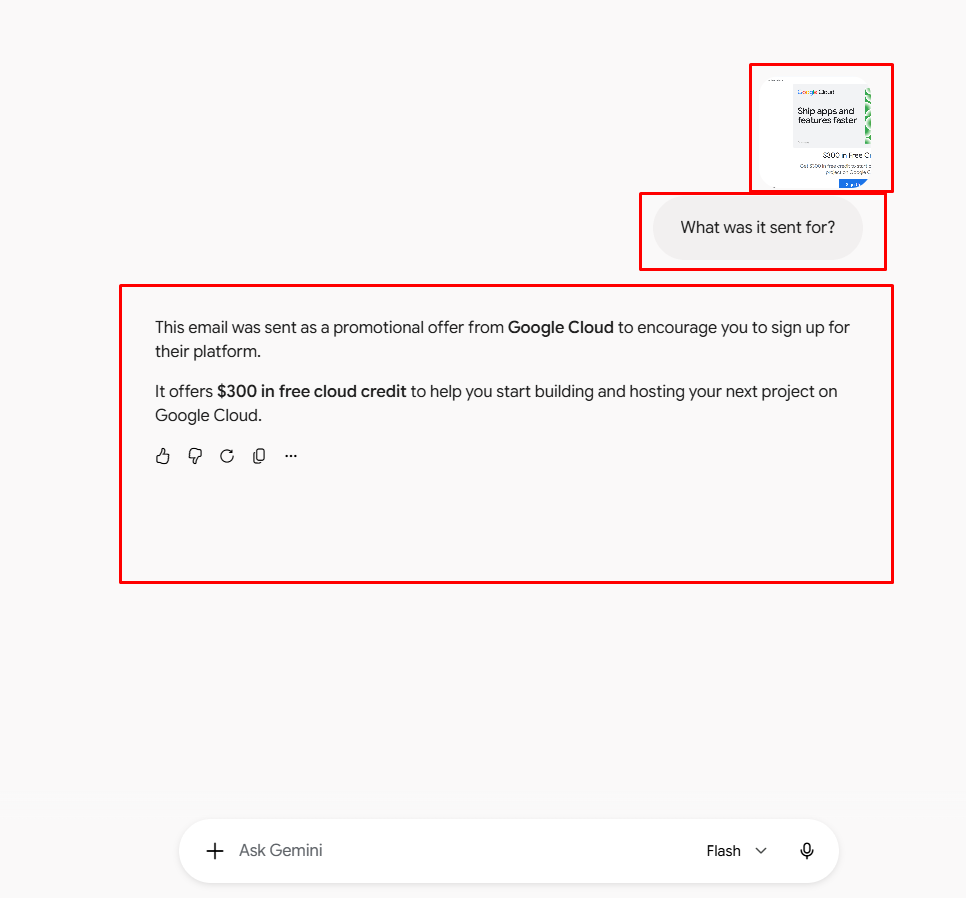
For example, someone sends me an email. I can give that email to Gemini and ask, “What is this email about?” Gemini will analyze it and explain why the person sent the email.
Then, if I ask Gemini, “Write a reply to this email for me,” it can write the reply.
If I want to send an email to promote my product or get more traffic to my website, I can simply tell Gemini what I want to do, and it can write the email for me.
You can do this with many different tasks.
I have kept this article short so that you can get the main idea without making it unnecessarily long. I think you can understand from these examples how useful Gemini can be.
Whatever you need to know or whatever you want to do, simply ask Gemini. Tell it what you want to know or what you want to accomplish, and it will give you an answer or help you with the task.
Google Docs
Google Docs is an online word processor used to create and edit documents. Small businesses can use it for proposals, reports, blog posts, and business plans. Gemini can help with writing, editing, and brainstorming.
Google Sheets
Google Sheets is a cloud-based spreadsheet tool. It is useful for tracking expenses, organizing customer information, managing budgets, and analyzing business data. Gemini can assist with certain spreadsheet-related tasks.
Google Drive
Google Drive is a cloud storage service that lets users save, organize, and share files online. Businesses can use it to keep documents, spreadsheets, presentations, and other important files in one place.
Google Meet
Google Meet is a video conferencing tool for online meetings. Small businesses can use it for team discussions, client calls, and remote collaboration. Gemini can provide assistance with certain meeting-related tasks, depending on the available features and plan.
Google Calendar
Google Calendar helps users schedule appointments, meetings, and important business events. It can make it easier to organize work and manage time across a team.
Why Does Google Workspace Matter for Small Businesses?
The main advantage of Google Workspace is that these tools work together. A business owner can receive a customer email in Gmail, create a proposal in Google Docs, store it in Google Drive, and schedule a meeting through Google Calendar.
When AI assistance is available within this workflow, it can help reduce repetitive work and improve productivity. However, the actual benefits depend on the Google Workspace plan, available Gemini features, and how the business uses them.
Helps with marketing and content creation
marketing
When it comes to growing a business, one of the most important things is marketing.
There are many different types of marketing, and there is no shortage of marketing strategies. In fact, almost everything depends on marketing. But when we think about marketing, we often think about only one thing: paying money to promote our products so that they will sell. Okay. But wait a minute. You are spending money to promote your brand, but what is the actual value of your brand? How much value does your brand have after spending money on promotion year after year?
Yes, you can grow a business and do marketing this way, but you also have to consider how much money you are spending. You are a small business owner. You are not a big business yet. You are running a small business with limited resources. That’s why I would say: paid marketing can come later. When your business is small and your budget is limited, start with free marketing. In today’s world, a lot is possible through free marketing. You simply need to be present and consistent. If you continue doing this consistently, within three to six months, you may be able to build some value and establish a presence on social media platforms and online.
That’s it.
content creation
Now let’s come to Google Gemini.
Suppose you want to do content creation. You may have many questions: What type of content should you create? What should you create content about? How should you create it? You don’t have to go to anyone else for these answers.
As I have been saying, you can simply ask Google Gemini any question related to content creation, and it will help you with the answer.
For example, suppose you have a mug. If you want to create content for that mug, take a screenshot of the mug’s details, upload it to Gemini, and tell it that you want to market this mug or create a social media post for it. Ask Gemini to write the content for you.
You will see how beautifully it can create the content, with proper details and presentation.
Then, if you want to create an image for your post to increase activity, you can tell Gemini to create an image for that product. You will see how nicely it can create an image for you.
However, creating videos with Gemini requires a subscription; you cannot create videos with the free version.
So, if you want to do content creation using Gemini, you will need the paid version.
But there is one important thing I want to say: you can do many things with Gemini, but don’t become completely dependent on it. You should remain present yourself and use Gemini to help you complete the tasks.
For writing content, there is no major problem. For image content, there can be some limitations. If you want your logo or your face to appear in the image, you can provide your logo or photo and tell Gemini to create the image using it. If you give it the proper instructions, it can create the image accordingly.
And when it comes to creating videos, you can use Gemini for ideas and other parts of the process. However, I would recommend using your own voice for the voice-over. Gemini can help you write the content and prepare the video, but using your own voice for the voice-over will be much better.
One more thing I want to mention: you may see many popular entertainment videos online and think that you can create similar videos and become popular. Entertainment-category videos can become very popular, but for service or product-based businesses, things are different.
If there is no human presence in your product or service content, it may be difficult to create real value for people. People need to see the person behind the business.
So, when you use Gemini as your assistant, let it do the tasks for you while you remain present.
For example, you can use your own face and tell Gemini to create a video based on your instructions. Or you can record a video of yourself talking about something and then use Gemini to help improve or prepare that content.
You can also take a picture of yourself holding your product and upload that picture to Gemini. Then simply tell it what you want to create from that picture. You can also provide the product image and give Gemini a proper prompt to create the content you need.
If you work this way consistently, I believe that within three to six months, you can build good value for yourself and your business and achieve significant growth.
The important thing is to use Gemini as an assistant—not as a replacement for yourself.
Pricing
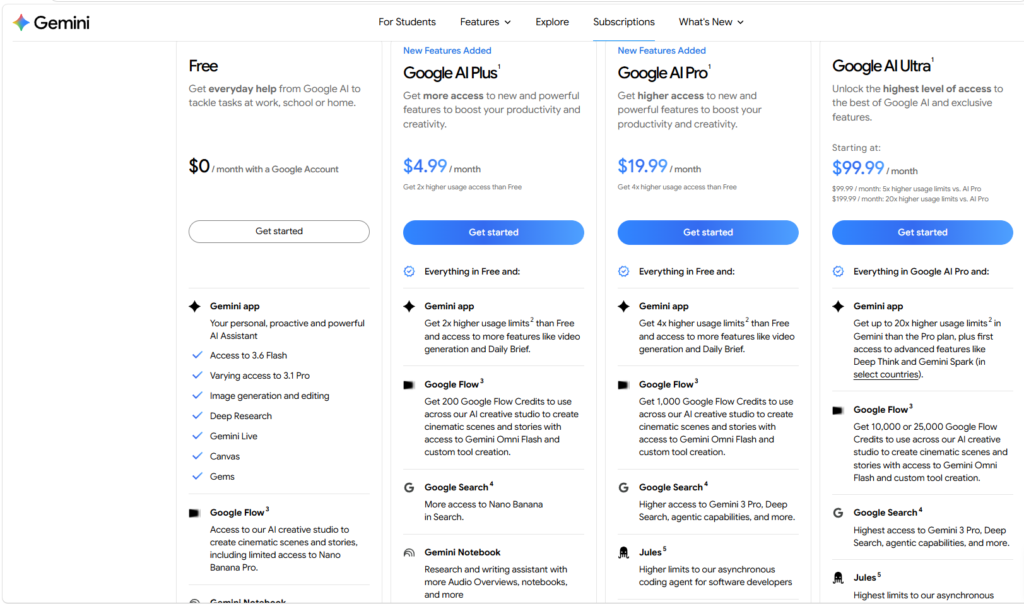
Google Gemini currently has four pricing plans. One of them is free to use, while the other three are paid plans with different features and access levels.
I have added a screenshot below, and there is also a link where you can check the pricing.
However, if you are checking the pricing while reading this article, I would strongly recommend checking it directly on Google’s official website. The reason is simple: today’s pricing may not remain the same tomorrow. Google can change its pricing, plans, features, or usage limits at any time.
So, my request is that you always check the current pricing directly from Google Gemini’s official website before choosing a plan.
Frequently Asked Questions
Is Google Gemini Free for Small Businesses?
Yes, a free Gemini option is available. Paid Google Workspace plans offer additional business features and Gemini capabilities.
Is Google Gemini Good for Small Business?
Yes, especially for businesses using Gmail, Docs, and Sheets. It can save time on emails, documents, and repetitive tasks.
How Much Does Google Gemini Cost for Business?
The cost depends on your Google Workspace plan. Check Google’s official pricing page for current prices and features.
Can Gemini Write Business Emails?
Yes. It can draft, rewrite, and summarize emails. For example, you can ask it to write a professional customer follow-up email.
Can Gemini Help with Google Sheets?
Yes. It can help create formulas, organize data, and analyze spreadsheets. Always check important calculations.
Is Gemini Better Than ChatGPT for Business?
Gemini is a strong choice for Google Workspace users. ChatGPT may be better for some general writing, research, and analysis tasks.
Is Google Gemini Safe for Business Data?
It can be useful for business data, but you should review privacy settings, permissions, and company policies before sharing sensitive information.
Which Google Workspace Plan Is Best for a Small Business?
Business Starter may suit solo businesses, Standard may suit growing teams, and Plus may suit businesses needing more storage and advanced features. Check current pricing before choosing.
Gemini is Google’s umbrella brand for its AI: the standalone Gemini app/website, the assistant built into Android and Chrome, and the underlying family of language models that power AI Overviews in Search and AI features across Workspace. By mid-2026, Google reported that the Gemini app alone had crossed 1 billion monthly active users, making it one of the fastest-growing consumer products in the company’s history — up from roughly 400 million a year earlier.
Some notable usage patterns Google has shared: the majority of users now speak to Gemini instead of typing, a significant share of Gemini Live sessions go beyond voice into live camera or screen-sharing, and the app generates well over 100 million images every day.

Demis Hassabis
Demis Hassabis is a British AI researcher, entrepreneur, and the CEO and co-founder of Google DeepMind. He leads research and development in artificial intelligence and frontier AI systems.
He played an important leadership role in the development of Google’s Gemini AI models. Google officially announced Gemini on December 6, 2023.


