


Google Gemini Image Generator
AI image generation has become easier than ever, and Google Gemini Image Generator is one of the most accessible tools for creating and editing images with artificial intelligence. Instead of learning complicated graphic-design software, you can simply describe what you want in natural language and let Gemini turn your idea into an image.
Artificial intelligence has completely changed the way people create digital content. What once required professional design skills, expensive software, and hours of editing can now be done with a simple text prompt.
One of the most popular tools for AI-powered image creation is the Google Gemini Image Generator. With Gemini, users can create original images from text descriptions, edit existing images, combine visual references, and refine results through natural-language instructions.
In 2026, Google’s Gemini image-generation technology has become more capable of understanding detailed prompts, rendering text inside images, maintaining visual consistency, and performing complex edits.
Whether you’re a content creator, blogger, marketer, designer, student, business owner, or simply interested in AI, Gemini can help turn your ideas into images in seconds.
In this guide, we’ll explain what Google Gemini Image Generator is, how it works, how to create AI images with Gemini, how to write better prompts, how to edit images, and how to get the best possible results in 2026.
What Is Google Gemini Image Generator?
Google Gemini Image Generator is an AI-powered image creation feature available through Google’s Gemini ecosystem.
Instead of manually designing an image, you describe what you want using ordinary language. Gemini interprets your instructions and generates an image based on your description.
For example, you can enter a prompt such as:
“Create a photorealistic image of a futuristic city at sunset, with towering skyscrapers, flying vehicles, glowing advertisements, and cinematic lighting.”

Gemini can transform that description into a visual image.
The system can be used for much more than simple text-to-image generation. Depending on the available model and account, Gemini can also help users edit images, combine multiple reference images, modify specific parts of an image, and create visual content containing text.
This makes Gemini useful for both casual experimentation and professional creative workflows.
How Does Gemini AI Image Generation Work?
Gemini uses Google’s generative AI models to understand the instructions in a user’s prompt and create an image that matches those instructions.
The process is relatively simple:
- You describe the image you want.
- Gemini analyzes the prompt.
- The AI interprets the subject, environment, style, composition, and other details.
- The image is generated.
- You can ask Gemini to make additional changes.
The conversational aspect is one of Gemini’s biggest advantages. Instead of creating a completely new prompt every time, you can tell Gemini, Make the lighting warmer. Then, Keep the subject unchanged but replace the background.And finally:Make the final image look more like professional commercial photography.
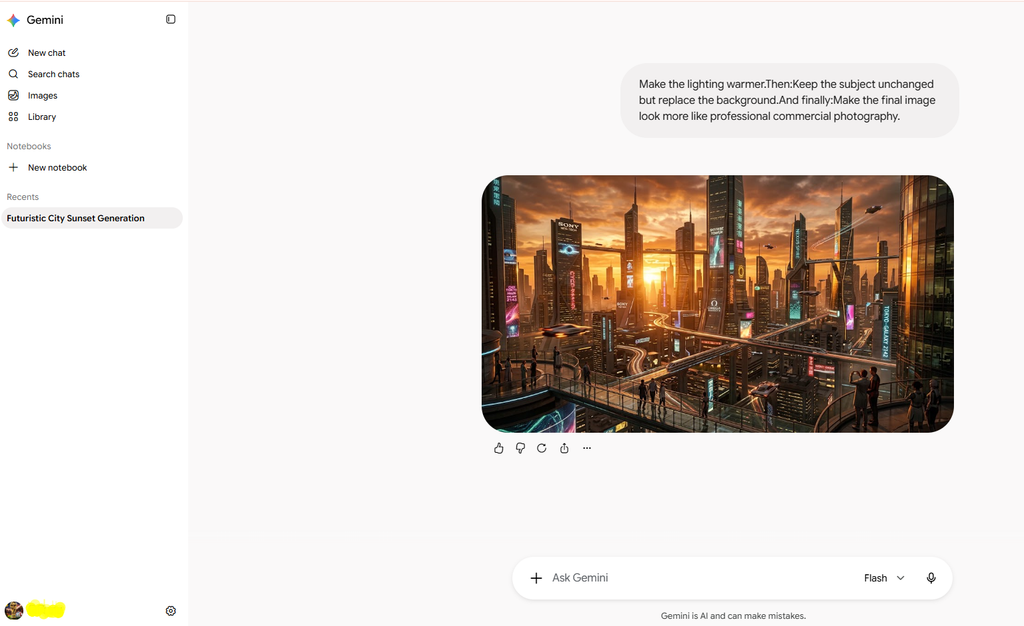
This allows you to refine an image step by step.
What Can You Create With Google Gemini?
Gemini can be used for many different types of visual content.
Photorealistic Images, You can create realistic-looking scenes, portraits, landscapes, products, interiors, and other photographic concepts.
Digital Artwork, Gemini can generate illustrations in different artistic styles, including cartoon, watercolor, fantasy, and conceptual artwork.
Marketing Images,Businesses can use AI-generated visuals for creative concepts, advertisements, promotional campaigns, and product presentations.
Social Media Graphics, You can create visual concepts for social media posts, stories, campaigns, and other digital content.
Blog Images, Bloggers can generate custom illustrations related to their articles rather than relying entirely on generic stock photography.
Product Concepts, You can describe a product and ask Gemini to visualize it in different environments or advertising scenarios.
Educational Images,Gemini can help create diagrams, visual explanations, illustrations, and educational graphics.
Storytelling,Writers and creators can use Gemini to visualize characters, locations, scenes, and story concepts.
How to Create AI Images With Google Gemini
Creating an AI image with Gemini is straightforward.
Step 1: Open Google Gemini
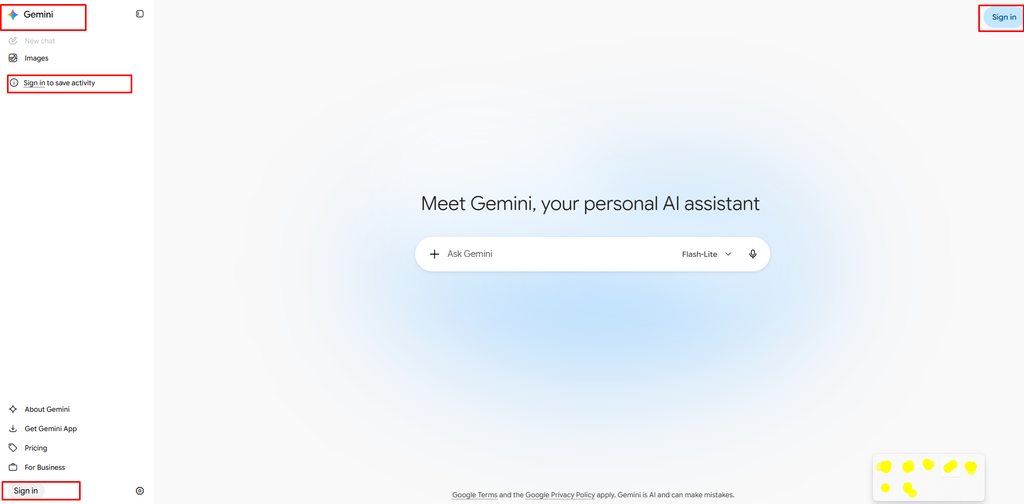
Start by opening Google’s Gemini service and signing in with your Google account.
The exact features available to you can depend on your account, location, age, language, subscription, and Google’s current product availability.
Step 2: Select the Image Generation Feature
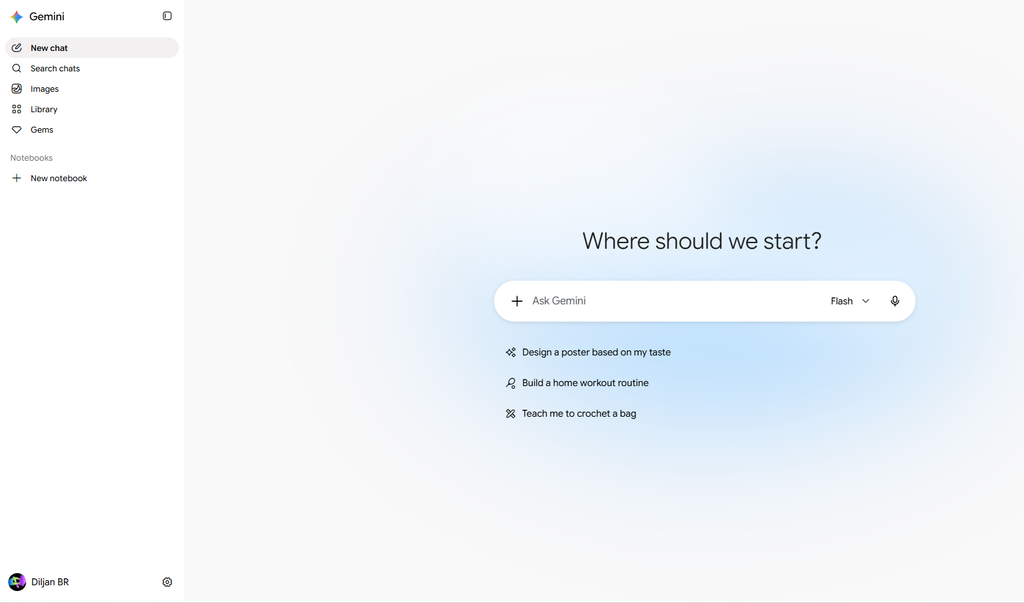
Where available, select the image-generation option in Gemini.
The interface may change over time as Google updates Gemini, so the exact location or appearance of the feature can vary.
Step 3: Enter Your Prompt
Write a clear description of the image you want to create.
For example:
Create a cinematic photograph of a futuristic electric sports car parked outside a modern glass building at night, neon reflections on the wet pavement, dramatic lighting, realistic photography.

Step 4: Review the Generated Image
Gemini will generate an image based on your instructions.
Look carefully at the result and identify anything you want to change.
Step 5: Refine the Image
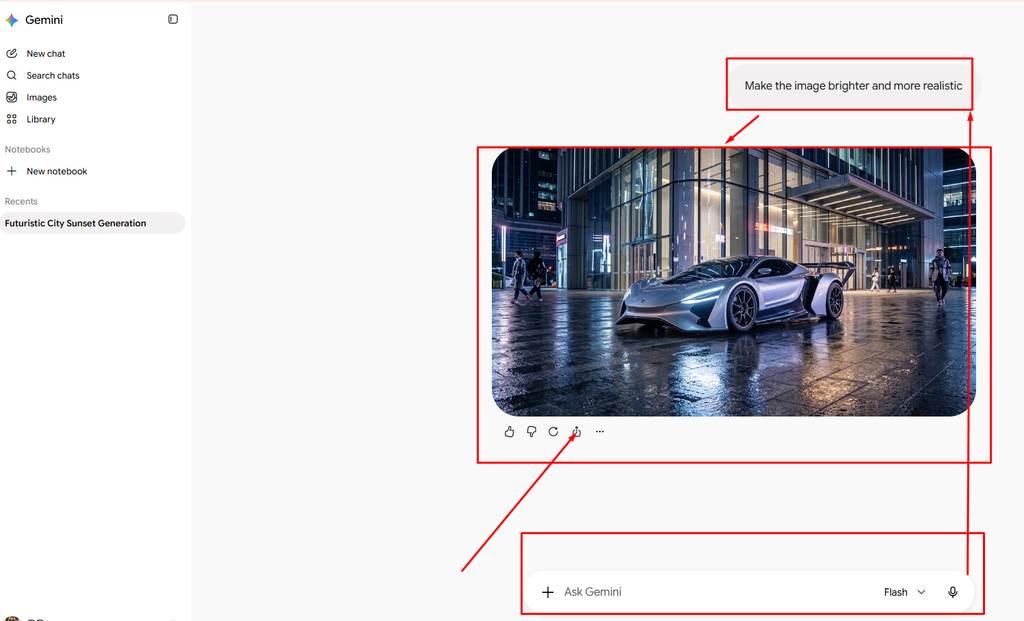
You can continue the conversation and give additional instructions.
For example:
Make the car metallic silver.
Or:
Keep the car unchanged but replace the background with a mountain road.
Or:
Make the image brighter and more realistic.
Step 6: Download the Result
Once you’re satisfied with the image, use the available download option to save it.
How to Write Better Gemini Image Prompts
The quality of your prompt can have a major impact on the result. A vague prompt gives the AI less information to work with.
For example, Create a beautiful city. This leaves many details open to interpretation. A better prompt would be,
Create a photorealistic modern city at sunset with tall glass skyscrapers, busy streets, pedestrians, glowing storefronts, warm golden lighting, realistic reflections, and a cinematic wide-angle composition.

The second prompt gives Gemini much more visual information.
The Best Gemini Prompt Formula
A useful formula for creating detailed prompts is:
Action + Subject + Environment + Style + Lighting + Composition + Details
For example:
Create a photorealistic image of a professional photographer working inside a modern studio, surrounded by cameras and lighting equipment, soft natural lighting, realistic photography, shallow depth of field, detailed textures, clean composition.
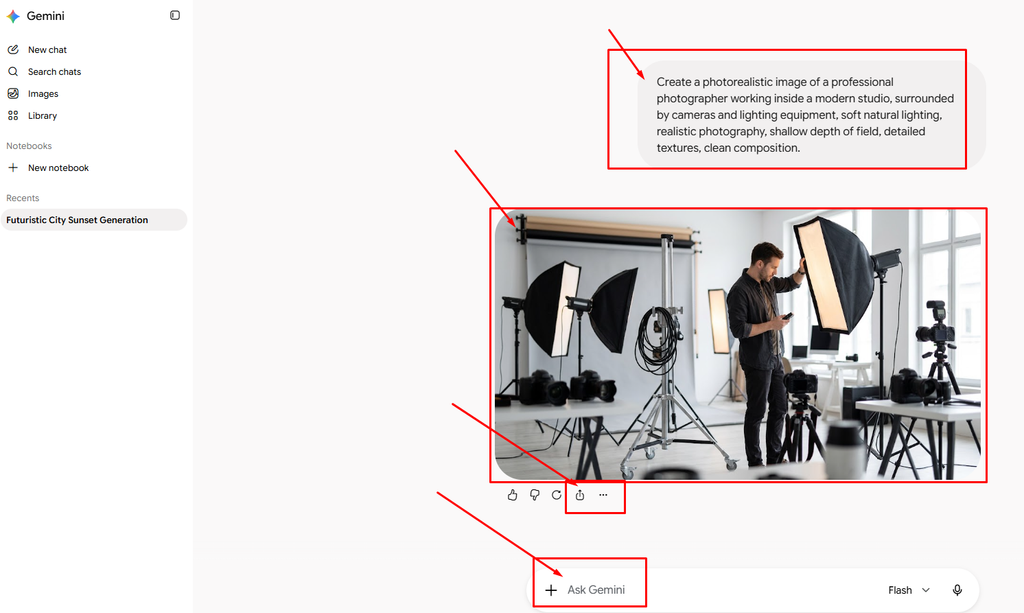
You don’t always need every element. However, adding relevant details can make your desired result clearer.
15 Google Gemini Image Generator Prompt Examples
Here are several prompts you can use as starting points.
1. Photorealistic Portrait
“Create a professional photorealistic portrait of a young entrepreneur wearing a modern business outfit, standing inside a stylish office, natural window lighting, realistic skin texture, shallow depth of field, premium editorial photography.”

2. Futuristic City
“Create a cinematic futuristic city at night with massive skyscrapers, flying vehicles, glowing neon advertisements, busy streets, reflective wet pavement, atmospheric fog, and realistic cinematic lighting.”
3. Product Photography
“Create a professional studio photograph of a premium wireless headphone placed on a minimalist surface, soft studio lighting, realistic shadows, detailed materials, subtle reflections, luxury advertising photography.”
4. Fantasy Landscape
“Create an epic fantasy landscape featuring an ancient castle on a mountain surrounded by waterfalls, forests, mist, dramatic clouds, warm sunset light, and highly detailed fantasy concept art.”
5. YouTube Thumbnail
“Create a dramatic YouTube thumbnail about artificial intelligence, featuring a futuristic humanoid robot and a glowing digital interface, dynamic composition, strong visual contrast, cinematic lighting, and empty space for headline text.”
6. Food Photography
“Create a professional food photograph of a beautifully prepared bowl of ramen on a wooden table, steam rising from the bowl, chopsticks beside it, warm restaurant lighting, realistic textures, shallow depth of field.”
7. Travel Photography
“Create a photorealistic tropical beach at sunrise, turquoise water, palm trees, soft golden sunlight, gentle waves, realistic reflections, professional travel photography, wide-angle composition.”
8. Children’s Book Illustration
“Create a colorful children’s storybook illustration of a friendly fox exploring an enchanted forest, expressive face, colorful flowers, magical atmosphere, warm sunlight, whimsical illustration style.”
9. Technology Advertisement
“Create a premium technology advertisement featuring a futuristic smartphone on a sleek black desk, dramatic studio lighting, subtle reflections, dark luxury background, realistic materials, high-end commercial photography”.
10. Minimalist Poster
“Create a modern minimalist poster about creativity, clean typography, geometric shapes, elegant composition, contemporary graphic design, balanced negative space.”
11. Sci-Fi Character
“Create a highly detailed futuristic astronaut standing on an alien planet, massive mountains in the background, two moons in the sky, dramatic atmospheric lighting, cinematic science-fiction concept art.”
12. Interior Design
“Create a photorealistic modern living room with floor-to-ceiling windows, minimalist furniture, natural wood textures, indoor plants, soft afternoon sunlight, elegant interior design photography.”
13. Business Illustration
“Create a clean professional illustration showing a modern team collaborating around a digital workspace, contemporary corporate style, simple composition, polished visual design.”
14. Vintage Photography
“Create a vintage-style photograph of a classic automobile parked outside an old roadside diner, warm afternoon sunlight, subtle film grain, nostalgic 1970s photography aesthetic.”
15. Social Media Graphic
“Create a modern social media graphic about artificial intelligence, futuristic digital elements, clean layout, professional typography area, polished technology aesthetic, square composition.”
How to Edit Existing Images With Gemini
One One of the most useful Gemini features is image editing.
Instead of generating a completely new image, you can upload an existing image and ask Gemini to modify it.
For example:
Remove the people in the background while keeping the main subject unchanged. You can also request, Replace the background with a modern office.
Or:
Change the clothing color to black.
Or:
Turn the daytime scene into nighttime.
Or:
Make the lighting warmer and more cinematic.
The conversational editing process makes it possible to experiment with several variations with.
Can Gemini Combine Multiple Images?
Gemini can also work with multiple reference images where the feature is supported.
For example, you could provide:
- A photograph of a person
- A photograph of a location
- A product reference image
Then ask Gemini to create a new scene incorporating those references.
A prompt could be:
“Create a realistic photograph using the person from the first image and the location from the second image. Keep the person’s appearance consistent and make the final composition look like professional travel photography.”
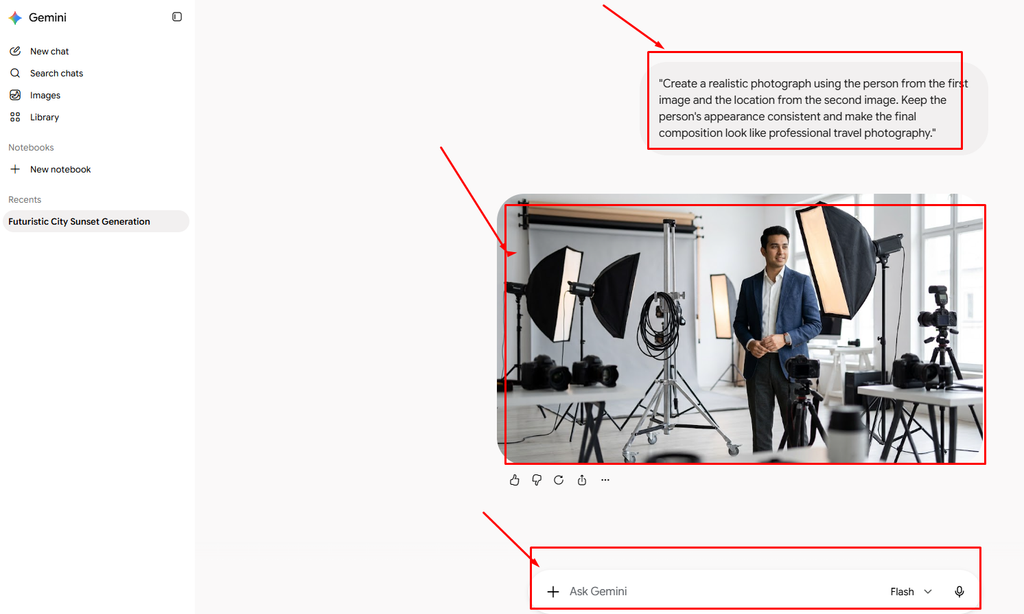
This type of workflow can be useful for creative projects, product visualization, marketing concepts, and storytelling.
Gemini AI Image Generator for Bloggers
Bloggers can use Gemini to create custom visuals for their content.
Suppose you’re publishing an article about artificial intelligence. Instead of using a generic stock image, you could create a custom visual such as,
“Create a professional technology illustration showing an AI system generating digital artwork on a large computer display, futuristic workspace, glowing interface elements, cinematic lighting, modern editorial style.”

AI-generated images can be used as:
- Featured images
- Article illustrations
- Blog headers
- Social media graphics
- Tutorial visuals
- Content marketing assets
However, you should always review generated images before publishing them and make sure your intended use complies with applicable terms and intellectual-property requirements.
Gemini for YouTube Creators
YouTube creators can use Gemini to develop visual concepts for videos.
For example, a creator could generate ideas for:
- YouTube thumbnails
- Background images
- Video concepts
- Character designs
- Storyboards
- Promotional graphics
A thumbnail prompt could be:
“Create a high-impact YouTube thumbnail about AI technology. Show a futuristic robot looking at a glowing computer screen, dramatic lighting, strong depth, expressive visual composition, bold technology aesthetic, 16:9 layout, and clear space for headline text.”
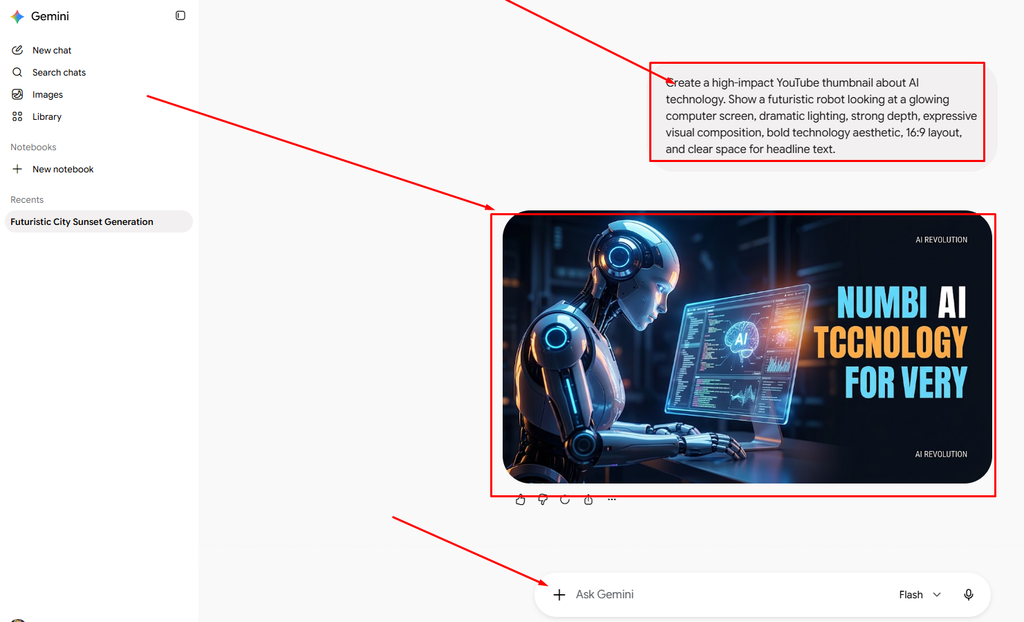
You can then refine the image by asking Gemini to change the composition or emphasize a particular element.
Gemini for Social Media Content
Social media creators need fresh visual content constantly.
Gemini can help generate ideas for:
- Instagram posts
- Facebook graphics
- Pinterest visuals
- Promotional images
- Quote graphics
- Campaign concepts
- Product announcements
For example:
“Create a premium social media graphic promoting a new productivity app, modern technology aesthetic, clean composition, elegant typography area, bright workspace, professional commercial design.”

After generating the image, you can request additional modifications.
How to Create Realistic Images With Gemini
If realism is your goal, clearly describe the photographic style.
Useful terms include:
- Photorealistic
- Professional photography
- Natural lighting
- Studio lighting
- Cinematic photography
- Realistic textures
- Detailed materials
- Natural shadows
- Shallow depth of field
- Wide-angle photography
- Close-up photography
For example:
“Create a photorealistic product photograph of a luxury smartwatch on a minimalist desk, soft studio lighting, realistic reflections, detailed metal and glass textures, shallow depth of field, premium commercial photography.”
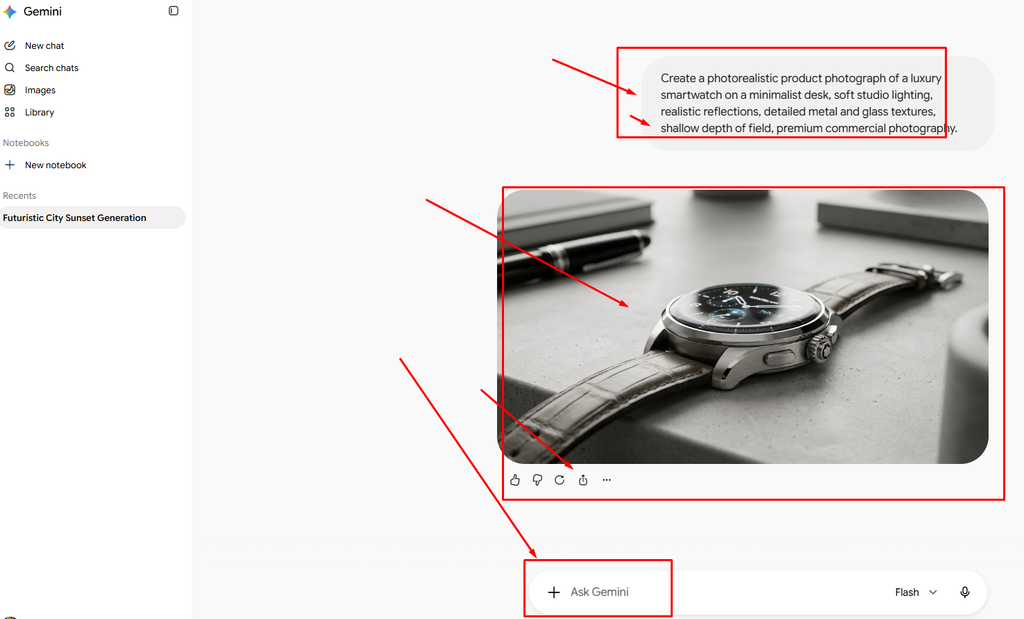
Remember that adding more keywords isn’t always better. A clear, logically structured prompt is generally more useful than a long list of unrelated terms.
How to Keep Characters Consistent
Character consistency is important when creating stories, comics, advertisements, or a series of images.
Start by defining the character.
For example:
Create a young fantasy explorer with short black hair, green eyes, a brown leather jacket, dark trousers, hiking boots, and a red backpack.
Then continue the conversation:
Show the same character exploring an ancient forest.
Then:
Show the same character standing outside an ancient castle at sunset.
Using a reference image when appropriate can provide additional visual guidance.
This workflow can make it easier to build a consistent visual identity across multiple images.
How to Generate Text Inside Images
AI-generated text has historically been challenging, but modern image-generation models have become much better at handling text.
When you need text in an image, be explicit about the wording.
For example:
Create a professional event poster with the headline “AI CREATIVE SUMMIT 2026”. Use a modern technology design, clean typography, dark background, futuristic visual elements, and a balanced professional layout.
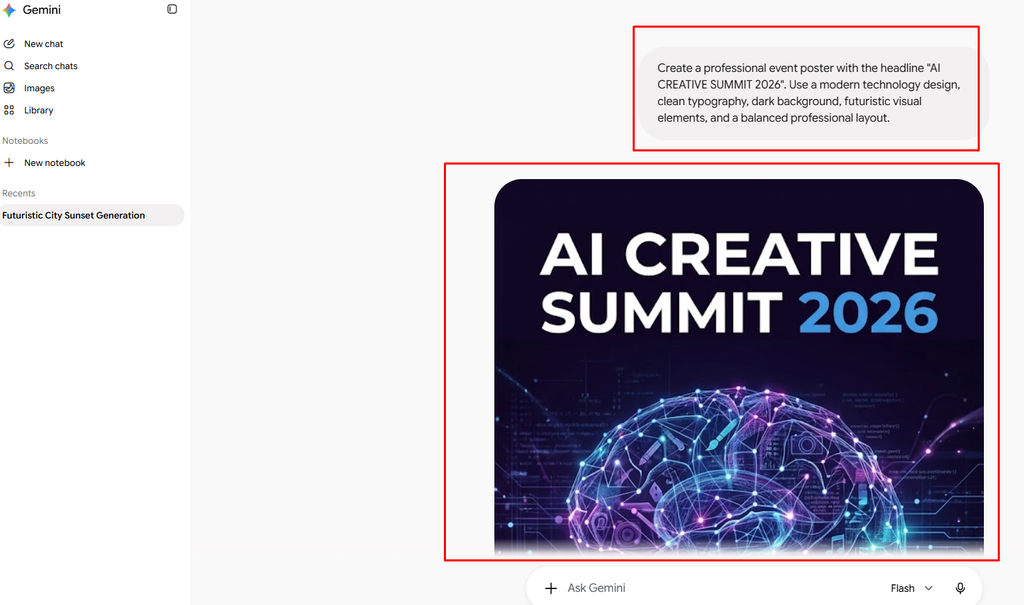
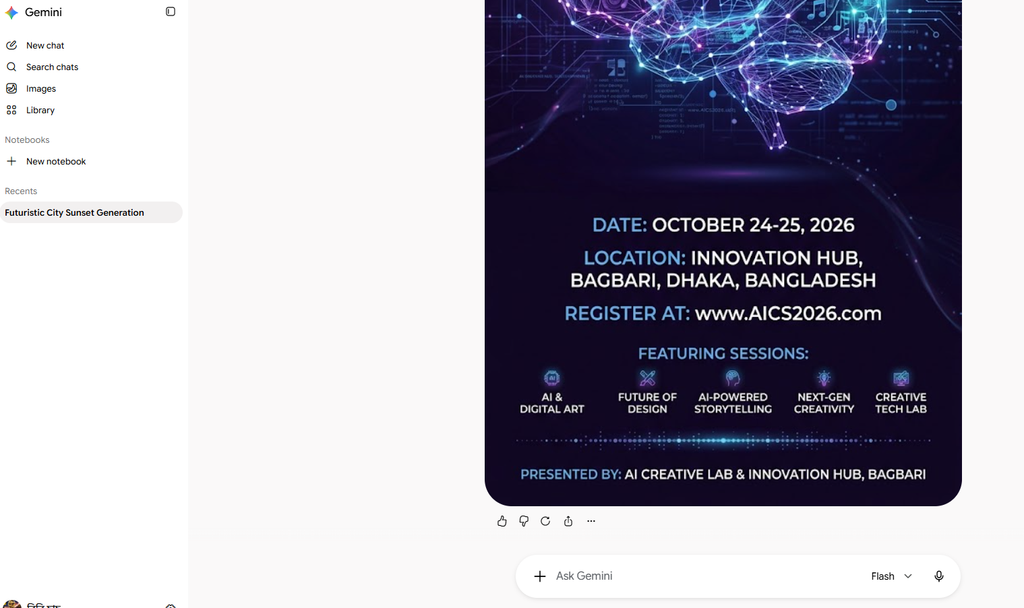
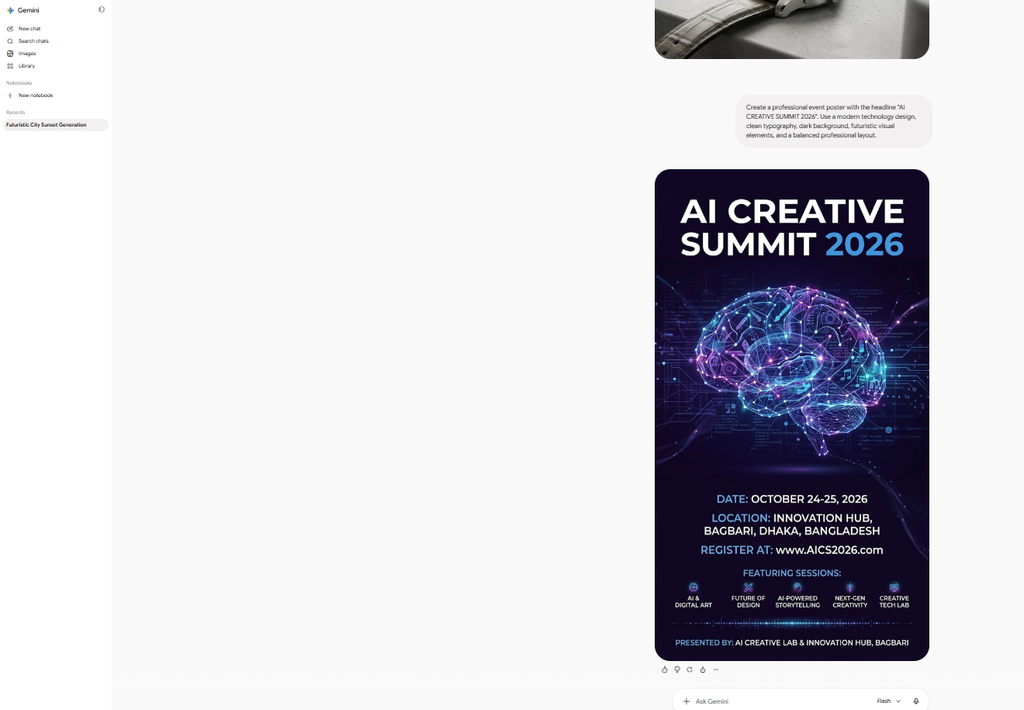
Always check the final image carefully for:
- Spelling
- Missing letters
- Incorrect words
- Strange characters
- Incorrect numbers
- Unwanted text
If the text is important, it may still be preferable to add or correct it using a dedicated design tool after generating the visual.
Gemini Image Generator for Marketing
Gemini Image Generator for Marketing
AI image generation can be useful throughout the marketing process.
Marketers can use Gemini to create initial concepts for:
Advertising, Generate visual concepts for advertisements and campaigns.
Product Promotion, Create different environments for product photography.
Social Media, Generate multiple creative directions for campaigns.
Branding, Experiment with visual styles, layouts, and creative concepts.
Content Marketing, Create custom illustrations for articles, guides, and educational content.
AI doesn’t necessarily replace a professional marketing or design workflow. Instead, it can significantly speed up the process of creating and testing visual concepts.
Gemini Image Generator vs Traditional Design Tools
AI image generation and traditional graphic-design software serve different purposes. Traditional design software gives you precise manual control over individual elements. AI image generators are particularly useful for,
- Rapid concept creation
- Visual experimentation
- Image variations
- Creative brainstorming
- Background generation
- Illustrations
- Photographic concepts
A professional workflow may combine both.
For example:
Gemini → Generate the visual concept → Design software → Add final typography and branding → Publish
This can provide both AI-powered speed and professional control.
Is Google Gemini Image Generator Free?
The availability of Gemini’s image-generation capabilities depends on factors such as your Google account, country, age, language, product availability, and subscription.
Google can also change usage limits, model availability, and feature access over time. Some advanced Gemini capabilities may be available only to eligible paid subscribers.
Because Google’s plans and limits can change, users should check the current Gemini product information associated with their account rather than relying on an old fixed usage limit.
Can You Use Gemini-Generated Images Commercially?
Commercial use depends on the applicable Google terms, the specific content generated, and how the image is being used.
Before using an AI-generated image commercially, consider:
- Copyright
- Trademarks
- Privacy
- Personality rights
- Brand restrictions
- Platform policies
- Google’s applicable terms
Be particularly careful when generating images that resemble real people, copyrighted characters, logos, or existing artwork.
For business use, review the applicable terms and consider professional legal advice for high-value or sensitive commercial projects.
Why Can’t Gemini Generate My Image?
There are several reasons Gemini may not generate an image.
Safety Restrictions, Some prompts may trigger Google’s safety systems.
Feature Availability, Image generation may not be available for every account, country, language, or product configuration.
Usage Limits, Your account may have reached an applicable usage limit.
Prompt Issues, An unclear or contradictory prompt may produce an unexpected result.
Technical Problems, Temporary service issues can also affect image generation.
If a prompt doesn’t work, try simplifying it and removing unnecessary instructions.
Tips for Getting Better Gemini Image Results
1.Start With a Clear Goal, Know exactly what you want the image to communicate.
2.Describe the Main Subject First, Tell Gemini what the most important element of the image is.
3.Add the Environment, Explain where the subject should appear.
4.Specify the Style, Mention whether you want photography, illustration, 3D art, watercolor, or another style.
5.Describe Lighting, Lighting can dramatically affect the appearance of an image.
6.Explain Composition, Tell Gemini where the subject should appear and how the image should be framed.
7.Use Reference Images When Helpful, Reference images can provide additional visual information.
8.Refine the Result, Don’t expect every first-generation image to be perfect. Use follow-up instructions to improve it.
9.Check Important Details, Always inspect faces, hands, text, logos, numbers, and other important elements.
10.Keep Your Prompts Natural, You don’t need to write complicated technical commands. Describe the desired result as clearly as you would explain it to a human designer.
Common Mistakes to Avoid
Using Extremely Vague Prompts, “Make a cool image” gives the AI very little direction.
Giving Contradictory Instructions, Don’t ask for a minimalist image while simultaneously requesting dozens of complex visual elements.
Overloading the Prompt, More words don’t automatically mean better results.
Ignoring Composition, If you need a specific layout, describe it.
Forgetting to Review Text, AI-generated text can still contain mistakes.
Expecting Perfect Results Every Time,AI generation is probabilistic. You may need multiple attempts and refinements.
Frequently Asked Questions
What is Google Gemini Image Generator?
Google Gemini Image Generator is an AI-powered image creation feature that lets users create and edit images using natural-language instructions.
Can Gemini generate images from text?
Yes. You can describe a visual concept using a text prompt and Gemini can generate an image based on the instructions.
Can Gemini edit photos?
Yes. Where image-editing capabilities are available, you can upload an image and ask Gemini to make changes.
Can Gemini combine images?
Gemini can use multiple reference images for supported image-generation workflows.
Can Gemini create realistic photos?
Yes. You can request photorealistic images and provide details about lighting, composition, environment, and photography style.
Can Gemini generate text inside images?
Yes. Modern Gemini image-generation models are designed to handle text inside images more effectively, although generated text should still be checked for errors.
Can I use Gemini on mobile?
Gemini is available through supported mobile experiences, although specific image-generation features can vary by platform and account.
Is Gemini better than traditional image-generation tools?
It depends on what you need. Gemini’s conversational workflow is particularly useful for creating and refining images through natural-language instructions.
Can Gemini maintain character consistency?
Gemini’s image-generation capabilities can help maintain visual consistency across related images, especially when appropriate reference images and detailed instructions are used.
Can I use Gemini images for my website?
Potentially, yes, but you should review the applicable Google terms and make sure the image doesn’t create copyright, trademark, privacy, or other legal issues.
Final Verdict: Is Google Gemini Image Generator Worth Using in 2026?
The Google Gemini Image Generator is a powerful option for anyone who wants to create AI images without learning complex design software. Its biggest advantage is the ability to work conversationally. You can describe an idea, generate an image, request changes, and continue refining the result using ordinary language.
For bloggers, creators, marketers, businesses, and everyday users, this can make visual content creation much faster. The key to getting better results is not simply generating more images. It is learning how to communicate your visual idea clearly. Describe the subject, environment, style, lighting, composition, and important details, then refine the result through follow-up instructions.
As AI image generation continues to improve, Gemini is becoming a useful creative assistant for turning ideas into visual content quickly and efficiently. If you’re looking for an easy way to experiment with AI-generated images in 2026, Google Gemini is certainly worth trying.


