


Last Updated: 28 October 2026
Category: AI Video Generators
Our Verdict: Google Veo is one of the strongest options for creators who want realistic AI-generated videos with synchronized audio, cinematic visuals, and flexible creative controls.
Affiliate disclosure: This post contains affiliate links. If you click a link and make a purchase, we may earn a commission at no extra cost to you. We only recommend tools we have tested or believe are useful.
Google Veo 3 Review
AI video generation has rapidly transformed how creators produce content. From YouTube videos and social media advertisements to short films and product demonstrations, AI-powered tools are making professional-looking video production more accessible.
Google Veo 3 is one of the most capable AI video generators available today, and its realistic speech, lip sync and built-in sound set it apart from every earlier Veo model. It is also pricier than most rivals and can stumble when you need precise, tightly controlled shots.
Veo 3 launched on May 20, 2025, and it is now offered globally through Google Cloud’s Vertex AI. After a hands-on test and a comparison with Veo 1, Veo 2 and several competitors, here is what we found.
But is Google Veo worth using in 2026? How much does it cost? What are its biggest strengths and weaknesses?
In this comprehensive Google Veo 3 review, we will explore its features, pricing, performance, advantages, limitations, and best use cases to help you decide whether it is the right AI video generator for your need.
✓ Google Veo 3 Pros
- Life-like colours, lighting and motion make clips feel authentic.
- No technical skills are needed to generate and edit videos.
- Natural-language prompts turn into video almost instantly.
- Audio, music and sound effects are synced to the frames as they are created.
- Reference images help you control scenes, characters and objects.
✕ Google Veo 3 Cons
- Some actions, such as a person falling, look wrong or include illogical details.
- Parts of the prompt are sometimes left out of the final clip.
- Subtitles can be inaccurate, with random text overlays and glitches.
- Every prompt uses credits, so careless experimenting drains your balance quickly.
Quick Overview
Google Veo 3 turns a text prompt or a single image into a short video. The clips follow the prompt closely, and adding music or sound effects takes almost no effort. Google Veo 3 makes it useful for beginners and professionals who want to speed up clip-making.
It worked best with prompts that left room for interpretation, producing natural movement in believable settings. When we asked for exact, controlled shots, consistency and fine detail slipped. The entry price is also higher than most alternatives.

What Is Veo 3?
Veo 3 is a generative video model built by Google DeepMind. It arrived a year after Veo 1 and is the most advanced of the three versions, with high-quality sound effects, synchronized audio and dialogue. Those additions make the videos noticeably more realistic.
It is also part of the Gemini ecosystem, so it connects with Google Workspace, YouTube and Google Cloud, and it keeps improving through updates across Gemini tools.
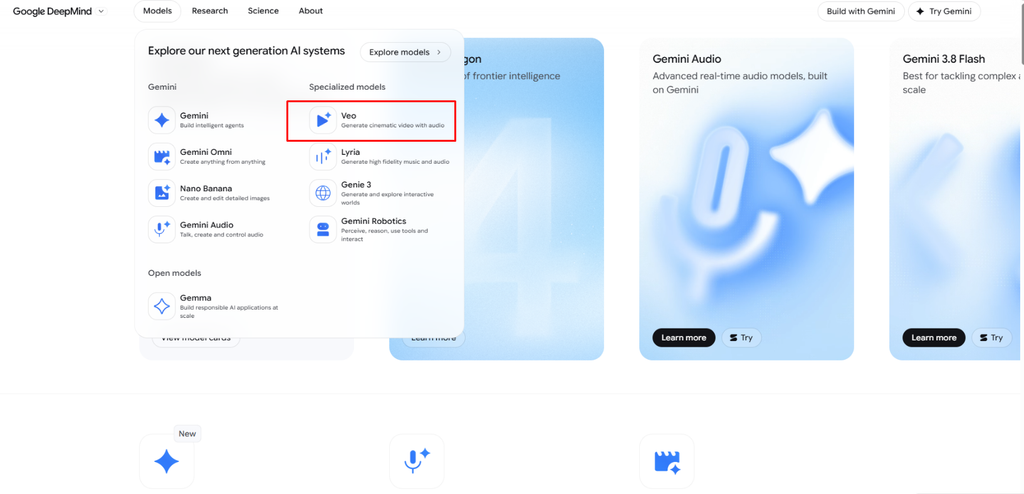
Key Features and Capabilities of Google Veo 3
- High-Quality Video Generation: Google Veo 3 generates realistic, cinematic video clips with detailed visuals and smooth motion. Supported workflows offer up to 1080p resolution, while clip duration and output quality depend on the model and platform.
- Flexible Video Formats: Veo supports different aspect ratios and output options in compatible workflows, helping creators produce content for YouTube, YouTube Shorts, Instagram Reels, and other social media platforms.
- Synchronized Audio Generation: One of Veo 3’s standout features is its ability to generate audio alongside video. This can include dialogue, sound effects, ambient sounds, and other audio elements, reducing the need for separate audio production. However, results may require additional editing.
- Text-to-Video Generation: Users can turn written prompts into video clips by describing the subject, setting, actions, camera movements, lighting, and visual style. Veo interprets these instructions to create scenes based on the prompt.
- Image-to-Video Generation: Veo can animate supported still images, adding movement and, where available, synchronized audio. This feature is useful for transforming photographs, illustrations, and concept art into engaging video content.
- User-Friendly Interface: Google’s Veo ecosystem offers accessible video-generation tools for beginners, while supported platforms and APIs provide additional creative controls and integration options for professional creators and developers.
Google Veo 3 Pricing and Plans
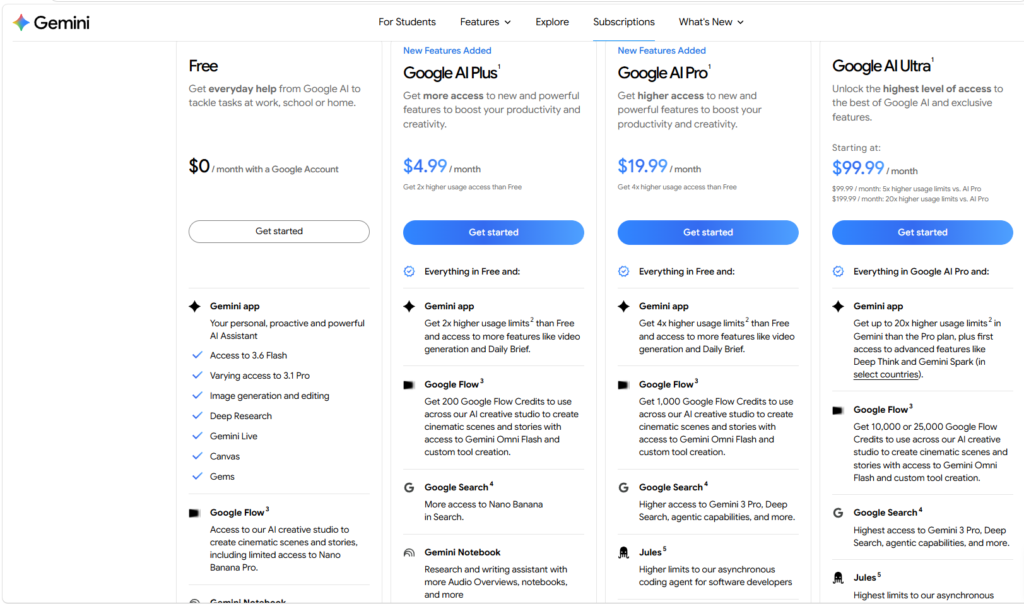
Google Veo offers several ways to access its AI video-generation capabilities, including Google Flow subscriptions and pay-as-you-go API pricing. The total cost depends on the selected model, generation quality, and how frequently you create videos.
Google Flow Subscription Plans
Google Flow offers free access with daily credits, alongside paid Google AI plans that provide additional monthly credits and features.
| Plan | Monthly Price (USD) | Monthly Flow Credits |
|---|---|---|
| Free | $0 | 50 daily credits |
| Google AI Plus | $4.99 | 200 additional credits |
| Google AI Pro | $19.99 | 1,000 additional credits |
| Google AI Ultra | $99.99 | 10,000 additional credits |
| Google AI Ultra | $199.99 | 25,000 additional credits |
Prices are based on Google’s displayed US pricing and may vary by country, taxes, and promotions.
All plans provide different levels of access to supported video-generation tools. Higher-tier subscriptions offer more credits and additional features, while the free option is suitable for experimenting with AI-generated videos. Credit consumption depends on the model and generation settings. <Cite refs={[“turn710585search0″,”turn710585search3”]}/>
Google Veo API Pricing
Developers can also generate videos through Google’s API and pay according to their usage. This option is useful for businesses and creators who want to integrate AI video generation into their own applications.
Google’s published Veo 3.1 API pricing includes:
- Veo 3.1 Standard: $0.40 per second for supported 720p and 1080p video-with-audio generation.
- Veo 3.1 Fast: $0.10 per second at 720p or $0.12 per second at 1080p.
- Veo 3.1 Lite: $0.05 per second at 720p or $0.08 per second at 1080p.
For example, an eight-second video generated with Veo 3.1 Standard at $0.40 per second would cost $3.20. Actual costs depend on the selected model, resolution, and generation configuration. <Cite refs={[“turn710585search8″,”turn710585search10”]}/>
Can You Use Google Veo for Free?
Yes. Google Flow provides free access with 50 daily credits, although video-generation availability can be affected by demand and account eligibility.
Developers can check Google Cloud’s current trial and billing terms separately. API access, trial credits, and consumer subscription credits are different offerings, so a free Vertex AI trial should not be confused with unlimited free Veo generation.
Which Plan Should You Choose?
- Beginners: Start with Google Flow’s free access to test prompts and evaluate video quality.
- Regular content creators: Consider Google AI Plus or Pro, depending on your monthly generation needs.
- Professional creators and production teams: Compare Google AI Ultra’s higher credit allowance with the cost of API-based generation.
- Developers and businesses: Use API pricing to estimate costs based on expected video volume.
Before subscribing, review Google’s current pricing, regional availability, usage terms, and commercial-use requirements. Do not assume that every subscription includes identical licensing rights or generation limits.
Official pricing resources:
Final Verdict
Veo 3 is an impressive tool for casual and experienced users alike, and the quality of the result depends mostly on your prompt. It shines when you have a loose idea. For something specific, write a detailed prompt, because the model may fill gaps in unexpected ways. Expect occasional artifacts and unpredictable outcomes.
Pricing is the biggest concern, since starting prices are steep and credits are limited. Fortunately, the free trial lets you test it before you commit.
FAQ
How much does Google Veo 3 cost?
Prices run from $37.50 to $199.90 per month. Annual plans are cheapest per month, and month-to-month billing is the most expensive.
How can I access Google Veo 3?
You can use it through Google AI Studio, the Gemini app, Google Flow or Google Vids.
Is Google Veo 3 worth it?
It is worth it if you need fast, decent-quality video with little manual editing. It is pricey compared with competitors.


