

Affiliate disclosure: This post contains affiliate links. If you click a link and make a purchase, we may earn a commission at no extra cost to you. We only recommend tools we have tested or believe are useful.
Last updated: October 2026
OpenArt AI Review
OpenArt started as an AI image generator, but it now bundles video, image, audio, character, and world-building tools in one workspace. The video tool lets you choose between several models, add reference images, and see the credit cost before you generate.
Is it worth paying for? How far does the free plan go, and how does it compare with Runway, Kling AI, and Pika? This review covers OpenArt’s tools, pricing, free plan limits, strengths, weaknesses, and best alternatives.
OpenArt AI Pros and Cons
A quick overview of OpenArt AI’s advantages and disadvantages.
✓ Pros
Video, image, audio, character, and world tools share one workspace.
You can pick from several video models instead of being locked to one.
The Generate button displays the price before you commit.
Up to 50 references help with consistency.
Chat Mode and Director Mode help beginners plan longer projects.
You can try the interface without paying.
✕ Cons
40 one-time credits do not stretch to a full video clip.
A single short clip can cost hundreds of credits.
Free-plan work is stored for only 7 days.
Plan names and prices have been restructured more than once.
Director Mode and long clips can use a lot of credits.
Many tools and menus take time to learn.
What Is OpenArt?
OpenArt is an AI creation platform that combines image, video, audio, character, and world tools under one account. Instead of jumping between separate apps, you can generate an image, animate it, add audio, and keep the result in one project.
The workspace is organized around a few main areas: an Agents section with Chat Mode and Director Mode, a Tools section for Video, Image, World, Character, and Audio, an Assets section for projects, characters, and brand kits, and an Inspire section with templates and tutorials.

OpenArt Features in 2026
1. Text-to-Video and Image-to-Video
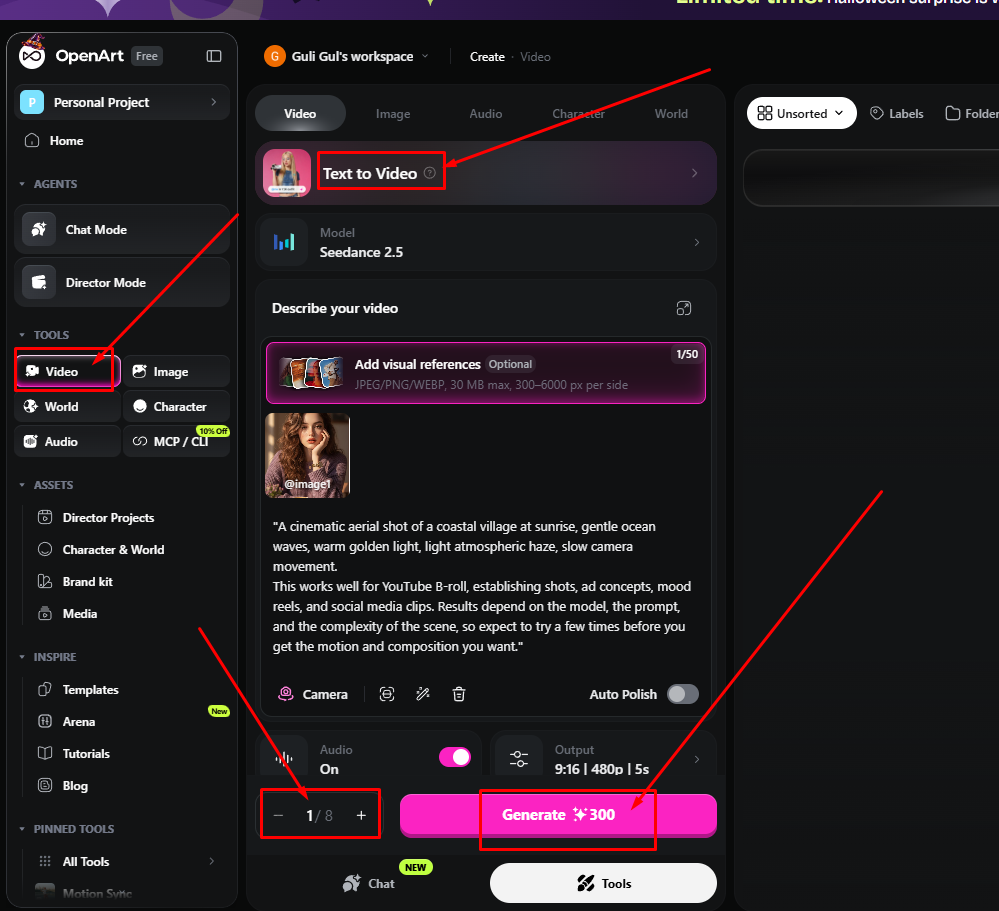
The Video tool is the main reason to look at OpenArt in 2026. You write a description of the clip, optionally add reference images, and choose a model. When we opened it, the default model was Seedance 2.5.
Before generating, you can set three things:
- Audio: switch generated audio on or off
- Output: aspect ratio, resolution, and clip length (our test used 9:16, 480p, 5 seconds)
- Batch size: how many versions to generate at once
Reference images accept JPEG, PNG, and WEBP files up to 30 MB, with each side between 300 and 6,000 pixels. The tool allows up to 50 references, which helps with keeping a subject consistent across clips.
2. Image, Character, and World Tools
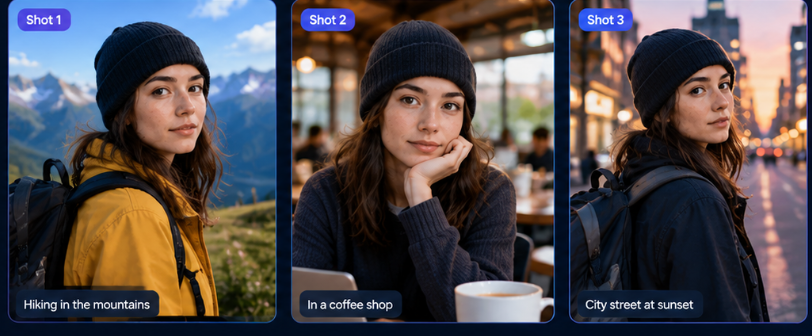
Beyond video, OpenArt has separate Image, Character, and World tools. The Character tool is built for keeping the same character across images and videos, and the World tool is for building consistent environments. Together with Brand Kit and Character & World assets, these features make OpenArt useful for storytelling and recurring social media characters rather than one-off clips.

3. Chat Mode and Director Mode
OpenArt offers two guided ways to build projects. Chat Mode lets you describe what you want in conversation, and Director Mode is meant for planning longer, multi-shot projects. Both appear at the top of the workspace under Agents. These modes use credits as well, so check the cost before starting a long project.
4. Motion Sync, Lip-Sync, and Audio Tools
The pinned tools list includes Motion Sync and Lip-Sync, and the Audio tool covers voice and sound generation. These are useful when you want a character to speak in a clip or a performance to drive an animation.
5. Templates and Brand Kit
The Inspire section includes templates, tutorials, and an Arena section, which helps beginners start from a working example instead of a blank prompt. Brand Kit lets you store brand assets for repeated use.
OpenArt Pricing in 2026
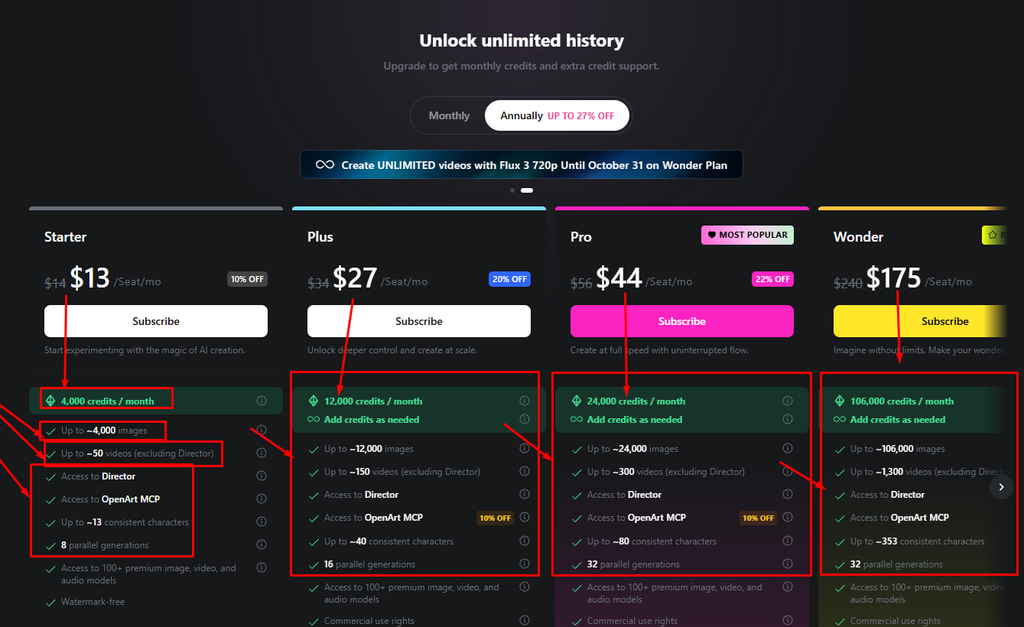
OpenArt uses a credit-based subscription. The monthly credit allowance depends on your plan, and different models and settings cost different amounts per generation.
| Plan | Monthly price | Annual price (per month) | Credits per month |
|---|---|---|---|
| Free | $0 | n/a | 40 one-time trial credits |
| Starter | $14 | $13 | 4,000 |
| Plus | $34 | $27 | 12,000 |
| Pro | $56 | $44 | 24,000 |
| Wonder | $240 | $175 | 106,000 |
| Team and Enterprise | Custom | Custom | Custom |
Runway pricing is a very important topic because your work depends on the pricing. Look brother, I tried to create videos for free but I couldn’t, I’ll come to the free thing later. Now I’m talking about pricing, let’s get to the pricing. There is a monthly $13 subscription to start with, there they will give 4,000 credits monthly, you can create 4,000 images but you can create only fifty videos.
How Do OpenArt Credits Work?
Credits are spent each time you generate. The cost depends on the model, resolution, clip length, and whether audio is on. In our test, one 5-second, 480p vertical clip with audio on showed 300 credits on the Generate button.
At that rate, the 4,000 monthly credits on the Starter plan cover roughly 13 clips with those settings. Longer clips, higher resolution, and tools like Director Mode cost more, and failed attempts still use credits, so plan for fewer usable clips than the raw number suggests.
Is OpenArt Free?
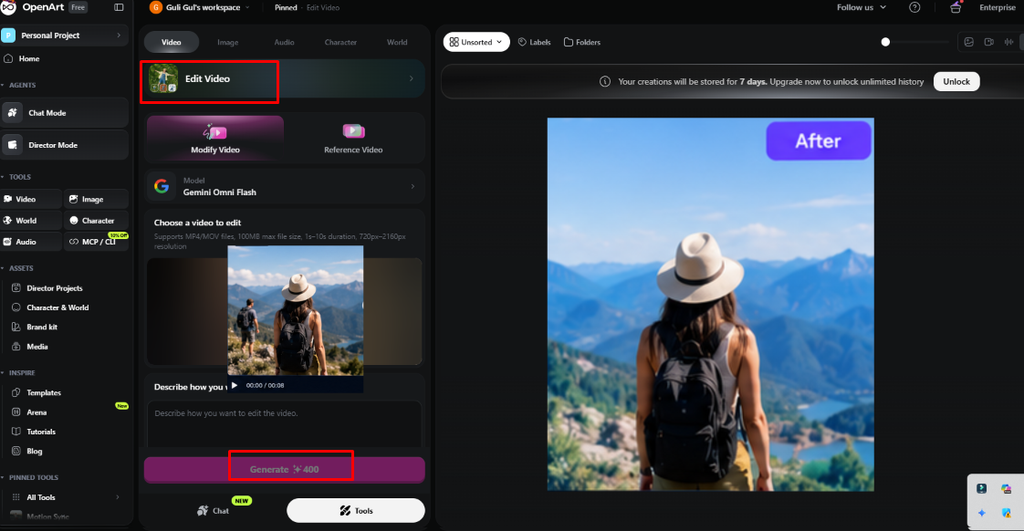
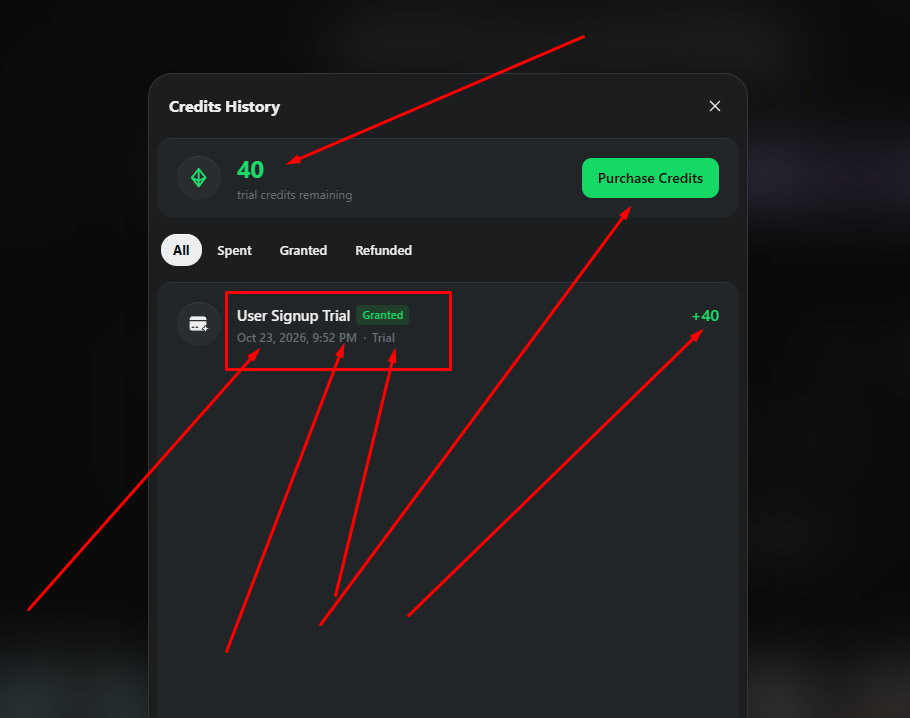
OpenArt has a free plan, but it works as a trial, not as a real monthly allowance. Third-party reviews and plan listings describe it as 40 one-time credits that do not renew, and the workspace notes that free-plan creations are stored for only 7 days. After that, you need to upgrade to keep unlimited history.
That has a practical effect on video. A single 5-second clip with the settings we used costs 300 credits, which is far more than the 40 trial credits, so the free plan is best for exploring the interface rather than producing finished videos.
OpenArt vs. Runway
OpenArt and Runway both generate AI video, but they are built differently. OpenArt is a broader creation suite with image, character, and world tools next to video, while Runway focuses on video generation and editing with its own models plus selected third-party ones.
| OpenArt | Runway | |
|---|---|---|
| Main focus | All-in-one creation suite | Video generation and editing |
| Video models | Several models, including Seedance 2.5 | Runway’s own models plus selected third-party models |
| Credit cost | Shown on the Generate button | Shown before generation |
| Best for | Image, character, and video in one project | Video generation with editing tools |
Best OpenArt Alternatives in 2026
- Runway: Better if video generation and AI editing are your priority.
- Kling AI: Strong for cinematic clips and image-to-video.
- Pika: Good for stylized social media clips and quick effects.
- Leonardo AI: A common choice if image generation is your main need.
Who Should Use OpenArt?
- Social media creators: Vertical clips and recurring characters.
- Storytellers and small studios: Character and world tools for consistent scenes.
- Marketers: Quick visual concepts using reference images.
- Beginners: Templates and guided modes reduce the blank-page problem.
OpenArt is a weaker fit if you need free, unlimited experimentation, a predictable low monthly cost for heavy video, or a dedicated video editor.
Frequently Asked Questions
Is OpenArt free to use?
OpenArt has a free plan with 40 one-time trial credits, and free-plan creations are stored for 7 days. For regular video generation you will need a paid plan.
How much does OpenArt cost?
Paid plans start at $14 per month for Starter, or about $13 per month billed annually. Higher plans cost more and include more monthly credits. Check the official pricing page for current rates.
How many credits does one OpenArt video cost?
It depends on the model, resolution, length, and audio setting. In our test, one 5-second, 480p vertical clip with audio on cost 300 credits.
Can OpenArt turn images into videos?
Yes. You can add reference images to the Video tool and describe the motion you want.
Is OpenArt better than Runway?
It depends on your goal. OpenArt covers more types of creation in one workspace, while Runway focuses on video generation and editing. Run the same prompt in both and compare quality, credit cost, and limits.
Can I use OpenArt for commercial projects?
Commercial-use rights can depend on your plan, so read OpenArt’s current terms before using output in client or paid work.
Final Thoughts
Official website: OpenArt
Final Verdict on OpenArt
OpenArt is a useful option for creators who want to combine AI image creation with video generation in a single creative workspace. Its reference-image workflow, model selection, configurable output settings, and visible generation costs can make it easier to experiment with different visual ideas.
However, the platform’s value depends on your actual workflow and how quickly you use your available credits. Before paying, test the free plan, compare the results from different models, and confirm the latest pricing and usage limits.
If your goal is to turn AI-generated images into engaging short videos without managing several separate tools, OpenArt is worth trying. If advanced video editing is your main priority, compare it directly with Runway before making your final decision.


