

OpenAI ChatGPT: Complete Guide & How to Use
Many people use ChatGPT simply to ask questions, find information, solve math problems, or get quick answers. But ChatGPT can be much more than a basic question-and-answer tool.
When used effectively, ChatGPT can help with education, career development, content creation, business tasks, data analysis, productivity, creative projects, image generation, research, and many other everyday tasks.
You do not need to be a programmer, AI engineer, or technology expert to get started. The key is understanding how to communicate with ChatGPT clearly and how to give it the right instructions for the task you want to complete.
In this guide, we will explain what ChatGPT is, how to use ChatGPT effectively, what you can do with it, and how better prompts can help you get more useful results.
One thing,GPT can actually build a complete website. If you ask it to create a website using only GPT, it can do that. Of course, if you’re an expert, you can guide it and make the website even better. But that’s not the point I’m trying to make today.GPT can do web development, while others may not be able to do it as effectively.
In this guide, we will explain what ChatGPT is, how to use ChatGPT effectively, what you can do with it, and how better prompts can help you get more useful results.
What Is ChatGPT?
ChatGPT is an AI-powered conversational tool designed to understand natural-language instructions and generate responses based on the information and context provided during a conversation.
You can use ChatGPT to ask questions, explain complicated topics, brainstorm ideas, create written content, analyse information, organise tasks, and assist with many different types of work.
One of the most important things to understand is that the quality of your interaction can affect the usefulness of the response.
Instead of simply asking a very general question, you can provide context, explain your goal, specify the type of response you want, and tell ChatGPT who the intended audience is.
This makes ChatGPT much more useful for practical work.
How to Use ChatGPT: More Than Just Getting Answers
OpenAI ChatGPT Login
Anyone can log in. You simply select your Gmail account, and your account is created automatically. There’s really nothing complicated about that.
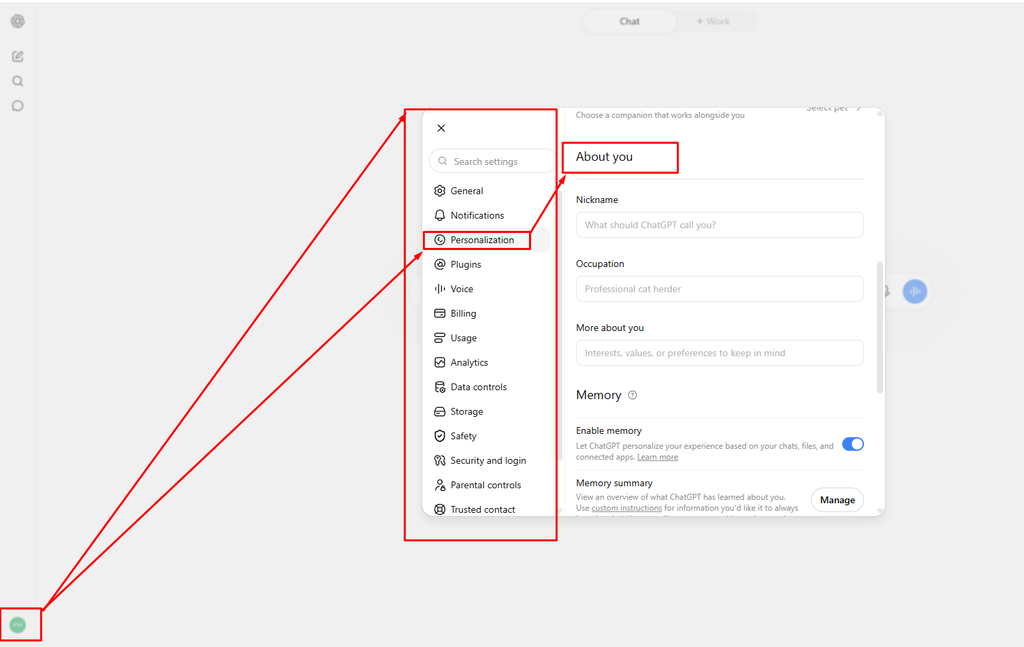
So, I would recommend that you take some time to optimize your profile properly.
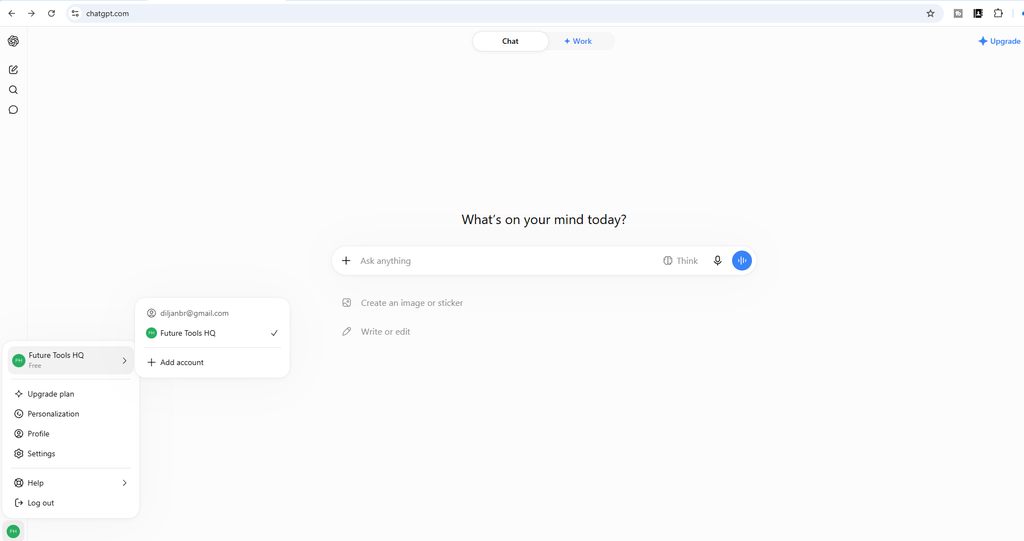
Open Chatgpt Click Profile Icon next Click Personalization.
You Don’t Need to Be an AI Expert
One of the biggest misconceptions about ChatGPT is that you need advanced technical knowledge to use it properly.
You don’t. You do not need a science background. You do not need to be an engineer. You do not need to be an expert in English. And you do not need to be an AI professional.
If you can understand basic instructions and communicate what you want, you can start learning how to use ChatGPT. The important thing is learning how to communicate clearly with AI and give it the right instructions.
ChatGPT Has a Much Bigger World Behind the Basic Chat
When most people open ChatGPT, they see a simple chat box. They type a question and receive an answer. But there is a much bigger world behind that basic experience.
ChatGPT can be used for tasks such as data analysis, automation, problem solving, programming assistance, file analysis, image generation, and creating customized AI workflows.
For example, if you are not an expert in a particular field but need help working in that field, ChatGPT can act as an assistant.
You may not know graphic design, but you can use AI to help with graphics-related tasks.
You may not be an SEO expert, but you can use ChatGPT to help understand and work through SEO-related tasks.
You may not know how to perform certain HR tasks, but ChatGPT can help you learn and organize the work.
The same idea can apply to education, business, career development, content creation, and many other areas.
The key is understanding how to use it properly.
Where Can You Use ChatGPT?
There are many areas where ChatGPT can be useful. In fact, its applications extend far beyond the basic question-and-answer format most beginners are familiar with.
Let’s look at some of the major areas.
🎓 Education and Learning
💼 Career Development
✍️ Content Creation
📊 Business
⚡ Productivity
🎨 Creativity
1. Education and Learning
ChatGPT can be extremely useful for studying and learning.Imagine that you have a large book and your exam is only two days away.
If you have the book as a PDF, you can upload it and ask ChatGPT to identify possible questions from the material.
If your exam contains multiple-choice questions, you can ask it to create practice MCQs based on the material. You can also ask it to explain difficult topics in simpler language.
However, there is an important point here. The quality of the result depends heavily on how you communicate your instructions.
Simply uploading a file and saying, “Give me questions,” may not always produce exactly what you need. You need to learn how to give clear instructions.
ChatGPT supports working with uploaded documents and can summarize, extract information, and answer questions based on files.
2. Career Development
ChatGPT can also help with your career.
For example, you may need a professional resume. You may need help writing a cover letter or job application. You may want to improve your LinkedIn profile. You may want to prepare for a job interview or organize your job-search strategy. These are all areas where ChatGPT can act as an assistant.
Instead of starting everything from scratch, you can provide your information and ask ChatGPT to help organize, improve, or transform it into a more professional format.
3. Content Creation
Content creation is another major area where ChatGPT can be useful.
Suppose you are creating content for a website. Or perhaps you are writing blog posts. Maybe you are creating social media content for a company. ChatGPT can help you generate ideas, structure content, develop scripts, rewrite drafts, and explore different approaches.
It can become a useful assistant throughout the content-creation process rather than simply being a tool for generating one piece of text.
4. Business
ChatGPT can also be useful for business-related tasks. Suppose , you have business data that needs to be analyzed.
You may want to understand previous results, identify patterns, or organize information before making a business decision. You can provide the relevant data and ask ChatGPT to help analyze it. It can also help you think through marketing ideas, customer communication, planning, and other business tasks.
For structured data, ChatGPT can analyze spreadsheets and create tables and charts from uploaded data.
5. Productivity
Another important area is productivity.
You can use ChatGPT to organize your work and think through how you can complete your tasks more effectively. For example, you can create a to-do list. You can create a daily or weekly planner. You can organize a project. You can ask ChatGPT to break a large task into smaller steps. You can even use it to help organize a budget or plan how you want to spend your time. The goal is not simply to make ChatGPT do everything for you.
The goal is to use it as an assistant that helps you organize and improve the way you work.
6. Creativity
Creativity is another area where ChatGPT can be extremely useful.
Imagine that you suddenly have one idea. You can ask ChatGPT to give you 10 more ideas based on it.Then you can ask for 50. You can continue exploring different directions until you find something that works for you. This can be useful for content ideas, business ideas, marketing concepts, video topics, writing ideas, and many other creative tasks. But again, there is one important skill behind all of this:
You need to know how to communicate with AI effectively.
Why Learning Prompts Matters
Many people think that using ChatGPT simply means typing something into the chat box and waiting for an answer.
It can be that simple. But if you want better and more consistent results, you need to understand how to create better prompts. A prompt is essentially the instruction you give to the AI. The clearer your instruction, the easier it is for ChatGPT to understand what you actually want.
A useful prompt can include several important elements. Define the Role, First, explain what role you want ChatGPT to take. For example, you might ask it to act as a teacher, content writer, marketing assistant, researcher, or career coach. Define the Task, Next, clearly explain what you want it to do. Don’t leave the task vague. Tell ChatGPT exactly what you need. Provide Context, Context is also important.
Explain the situation, audience, purpose, or information that ChatGPT needs to understand before completing the task. Specify the Output Format Finally, tell it how you want the answer. Do you want a short answer?
A detailed explanation?
A table?
A list?
A report?
A document?
An Excel file?
The more clearly you explain the desired output, the easier it is for ChatGPT to produce something useful. Learning these basic principles can make a significant difference in the quality of your results.
You Can Also Customize the Way ChatGPT Responds
Another important part of using ChatGPT effectively is understanding how you want it to communicate with you.
Imagine you ask ChatGPT how airplane aerodynamics work. If you already understand engineering, you may want a technical explanation. But if you know nothing about aerodynamics, a highly technical explanation may be difficult to understand. In that situation, you can simply tell ChatGPT:
“Explain this in simple English, like you’re explaining it to an eighth-grade student.”
Or:
“I know nothing about this subject. Explain it in very simple language.”
The answer can then be adapted to your level of understanding. The same principle can apply to tone, structure, length, complexity, and other preferences.
Creating Images With ChatGPT
ChatGPT is not limited to text.
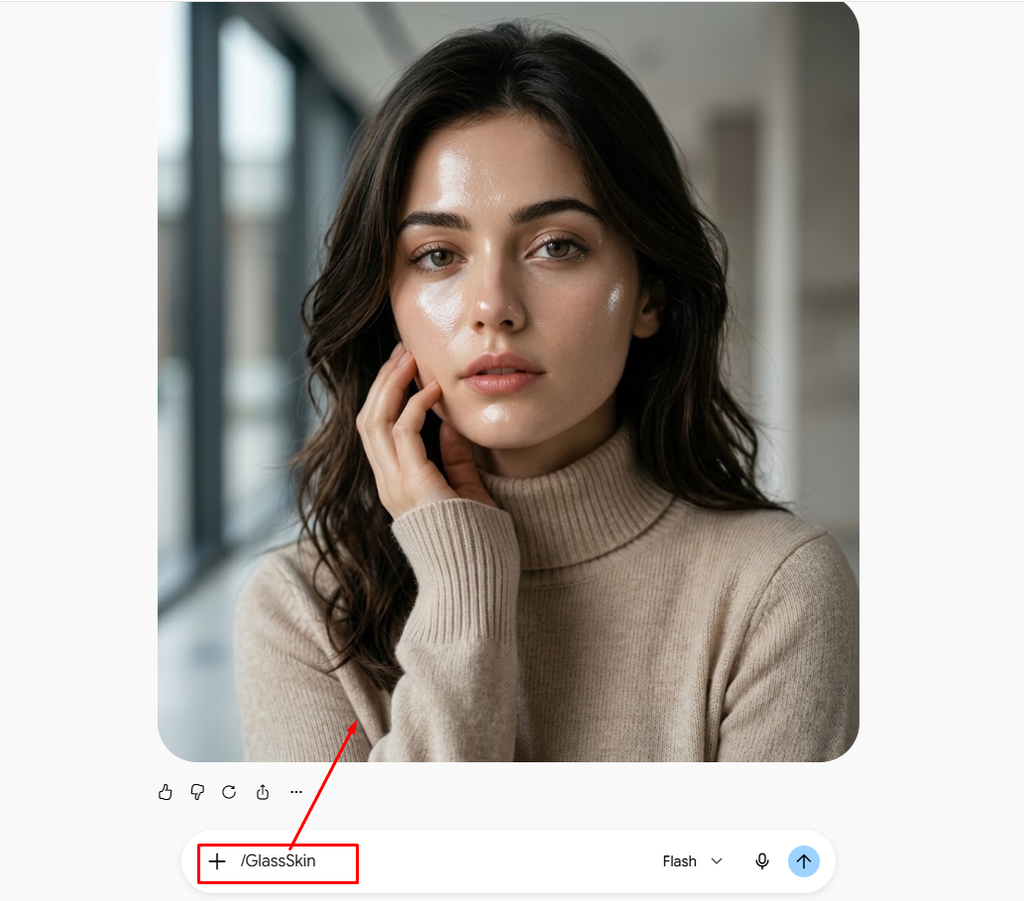
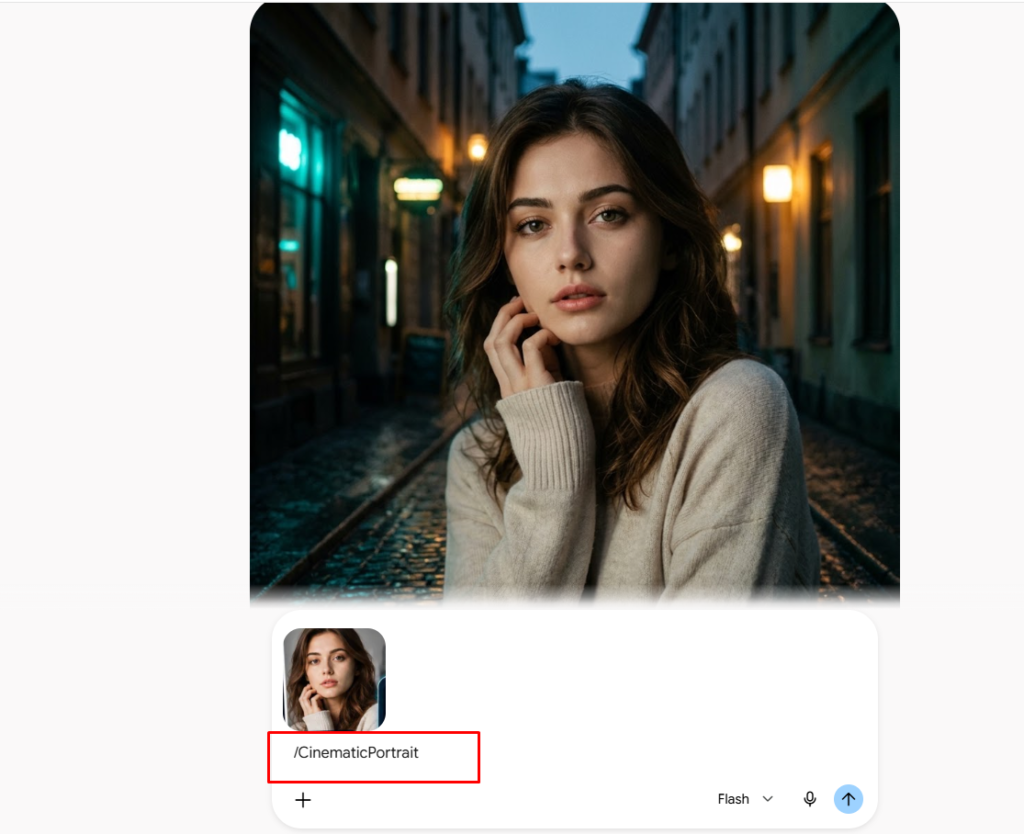
It can also be used to create and edit images. You can describe the type of image you want. You can explain what should appear in the image. You can specify the style, lighting, colors, composition, background, and overall visual direction.
For example, imagine you want to create an image of a house inspired by a luxurious celebrity-style mansion. Simply saying, “Make a luxury house,” may not be enough. You may need to describe the architecture, colors, lighting, camera angle, environment, mood, and visual style. The more clearly you communicate the visual idea, the more closely the result can match what you have in mind. You can ask for a professional look. You can ask for an eye-catching social media style. You can request a cartoon or animation-inspired appearance.
You can define the visual direction according to your purpose.
ChatGPT as a Personal AI Assistant
One of the more powerful ideas is using ChatGPT as your own personal AI assistant.
Instead of starting every conversation from zero, you can provide instructions and context that help it understand how you want to work. Your assistant could help with image analysis. It could help analyze files. It could help organize information. It could assist with writing and planning. It can also be customized through GPTs and instructions for particular workflows. OpenAI’s documentation describes GPTs as customizable versions of ChatGPT that can use instructions and uploaded knowledge files for specific purposes.
The goal is to create a workflow where you don’t have to explain the same requirements repeatedly. You can establish the tone, format, workflow, and other preferences you want the assistant to follow.
Using ChatGPT for Education
Students and teachers can also use ChatGPT in many ways.
A student can use it to create study notes. They can ask questions about difficult topics. They can generate practice questions. They can organize information. They can create study plans. Teachers can use it to develop questions, organize lesson materials, and create educational resources. You can even provide your own learning material and ask ChatGPT to work specifically from that material.
Projects in ChatGPT can also use uploaded PDFs, spreadsheets, documents, and images as reference material for ongoing work.
Using ChatGPT for Career Development
Career development is another important area. Suppose you want to apply for a job. You may need a professional resume. You may need an application letter. You may want to improve your LinkedIn profile. You may want help organizing your job search. ChatGPT can assist with these tasks.
The important thing is to provide your real information and use AI to improve the way that information is presented rather than simply creating generic content.
Using ChatGPT for Content Creation
If you are a content creator, ChatGPT can become part of your creative workflow.
It can help generate new content ideas. It can help develop video topics. It can create draft scripts. It can help structure articles. It can help brainstorm thumbnail concepts. It can help you explore different versions of the same idea. This means you can use ChatGPT not only for writing but also for planning and developing your content.
Using ChatGPT to Improve Productivity
If you regularly discuss your work and goals with ChatGPT, you can give it enough context to help you organize your tasks.
For example, you can create:
To-do lists
Daily plans
Weekly planners
Project plans
Budget structures
Marketing plans
Customer communication drafts
The purpose is to reduce the amount of repetitive planning you have to do manually. Instead of trying to remember everything yourself, you can use ChatGPT as a planning assistant.
Using ChatGPT for Business and Marketing
Business owners can also use ChatGPT to think through different parts of their operations.
For example, you can use it to brainstorm marketing strategies. You can analyze business information. You can plan customer communication. You can develop content ideas. You can organize marketing campaigns. You can think through ways to reach potential customers.
You can also use data analysis capabilities when working with structured business data. ChatGPT can analyze uploaded datasets and produce tables and visualizations based on natural-language instructions.
You Don’t Have to Know Everything Yourself
At this point, you may be thinking:
“How am I supposed to learn all of this?” The answer is simple. You are not expected to know everything. That is exactly why an AI assistant can be useful. You don’t need to become an expert in every field before you can use ChatGPT. Instead, you need to learn how to communicate your goal, provide the right context, give useful instructions, and review the result.
ChatGPT can then assist you with the parts of the work you don’t already know how to do.
From Beginner to Practical AI Skills
The goal should not be to simply learn how to ask ChatGPT questions.
The real goal is to understand how to use AI practically. You can start with basic prompting. Then move into content creation. Then learn how to work with files. Then explore data analysis. Then learn image generation and editing. Then build customized workflows.
Eventually, you can combine these skills to solve real-world problems.
The Final Practical Project
Once the basics are complete, the next step should be practical application.
Instead of only learning theory, you can work on a real-world project. You can take a real problem and use ChatGPT to analyze it. You can design prompts. You can work with information and files. You can generate outputs. You can analyze the results. And you can bring everything together into one practical workflow. This is where the concepts become much easier to understand because you are actually applying what you have learned. The purpose of learning ChatGPT is not simply to become better at asking questions.
It is to learn how to use an AI assistant effectively across education, career development, content creation, business, productivity, creativity, and everyday work. Once you understand that, you begin to see that ChatGPT is much more than a search box.
It can become a practical assistant that helps you think, create, analyze, organize, and work more efficiently. And that is where the real value of learning ChatGPT begins.


