

Affiliate disclosure: This post contains affiliate links. If you click a link and make a purchase, we may earn a commission at no extra cost to you. We only recommend tools we have tested or believe are useful.
Runway AI Review
AI video generators have changed how creators make ads, product demos, and cinematic scenes. Instead of filming every shot, you can describe a scene, upload a reference image, or edit existing footage with a text prompt.
Runway is one of the most complete AI video platforms in 2026. It combines text-to-video, image-to-video, and AI editing in one workspace, and it also gives you access to selected third-party models such as Kling and Veo.
But is it worth paying for? How far does the free plan go, and how does Runway compare with Kling AI, Google Veo, and Pika? This review covers Runway’s features, pricing, strengths, weaknesses, and best alternatives, so you can decide whether it fits your workflow.
Runway AI Pros and Cons
✓ Pros
- Flexible generation: Create video from text, images, and source footage.
- Editing and generation together: Modify existing clips instead of always generating from scratch.
- Multiple models in one place: Use Runway’s own models and selected third-party ones without switching tools.
- Strong creative control: Prompts, reference images, and editing tools let you refine results.
- Good for marketing: Useful for product visuals, ad concepts, and social media clips.
- Free plan to start: You can test the platform before paying.
✕ Cons
- Free credits are one-time: They do not renew monthly.
- Credits go fast: Repeated generations and failed attempts add up quickly.
- Inconsistent output: Motion, fine details, and character appearance can change between generations.
- Short clips: Longer sequences need multiple generations and extra editing.
- Plan restrictions: Some models and features are limited to paid tiers.
- Learning curve: Predictable results take practice with prompts, references, and model choice.
- Not a full editor: Complex timelines, sound mixing, and frame-level fixes still need other software.
What Is Runway AI?
Runway is an AI-powered creative platform for generating, editing, and transforming video. It supports text-to-video, image-to-video, and AI-assisted editing, so you can start from a prompt, a still image, or footage you already have.
Beyond generating new clips, Runway can modify existing footage. Depending on the model you choose, you can change lighting, replace backgrounds, remove objects, and adjust a scene’s style.
Runway offers its own models, such as Gen-4.5 and Aleph 2.0, alongside selected third-party models. That means you can pick a different model for different shots without leaving the platform.
Runway AI Features in 2026
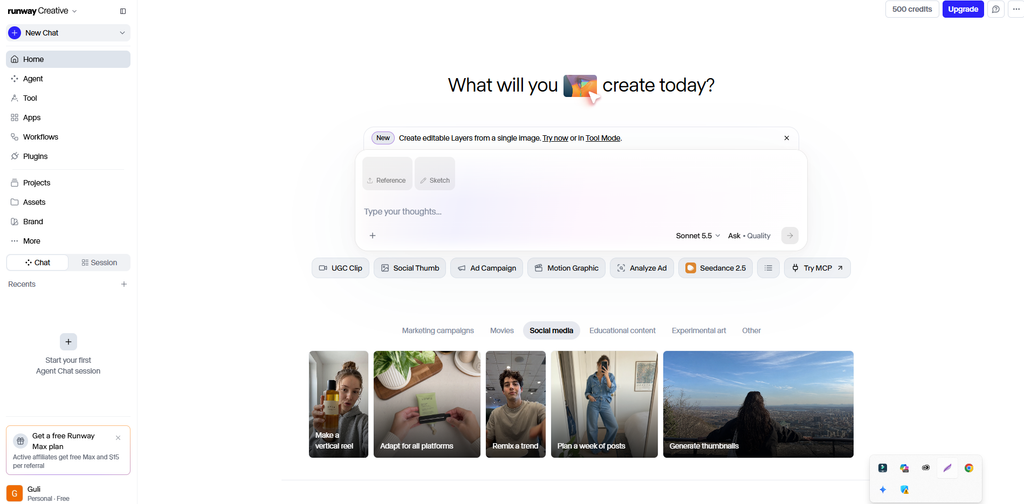
Runway’s main strength is the range of tasks it covers in one place. These are the features that matter most.
1. Text-to-Video Generation
You write a description, and Runway generates a clip from it. For example:
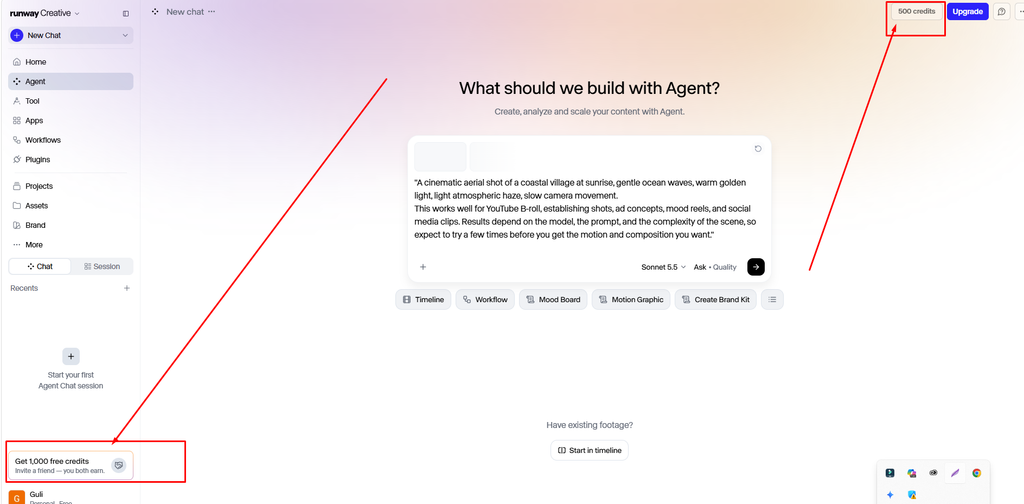
“A cinematic aerial shot of a coastal village at sunrise, gentle ocean waves, warm golden light, light atmospheric haze, slow camera movement.
This works well for YouTube B-roll, establishing shots, ad concepts, mood reels, and social media clips. Results depend on the model, the prompt, and the complexity of the scene, so expect to try a few times before you get the motion and composition you want.”
2.Image-to-Video Animation
Image-to-video turns a still image into a moving clip. Upload a product photo, an illustration, a character, or a landscape, describe the motion you want, and the model animates it.
For example, “you can animate a still of a sports car on a rainy street, or turn a landscape illustration into a slow cinematic shot. It is especially useful if you already create images with an AI image generator and want to bring them to life.
3. AI Video Editing
Runway is not only for creating clips from scratch. Its editing tools let you change footage you already have. Depending on the model, you can:
- Add or remove objects
- Replace a background
- Change the lighting or time of day
- Adjust the visual style
- Refine a clip using text instructions
Aleph 2.0 is one of Runway’s models built for editing existing clips. These tools can cut down manual editing time for certain tasks, but complex edits will still need a traditional video editor.
4. Character Consistency
Keeping a character looking the same across shots is one of the hardest parts of AI video. Runway supports reference-based workflows that help preserve a character’s appearance across scenes, which is useful for short films, ads, animated stories, and recurring social media characters.
It is not perfect. Faces, clothing, and proportions can still drift between generations, so plan to review every shot.
5. AI Video With Audio
Runway supports models and tools that can generate or work with audio, including speech, dialogue, and music-related workflows. Some of the third-party video models available on the platform also generate native audio. Availability depends on the model and your plan.
This helps you build a more complete video without jumping between tools. Still, check generated speech, effects, and music for quality and sync before publishing.
6. Multiple AI Models in One Platform
Runway gives you access to its own models, including Gen-4.5 and Aleph 2.0, plus selected third-party options such as Kling and Veo. If one model handles a particular shot or edit better than another, you can switch without leaving the platform.
Model availability, credit cost, and output limits vary by plan.
7. Upscaling and Finishing Tools
Generating a clip is only part of the job. Runway also includes finishing tools for improving resolution, adjusting frame rates, and preparing exports, with availability depending on the feature and your plan. For professional projects, always inspect the final file for artifacts and inconsistent motion.
Runway AI Pricing in 2026
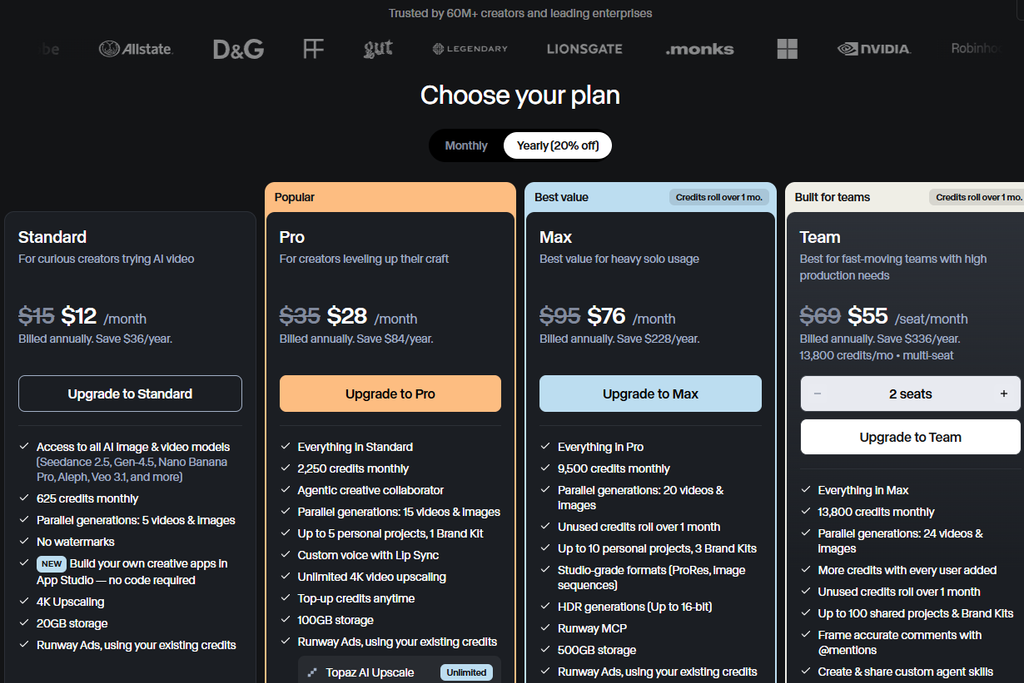
Runway uses a subscription model with a free plan and several paid tiers. Credits determine how much you can generate. Plans are priced per editor, and annual billing is cheaper than paying monthly.
Runway AI Plans Compared
| Plan | Price | Credits | Best for |
|---|---|---|---|
| Free | $0 | 125 one-time credits | Testing the interface and a few prompts |
| Standard | $15/month, or about $12/month billed annually | 625 per month | Occasional creators and light use |
| Pro | $35/month, or about $28/month billed annually | 2,250 per month | Regular creators who generate weekly |
| Max | $XX/month | Larger monthly allowance | Heavy users and frequent batch generation |
| Team and Enterprise | Custom | Custom | Collaborative and organizational workflows |
It is clearly stated in the pricing, I just told you the first one, the second one I’m giving as a picture and you all must, before buying or before purchasing this, must check the price on their own website. For now I’m giving a screenshot, please have a look at it.
Is Runway AI Free?
Yes, but the free plan is built for testing, not for regular production. You get 125 one-time credits that do not renew once you spend them, access to a limited set of tools, and 5 GB of asset storage. Free-plan videos carry a Runway watermark, and some advanced models and features require a paid plan.
That is enough to explore the interface, test a few prompts, and see whether Runway’s output suits your needs before you commit.
Best Runway AI Alternatives in 2026
Runway is not the only option. The best alternative depends on whether you care most about cinematic quality, audio, ease of use, or cost.
1. Kling AI
Kling AI is a strong pick for cinematic clips, image animation, and reference-driven workflows. Choose it if your priority is visually striking generations rather than a broad editing suite.
Best for: Cinematic clips and image-to-video.
2. Google Veo
Google Veo offers high-quality, realistic video generation with supported native audio. Access, features, and pricing depend on the Google product you use it through.
Best for: Realistic scenes and videos that benefit from built-in audio.
3. Pika
Pika focuses on accessible video creation and creative effects, which makes it popular with social media creators who want stylized clips and quick transformations.
Best for: Social media content and fast creative experiments.
4. OpenAI Sora
Sora is another prompt-based video option aimed at visual storytelling. Check its current availability and usage limits before you plan around it.
Best for: Creators exploring prompt-based storytelling.
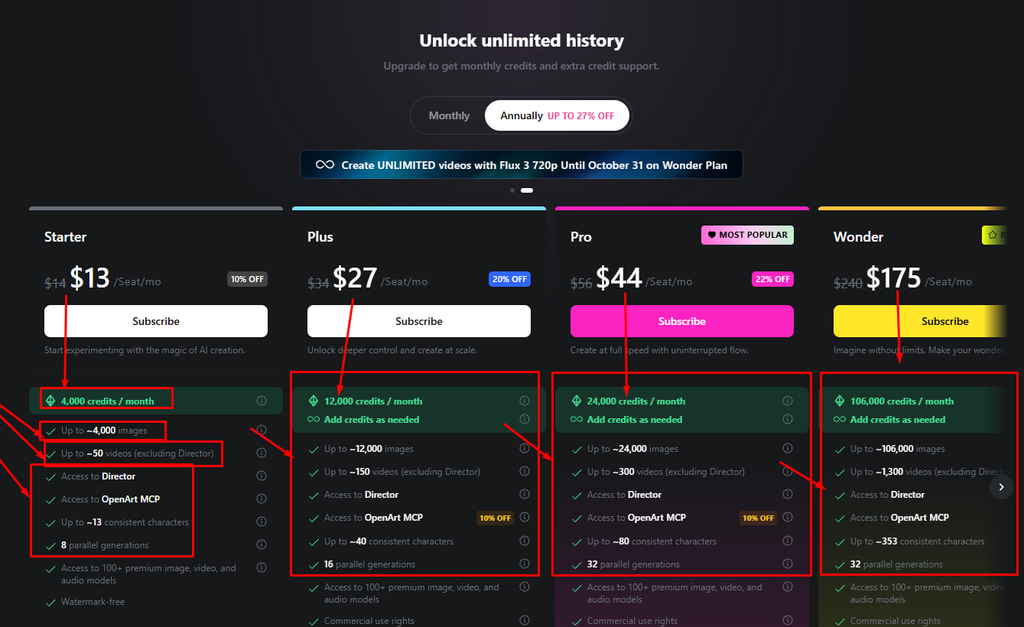
5. OpenArt
OpenArt is an all-in-one AI creation platform that keeps video, image, audio, and character tools in a single workspace. Its video tool lets you pick a model (the default we saw was Seedance 2.5), add reference images, switch audio on or off, and set the aspect ratio, resolution, and clip length before you generate. The credit cost appears on the Generate button, so you know what a clip will cost before you commit.
It also offers a Chat Mode and a Director Mode for building projects with more guidance, plus a free plan to try it. Choose OpenArt if you want video, images, and audio tools together and prefer to see the credit cost up front.
Best for: Creators who want video, image, and audio tools in one workspace.
Runway vs. Its Alternatives
| Tool | Why consider it | What to compare |
|---|---|---|
| Runway | Generation, AI editing, and multiple models in one platform | Credits, editing controls, model access |
| Kling AI | Cinematic generation and reference-driven video | Motion quality, clip length, limits |
| Google Veo | Realistic video with supported audio | Access, output quality, cost |
| Pika | Creative effects and an approachable workflow | Effects, output limits, ease of use |
| OpenAI Sora | Prompt-based visual storytelling | Availability, capabilities, usage limits |
| OpenArt | Video, image, and audio tools in one workspace | Credit cost per clip, model choice, free plan limits |
The best way to compare tools is to run the same prompt through each one and judge the results against the total cost.
Who Should Use Runway AI?
- YouTube creators: B-roll, visual storytelling, and supporting footage.
- Digital marketers: Ad concepts, campaign visuals, and product videos before committing to a full production.
- Filmmakers: Storyboards, mood reels, scene concepts, and selected visual effects.
- Social media creators: Short clips for TikTok, Instagram Reels, and YouTube Shorts.
- Designers and creative teams: Animating existing artwork and developing motion concepts.
Runway is a weaker fit if you need unlimited high-volume output at a predictable low cost, frame-by-frame control, or a traditional editing workflow with no AI variation.
Is Runway AI Worth It in 2026?
Runway is worth it if you want more than a basic text-to-video tool. Generation, editing, reference workflows, and access to third-party models in one place make it one of the more complete options available.
Start with the free plan to see whether the output style works for you. If you generate videos regularly, Pro is the plan most active creators will be comfortable on. Standard suits light, occasional use, and Max only makes sense if you regularly burn through Pro’s credits.
Skip Runway if you only need a few casual clips, since the free credits may be enough, or if you need very long videos at a very low cost.
Frequently Asked Questions
Is Runway AI free to use? Yes. Runway offers a free plan with 125 one-time credits and limited tool access. The credits do not renew, and free-plan videos include a watermark.
How much does Runway AI cost? Paid plans start at $15 per month, or about $12 per month when billed annually, for Standard. Pro costs $35 per month, or about $28 per month billed annually. Higher-capacity and team plans cost more, so check the official pricing page for current rates.
Can Runway generate videos from images? Yes. Image-to-video workflows animate a still image based on your prompt and the model you choose.
Can I use Runway AI for commercial projects? Runway states that you own the work you create on the platform, including work made on the free plan. Ownership does not remove third-party rights, privacy, or publicity concerns, so read Runway’s current terms and make sure your inputs and outputs are suitable for commercial use.
Is Runway AI good for beginners? Yes. Beginners can start on the free plan and learn the basics. Getting consistent, polished results still takes practice with prompts, references, and model limits.
Which is better, Runway or Kling AI? It depends on the job. Runway is stronger as an all-in-one platform with editing and multiple models, while Kling is often chosen for cinematic generation. Run the same prompt in both and compare quality, limits, and cost.
Does Runway create long videos? Individual generations are short clips. For longer videos, you extend and combine several generations and edit them into one sequence.
Does Runway add a watermark? Free-plan videos include a Runway watermark. Paid plans change the output conditions, so check Runway’s current terms for the plan you plan to use.
Final Thoughts
Runway gives creators a broad toolkit for generating video, animating images, editing footage, and working with multiple AI models in one place. Its biggest strengths are workflow flexibility and the combination of generation and editing. Its main drawbacks are credit-based usage, plan restrictions, and the unpredictable nature of AI motion.
If you are new to AI video, start with the free plan and test a small project. If you create content regularly, compare the cost of a paid plan with the alternatives that best match your needs.
Ready to try it? Start with Runway’s free plan
Official references
- Runway AI video generator
- Runway pricing
- Runway free plan details
- Runway credit guide
- Runway available models
100 Best AI Video Generators and Tools in 2026 (Free & Paid)


