


Affiliate disclosure: This post contains affiliate links. If you click a link and make a purchase, we may earn a commission at no extra cost to you. We only recommend tools we have tested or believe are useful.
“I made a list of a hundred video-generating AI tools. Please take a look at this list, and on my website I regularly publish articles reviewing AI tools. I research AI tools, I research the features — the good features, the bad features — I discuss each and every one of them. Whichever tool you like, whichever tool you want to work with, please take a look at my review, I mean the article that I write. If you look for five to seven minutes, you won’t lose anything, as far as I know it will be beneficial for you.”
Introduction
The best AI video generators in 2026 can turn a text prompt into a cinematic clip, animate a single photo, create a talking presenter from a script, or cut a one-hour recording into ten short videos. What used to take a crew, a camera, and days of editing can now take minutes.
The hard part is choosing. Some tools are built for realistic footage, others for talking avatars, product ads, training videos, or fast editing. Paying for the wrong one wastes both money and time.
This guide covers 100 AI video generators and video tools. The top 10 get a full review with features, pros, cons, and best use cases. The remaining 90 are grouped by purpose so you can jump straight to what you need.
Prices are in US dollars. Plans, credits, and free tiers change often, so each price below shows the date we last checked it. Always confirm on the official website before you buy.
How We Ranked These Tools
There is no single official ranking of AI video software, so this is our editorial ranking. We looked at:
- Output quality: realism, motion, consistency, and prompt accuracy
- Ease of use: how quickly a beginner gets a usable result
- Versatility: how many types of video the tool can produce
- Value: what you actually get for the price, including credit limits
- Market adoption: creator and business usage
For a traffic-based benchmark, see the AICPB AI Video Generator rankings. Keep in mind that website traffic shows popularity, not video quality or customer satisfaction.
The top 10 are ranked in order. Tools 11–100 are grouped by category and are not ranked individually. Some entries are editors, avatar platforms, or voice tools rather than pure text-to-video generators, and we label them clearly.
The 10 Best AI Video Generators Overall
1. Runway — Best All-Around AI Video Generator
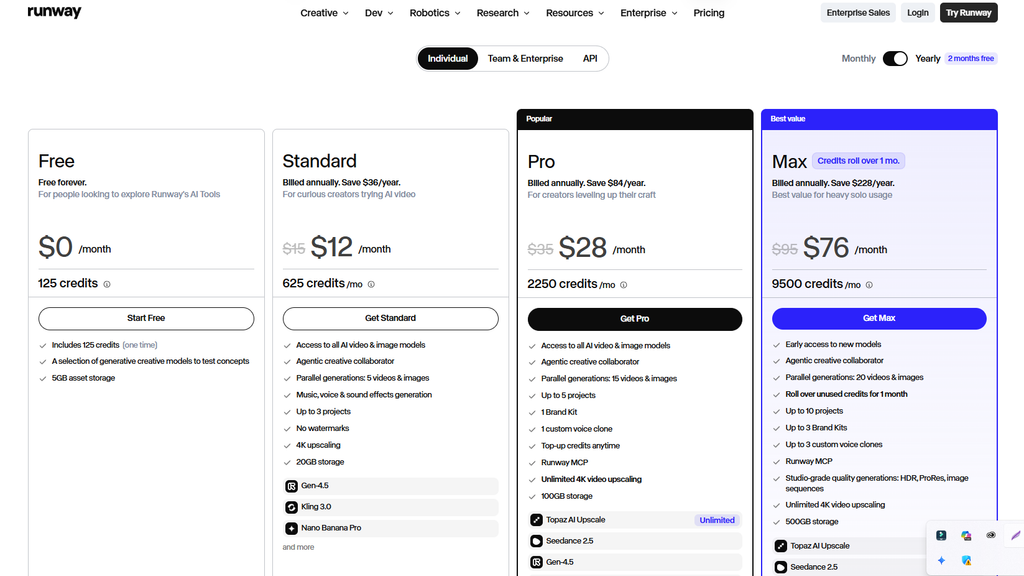
Website | Free plan: Yes — 125 one-time credits, 5GB of asset storage, and limited AI tools. Free exports include a watermark. | Starting price: $12/month billed annually or $15/month with monthly billing (Standard plan). | Price checked: October 23, 2026.
Runway is an AI-powered video creation platform that helps filmmakers, content creators, and marketers generate video clips and develop creative projects. Its features include text-to-video, image-to-video, AI-assisted editing, and audio generation.
Best for: Cinematic videos, creative storytelling, marketing content, and professional AI video workflows.
Official pricing: Runway Pricing
Pros and Cons
✓ Pros
- Strong balance of quality and creative control
- Good for both quick experiments and professional workflows
- Frequent model updates
✕ Cons
- Credits can run out quickly on cheaper plans
- Takes time to learn the more advanced controls
2. Google Veo — Best for Realistic AI Video
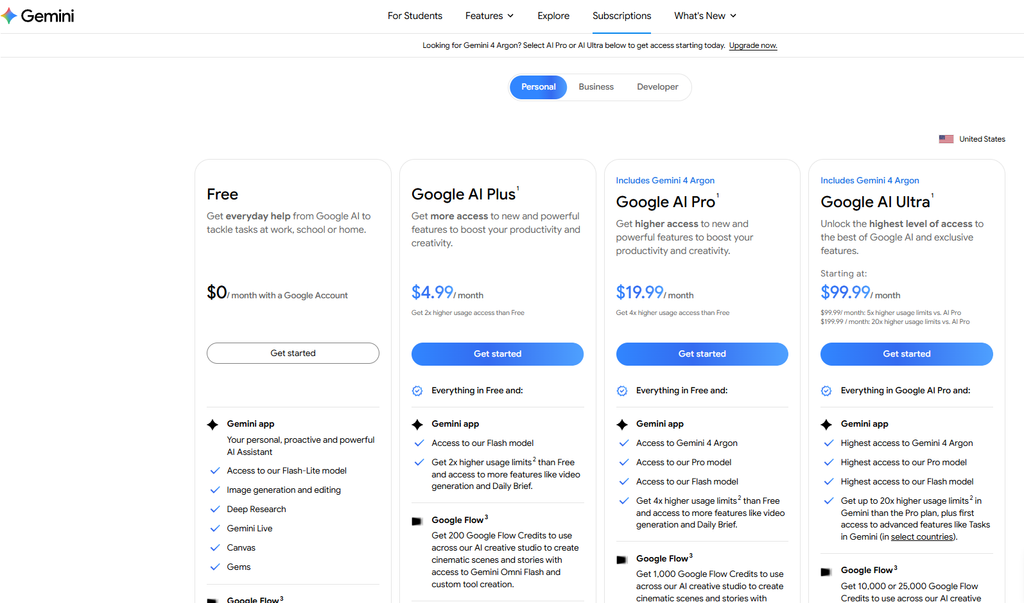
Website | Free plan: Yes — 10 free video generations per month through Google Vids for personal Google accounts. | Starting price: $4.99/month for Google AI Plus; higher-tier plans offer expanded access. | Price checked: October 23, 2026.
Google Veo creates video from text prompts and images, and supported versions can generate synchronized audio such as dialogue and sound effects. It stands out for realistic physics, lighting, and natural-looking scenes.
Key features: Text-to-video, image-to-video, realistic motion, and audio generation in supported versions.
Official pricing: Google AI Plans
Google Veo: Pros and Cons
✓ Pros
- Very realistic scenes and lighting
- Built-in audio in supported versions
- Available through Google’s own apps and developer tools
✕ Cons
- Access and pricing depend on your Google plan and region
- Less hands-on editing control than a full creative suite
3. Kling AI — Best for Image-to-Video Creation
Website | Free plan: Yes — limited free credits are available; usage limits and access to features vary. | Starting price: Approximately $6.99/month for a paid subscription, depending on the plan and billing offer. | Price checked: October 23, 2026
Kling AI is popular with creators who want to animate still images or generate detailed, character-focused clips. Its motion quality makes it a strong choice for social media content, product videos, and short ads.
Key features: Text-to-video, image-to-video, motion generation, and character-focused scenes.
Official pricing: Kling AI Pricing

3. Kling AI — Best for Image-to-Video Creation
✓ Pros
- Strong motion and animation of still photos
- Credit-based plans are easy to start with
- Good value for social media clips
✕ Cons
- Queue times can be long on free access
- Results can vary between generations
4. OpenAI Sora — Best for Creative Storytelling and Ideas
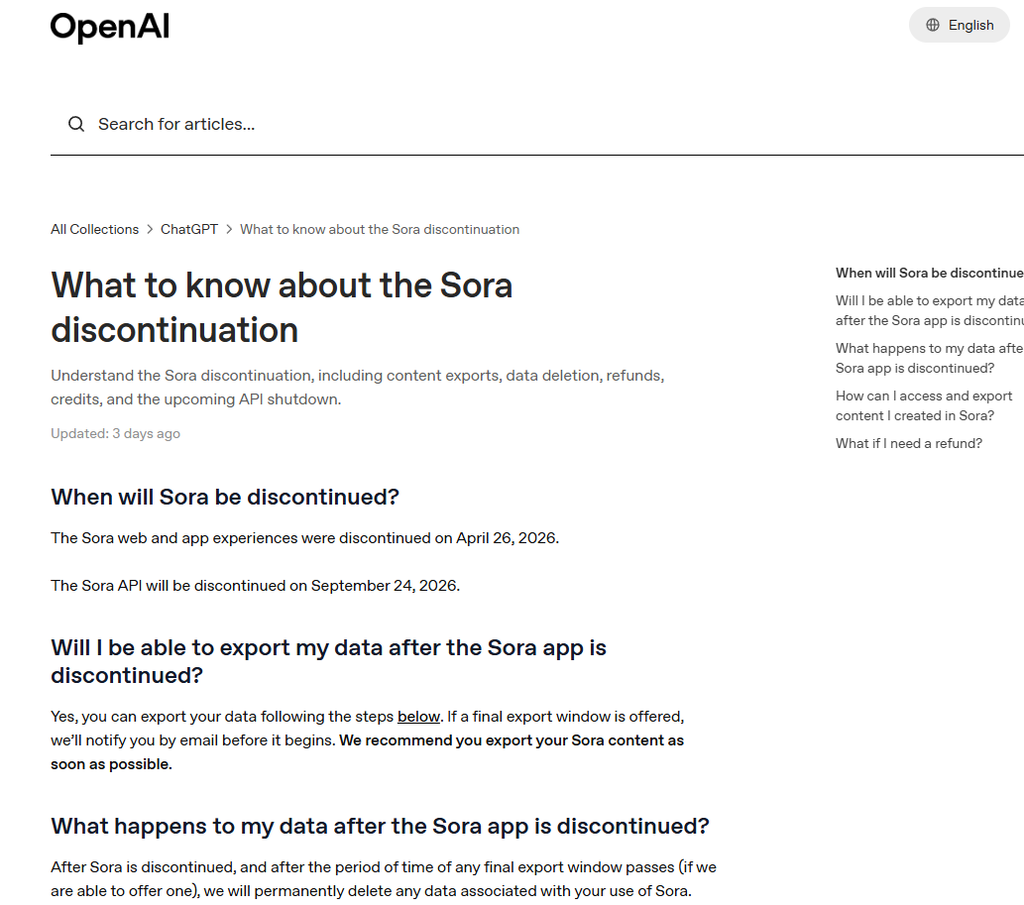
Website | Free plan: No — discontinued on April 26, 2026. | Starting price: Not available — Sora is no longer offered as a standalone product. | Price checked: October 23, 2026.
Important update: OpenAI discontinued the Sora web and app experiences on April 26, 2026, and discontinued the Sora API on September 24, 2026. As a result, Sora should not be presented as a currently available AI video generator in a 2026 ranking.
Sora was OpenAI’s video-generation model, designed to turn text and image prompts into short clips. Its capabilities included creative scene generation, remixing and extending videos, and generating synchronized dialogue and sound effects in supported versions.
Key features (historical): Text-to-video, image-to-video, remixing existing clips, storyboard tools, and synchronized audio in Sora 2.
Official announcement: What to know about the Sora discontinuation
Sora AI: Pros and Cons
✓ Pros
- Strong prompt understanding and imaginative scenes
- Simple, approachable interface
- Convenient if you already use ChatGPT
✕ Cons
- Availability varies by country
- Usage limits and content rules can restrict some projects
5. HeyGen — Best AI Avatar Video Generator
Website: heygen.com | Free plan: [update] | Starting price: [update] | Price checked: [DATE]
HeyGen turns a script into a presenter-led video using digital avatars and synthetic voices. Its video translation feature is especially useful for businesses that need the same message in many languages without re-recording.
Key features: AI avatars, script-to-video, voice generation, custom avatars, and video translation.
HeyGen AI: Pros and Cons
✓ Pros
- Natural-looking avatars and lip-sync
- Excellent for multilingual content
- Fast turnaround for marketing and sales videos
✕ Cons
- Higher plans can get expensive for heavy use
- Custom avatars need quality source footage
6. Synthesia — Best for Corporate Training Videos
Website | Free plan: Yes — the Basic plan includes 500 monthly credits, enough for up to 10 minutes of video, with no credit card required. | Starting price: $18/month billed annually ($29/month when billed monthly) for the Starter plan. | Price checked: October 23, 2026.
Synthesia focuses on professional presenter-style videos for businesses. Teams use it for onboarding, employee training, product explainers, and internal communication.
Key features: Digital presenters, multilingual video creation, customizable avatars, ready-made templates, AI dubbing, and team collaboration workflows.
Official pricing: Synthesia Pricing

✓ Pros
- Polished, business-ready results
- Built for teams and repeatable training content
- Wide language support
✗ Cons
- Less suited to cinematic or creative footage
- Pricing is aimed more at businesses than hobbyists
7. Pika — Best for Creative Short Videos
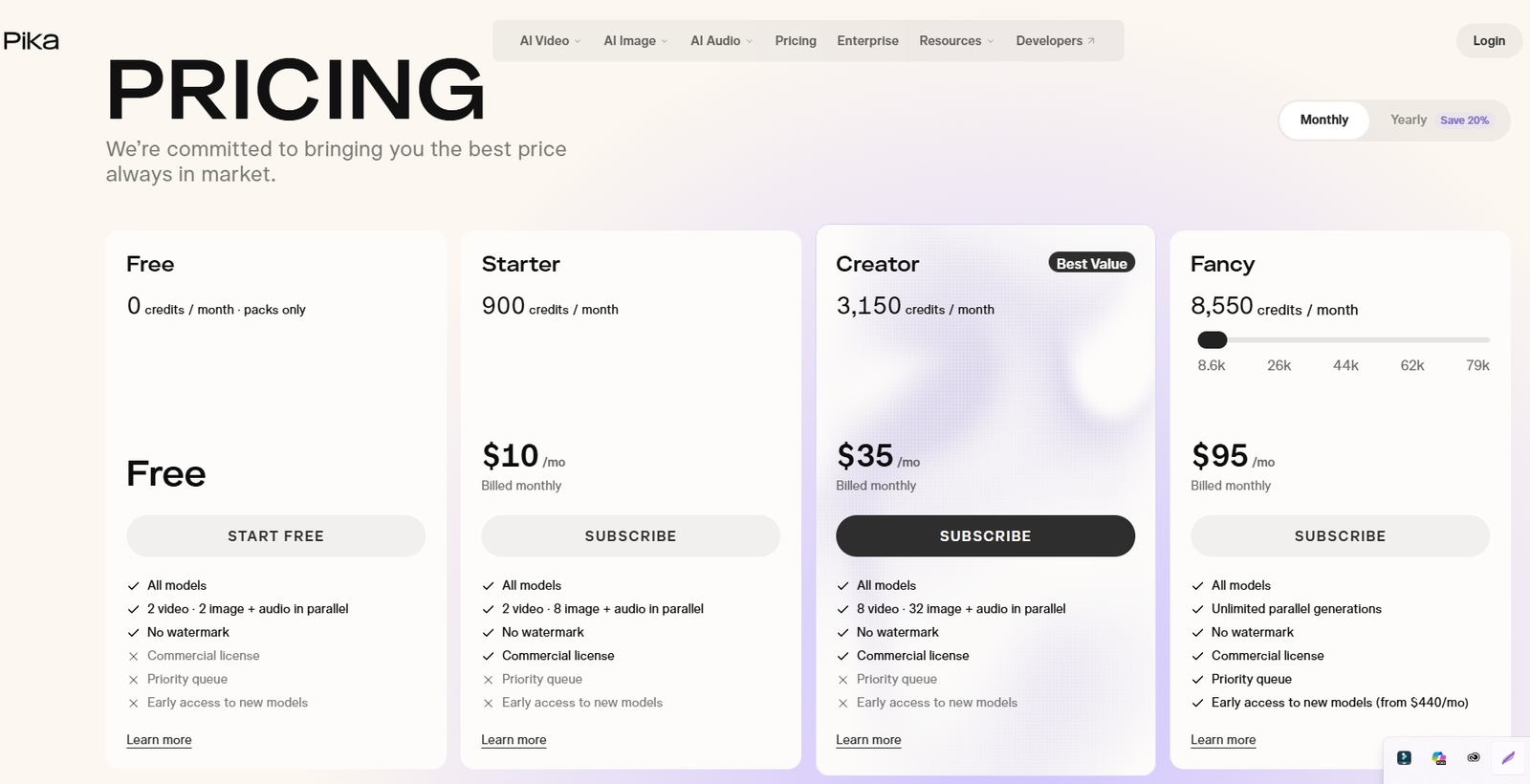
Website | Free plan: Yes — $0/month, with no monthly credits included. You can purchase credit packs to generate videos without a subscription. | Starting price: $8/month billed annually or $10/month with monthly billing (Starter plan). | Price checked: October 23, 2026.
Pika helps creators make imaginative, stylized clips quickly. Its simple workflow and playful effects make it a good fit for social media content, short-form videos, and visual experiments.
Key features: Prompt-based video generation, image animation, Pikaframes for transitions between still images, and creative visual effects such as Pikaffects.
Official pricing: Pika Pricing
✓ Pros
- Easy to learn, quick results
- Fun effects for short-form content
- Low barrier for beginners
✗ Cons
- Less suited to long or highly realistic videos
- Free access and limits can change
8. Luma Dream Machine — Best for Cinematic Camera Movement
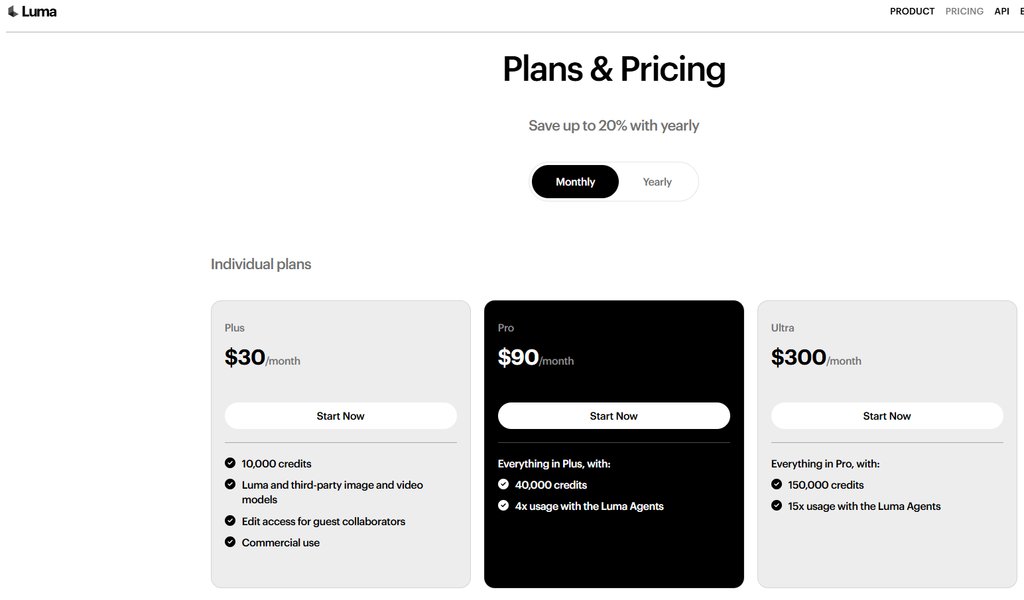
Website | Free plan: No free plan is listed on the current official pricing page; limited free access may vary. | Starting price: $25/month billed annually ($300/year), or $30/month with monthly billing (Plus plan). | Price checked: October 23, 2026.
Luma Dream Machine generates and transforms video with a focus on natural camera motion and cinematic concepts. The platform has evolved into a broader creative AI workspace, combining Luma’s own models with third-party image and video models. It works well for prototyping visual ideas and developing clips before committing to a larger production.
Key features: Text-to-video, image-to-video, video-to-video transformation, video extension, reframing, and generative visual workflows.
Official pricing: Luma Pricing
✓ Pros
- Smooth, natural camera movement
- Useful for concept videos and previews
- Simple prompt-based workflow
✗ Cons
- Generation limits vary by plan
- Fine control over details can be limited
9. InVideo AI — Best for Prompt-to-Video Production
Website | Free plan: Yes — limited weekly credits to try AI features and create videos, with usage limits. | Starting price: $4/month 190 credits/mo, $15/month 1,000 credits/mo,$40/month 3,000 credits/mo, Price checked: October 23, 2026.
InVideo AI turns a prompt or script into a video draft, combining narration, visuals, and editing elements. It is a practical choice for creators who want to produce complete videos rather than generate individual clips.
Key features: Prompt-to-video, script-to-video, AI-assisted editing, voiceovers, stock media, and social content creation.
Official pricing: InVideo AI Pricing

✓ Pros
- Produces a full video draft, not just a clip
- Great for faceless YouTube channels
- Easy to edit the result with text commands
✗ Cons
- Stock-heavy results can feel generic without editing
- Free exports may include a watermark
10. Adobe Firefly — Best for Creative Workflows and Commercial Use
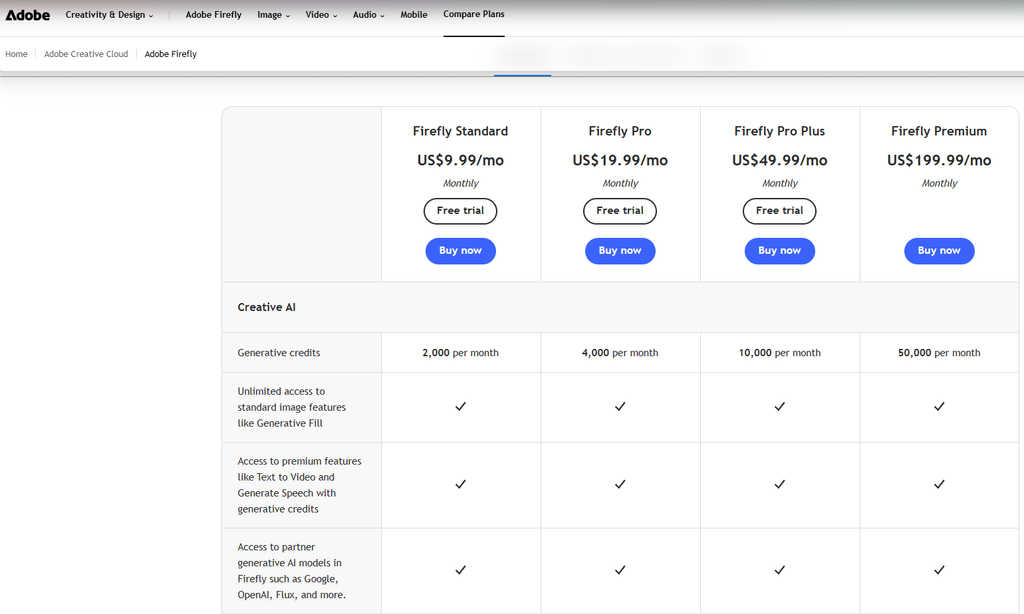
Website | Free plan: Yes — limited free daily generations for image, video, and audio features. | Starting price: $9.99/month for the Firefly Standard plan (US pricing). | Price checked: October 23, 2026.
Adobe Firefly offers generative image and video tools that fit into the wider Adobe ecosystem. It is a natural choice for designers, marketers, and editors who already work with Photoshop, Premiere Pro, or Adobe Express. Adobe’s Firefly models are designed with commercial use in mind, although terms may differ for third-party models available within the platform.
Key features: Text-to-video, image-to-video, generative video editing, image generation, AI-powered audio tools, and integration with Adobe apps.
Official pricing: Adobe Firefly Plans
✓ Pros
- Fits smoothly into existing Adobe workflows
- Clear positioning around commercially safe content
- Familiar tools for creative teams
✗ Cons
- Credit limits apply
- Best value if you already pay for Adobe
Quick Comparison Table
Here’s a cleaned-up, publication-ready Quick Comparison Table for your article. I’ve kept the prices in US dollars and Pricing was checked on October 23, 2026. Prices and plans may change.
| Tool | Best for | Type | Free plan | Starting price (USD) |
|---|---|---|---|---|
| Runway | All-around creative video | Generator + editor | Yes — 125 one-time credits | $12/mo billed annually; $15 monthly |
| Google Veo | Realistic scenes with audio | Generator | Limited free access may vary | $4.99/mo for Google AI Plus |
| Kling AI | Image-to-video | Generator | Yes — limited credits; allowance may vary | About $8.80/mo; verify at checkout |
| OpenAI Sora | Creative concepts | Generator | No — discontinued | Unavailable |
| HeyGen | Avatar and multilingual videos | Avatar | Yes — up to 3 videos/month | $24/mo billed annually; $29 monthly |
| Synthesia | Corporate training | Avatar | Yes — up to 10 minutes/month | $18/mo billed annually; $29 monthly |
| Pika | Short creative clips | Generator | $0 plan available; no monthly credits included | $8/mo billed annually; $10 monthly |
| Luma Dream Machine | Cinematic camera movement | Generator | No free plan listed | $25/mo billed annually; $30 monthly |
| InVideo AI | Script-to-video, YouTube | Script-to-video | Yes — limited usage and watermarked exports | From $4/mo |
| Adobe Firefly | Adobe workflows | Generator | Limited free generations | From $9.99/mo |
Pricing was checked on October 23, 2026. Plans, free credits, and availability may change.
90 More AI Video Tools to Explore
The tools below are grouped by main 90 More AI Video Tools to Explore
The tools below are grouped by their primary use rather than ranked individually. Free access may mean limited credits, trial generations, or access through another subscription. Check the official site for the latest limits and billing terms.
Cinematic and Generative Video Tools (11–35)
| Number | Tool | Best for | Free plan | Starting price |
|---|---|---|---|---|
| 11 | Hailuo AI | Expressive, detailed clips | Yes — limited credits; watermark included on free exports | Check official pricing |
| 12 | Seedance | High-quality prompt-based video from ByteDance | Access depends on the platform | Varies by platform |
| 13 | Midjourney Video | Animating Midjourney images | No standard free plan listed | $10/month |
| 14 | PixVerse | Stylized clips and image animation | Yes — daily free credits | $8/month billed annually; $10 monthly |
| 15 | Vidu | Video from prompts and reference images | Check current free-credit allowance | Check official pricing |
| 16 | Higgsfield AI | Cinematic camera moves and effects | Yes — limited free generations on selected tools | Check current plan options |
| 17 | Google Flow | AI filmmaking workflows built on Veo | Access depends on Google AI plan and region | Check Google AI plans |
| 18 | LTX Studio | Planning stories and shots | Yes — 800 one-time credits for personal use | $12/month billed annually; $15 monthly |
| 19 | Krea AI | Creating and refining AI visuals and video | Yes — 100 units per day, with limits by model | $21/month billed annually for Pro |
| 20 | Pollo AI | Multiple video models in one platform | Yes — limited free access | Check official pricing |
| 21 | Kaiber | Artistic animation and music visuals | Check current trial availability | Check official pricing |
| 22 | Genmo | Generative video experiments | Yes — 250 lifetime credits; watermark included | $10/month |
| 23 | DomoAI | Animation and video stylization | Yes — 15-credit free trial | $8.99/month billed annually; $9.99 monthly |
| 24 | Viggle AI | Character animation and motion | Yes — 5 free videos per day | Check official pricing |
| 25 | Dreamina | AI images and video in the CapCut ecosystem | Limited free access may be available | Varies by region and plan |
| 26 | Wan | Video from Wan models, including open-source options | Depends on the interface or hosting service | Free for open-source model use; hosting may cost extra |
| 27 | Moonvalley | Cinematic workflows for filmmakers | Check current access | Check official pricing |
| 28 | Morph Studio | AI-assisted video creation | Check current availability | Check official pricing |
| 29 | Haiper | Quick creative clips | Verify current service availability | Verify current service availability |
| 30 | Leonardo AI | Animating images generated in Leonardo | Yes — limited free tokens | Check official pricing |
| 31 | Grok Imagine | Image and video generation inside Grok | Access and limits depend on the Grok plan | Check current Grok plans |
| 32 | Hedra | Talking characters and expressive performances | Check current free-credit allowance | Check official pricing |
| 33 | ComfyUI | Custom node-based video workflows | Yes — free, open-source software | Free; hardware or cloud compute may cost extra |
| 34 | HunyuanVideo | Open-source video generation for advanced users | Yes — model weights and code are available under their stated license terms | Free to use; compute costs may apply |
| 35 | Stable Video Diffusion | Image-to-video model technology | Model access depends on the distribution method | Check the model license and current availability |
Price checked: October 23, 2026.
AI Avatar and Presenter Tools (36–50)
Discover AI tools for creating virtual presenters, talking avatars, lip-synced videos, and digital spokespersons.
| Number | Tool | Best for | Free plan | Starting price |
|---|---|---|---|---|
| 36 | D-ID | Talking digital presenters | Free trial; limits apply | Check official pricing |
| 37 | DeepBrain AI Studios | Business and education presenter videos | Free access or trial; limits apply | Check official pricing |
| 38 | Colossyan | Training and instructional videos | Yes — free plan and trial | Professional: $59/month, billed annually |
| 39 | Elai.io | Turning scripts and documents into avatar videos | Yes — 1 minute | $23/month, billed annually |
| 40 | Hour One | Professional virtual presenters | Check current availability | Check official pricing |
| 41 | Vidnoz AI | Template-based avatar videos | Yes — limited free tools | Check official pricing |
| 42 | Yepic AI | Multilingual presenter videos | Check current availability | Check official pricing |
| 43 | Akool | Avatars and marketing video tools | Check current free access | $12/month, billed annually |
| 44 | Synthesys | Synthetic voices and presenter content | Check for a free plan or trial | $20/month, billed annually |
| 45 | Tavus | Personalized video and conversational AI | Yes — limited developer access | $59/month for the developer Starter plan |
| 46 | Wondershare Virbo | Explainer and marketing avatars | Free trial or limited access; verify current terms | Check official pricing |
| 47 | Argil | Personal AI clones for social content | Check current free access | Check official pricing |
| 48 | Soul Machines | Interactive digital people | Check current availability | Contact sales |
| 49 | Pippit | Product videos and avatars for e-commerce | Yes — daily free credits | $101/year for Starter at the listed annual rate |
| 50 | Sync Labs | AI lip-sync for video | Check current free access | Usage-based pricing; rates vary by model |
Script-to-Video and Marketing Tools (51–65)
Turn scripts, blog posts, product links, and marketing ideas into promotional videos, explainers, and social content.
| Number | Tool | Best for | Free plan | Starting price |
|---|---|---|---|---|
| 51 | Pictory | Turning scripts and blog posts into videos | Yes — limited free access | Check official pricing From $25 per Month |
| 52 | Fliki | Text-to-video with AI narration | Yes — 3 credits/month on the listed free tier | Check official pricing Fliki |
| 53 | Lumen5 | Turning written content into social videos | Yes — free plan available | Check official pricing |
| 54 | Steve.AI | Animated videos from scripts | Check current free access | Basic: $10/month on annual billing |
| 55 | Animoto | Template-based promo videos | Free plan; export restrictions may apply | Check official pricing |
| 56 | Biteable | Business videos and explainers | 7-day free trial | $15/month, billed annually |
| 57 | Powtoon | Animated presentations and education | Yes — watermarked exports and feature limits | Lite: $15/month, billed annually |
| 58 | Vyond | Character-based business animation | Check current trial availability | Check official pricing |
| 59 | Renderforest | Promo videos, animations, and branding | Yes — free plan with watermarked exports | Lite: $8/month, billed annually |
| 60 | FlexClip | Online editing with templates and AI tools | Yes — limited free exports and features | Check official pricing |
| 61 | Wave.video | Creating and publishing marketing videos | Free access may have limits | Check official pricing |
| 62 | Creatify | Product ads and UGC-style creative | Check current free-credit allowance | Check official pricing |
| 63 | Topview AI | Product-focused marketing videos | Check current free access | Check official pricing |
| 64 | Revid.ai | Short social videos from ideas and scripts | Check current free-credit allowance | Check official pricing |
| 65 | Arcads | AI actors for video ads | Check current trial availability | Check official pricing |
AI Video Editing and Repurposing Tools (66–80)
Edit footage with AI, generate captions, remove pauses, and turn long videos into short clips for social media.
| Number | Tool | Best for | Free plan | Starting price |
|---|---|---|---|---|
| 66 | CapCut | Social video editing with AI features | Yes — free editor; some features are paid | Check regional pricing |
| 67 | Descript | Editing video by editing the transcript | Yes — limited free plan | Check official pricing |
| 68 | VEED | Online editing, captions, and social content | Yes — limited free plan | Check official pricing |
| 69 | OpusClip | Turning long videos into short clips | Yes — limited free processing | Check official pricing |
| 70 | Vizard | Repurposing webinars, interviews, and podcasts | Yes — limited free access | Check official pricing |
| 71 | Klap | Converting long videos into vertical clips | Check current free-trial terms | Check official pricing |
| 72 | Munch | Finding shareable moments in long videos | Check current free access | Check official pricing |
| 73 | Gling | Removing pauses and mistakes automatically | Yes — limited free exports or usage | Check official pricing |
| 74 | Wisecut | Auto-editing, captions, and audio cleanup | Check current free-plan terms | Check official pricing |
| 75 | Submagic | Dynamic captions for short videos | Free trial or limited access; verify current terms | Check official pricing |
| 76 | Captions | Talking-head video editing with AI | Limited free access may be available | Check current pricing |
| 77 | Wondershare Filmora | Traditional editing plus AI tools | Free version with export restrictions | Check official pricing |
| 78 | Microsoft Clipchamp | Simple browser-based editing | Yes — free plan | Premium features included with eligible Microsoft 365 plans |
| 79 | Adobe Premiere Pro | Professional editing with AI features | No permanent full-featured free plan; trial may be available | Check Adobe’s current plan pricing |
| 80 | Kapwing | Collaborative online editing and resizing | Yes — limited free plan | Check official pricing |
Dubbing, Translation, and Voice Tools (81–86)
Translate video dialogue, generate voiceovers, create subtitles, and localize content for international audiences.
| Number | Tool | Best for | Free plan | Starting price |
|---|---|---|---|---|
| 81 | Rask AI | Translating and dubbing videos | Free trial or limited access; verify current terms | Check official pricing |
| 82 | Maestra AI | Subtitles, transcripts, and translated video | Limited free tools or trial | Check official pricing |
| 83 | Dubverse | Multilingual dubbing and subtitles | Free trial or limited access; verify current terms | Check official pricing |
| 84 | ElevenLabs | AI voiceovers and dubbing for video | Yes — limited free monthly credits | Check current pricing |
| 85 | Vozo AI | Video translation with lip-sync | Check current free-credit allowance | Check official pricing |
| 86 | Murf AI | Studio-quality voiceovers | Free trial with usage limits | Check official pricing |
Specialized Video Production Tools (87–100)
Explore tools for animation, screen recording, branded content, podcast production, social publishing, and business video workflows.
| # | Tool | Best for | Free plan | Starting price |
|---|---|---|---|---|
| 87 | Animaker | Animated explainers and character videos | Yes — limited free plan | Check official pricing |
| 88 | Moovly | Educational and business videos | Check current free-plan availability | Check official pricing |
| 89 | Raw Shorts | Explainer videos from text and templates | Free trial or limited exports; verify current terms | Check official pricing |
| 90 | Rocketium | Automating marketing creative at scale | Check current availability | Contact sales |
| 91 | Tella | Polished screen and camera recordings | Check current free-trial terms | Check official pricing |
| 92 | ScreenPal | Screen recordings and tutorials | Yes — free recording tools with limits | Check official pricing |
| 93 | Loom | Quick workplace video messages | Yes — Starter plan with limits | Check current plan pricing |
| 94 | Riverside | Recording interviews and podcasts as video | Yes — limited free plan | Check official pricing |
| 95 | Adobe Express | Social videos and branded content | Yes — free plan | Premium pricing varies by plan |
| 96 | Canva | Design-first video and AI video tools | Yes — free plan with feature limits | Check current plan pricing |
| 97 | Quso.ai | Repurposing and scheduling short-form video | Check current free-plan limits | Check official pricing |
| 98 | Predis.ai | Social media videos and posts | Free trial or limited access; verify current terms | Check official pricing |
| 99 | Hippo Video | Sales and customer-facing video | Check current free-plan availability | Check official pricing |
| 100 | Visla | Script-to-video for business content | Yes — limited free plan may be available | Check official pricing |
Price checked: October 23, 2026. Prices, free-plan limits, and availability can change by region and billing cycle. Confirm all entries on their official websites before publishing.
How to Choose the Right AI Video Generator
The best tool depends on the video you want to make.
| Your goal | Recommended tools |
|---|---|
| Cinematic AI footage | Runway, Google Veo, Kling AI, Sora |
| Animate still images | Kling AI, Pika, PixVerse |
| AI spokesperson videos | HeyGen, Synthesia, D-ID |
| YouTube Shorts and Reels | CapCut, OpusClip, Vizard |
| Turn scripts into videos | InVideo AI, Fliki, Pictory |
| Professional editing | Premiere Pro, Descript, Filmora |
| Multilingual dubbing | Rask AI, Maestra AI, ElevenLabs |
| Custom AI workflows | ComfyUI, HunyuanVideo |
| Product and UGC-style ads | Creatify, Arcads, Topview AI |
What to Check Before Paying
- Free plan limits: Check generation credits, video length, resolution, and export restrictions.
- Commercial rights: Confirm whether your plan allows monetized YouTube videos, client work, or paid ads.
- Watermarks: Many free tiers add branding to exports.
- Real cost per video: A low monthly price may include only enough credits for a few short clips. Divide the price by the number of finished videos you can realistically make.
- Language support: Test voice quality, captions, and pronunciation before producing in bulk.
- Privacy: Review how the platform handles uploaded images, recordings, and personal data, especially for avatar videos.
Frequently Asked Questions
What is the best AI video generator in 2026?
Runway is our top all-around pick for creative video production. Google Veo is worth considering for realistic scenes, Kling AI for image-to-video, and HeyGen or Synthesia for presenter-led videos. The best choice depends on your project and budget.
What is the best free AI video generator?
CapCut is a practical starting point for editing short videos. Runway, Pika, Kling AI, and several others may offer limited free credits, though free tiers often restrict video length, resolution, watermarks, or commercial use. Check each tool’s current free plan.
Can AI generate videos from text?
Yes. Runway, Google Veo, Kling AI, Sora, and InVideo AI all support text-driven video. Some generate short visual clips, while others assemble longer videos using narration, stock footage, and templates.
Which AI video generator is best for YouTube?
For cinematic footage, try Runway or Google Veo. For faceless explainers, try InVideo AI or Pictory. For Shorts, CapCut and OpusClip help you edit and repurpose content quickly.
Are AI-generated videos copyright-free?
Not automatically. Commercial rights depend on the platform’s terms, the assets used, applicable law, and the nature of the content. Read the license before you publish or monetize a video.
Which AI tool makes talking avatar videos?
HeyGen and Synthesia are the leading choices, with D-ID, Colossyan, and Elai.io as alternatives. HeyGen is stronger for marketing and translation, while Synthesia suits corporate training.
Final Verdict
AI video generators can cut production time, expand creative options, and make video creation accessible to individuals and businesses. But no single platform is best for every project.
Start by deciding your main goal: cinematic footage, social clips, avatar presentations, or automated editing. Test two or three tools with the same prompt or script, compare the results, and calculate the real cost per finished video.
For most beginners, CapCut is a sensible place to start. Creators who want more advanced generated footage can test Runway, Google Veo, or Kling AI, while businesses making training and presenter-led videos should compare HeyGen and Synthesia.
The smartest choice is not necessarily the most popular tool. It is the tool that consistently delivers the quality, workflow, and value your audience expects.


