

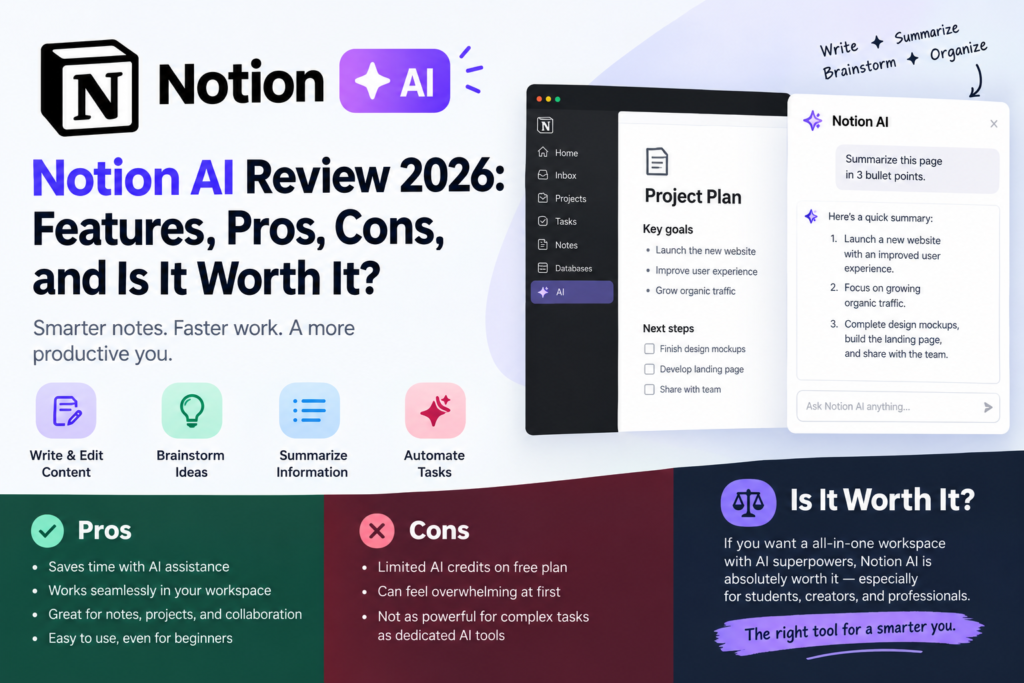
Notion AI review Introduction
Artificial intelligence is changing how people write, study, manage projects, and create digital content. One tool gaining attention is Notion AI, an AI assistant built into the Notion productivity platform. It helps users draft articles, summarize information, organize tasks, translate content, and work more efficiently with information stored in their workspace.
But is Notion AI really worth using? Can it help bloggers, students, content creators, and professionals save time and improve productivity? In this review, we’ll explore its key features, practical uses, advantages, disadvantages, pricing, and how it compares with ChatGPT to help you decide whether it’s the right tool for your needs.
Quick Verdict: 4/5 — Notion AI is a useful productivity assistant for people who already use Notion to manage their work. However, if you only need a standalone AI chatbot for writing, research, or brainstorming, a dedicated alternative may be a better fit.
What Is Notion AI?
Notion AI is an AI-powered assistant built into Notion, a productivity platform used for note-taking, document creation, project management, databases, and team collaboration. It helps users work with information directly inside their Notion workspace without constantly switching between different applications.
With Notion AI, you can generate article drafts, improve existing content, summarize long documents, translate text, brainstorm ideas, and find information across your workspace. It can also help organize information and automate certain tasks, depending on the features available in your plan.
For bloggers, students, YouTubers, and professionals, Notion AI can make everyday work more organized and efficient. For example, a blogger can use it to outline an article, a student can summarize study notes, and a YouTuber can organize video ideas and plan content.
However, Notion AI is not simply another standalone chatbot. Its main advantage is its integration with Notion’s documents, databases, and workspace tools. This makes it particularly useful for people who already use Notion to manage their daily work.
In short: Notion AI combines AI-powered writing and information assistance with Notion’s productivity features, helping users manage content and complete tasks in one workspace.
Key Features of Notion AI
1. AI Writing Assistant
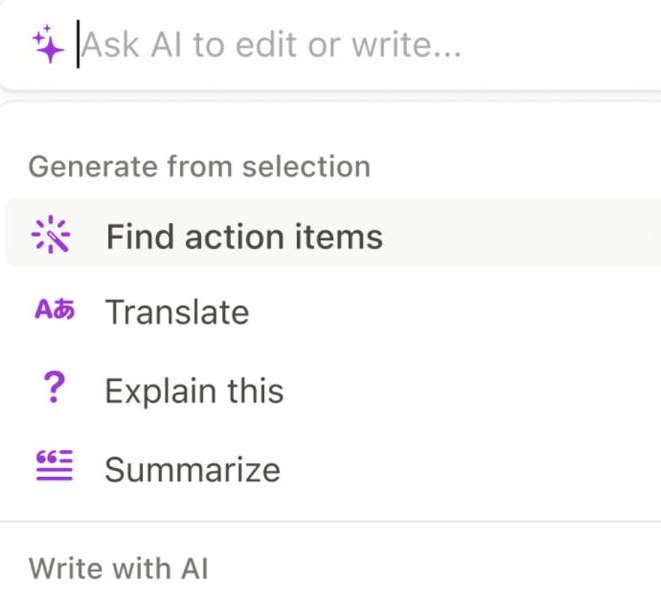
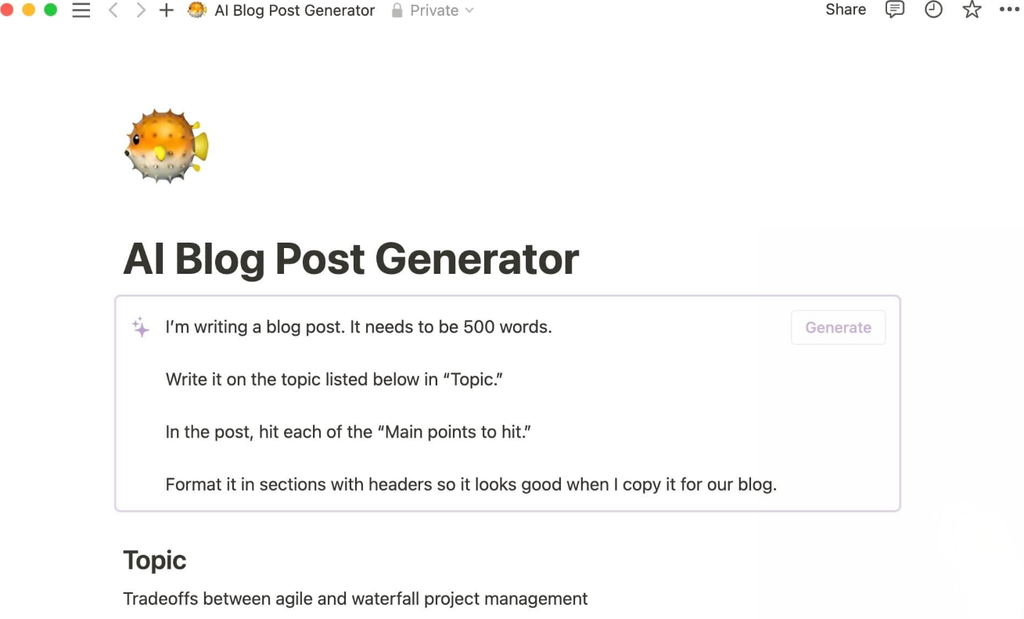
One of the most useful features of Notion AI is its built-in writing assistant. It helps users create blog posts, articles, emails, social media captions, content outlines, and other types of written content directly inside their Notion workspace.
Notion AI can also improve existing text by correcting grammar, rewriting sentences, adjusting the tone, and making content shorter or longer. These tools are useful when you want to refine a rough draft, simplify complicated explanations, or adapt your writing for a specific audience.
For bloggers and content creators, Notion AI can help brainstorm topics, organize article structures, and generate first drafts. However, AI-generated content may still require fact-checking, editing, and a personal touch before publication.
My take: Notion AI is most useful when you want to write and organize content in the same workspace. It can speed up the drafting process, but it works best as a writing assistant rather than a complete replacement for human judgment and creativity.
[SCREENSHOT]
[SCREENSHOT]
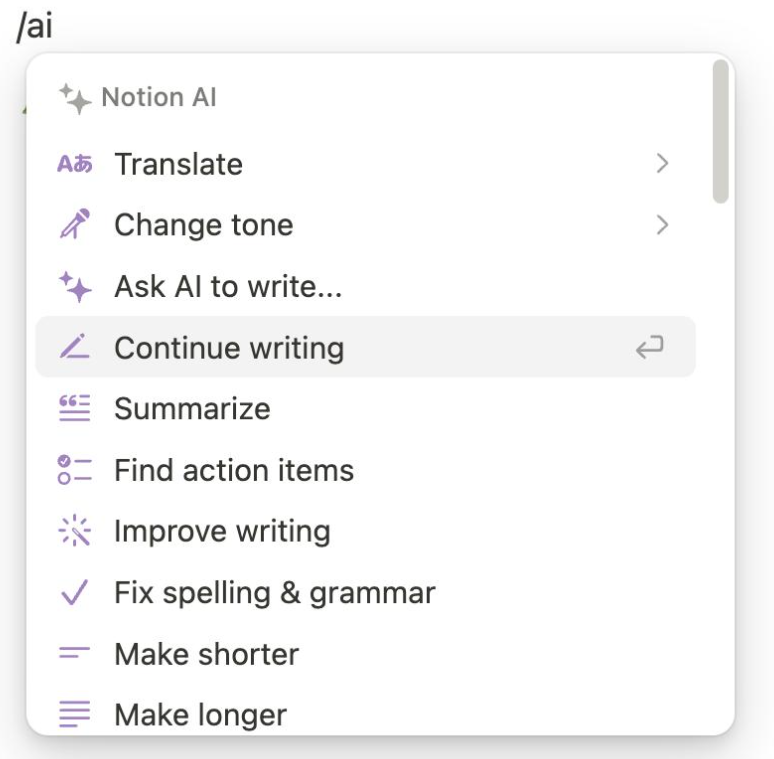
This feature is especially useful for bloggers, marketers, students, and professionals who regularly produce written content.
2. Content Summarization
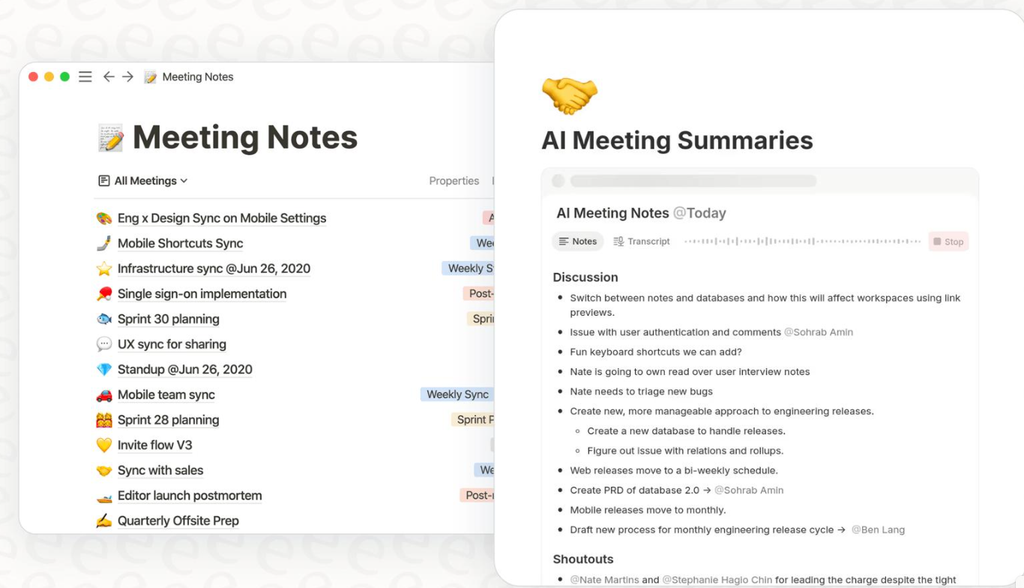
Reading long documents, meeting notes, and reports can take a lot of time. Notion AI helps simplify this process by turning lengthy content into shorter summaries that are easier to read and understand.
You can use it to identify key points, extract important information, and create concise summaries of notes and documents available in your Notion workspace. This is especially helpful when reviewing research materials, preparing meeting recaps, or revisiting information from an earlier project.
For students, Notion AI can make study notes easier to review. Bloggers and content creators can use summaries to organize research, while professionals can quickly review lengthy project documents before making decisions.
However, summaries may leave out important details or misunderstand parts of the original text. Always check important facts against the source document, especially when accuracy matters.
My take: Content summarization is a practical time-saving feature, particularly for people who regularly work with long documents. Its usefulness depends on the quality of the original content and how carefully you review the summary.
[SCREENSHOT]
3. Translation and Language Support
Notion AI can translate written content into different languages and help users improve the clarity and wording of their text. This can be useful for bloggers, students, freelancers, and businesses that communicate with audiences across different countries.
For example, you can translate an English paragraph into Spanish, rewrite text to make it easier to understand, or refine wording before sharing a document with an international audience. These capabilities can help content creators adapt their work for different readers without leaving their Notion workspace.
However, AI translations are not always perfect. Idioms, cultural references, technical terms, and subtle differences in meaning may be lost or interpreted incorrectly. For professional, legal, or other high-stakes content, have a fluent speaker or qualified translator review the result.
My take: Notion AI’s translation tools can save time when working with multilingual content. They are particularly convenient for users who already organize their writing and documents in Notion, although the results should be checked before publication.
[SCREENSHOT]
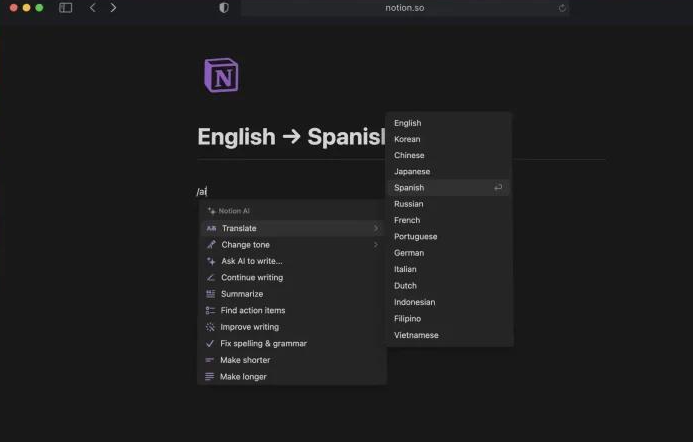
Users translating into other languages should review the output carefully for natural phrasing, grammar, and cultural context.
4. Task and Project Management
Notion combines AI assistance with productivity tools such as pages, databases, calendars, and task lists. This allows users to organize projects, track progress, plan content, and manage their daily work in one workspace.
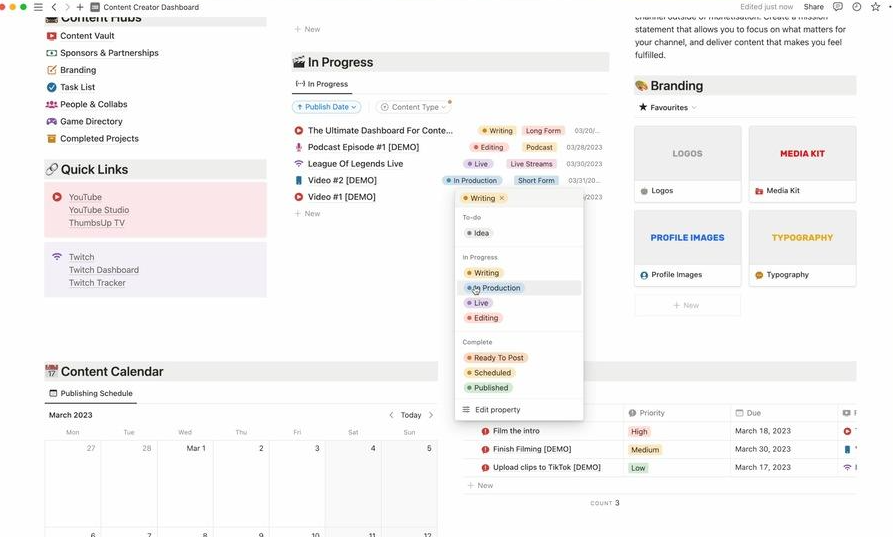
For example, bloggers and YouTubers can create content calendars to schedule articles and videos, track publication dates, and manage ideas from brainstorming to completion. Students can organize assignments and deadlines, while teams can use databases to coordinate projects and monitor tasks.
Notion AI can also help users organize information, generate task descriptions, and work with database content. Depending on the available features and plan, AI-powered database functions may help populate or categorize information. However, AI assistance does not automatically replace the need to set up a useful project-management system.
My take: Notion is especially useful for people who want to combine writing, planning, and task management in one place. Its biggest advantage is the flexibility to build a workflow around your needs, although setting up complex databases can take time.
[SCREENSHOT]
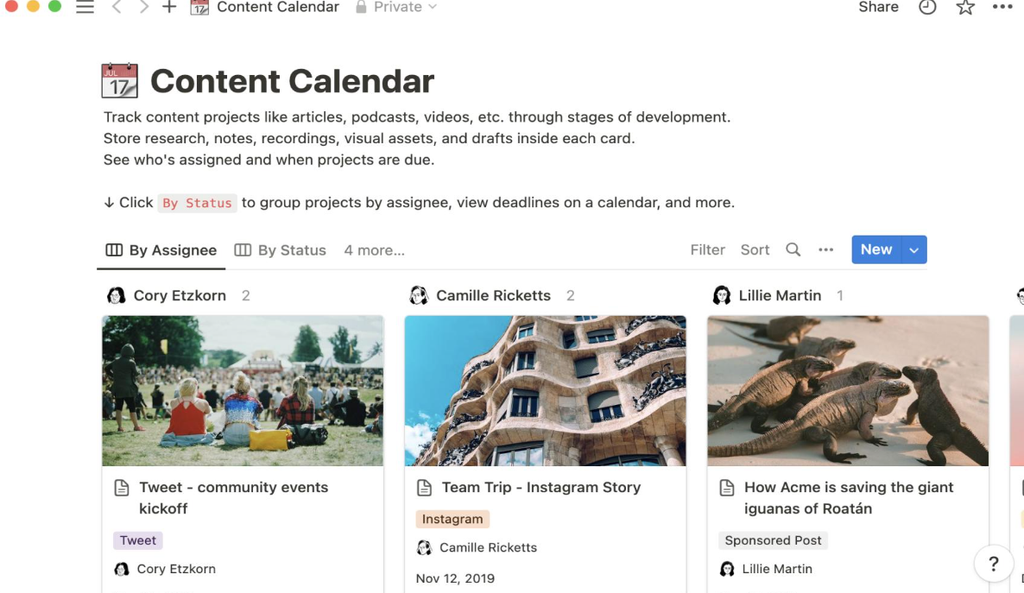
Depending on the plan and available features, Notion AI can also help create or update database content and automate parts of a workflow.
5. AI Agents and Workspace Search
Notion AI has evolved beyond basic text generation, offering tools designed to help users find information and handle more complex tasks within their workspace. Depending on the available features, subscription plan, and connected services, these capabilities can make it easier to work across documents, databases, and other sources of information.
Workspace search is particularly useful when you need to find details buried in meeting notes, project documents, or internal resources. Instead of manually opening multiple pages, you can ask a question and use the available search features to locate relevant information. When supported integrations are connected and authorized, Notion AI may also help retrieve information from compatible external applications.
More advanced AI agent capabilities can assist with multistep workflows, such as gathering information, organizing content, or helping carry out tasks. The exact actions available depend on the feature, permissions, and plan you’re using.
However, AI-generated answers and automated actions still need oversight. Search results may miss relevant information, and responses should be checked against the original sources before you rely on them.
My take: Advanced workspace search and AI agents can be valuable for teams and professionals who manage large amounts of information. For users with only a few notes or simple writing needs, these features may offer less benefit.
[SCREENSHOT]
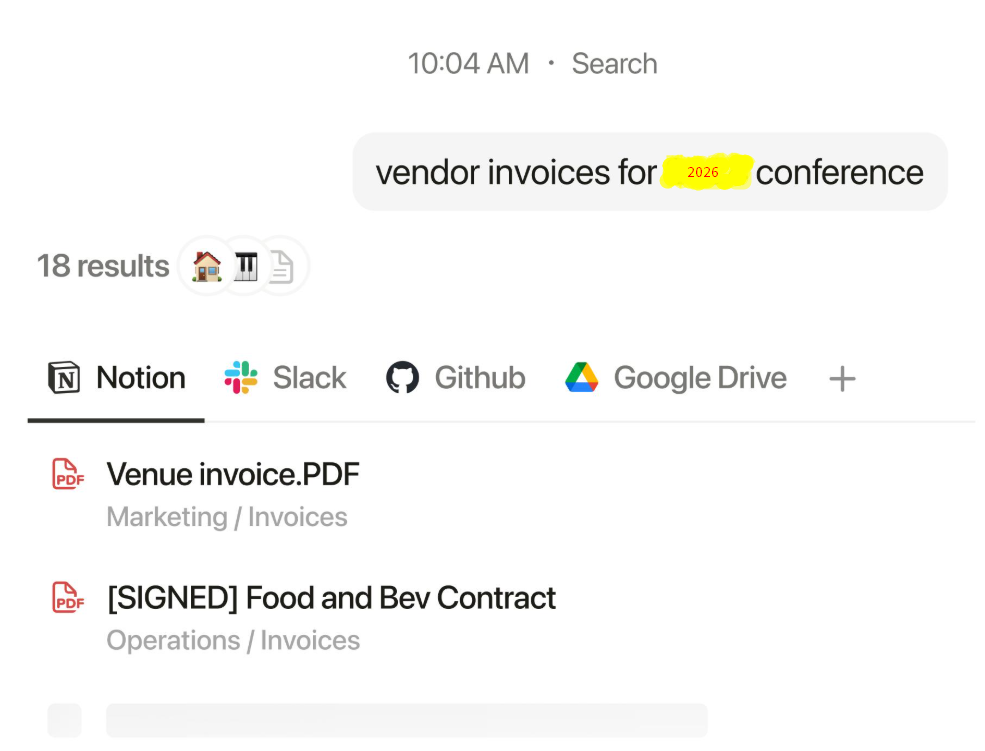
Availability depends on the plan, workspace settings, and applicable usage limits. [If your plan did not include this, say so: “I could not test this on my plan.”]
6. Meeting Notes and Research
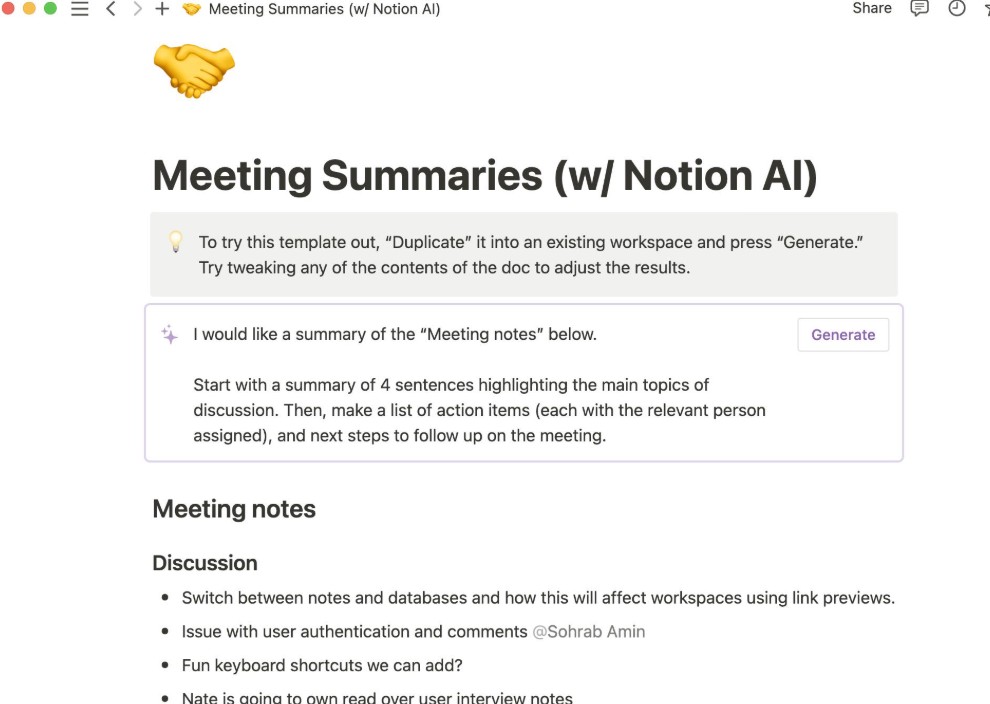
Notion AI can help users turn meeting discussions and research materials into more organized, useful information. Depending on the subscription plan and available features, users may be able to generate AI-powered meeting notes, summarize discussions, identify key decisions, and organize follow-up tasks.
For teams, meeting summaries can make it easier to review important points without rereading lengthy notes. Project managers can use them to track decisions and action items, while freelancers and professionals can organize client discussions and follow-up work.
Notion AI can also assist with research by summarizing documents, organizing findings, and helping users develop reports from available information. This can be useful for bloggers researching article topics, students reviewing study materials, and professionals preparing project documentation.
However, AI-generated meeting notes may omit details or misinterpret parts of a conversation. Research summaries can also contain inaccuracies, so important claims should be checked against reliable original sources.
My take: Meeting notes and research assistance can save time for people who regularly work with large amounts of information. Their value depends on the features included in your plan and how accurately the AI captures and organizes the material.
[SCREENSHOT]
Pros and Cons of Notion AI
Pros and Cons of Notion AI
Explore the key benefits and limitations of Notion AI.
Advantages
-
All-in-one workspace
Write, plan, and organize information in one convenient place.
-
Time-saving
Speed up writing, brainstorming, and everyday work with AI assistance.
-
Better organization
Connect AI assistance with notes, databases, and projects.
-
Flexible writing support
Generate ideas, rewrite content, summarize text, and adjust tone.
-
Team productivity
Use AI features to support meeting notes, research, and repetitive tasks.
Disadvantages
-
Subscription limitations
Access to AI features depends on Notion’s current plans and usage limits.
-
Learning curve
New users may need time to understand pages, databases, and workflows.
-
Possible inaccuracies
AI-generated information may contain errors or unsupported claims.
-
Editing is still necessary
Generated articles may sound generic, repeat ideas, or need fact-checking.
-
Dependence on the Notion ecosystem
Users who only need a simple chatbot may not need the full workspace.
Notion AI Pricing: Is It Free?
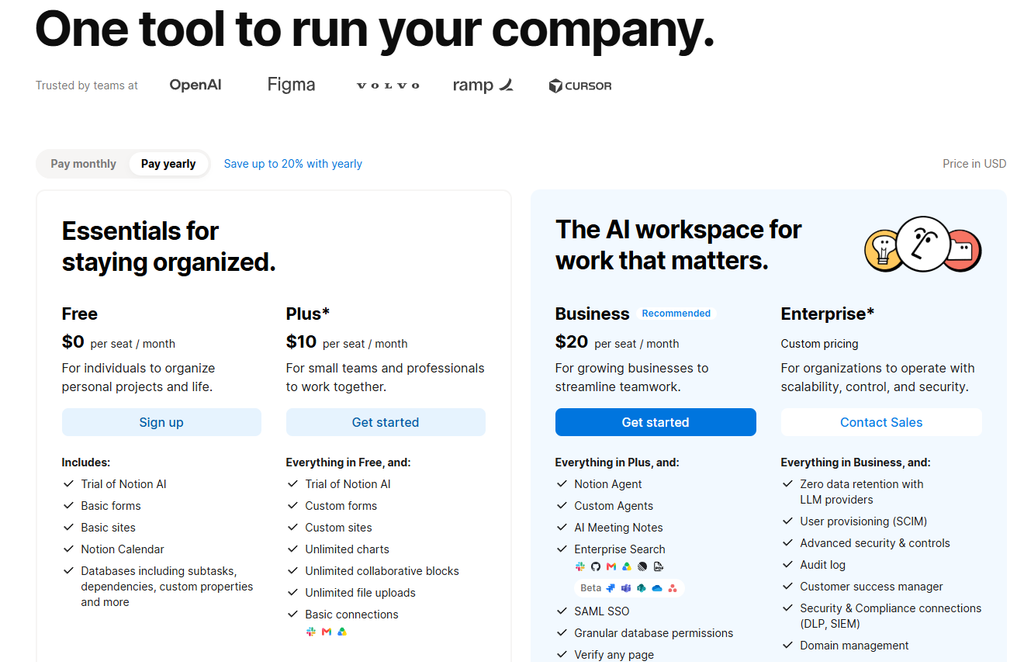
Notion offers a free plan, but access to AI features is limited. Its official plan information states that Business and Enterprise plans include core Notion AI capabilities, while Free and Plus users receive limited complimentary AI responses or trial access.
Additional usage rules may apply to advanced models and automated agents. Because prices, allowances, and plan features can change, check the official Notion pricing page before subscribing.
For occasional writing tasks, a limited trial may be enough to decide whether the tool suits your needs. For frequent AI use, compare the total subscription cost with the time you expect to save.
Notion Pricing Plans: Free, Plus, Business, & Enterprise.
Nion AI and ChatGPT serve overlapping but different purposes. Notion AI is especially usefulotion AI vs. ChatGPTotion AI vs. ChatGPT
Not when you want AI assistance alongside your existing notes, documents, databases, and project workflows. ChatGPT is a more general-purpose assistant for conversations, explanations, brainstorming, research, and a wide range of other tasks.Not
| Notion AI | ChatGPT | |
|---|---|---|
| Best for | AI inside your notes and projects | General-purpose conversation and tasks |
| Works with your workspace data | Yes | Limited |
| Project and database tools | Yes | No |
| Standalone chatbot | Not its main purpose | Yes |
Choose Notion AI if you already organize most of your work in Notion. Choose ChatGPT if you mainly need a flexible standalone assistant. Some users may benefit from using both.
Is Notion AI Good for Freelancers and Small Business Owners?
Yes, if you juggle several clients or projects. Notion AI can help you draft proposals and client emails, turn call notes into action items, and keep project details in one place. For example, you can:
- Draft client proposals and follow-up emails.
- Summarize call notes into a to-do list.
- Track deadlines, invoices, and projects in one database.
Is Notion AI Good for Bloggers and YouTubers?
Yes, Notion AI can be a useful tool for bloggers and YouTubers who want to organize their content creation workflow. It combines AI writing assistance with Notion’s planning and project-management features, making it easier to manage ideas, drafts, research, and publishing schedules in one place.
Here are some ways content creators can use Notion AI:
- Brainstorm content ideas: Generate potential blog topics, YouTube video ideas, and new angles for existing content.
- Create blog outlines: Organize article ideas into headings, subheadings, and key points before writing a full draft.
- Plan YouTube scripts: Develop video structures with an introduction, main sections, examples, and a conclusion.
- Write social media captions: Draft captions and promotional text to share new articles or videos.
- Manage a content calendar: Use Notion databases to track ideas, deadlines, publishing dates, and content status.
- Summarize research: Turn lengthy notes and source material into shorter summaries that are easier to review.
Example: A Simple Content Creation Workflow
A blogger could use Notion AI to brainstorm a topic, create an article outline, organize research notes, and prepare a first draft. A YouTuber could use a similar workflow to plan a video, structure the script, and track production tasks in a content calendar.
However, Notion AI will not automatically guarantee engaging articles, accurate research, or successful YouTube videos. Creators should fact-check information, add original insights, and edit AI-generated drafts to match their own voice.
My take: Notion AI is most valuable for creators who already use Notion to plan and manage their work. If you only need to generate scripts or blog posts, a dedicated AI writing tool may be sufficient. But if you want to combine writing, research, and content planning in one workspace, Notion AI is worth considering.
[SCREENSHOT – ]
Final Verdict: Should You Use Notion AI?
Notion AI is a useful productivity assistant for people who want to combine writing, planning, note-taking, and project management in one workspace. Its biggest advantage is the connection between AI and the information users already organize in Notion.
Its main limitations are subscription restrictions, the need to verify AI-generated information, and the fact that it may be unnecessary for people who only want a general-purpose chatbot.
Our verdict: Notion AI is worth considering for regular Notion users, content creators, students, and teams that can benefit from integrated AI workflows. Before paying, test the available features and compare the subscription cost with your actual needs.
FAQ
Is Notion AI free?
No, Notion AI isn’t free. While Notion offers a free tier for its core productivity tools, it only includes a trial of AI features, such as document generation and database autofill. Full access to Notion AI is available only with a paid subscription or add-on plan.
What are the benefits of Notion AI?
Notion AI helps you work faster by creating content, summarizing notes, and handling repetitive tasks automatically. It also keeps your projects organized with smart databases, research help, and helpful suggestions inside your Notion workspace.
Is Notion AI better than ChatGPT?
No, Notion AI isn’t better than ChatGPT, as they serve different purposes. ChatGPT is best as a basic AI writer, while Notion AI works better for teams, helping create documents, draft notes, and manage projects all in one workspace.
Affiliate disclosure: This post contains affiliate links. If you click a link and make a purchase, we may earn a commission at no extra cost to you. We only recommend tools we have tested or believe are useful.
Google Pomelli Review & Tutorial


