


Heads up: some links below are affiliate links. If you use them, we may get a small commission at no extra cost to you. Thanks for supporting FutureToolsHQ!
“Want to create AI images without spending a dime? We tested dozens of tools and picked the 10 best free AI image generators in 2026. Each one is ranked by image quality, free usage limits and how easy it is to use.”
AI image generators have changed the way people create visual content. You no longer need advanced Photoshop skills, expensive design software, or a professional graphic designer to turn an idea into an image. With the right AI image generator, you can describe what you want in plain English and create everything from realistic photos and digital artwork to social media graphics, product concepts, posters, and illustrations.
The good news is that many of the best AI image generators now offer free access. However, “free” usually comes with some limitations, such as daily or weekly generation limits, slower queues, fewer editing features, watermarks, or restrictions on commercial use.
In this guide, we’ll look at the 10 best free AI image generators in 2026, what each tool is best for, how its free access works, and which type of user should consider it.
I have used each and every tool and talked about the benefits I got and the pros and cons I found from using them. I generated images with one prompt for each tool and shared the screenshots of the results I got from the image generation here. From this you can easily understand. However, all these ten tools generate images for free.
Quick note: AI tools and their free plans change frequently. Generation limits, available models, and commercial-use terms can change, so always check the provider’s current terms before using an image for a commercial project.
Free AI Image Generators
| Number | AI Image Generator | Free Image Limit | Commercial Use | Best For |
|---|---|---|---|---|
| 1 | Google Gemini | Almost 20 images/day* | ✅ Generally allowed; terms apply | Realistic images, general use |
| 2 | Microsoft Designer / Bing Image Creator | Almost 15 fast creations/day + slower generation | ⚠️ Restrictions apply | Quick images & illustrations |
| 3 | Adobe Firefly | Free monthly credits; amount can vary by plan | ✅ Yes | Commercial projects |
| 4 | Leonardo AI | 150 tokens/day | ⚠️ Free-tier rights are restricted; check current terms | Game art, characters |
| 5 | Ideogram | 10 slow credits/week | ✅ Yes, with conditions | Text, logos & posters |
| 6 | ChatGPT | A few images/day on Free tier | ✅ Subject to OpenAI terms | Easy image creation & editing |
| 7 | Canva AI / Magic Media | Limited free generations | ⚠️ Commercial use subject to Canva terms | Social media & design |
| 8 | Recraft | Limited daily free credits | ⚠️ Check current plan/license | Vector graphics & design |
| 9 | FLUX.1 schnell | Free when self-hosted | ✅ Yes under Apache 2.0 | Developers & unlimited local generation |
| 10 | Playground AI | Free tier with periodic limits | ✅ Free commercial use according to current plan information | General AI art |
Google Gemini
Google Gemini is a powerful AI assistant that can also create and edit images from text prompts. You can describe what you want—such as realistic photos, illustrations, product concepts, or social media graphics—and Gemini can generate an image based on your instructions.
Key Features:
- 🖼️ Text-to-image generation
- ✏️ AI image editing and modifications
- 🎨 Supports different visual styles
- 💡 Useful for blog images, social media posts, concepts, and creative projects
- 💬 Create images using natural-language prompts
- 🆓 Free access is available, although usage limits and features can vary by plan and region
Best for: Beginners, content creators, bloggers, marketers, and anyone who wants to create images using simple text prompts.
Example prompt:
“Create a realistic cinematic image of a futuristic city in 2030 at sunset, with flying cars, modern skyscrapers, and people walking through a busy street.”
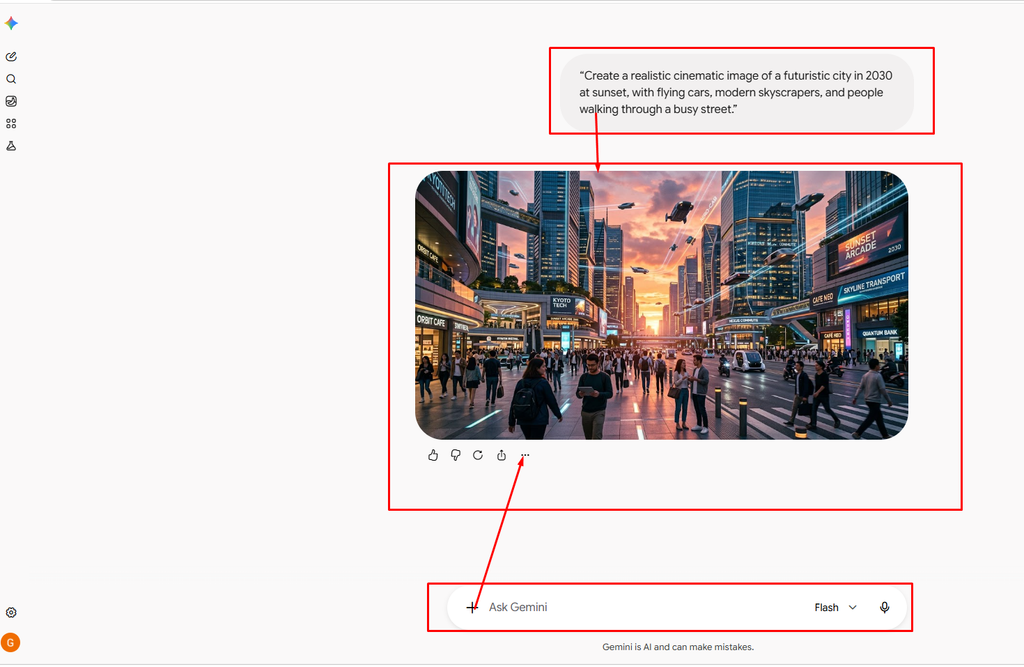
I can also create a custom image for your article or demonstrate a Gemini-style AI image prompt.
Microsoft Designer / Bing Image Creator
Microsoft Designer and Bing Image Creator make it easy to generate images from simple text prompts. They are particularly useful for creating social media graphics, blog visuals, posters, illustrations, and other creative content without needing advanced design skills.
Key Features:
- 🖼️ Text-to-image generation
- 🎨 Multiple artistic and realistic styles
- ✏️ AI-powered design and editing tools
- 🌐 Easy to use directly from a web browser
- 📱 Useful for social media posts, presentations, and marketing graphics
- 🆓 Free access is available, with usage limits depending on the current Microsoft service and account
Best for: Beginners, bloggers, marketers, students, and social media creators who want to quickly create AI-generated visuals.
Example prompt:
“Create a realistic image of a modern laptop on a wooden desk with a cup of coffee, soft morning sunlight, minimalist home office, professional photography.”
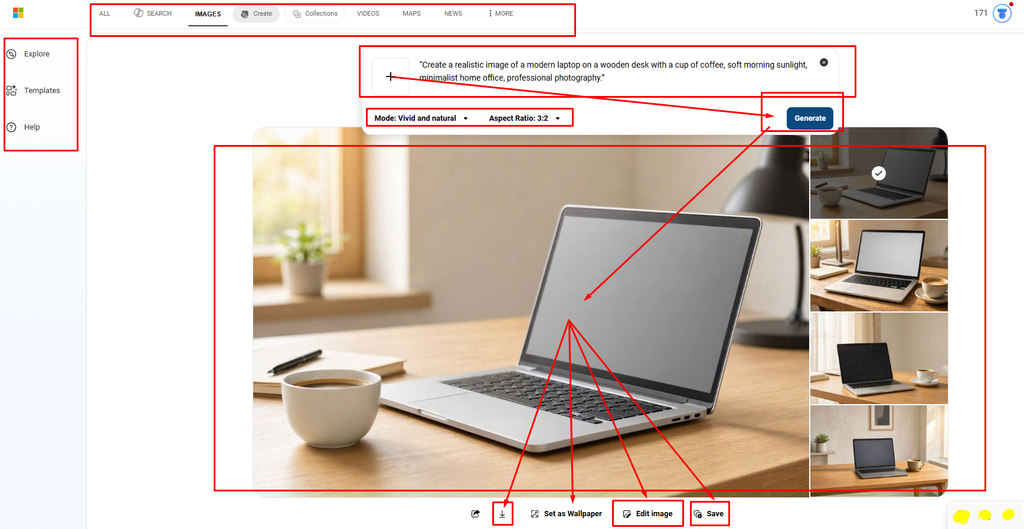
Why use it: Microsoft Designer is especially useful when you want to generate an image and turn it into a finished design such as a social post, poster, or promotional graphic.
Adobe Firefly
Adobe Firefly is Adobe’s generative AI platform for creating and editing images with text prompts. It is designed for creative workflows and integrates with Adobe’s broader ecosystem, making it useful for designers, marketers, content creators, and businesses.
Key Features:
- 🖼️ Text-to-image generation
- ✏️ Generative Fill for adding or removing objects
- 🎨 Generate images in different styles and compositions
- 🔄 AI-powered image editing and variations
- 🧩 Works alongside Adobe’s creative tools
- 🆓 Offers a free tier with limited generative credits
Best for: Graphic designers, marketers, content creators, and anyone who wants AI image generation combined with professional design and editing tools.
Example prompt:
“Create a cinematic product photo of a sleek smartphone on a black reflective surface, dramatic studio lighting, premium advertising style, ultra-detailed.”
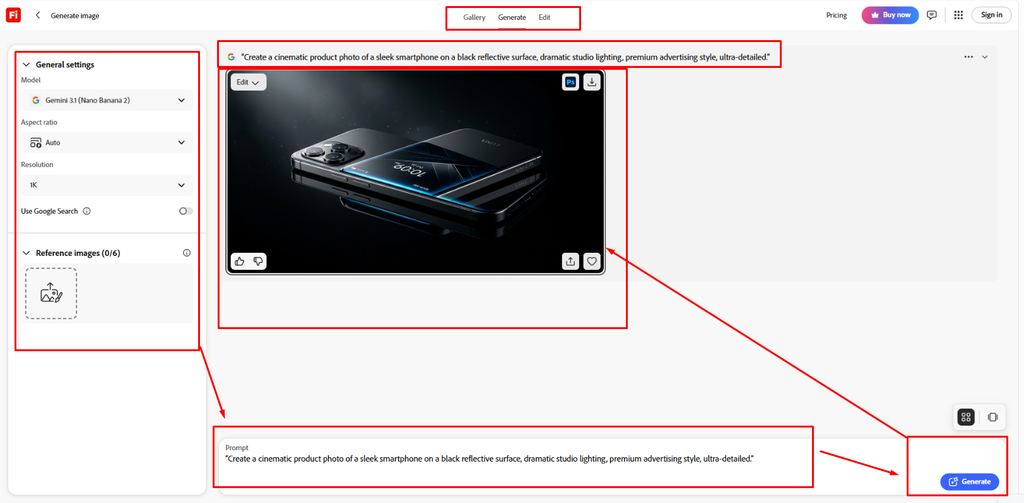
Why use it: Firefly is particularly useful when you need more than just image generation—for example, removing objects, changing backgrounds, expanding images, or creating multiple design variations.
Leonardo AI
Leonardo AI is an AI-powered creative platform designed for generating high-quality images, artwork, illustrations, game assets, and visual concepts from text prompts. It offers more creative control than many beginner-focused image generators.
Key Features:
- 🖼️ Text-to-image generation
- 🎨 Multiple artistic and realistic styles
- 🧑🎨 Character and concept creation
- 🎮 Useful for game assets and digital artwork
- ✏️ AI-powered image editing and variations
- ⚙️ Greater control over image generation and customization
- 🆓 Free plan with limited daily tokens/credits
Best for: Digital artists, game developers, designers, content creators, and users who want more control over AI-generated visuals.
Example prompt:
“Create a highly detailed fantasy warrior standing in an ancient castle, dramatic cinematic lighting, realistic armor, epic atmosphere, intricate details, 4K digital artwork.”
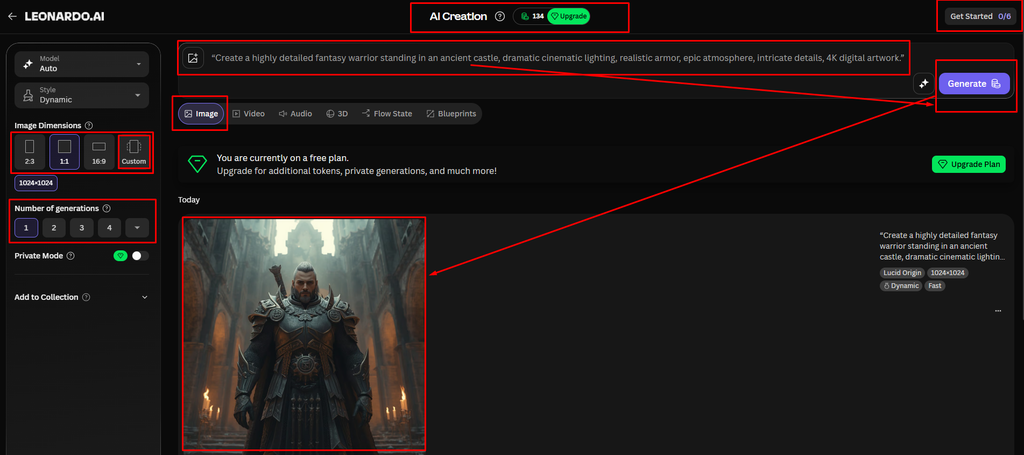
Why use it: Leonardo AI is a strong choice when you want to create detailed artwork, characters, concept designs, and game-related visuals while having more control over the creative process.
Files, images, and data analysis are unavailable until usage resets tomorrow at 2:36 AM. Continue chatting with text only, or upgrade for more access.
Ideogram
Ideogram is an AI image generator known for producing images with clear, readable text. This makes it particularly useful for creating posters, logos, advertisements, social media graphics, thumbnails, and other designs where typography is important.
Key Features:
- 🖼️ Text-to-image generation
- ✍️ Strong text and typography rendering
- 🎨 Multiple visual styles and design options
- 🖼️ Image editing and remixing capabilities
- 📱 Useful for social media posts and marketing graphics
- 🆓 Free plan with limited generation credits
Best for: Bloggers, marketers, designers, social media creators, and anyone who needs AI-generated images containing text.
Example prompt:
“Create a modern promotional poster for a coffee shop with the headline ‘Fresh Coffee Every Morning’, realistic coffee cup, warm lighting, elegant typography, premium advertising design.”

Why use it: Ideogram stands out when your AI-generated image needs accurate text, headlines, signs, or typography, an area where many image generators can struggle.
ChatGPT
OpenAI ChatGPT is an AI assistant that can generate images from natural-language prompts as well as edit existing images. You can describe your idea conversationally and refine the result with follow-up instructions, making it convenient for users who don’t have experience with traditional image-generation tools.
Key Features:
- 🖼️ Text-to-image generation
- ✏️ Edit and modify generated or uploaded images
- 🎨 Create realistic images, illustrations, artwork, and designs
- 💬 Refine images using conversational prompts
- 🧠 Understands detailed and multi-step image instructions
- 🆓 Image generation is available on eligible free access, with usage limits that can vary by plan and availability
Best for: Beginners, bloggers, content creators, marketers, students, and anyone who wants to create or edit images using simple conversational instructions.
Example prompt:
“Create a realistic 16:9 image of a modern AI workspace with a laptop displaying colorful neural-network graphics, soft natural lighting, clean desk, professional technology blog style.”

Why use it: ChatGPT is especially convenient when you want to generate an image and then refine it through a conversation—for example, changing the background, style, composition, objects, or overall look without starting from scratch.
Canva AI / Magic Media
Canva AI / Magic Media
Canva AI, including its Magic Media tools, combines AI image generation with Canva’s drag-and-drop design editor. Users can generate visuals from text prompts and then immediately use them in presentations, social media posts, thumbnails, posters, ads, and other designs.
Key Features:
- 🖼️ Text-to-image generation
- 🎨 Multiple styles and visual formats
- ✏️ AI-powered editing and design tools
- 📱 Ready-made templates for social media and marketing
- 🖥️ Create presentations, posters, thumbnails, and graphics
- 🔄 Generate variations and customize designs
- 🆓 Free Canva accounts can access selected AI features with usage limits
Best for: Bloggers, social media creators, marketers, students, small businesses, and beginners who want to generate an image and turn it into a complete design.
Example prompt:
“Create a clean, modern illustration of artificial intelligence technology with glowing neural network connections, blue futuristic background, professional business style, suitable for a blog thumbnail.”
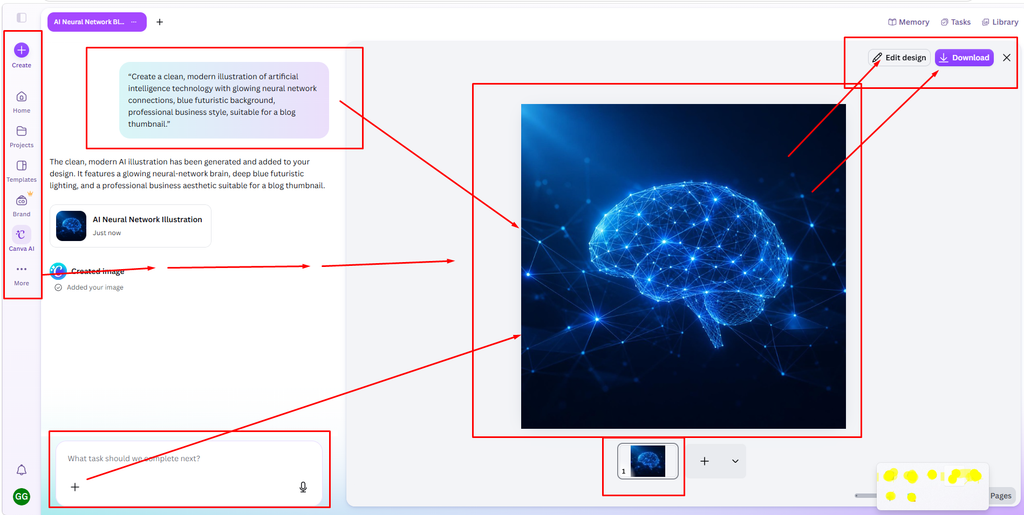
Why use it: Canva AI is particularly useful if you don’t just want an AI-generated image but also need to add text, logos, shapes, templates, and other design elements in the same workspace.
Recraft
Recraft is an AI-powered image and design generator focused on creating high-quality graphics, illustrations, icons, logos, and vector-style artwork. It gives users more control over visual styles and is particularly useful for branding and professional design projects.
Key Features:
- 🖼️ Text-to-image generation
- 🎨 Create illustrations, icons, and graphics
- 🧩 Vector-style and editable designs
- ✏️ AI-powered image editing
- 🖌️ Custom visual styles and consistent designs
- 🏷️ Useful for logos and branding concepts
- 🆓 Free plan with limited credits
Best for: Graphic designers, brand creators, marketers, illustrators, and users who need clean, professional-looking graphics and vector-style visuals.
Example prompt:
“Create a minimalist vector illustration of a futuristic AI robot helping a human, clean geometric shapes, modern professional style, white background, suitable for a technology brand.”

Why use it: Recraft is a good option when you need more design-oriented visuals rather than simple AI artwork, especially for logos, icons, illustrations, branding concepts, and clean vector-style graphics.
FLUX.1 schnell
FLUX.1 schnell is a fast, open-weight text-to-image model from Black Forest Labs designed to generate images quickly while maintaining strong visual quality. It can be used through various AI platforms and, for users with suitable hardware, can also be run locally.
Key Features:
- ⚡ Fast image generation
- 🖼️ Text-to-image generation
- 🎨 Supports realistic and artistic styles
- 💻 Can be used in local/open-source workflows
- 🧑💻 Suitable for developers and AI enthusiasts
- 🆓 Available under an open license for certain use cases
Best for: Developers, AI enthusiasts, creators, and users who want a fast image-generation model with more flexibility and control than many closed online tools.
Example prompt:
“A photorealistic futuristic city at sunset, towering glass skyscrapers, flying vehicles, people walking on illuminated streets, cinematic lighting, highly detailed.”
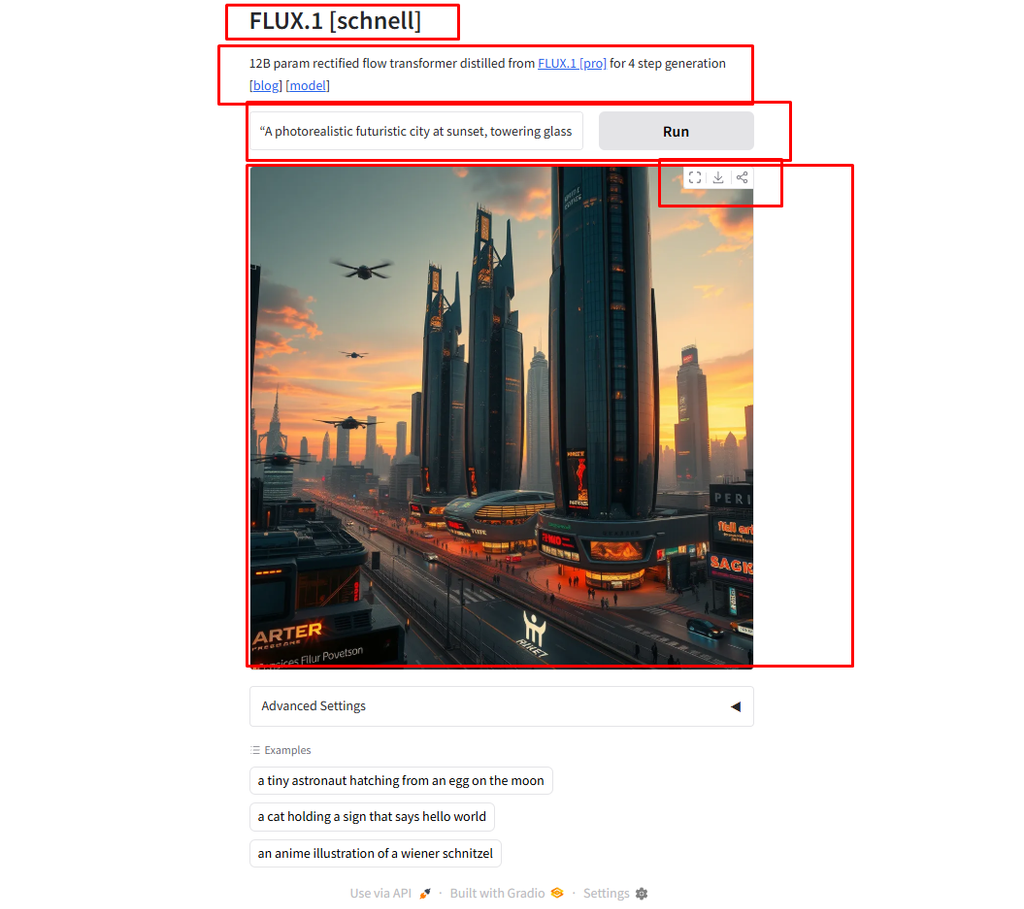
Why use it: FLUX.1 schnell is especially useful when speed and flexibility are important. Because it can be integrated into different AI image-generation workflows, it is also a popular option for users who want greater control over how and where images are generated.
Playground AI
Playground AI
Playground AI is an AI-powered creative platform that lets users generate and edit images from text prompts. It is designed to be accessible to beginners while offering tools for creating social media graphics, illustrations, marketing visuals, and other creative content.
Key Features:
- 🖼️ Text-to-image generation
- ✏️ AI image editing and transformations
- 🎨 Multiple styles and creative options
- 🔄 Create variations of existing images
- 📱 Useful for social media and marketing content
- 🧑🎨 Beginner-friendly interface
- 🆓 Free access with usage limits that can vary over time
Best for: Beginners, bloggers, social media creators, marketers, and users who want an easy-to-use AI image creation platform.
Example prompt:
“Create a vibrant digital illustration of a futuristic city at night, glowing skyscrapers, neon signs, flying cars, cinematic atmosphere, highly detailed, modern sci-fi artwork.”

Why use it: Playground AI is useful for people who want to generate and edit creative visuals without dealing with complicated AI models or technical setups.
I have used each and every tool and talked about the benefits I got and the pros and cons I found from using them. I generated images with one prompt for each tool and shared the screenshots of the results I got from the image generation here. From this you can easily understand. However, all these ten tools generate images for free.


