Bluehost Review 2026

Bluehost Review 2026: Bluehost remains one of the most recognizable names in WordPress hosting, but is it still a smart choice for a new website today?For beginners, the answer is often yes. Bluehost combines WordPress hosting, domain registration, SSL, an AI website builder, CDN, support, and website-management tools in one platform. It is also WordPress.org’s longest-running recommended hosting provider.But there’s another side to the story.
Bluehost’s introductory pricing is considerably lower than its renewal pricing, and not every advanced feature is available on the cheapest plan. Performance is generally solid, but that doesn’t automatically make Bluehost the fastest or cheapest host for every type of website.So rather than simply saying Bluehost is “good” or “bad,” this review looks at what actually matters when you’re paying for hosting in 2026.We’ll cover pricing, features, WordPress usability, performance, security, support, renewal costs, alternatives, and who should—and shouldn’t—use Bluehost.
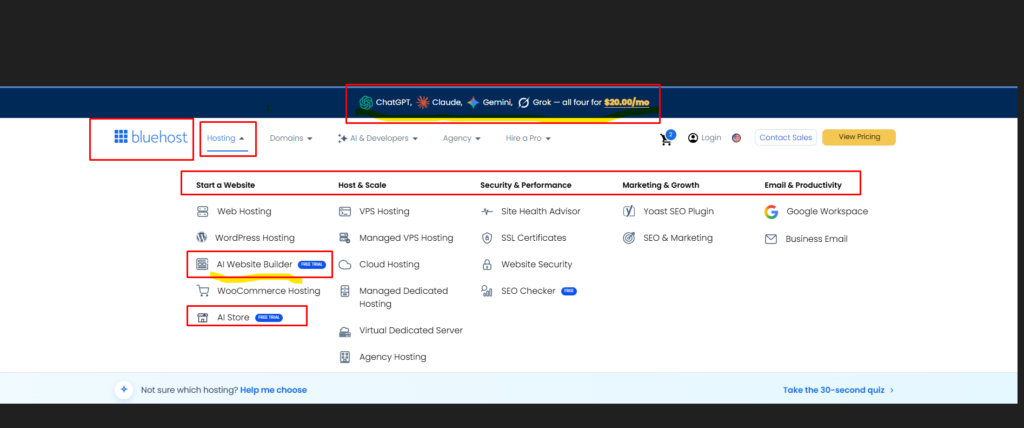
Bluehost Review 2026: Quick Verdict
Overall rating: 4.2/5
Best for: Beginners, WordPress websites, blogs, small businesses, and new affiliate websites.
Not ideal for: Users looking for the lowest long-term hosting cost, advanced server customization, or highly specialized high-performance hosting.
My verdict
Bluehost is still a good web host in 2026, particularly for beginners and WordPress users.
Its biggest advantage isn’t a single technical specification. It’s the combination of ease of use + WordPress integration + built-in tools + support.
Its biggest drawback is renewal pricing.
If you’re comfortable paying more after the initial promotional term, Bluehost is a reasonable choice. If your main priority is minimizing long-term hosting costs, you should compare it with alternatives before buying.

What Is Bluehost?
Bluehost is a web hosting company that provides infrastructure and tools for individuals, bloggers, businesses, online stores, and WordPress website owners.
Its hosting ecosystem includes shared hosting, WordPress hosting, managed WordPress solutions, VPS hosting, dedicated hosting, and other products designed for websites at different stages of growth.
For most beginners, however, the real decision isn’t between every Bluehost product.
It’s usually:
Which Bluehost WordPress or shared hosting plan is enough for my website?
That’s where Bluehost has traditionally focused much of its appeal.
Instead of expecting a new website owner to configure a server manually, Bluehost provides a managed dashboard and tools that simplify tasks such as installing WordPress, connecting domains, managing SSL, creating websites, and handling basic performance and security settings.
That approach is particularly useful if you’ve never purchased hosting before.
Is Bluehost Still Recommended by WordPress?
Yes.
WordPress.org currently lists Bluehost as its longest-running recommended host and describes its platform as powering millions of websites. The WordPress hosting page also highlights features including pre-installed WordPress, an AI site builder, free domain registration, email, SSL, and built-in CDN functionality.
That’s a meaningful positive.
However, being recommended by WordPress.org doesn’t mean Bluehost is automatically the best host for every website.
Your website’s traffic, budget, audience location, technical requirements, and growth plans still matter.
Think of the WordPress recommendation as a strong starting point—not the final buying decision.
Bluehost Pricing 2026
Pricing is one of the most important parts of this Bluehost review because the promotional price isn’t necessarily what you’ll pay over the long term.
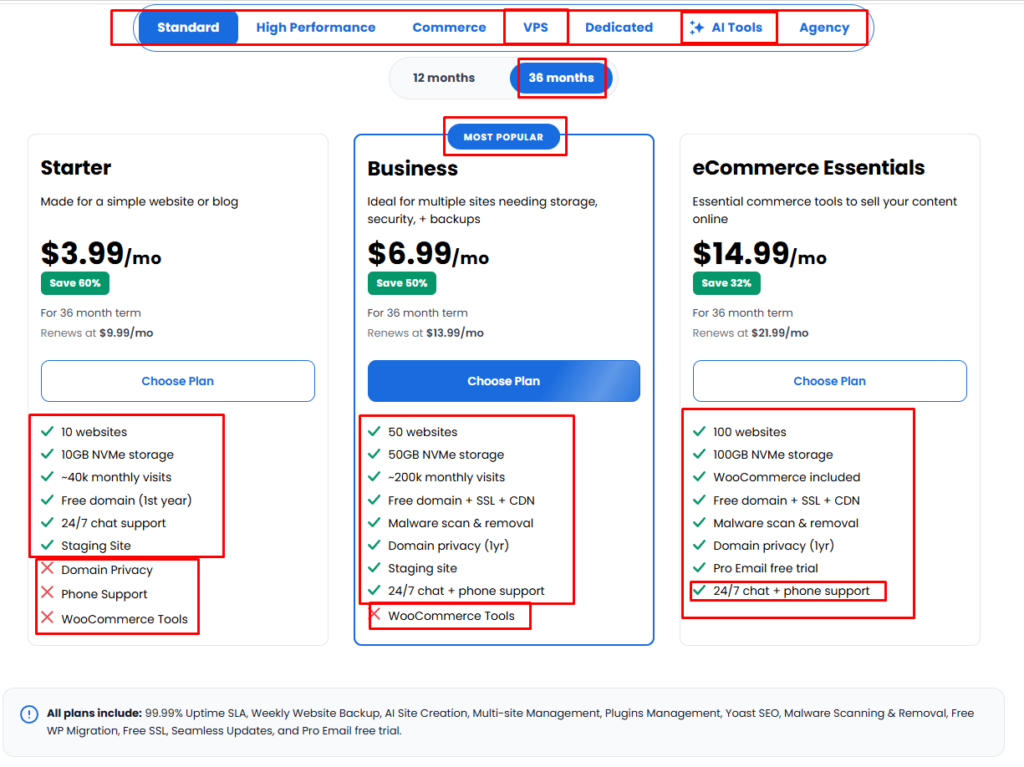
As of August 2026, Bluehost’s official US web-hosting page lists:
| Plan | Introductory Price | Renewal Price | Best For |
|---|---|---|---|
| Starter | $3.99/mo | $9.99/mo | First website or blog |
| Business | $6.99/mo | $13.99/mo | Growing websites |
| Higher-tier plans | Varies | Varies | More demanding projects |
Bluehost currently shows the Starter plan at $3.99/month for a 36-month term, renewing at $9.99/month. The Business plan is listed at $6.99/month, renewing at $13.99/month.
Don’t confuse promotional pricing with long-term pricing
This is probably the most important thing to understand before purchasing Bluehost.
If you see:
$3.99/month
that does not mean you’ll continue paying $3.99/month forever.
The introductory rate applies to the initial promotional term. After that, the hosting renews at the regular rate.
That makes the renewal price much more important if you plan to keep your website for several years.
Is Bluehost cheap?
At the introductory price, Bluehost is competitive.
At renewal, it is no longer an ultra-budget option.
That’s not necessarily a problem. Hosting should be judged by what you receive for the money, not simply by the lowest number on a pricing table.
But if you’re working with a tight budget, calculate your total cost of ownership, not just your first-term price.
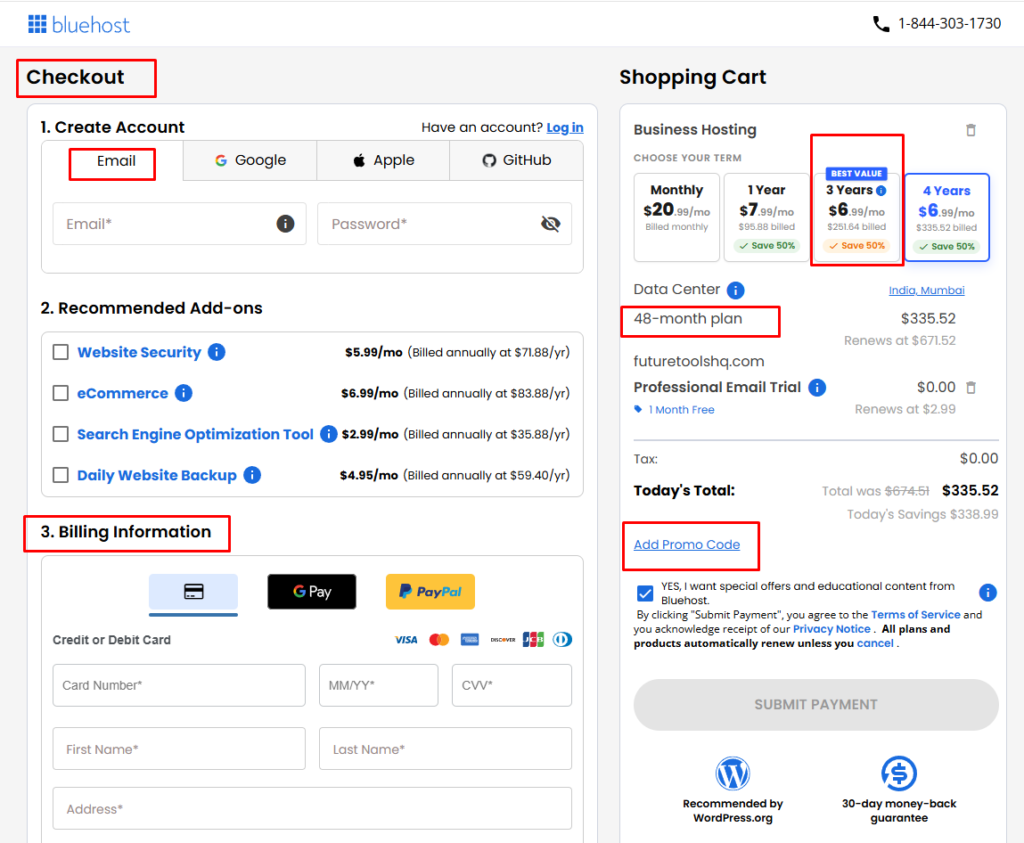
What Does Bluehost Include?
Bluehost’s current WordPress hosting plans include several features aimed at making website management easier.
Depending on the plan, these can include:
- Free domain for the first year
- Free SSL
- AI website-building tools
- CDN
- WordPress installation
- Website migration tools
- Managed WordPress updates
- Security features
- Backup options
- Staging on eligible plans
- SEO-related tools
- 24/7 support
Bluehost’s current WordPress hosting page says all of its WordPress hosting plans include a free domain, SSL, AI builder, and 24/7 WordPress support. Higher-tier plans add capabilities such as larger storage allowances, staging, and additional management features.
The important detail is plan differences.
Don’t assume that because Bluehost offers a feature somewhere in its ecosystem, you’ll automatically receive that feature on the cheapest plan.
Always check the exact plan you’re purchasing.
Bluehost for WordPress
This is where Bluehost makes the strongest argument.

If your website runs on WordPress, Bluehost provides a relatively straightforward environment for getting started.
WordPress is pre-installed on Bluehost’s recommended hosting setup, and the company provides tools designed around WordPress site creation and management. WordPress.org also highlights Bluehost’s WordPress-focused features on its hosting directory.
For a beginner, this can remove several technical obstacles.
You don’t necessarily need to understand:
- DNS configuration
- Server management
- SSL installation
- WordPress installation
- CDN setup
- Basic hosting configuration
before you can start publishing.
That’s a real advantage.
Bluehost isn’t just for beginners, though
A growing WordPress website can move to more powerful hosting as its requirements increase.
Bluehost currently offers multiple hosting categories, including managed WordPress, VPS, cloud, and dedicated options.
So you don’t necessarily have to change companies when your website grows.
Whether upgrading within Bluehost is the best financial or technical decision is a separate question.
Bluehost Performance: Is It Fast?
Performance is one area where hosting reviews often become misleading.
A hosting company can provide good server infrastructure, but your actual website speed depends on much more than the host.
Your:
- WordPress theme
- Plugins
- Images
- JavaScript
- CSS
- Database
- Caching
- CDN
- Page-builder setup
- Traffic level
can all influence performance.
Independent testing gives Bluehost a generally respectable performance profile.
Hostingstep’s 2026 monitoring, based on hundreds of thousands of tests between October 2025 and May 2026, reported an average TTFB of about 501 ms and 99.97% uptime during that monitoring period.
That’s useful evidence, but it shouldn’t be interpreted as a guarantee that every Bluehost website will achieve the same numbers.
A lightweight WordPress blog can be fast.
A heavily customized WooCommerce store with dozens of plugins can be slow.
The host is only one part of the equation.
Bluehost Speed for US Audiences
For a website targeting American visitors, Bluehost can be a sensible option.
Bluehost provides CDN functionality, and its current WordPress hosting materials emphasize global data centers and US-oriented optimization options.
This matters because visitor location affects latency.
If your primary audience is in the United States, you generally want your hosting infrastructure and CDN configuration to serve those visitors efficiently.
But don’t make the mistake of thinking:
“Bluehost = automatically fast in the US.”
Your website still needs proper optimization.
For a US-focused affiliate website, I would combine hosting with:
- Lightweight WordPress theme
- WebP/AVIF images
- Page caching
- CDN
- Minimal plugins
- Good Core Web Vitals practices
That combination will usually matter more than simply switching between two reasonably capable hosts.
Bluehost Uptime and Reliability
Reliability is another important consideration.Bluehost’s current hosting pages advertise a 99.99% uptime commitment/SLA on eligible hosting products.Independent monitoring is also generally positive. Hostingstep recorded 99.97% uptime during its 2025–2026 testing period.
That suggests Bluehost is perfectly capable of supporting normal websites where occasional infrastructure incidents aren’t business-critical.
For:
- Blogs
- Affiliate websites
- Portfolios
- Small business sites
- Informational websites
that’s generally sufficient.
For an application where downtime directly translates into significant financial loss, I’d look at specialized infrastructure rather than relying on an entry-level shared hosting plan from any provider.
Bluehost Security Features
Security is no longer something website owners can treat as optional.Bluehost includes several security-related features across its hosting products, including SSL, malware protection options, backups, CDN functionality, and other security tools depending on the plan.
Free SSL
SSL allows your website to use HTTPS and encrypts the connection between the visitor and your website.For a modern WordPress website, HTTPS should be considered a basic requirement.Bluehost includes SSL with its WordPress hosting plans.
Malware protection
Bluehost offers malware-related protection and security services, with the exact level depending on the hosting package.For a serious business website, however, I wouldn’t rely on a hosting provider as your only security layer.Keep WordPress, themes, and plugins updated.Use strong passwords.Limit unnecessary plugins.Maintain independent backups.Those practices remain important regardless of your host.
Backups
Backup availability varies by product and plan.
Bluehost’s current WordPress materials describe automated backup solutions, while specific backup frequency and restoration features can differ between packages.
For an affiliate site publishing new content regularly, having an additional backup strategy is still a smart idea.
Bluehost Customer Support
Support is one of the areas where beginners can benefit the most.
Bluehost currently advertises 24/7 support for its WordPress hosting products.
That’s useful when you run into problems involving:
- Domain connections
- SSL
- WordPress installation
- Hosting configuration
- Migration
- DNS
- Website availability
But there is an important distinction.
Hosting support isn’t the same as WordPress development
A support agent may help you identify a hosting problem.
That doesn’t mean they’ll redesign your website, fix every third-party plugin conflict, or write custom PHP for you.
If you understand that distinction, you’ll have much more realistic expectations of hosting support.
Bluehost Ease of Use
If I had to identify Bluehost’s biggest advantage, ease of use would be near the top of the list.
Bluehost is built around reducing the amount of technical knowledge required to launch a website.
You can manage your hosting, domain, website, and WordPress setup from one ecosystem.
That’s especially useful for first-time website owners.
An experienced developer may prefer a hosting provider that gives them more granular control.
A beginner may prefer not having to deal with that complexity at all.
For the second group, Bluehost makes a lot of sense.
Bluehost AI Website Builder
Bluehost has also expanded its AI-powered website creation tools.
Its current WordPress hosting offering includes an AI site builder designed to help users create a website more quickly.
This is useful for someone who wants to get a basic website structure online without starting from a blank WordPress installation.
But I wouldn’t choose a hosting company solely because it has an AI website builder.
AI-generated websites can accelerate the starting process, but you’ll still need to improve:
- Branding
- Content
- Navigation
- SEO
- Images
- Internal linking
- Conversion elements
- Mobile usability
The AI builder is a convenience feature, not a replacement for good website strategy.

Bluehost for Affiliate Websites
For a new affiliate website, Bluehost can be a practical starting point.You don’t need an expensive enterprise server to publish informational content.
A new affiliate site typically needs:
- Reliable hosting
- WordPress
- SSL
- Fast page delivery
- CDN/caching
- Backups
- Easy content management
- Room to grow
Bluehost can provide those basics.But there’s a bigger consideration for affiliate marketers:Don’t choose hosting based on commission alone.If Bluehost pays you an affiliate commission, that doesn’t automatically mean it’s the best host for your reader.our recommendation should match the reader’s needs.
For a beginner creating a WordPress blog, Bluehost can be a legitimate recommendation.For an experienced developer building a complex application, it may not be.That distinction will also make your affiliate content more credible.
Bluehost Pros and Cons
Pros
Beginner-friendly
Bluehost is designed to make launching a website relatively simple.
Strong WordPress integration
Bluehost is a long-standing WordPress.org recommended host.
Free SSL
SSL is included with current WordPress hosting plans.
Free domain for the first year
Eligible hosting plans include a free domain for the first year, subject to Bluehost’s terms.
AI website creation tools
The AI builder can make the initial website-building process easier.
CDN included
Bluehost’s current WordPress hosting plans include CDN functionality designed to improve website delivery.
24/7 support
Support availability is useful for people who are new to hosting and WordPress.
Multiple upgrade paths
Bluehost offers hosting options beyond entry-level shared hosting, including VPS, cloud, managed WordPress, and dedicated products.
Cons
Renewal pricing is much higher
The biggest downside for budget-conscious buyers is the difference between promotional and renewal pricing.The current Starter offer is $3.99/month for the initial 36-month term, while the listed renewal is $9.99/month.
Not every feature is included in the cheapest plan
Advanced functionality may require a higher-tier plan.
Performance depends heavily on your website
Bluehost can perform well, but hosting alone won’t make a poorly optimized WordPress site fast.
Entry-level hosting isn’t for every project
High-traffic stores, complex applications, and technically demanding websites may need more specialized infrastructure.
Bluehost vs Hostinger
For beginners, this is one of the most useful comparisons to make.Both companies offer beginner-friendly hosting, WordPress support, SSL, domain-related services, CDN capabilities, and 24/7 support.
The difference is more about positioning.
Bluehost
Better suited to users who value:
- WordPress ecosystem
- Beginner-friendly setup
- Established WordPress reputation
- Simple website management
- Broad hosting upgrade options
Hostinger
Often attractive to users who prioritize:
- Aggressive introductory pricing
- Resource value
- Performance-per-dollar
- A modern beginner-oriented dashboard
Hostinger’s current plans also offer free domain, SSL, CDN, backups, AI tools, and 24/7 support on eligible plans.
My take
If you’re choosing purely on price, compare the full initial term and renewal cost.If you’re choosing based on WordPress reputation and beginner experience, Bluehost deserves serious consideration.There isn’t a universal winner.
Bluehost vs SiteGround
SiteGround is another popular WordPress hosting option.
The two companies target somewhat different priorities.
Bluehost tends to be attractive to beginners who want a straightforward all-in-one ecosystem.
SiteGround is often considered by users who place greater emphasis on managed WordPress tools, support, and performance-focused features.
For a first personal blog, either can work.
For a growing business website, I’d compare:
- Renewal pricing
- Storage
- Backup system
- CDN
- Staging
- Support
- Performance
- Resource limits
rather than choosing based on brand reputation alone.
Is Bluehost Good for Beginners?
Yes.
This is probably the easiest question in the entire review.
If you’re buying hosting for the first time, Bluehost gives you many of the things you’re likely to need without forcing you to understand server administration.
You can register a domain, install WordPress, configure basic settings, use an AI builder, manage SSL, and get support from one ecosystem.
That’s exactly what a beginner-friendly host should do.
The only thing I’d emphasize is that beginners should read the pricing details carefully.
Don’t buy a three-year plan simply because the monthly promotional number looks cheap.
Understand the total upfront cost and the future renewal rate.
Is Bluehost Good for Small Businesses?
For many small businesses, yes.
A local service company, consultant, freelancer, agency, restaurant, professional, or small online business usually doesn’t need a dedicated server on day one.
What it needs is:
- Reliable uptime
- Professional domain
- SSL
- Fast-enough WordPress hosting
- Easy updates
- Backups
- Security
- Support
Bluehost can cover those requirements.
If traffic grows substantially, the business can then consider a more powerful hosting environment.
Is Bluehost Good for High-Traffic Websites?
This requires a more nuanced answer.
Entry-level Bluehost hosting is not what I’d choose for a high-traffic, business-critical website.
Once your site is generating significant traffic, hosting requirements change.
You may need:
- More CPU
- More RAM
- Better database performance
- Advanced caching
- Object caching
- Dedicated resources
- Better staging workflows
- More sophisticated monitoring
- Greater scalability
At that point, you should compare higher-tier managed WordPress, cloud, VPS, or dedicated hosting.
The good news is that Bluehost has those types of products.
The question is whether Bluehost remains the best provider for your specific requirements.
Is Bluehost Worth It in 2026?
After looking at the pricing, features, WordPress integration, performance, support, and usability, my answer is:
Yes—but with conditions.
Bluehost is worth considering if your main priority is getting a WordPress website online without unnecessary technical complexity.
It’s especially attractive for:
- New bloggers
- First-time WordPress users
- Small businesses
- Portfolio sites
- New affiliate websites
- Informational websites
But if you’re evaluating hosting primarily on long-term price, don’t stop at the promotional rate.
The current Starter plan’s $3.99/month introductory price becomes $9.99/month at renewal for the listed 36-month term.
That changes the economics significantly.
So my advice is simple:
Compare the renewal price before you buy.
Who Should Choose Bluehost?
I’d put Bluehost on your shortlist if:
- You’re new to WordPress
- You want a simple setup
- You want hosting and domain management together
- You’re building a blog
- You’re launching a small business website
- You’re starting an affiliate website
- You value 24/7 support
- You want the option to upgrade later
Who Should Look Elsewhere?
I’d compare other providers first if:
- Your #1 priority is the lowest long-term cost
- You need advanced server control
- You have unusually high traffic
- You’re running a technically complex application
- You need specialized managed infrastructure
- You already have strong server-management skills
In those situations, a different hosting category may be more appropriate.
Final Verdict: Bluehost Review 2026
Bluehost isn’t the cheapest host in every situation.It isn’t automatically the fastest.And it isn’t the perfect solution for every type of website.But that’s not really what Bluehost is trying to be.Its strongest selling point is simplicity.
You can start with a domain, WordPress, SSL, website-building tools, CDN, support, and other essentials without having to become a hosting expert first. WordPress.org continues to list Bluehost among its recommended hosts, and Bluehost remains a significant player in the WordPress ecosystem in 2026.
For a beginner, that’s valuable.For a new affiliate marketer, blogger, or small business owner, Bluehost can be a sensible starting point.But don’t let the promotional price make the decision for you.Look at the renewal price. Look at the plan limits. Look at your traffic expectations. Then decide.
My final rating: 4.2/5
Ease of use: 4.7/5
WordPress experience: 4.6/5
Features: 4.3/5
Performance: 4.0/5
Security: 4.2/5
Support: 4.2/5
Long-term value: 3.8/5
Is Bluehost good in 2026?
Yes. Bluehost remains a strong option for WordPress beginners, bloggers, small businesses, and new website owners. WordPress.org continues to list it as a recommended hosting provider.
How much does Bluehost cost in 2026?
Bluehost’s current US pricing shows the Starter plan at $3.99/month for a 36-month introductory term, renewing at $9.99/month. Prices and promotions can change, so check the official pricing page before purchasing.
Does Bluehost include a free domain?
Yes. Eligible WordPress hosting plans currently include a free domain for the first year, subject to Bluehost’s terms and eligible domain extensions.
Does Bluehost include SSL?
Yes. Bluehost’s current WordPress hosting plans include a free SSL certificate.
Is Bluehost good for WordPress?
Yes. WordPress.org lists Bluehost as its longest-running recommended host, and Bluehost’s current plans are built around WordPress management and website creation.
Is Bluehost fast?
Bluehost can provide solid performance for normal WordPress websites. Independent 2026 testing from Hostingstep recorded an average TTFB of about 501 ms and 99.97% uptime during its testing period. Actual results will vary depending on your website and configuration.
Does Bluehost have a money-back guarantee?
Bluehost currently advertises a 30-day money-back guarantee on eligible hosting products. Specific exclusions and refund conditions can apply, so check the terms before purchasing.
Is Bluehost better than Hostinger?
Not universally. Bluehost is particularly attractive for WordPress beginners and users who value simplicity, while Hostinger can be compelling for buyers focused heavily on price and resource value. Compare the specific plans and renewal costs before choosing.
Is Bluehost good for affiliate marketing?
Yes. Bluehost can work well for a new WordPress affiliate website. However, hosting should be selected based on the site’s actual requirements rather than affiliate commission potential.
Should I buy Bluehost for three years?
A three-year introductory term can lower the promotional monthly price, but you should calculate the total upfront payment and understand the renewal rate before committing. The current Starter plan renews at $9.99/month after the introductory term.
My Opinion:
In my opinion, Bluehost is still a good hosting option in 2026, especially for those building a WordPress website for the first time. Setup is easy, there is good integration with WordPress, and many of the features a beginner needs are available in one place. However, I would not recommend getting Bluehost just because of the $3.99/month promotional price. The renewal price is very high, so you should calculate the cost in the long run first.
My verdict:
👉 Beginner — Recommended
👉 New blog/affiliate site — Recommended
👉 US-focused WordPress site — Good choice
👉 If you want the lowest long-term price — Compare alternatives
👉 High-traffic/advanced website — Look for higher-tier hosting or another provider.