
SiteGround Review 2026 – Quick Verdict
SiteGround is a strong premium hosting choice in 2026, especially for WordPress users who value speed, security, ease of use, and 24/7 support. SiteGround currently promotes managed WordPress hosting with features such as automated updates, backups, CDN/caching, free WordPress migration, and human support.
The biggest issue is price after the introductory period. The current promotional WordPress price starts at $2.99/month, while the displayed regular price is $17.99/month, so buyers need to consider the renewal cost before signing up.
⭐ Our Quick Verdict
| Category | Rating |
|---|---|
| Performance | ⭐⭐⭐⭐⭐ |
| WordPress Features | ⭐⭐⭐⭐⭐ |
| Security | ⭐⭐⭐⭐⭐ |
| Customer Support | ⭐⭐⭐⭐⭐ |
| Ease of Use | ⭐⭐⭐⭐⭐ |
| Pricing | ⭐⭐⭐⭐ |
| Renewal Value | ⭐⭐⭐ |
| Overall | 4.5/5 |
Best for: WordPress bloggers, small businesses, affiliate websites, and users who want reliable support without managing complicated server technology.
Not ideal for: Users whose main priority is the lowest long-term hosting cost.
Bottom Line
Is SiteGround worth it in 2026? Yes—but mainly if you value quality and support more than the cheapest possible price. Independent 2026 reviews also highlight SiteGround’s support and reliability while consistently pointing to the high renewal cost as its biggest weakness.
What Is SiteGround?
SiteGround is a web hosting company that provides hosting services for websites, with a strong focus on WordPress, managed hosting, website performance, security, and customer support.
Founded in 2004, SiteGround has become a well-known hosting provider used by bloggers, small businesses, developers, and website owners. Its hosting platform includes features such as free SSL certificates, daily backups, CDN, caching, automatic WordPress updates, and website migration tools.
One of SiteGround’s main advantages is its managed hosting approach. Instead of requiring users to handle many technical server tasks themselves, SiteGround provides tools designed to make website management easier.
What Does SiteGround Offer?
- Managed WordPress Hosting
- Web Hosting
- WooCommerce Hosting
- Cloud Hosting
- Free SSL
- Daily Website Backups
- CDN and Caching
- WordPress Migration
- Website Security Tools
- 24/7 Customer Support
For beginners and website owners who want a relatively easy-to-manage WordPress hosting environment, SiteGround can be an attractive option. However, its renewal pricing can be significantly higher than its introductory pricing, which is something buyers should consider before purchasing.
In short: SiteGround is a premium-focused web hosting provider that prioritizes performance, security, WordPress management, and customer support, rather than competing primarily on the lowest price.
SiteGround Pricing 2026
SiteGround offers three main managed WordPress hosting plans in 2026: StartUp, GrowBig, and GoGeek. At the time of writing, the promotional prices start at $2.99/month, but the renewal prices are considerably higher, so this is an important factor to consider before purchasing.

SiteGround Pricing 2026: At a Glance
| Plan | Intro Price | Renewal Price | Websites | Storage |
|---|---|---|---|---|
| StartUp | $2.99/mo | $17.99/mo | 1 | 10 GB |
| GrowBig | $4.99/mo | $29.99/mo | Unlimited | 50 GB |
| GoGeek | $7.99/mo | $44.99/mo | Unlimited | 100 GB |
These prices are based on 12-month prepaid plans and can change with SiteGround promotions.
1. StartUp – $2.99/month
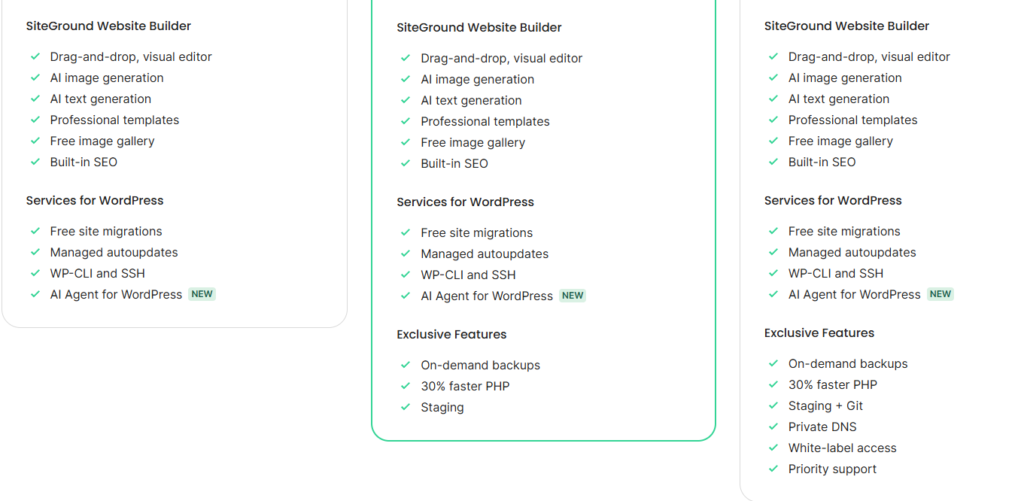
StartUp is designed for personal websites, blogs, and smaller WordPress sites. It supports one website and includes 10 GB of storage, free SSL, CDN, daily backups, free email, WordPress migration, and managed WordPress updates.
However, the price increases to $17.99/month at renewal, making the long-term cost much higher than the introductory offer.
Best for: Beginners and small websites.
2. GrowBig – $4.99/month
GrowBig is arguably the most attractive option for users who need more than a single website. It supports unlimited websites, provides 50 GB of storage, and adds features such as on-demand backups, staging, and 30% faster PHP.
The current renewal price is $29.99/month on a 12-month prepaid term.
Best for: Growing blogs, affiliate websites, small businesses, and users managing multiple sites.
3. GoGeek – $7.99/month
GoGeek is SiteGround’s most powerful shared WordPress plan. It includes unlimited websites, 100 GB of storage, staging with Git, private DNS, white-label access, and priority support.
The current renewal price is $44.99/month, so this plan makes the most sense for users who actually need its advanced features.
Best for: High-traffic websites, agencies, developers, and larger projects.
⚠️ The Biggest Thing to Know About SiteGround Pricing
The introductory price can look extremely attractive, but the renewal price is the number you should pay close attention to.
For example, StartUp is currently advertised at $2.99/month, but renews at $17.99/month. GrowBig goes from $4.99 to $29.99/month, while GoGeek goes from $7.99 to $44.99/month.
Our recommendation: If you’re creating a small affiliate website such as FutureToolsHQ, StartUp can be enough for one website, while GrowBig is the better choice if you plan to manage multiple websites or want staging and additional performance features.
Affiliate disclosure: If you purchase SiteGround through links on FutureToolsHQ, we may earn a commission at no additional cost to you. This helps support the website and our independent reviews.
SiteGround StartUp vs GrowBig vs GoGeek
SiteGround offers three main managed WordPress hosting plans: StartUp, GrowBig, and GoGeek. Each plan is designed for a different type of website, so choosing the right one depends on your website size, traffic, number of websites, and the features you need.
| Feature | StartUp | GrowBig | GoGeek |
|---|---|---|---|
| Starting Price | $2.99/mo | $4.99/mo | $7.99/mo |
| Renewal Price | $17.99/mo | $29.99/mo | $44.99/mo |
| Websites | 1 | Unlimited | Unlimited |
| Storage | 10 GB | 50 GB | 100 GB |
| Free SSL | ✅ | ✅ | ✅ |
| Free CDN | ✅ | ✅ | ✅ |
| Daily Backups | ✅ | ✅ | ✅ |
| On-Demand Backups | ❌ | ✅ | ✅ |
| Staging | ❌ | ✅ | ✅ |
| Faster PHP | ❌ | ✅ | ✅ |
| Git | ❌ | ❌ | ✅ |
| Private DNS | ❌ | ❌ | ✅ |
| White-Label Access | ❌ | ❌ | ✅ |
SiteGround StartUp
StartUp is SiteGround’s entry-level plan and is best suited for beginners, personal websites, blogs, and smaller WordPress projects. It supports one website and includes essential features such as free SSL, CDN, daily backups, and managed WordPress tools.
If you are launching your first website and don’t need advanced features, StartUp can be a good starting point.
SiteGround GrowBig
GrowBig is the middle-tier plan and offers significantly more flexibility. It supports unlimited websites and includes 50 GB of storage, on-demand backups, staging, and additional performance features.
For bloggers, affiliate marketers, small businesses, and growing websites, GrowBig is arguably the most balanced option.
SiteGround GoGeek
GoGeek is designed for more demanding websites, developers, agencies, and users who need advanced tools. It includes 100 GB of storage, unlimited websites, staging, Git, private DNS, and white-label capabilities.
However, the higher renewal price means GoGeek may be unnecessary for a small or new website.
Which SiteGround Plan Should You Choose?
For most users, the choice is fairly simple:
- StartUp: Best for one small website and beginners.
- GrowBig: Best overall choice for growing websites and affiliate marketers.
- GoGeek: Best for developers, agencies, and larger websites.
Our recommendation: If you’re building a serious affiliate website and expect it to grow, GrowBig offers the best balance between features and price. If you’re just starting with one small website and want to keep your initial cost low, StartUp may be enough.
Important: SiteGround’s introductory prices are much lower than its renewal prices. Always check the renewal cost before purchasing so you know what you’ll pay after the promotional period.
SiteGround Features
SiteGround is more than just basic web hosting. Its managed WordPress plans include a range of features designed to improve website speed, security, reliability, backups, and ease of management. The exact features available depend on the plan you choose.
⚡ 1. Fast Website Performance
SiteGround provides built-in performance tools such as caching, CDN, and optimized PHP to help websites load faster. GrowBig and GoGeek also include additional performance features compared with the entry-level StartUp plan.
For blogs, affiliate websites, and business websites, faster loading times can provide a better user experience and potentially help with conversions.
🔒 2. Free SSL Certificate
Every SiteGround hosting plan includes a free SSL certificate, which encrypts the connection between your website and its visitors.
SSL is essential for modern websites, particularly if you collect contact information, process payments, or want visitors to see your site as secure.
💾 3. Daily Backups
SiteGround automatically creates daily backups, helping protect your website if something goes wrong.
This can be particularly useful for WordPress websites because plugin updates, theme changes, or configuration errors can sometimes cause unexpected problems.
🚀 4. Free CDN
SiteGround includes its own CDN service, which can help deliver website content more efficiently to visitors in different geographic locations.
For websites targeting visitors across countries such as the United States, United Kingdom, and Canada, a CDN can be especially useful.
🛡️ 5. Security Features
Security is another major part of SiteGround’s hosting platform. Its hosting environment includes features designed to help protect websites from common security threats, along with SSL, backups, monitoring, and other security tools.
For WordPress users, this means you don’t have to manage every aspect of server security yourself.
🔄 6. Free Website Migration
SiteGround provides tools for moving an existing website to its platform. This can make migration easier for users who already have a WordPress website hosted elsewhere.
For beginners, having a migration option can save considerable time and reduce the technical difficulty of moving a website.
🧪 7. WordPress Staging
Staging is one of the more useful features available with GrowBig and GoGeek.
It allows you to create a separate copy of your website where you can test:
- New plugins
- Theme changes
- WordPress updates
- Design changes
- Custom code
You can test changes before applying them to your live website, reducing the risk of breaking your main site.
📈 8. Managed WordPress Hosting
SiteGround handles many technical aspects of WordPress hosting, including automated updates and hosting-level optimization.
This makes it particularly appealing to users who want to focus on creating content and growing their website rather than managing server technology.
📧 9. Professional Email
SiteGround hosting plans include email capabilities, allowing you to create professional addresses using your own domain—for example, contact@futuretoolshq.com.
This can make an affiliate or business website look more professional than using a generic Gmail address.
🛠️ 10. Site Tools
SiteGround provides a custom control panel called Site Tools for managing your website and hosting account.
From Site Tools, users can manage things such as:
- Websites
- Domains
- Email accounts
- Backups
- SSL
- Security
- Performance
- Databases
- File management
The interface is designed to be easier to use than a traditional server-management environment.
📞 11. Customer Support
SiteGround also places significant emphasis on customer support. Users can get assistance with hosting-related issues, WordPress problems, migration, and account management.
This can be particularly valuable for beginners who don’t have extensive technical knowledge.
⭐ SiteGround Features: Quick Summary
Overall, SiteGround’s strongest features are managed WordPress hosting, performance optimization, automated backups, free SSL, CDN, security tools, staging, migration tools, and customer support.
However, not every feature is included in every plan. StartUp is designed for basic needs, GrowBig adds several useful tools for growing websites, while GoGeek is aimed at advanced users and agencies.
For most affiliate websites, GrowBig offers the most useful combination of features without paying for all of GoGeek’s advanced capabilities.
WordPress Performance & Speed
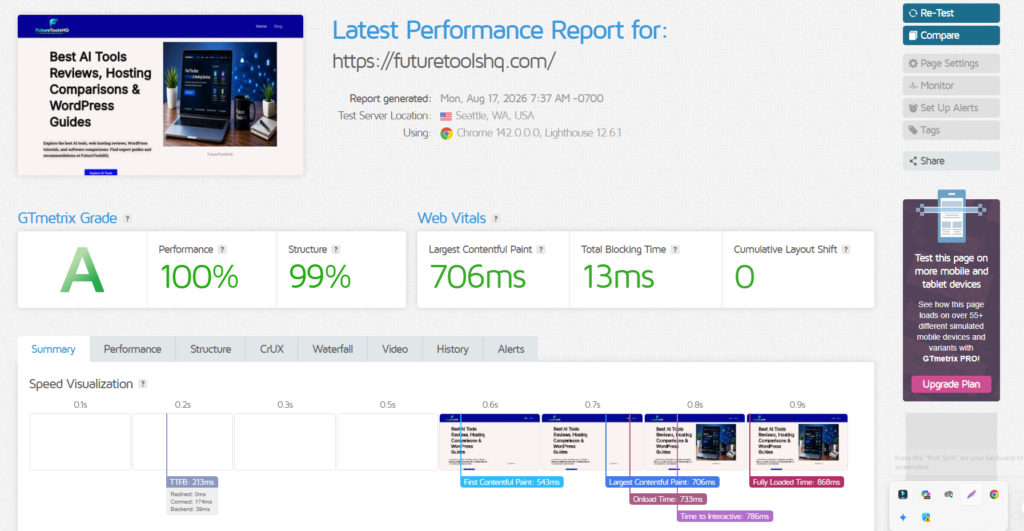
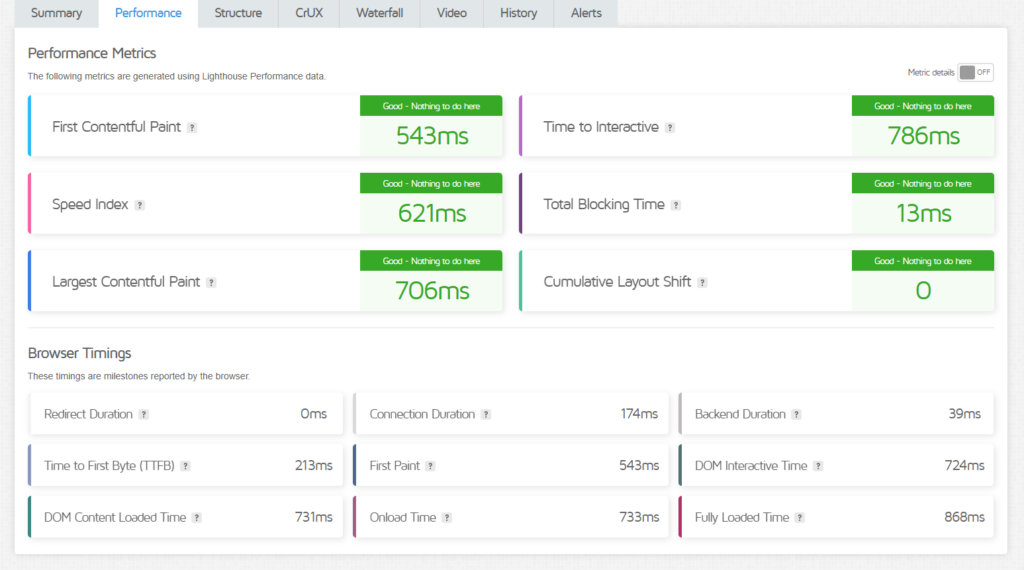
Website speed is one of the most important factors to consider when choosing WordPress hosting. A slow website can create a poor user experience, increase bounce rates, and make it harder to convert visitors into customers.
SiteGround performs well in WordPress performance, thanks to its combination of server infrastructure, caching, CDN, optimized PHP, and built-in performance tools. However, your actual speed will also depend on your WordPress theme, plugins, images, traffic, and website configuration.
⚡ SiteGround Speed Features
SiteGround provides several tools designed to improve WordPress performance:
- Built-in caching: Helps serve frequently requested content faster.
- Free CDN: Delivers website content through a distributed network to improve loading times for visitors in different locations.
- Optimized PHP: Newer PHP versions can improve WordPress processing speed.
- SiteGround Optimizer: Provides WordPress-specific performance optimization tools.
- HTTP/2 and modern hosting infrastructure: Helps improve the delivery of website resources.
- Image optimization: Tools can help reduce image sizes without significantly affecting visual quality.
🚀 How Fast Is SiteGround for WordPress?
In real-world use, SiteGround can provide fast page-loading performance, particularly when the website is properly optimized.
However, it’s important not to assume that choosing SiteGround automatically makes every WordPress website fast. A website loaded with large images, unnecessary plugins, heavy page builders, or poorly optimized code can still be slow—even on good hosting.
For the best results, SiteGround hosting should be combined with:
- A lightweight WordPress theme
- Optimized images
- A reasonable number of plugins
- Browser and server caching
- A CDN
- Updated WordPress, themes, and plugins
🌎 Good Choice for US Visitors?
If your primary audience is in the United States, SiteGround can be a strong option because its infrastructure and CDN can help deliver content efficiently to visitors in different regions.
For an affiliate website such as FutureToolsHQ, this matters because visitors are often coming from search engines and may leave if pages take too long to load.
🏆 Our Performance Verdict
SiteGround gets a strong score for WordPress performance and speed.
Performance Rating: ⭐⭐⭐⭐⭐ (4.5/5)
The biggest advantage is that SiteGround gives WordPress users several performance tools without requiring them to become server-management experts.
Bottom line: SiteGround is a good choice if you want fast, managed WordPress hosting with built-in optimization tools. Just remember that hosting is only one part of website speed—your theme, plugins, images, and overall site setup also have a major impact.
Uptime & Reliability
For any website, uptime and reliability are just as important as speed. A website that loads quickly but frequently goes offline can lose visitors, leads, search traffic, and affiliate revenue.
SiteGround has built its hosting platform around reliability, with infrastructure and monitoring designed to keep websites available and operating smoothly. It also provides features such as daily backups, security monitoring, CDN, and automated systems that help reduce the impact of common hosting problems.
🟢 SiteGround Uptime
SiteGround advertises a 99.9% uptime guarantee for its hosting services. While no hosting provider can realistically guarantee that a website will never experience downtime, a 99.9% target represents a strong level of availability.
For perspective, 99.9% uptime allows roughly 8 hours and 46 minutes of downtime per year.
🔒 What Helps SiteGround Reliability?
Several SiteGround features contribute to overall reliability:
- 24/7 server monitoring to detect potential problems
- Daily backups to help recover websites when something goes wrong
- Free SSL for secure connections
- CDN to improve content delivery
- Security monitoring to help protect websites
- Automated WordPress updates on managed WordPress plans
- Data-center infrastructure designed for reliable hosting
💾 Backups Are Especially Important
Even reliable hosting cannot prevent every problem. A plugin conflict, accidental deletion, or WordPress update can sometimes cause issues.
That’s why SiteGround’s backup system is valuable. Having recent backups gives website owners a way to restore their site if something goes wrong.
GrowBig and GoGeek also provide on-demand backup capabilities, giving users more control when making significant website changes.
⚠️ Is SiteGround 100% Reliable?
No hosting company should be described as 100% uptime. Even premium hosting providers can experience occasional outages or maintenance.
For a trustworthy review, it’s better to say that SiteGround offers strong reliability and a 99.9% uptime commitment, rather than claiming that downtime never happens.
🏆 Our Uptime & Reliability Verdict
Uptime & Reliability Rating: ⭐⭐⭐⭐⭐ (4.5/5)
SiteGround is a strong choice for bloggers, affiliate marketers, businesses, and WordPress users who need dependable hosting. Its combination of uptime commitment, monitoring, backups, security, and managed WordPress features makes reliability one of its strengths.
Customer Support
Customer support is one of the areas where SiteGround has historically tried to differentiate itself from budget-focused hosting providers. For beginners and small business owners, having access to knowledgeable support can be especially valuable when dealing with WordPress errors, migration issues, DNS problems, or hosting configuration.
📞 24/7 Support
SiteGround provides 24/7 customer support for hosting customers. Support is available through online support channels, allowing users to get help with technical and account-related issues.
This is particularly useful if your website experiences a problem outside normal business hours.
🛠️ What Can SiteGround Support Help With?
SiteGround’s support team can assist with many hosting-related issues, including:
- WordPress installation and configuration
- Website migration
- Domain and DNS issues
- SSL problems
- Email configuration
- Hosting performance issues
- Backup and restoration questions
- Server-related problems
- WordPress troubleshooting
However, support should not be expected to replace a web developer. For example, if a custom plugin contains badly written code, fixing the underlying code may be outside the scope of normal hosting support.
👨💻 Helpful for Beginners
One of SiteGround’s biggest advantages is its relatively beginner-friendly approach.
If you’re new to WordPress, you may eventually encounter problems such as:
“Why isn’t my SSL working?”
“Why isn’t my domain connecting?”
“Why did my WordPress site stop working after an update?”
Having hosting support available can save a lot of troubleshooting time.
⚡ Support on Different Plans
SiteGround provides support across its hosting plans, but GoGeek is positioned as the more advanced plan and includes priority support compared with the lower-tier options.
For most small websites, StartUp or GrowBig should provide sufficient support. GoGeek’s additional support benefits become more relevant for agencies, developers, and larger websites.
🏆 Our Customer Support Verdict
Customer Support Rating: ⭐⭐⭐⭐⭐ (4.5/5)
SiteGround is a strong choice for users who want 24/7 hosting support and a managed WordPress environment. Beginners can particularly benefit from having help available when technical hosting problems arise.
Security Features
Website security is essential for any WordPress website, especially for affiliate websites, business sites, and websites that receive traffic from search engines. A security breach can lead to downtime, lost data, spam, or even damage to your website’s reputation.
SiteGround includes several security features designed to protect websites at the hosting level and make WordPress security easier to manage.
🔒 Free SSL Certificate
All SiteGround hosting plans include a free SSL certificate. SSL encrypts the connection between your website and visitors, helping protect sensitive information and ensuring your site can use HTTPS.
For a modern WordPress website, HTTPS is essential.
🛡️ Web Application Firewall (WAF)
SiteGround provides a Web Application Firewall (WAF) designed to help protect websites against common web-based attacks.
A WAF can help filter malicious traffic before it reaches your website, adding an additional layer of protection beyond WordPress itself.
🔄 Automatic Updates
Keeping WordPress and its components updated is an important part of security.
SiteGround’s managed WordPress hosting includes automatic WordPress updates, helping users avoid leaving outdated software running on their websites.
However, you should still keep your themes and plugins updated and use reputable plugins from trusted sources.
💾 Daily Backups
Security isn’t only about preventing attacks—it’s also about being able to recover when something goes wrong.
SiteGround includes daily backups, allowing website owners to restore their website if they encounter problems such as a failed update, accidental changes, or certain security incidents.
GrowBig and GoGeek also provide additional backup functionality, including on-demand backups.
👁️ 24/7 Security Monitoring
SiteGround uses continuous monitoring and automated systems to identify potential problems within its hosting environment.
This type of server-level monitoring can help detect issues earlier and contributes to the overall security and reliability of the platform.
🚨 Anti-Malware & Security Tools
SiteGround also provides security tools intended to detect and protect websites from malicious activity. Users can manage various security-related settings through Site Tools.
For additional WordPress protection, website owners can still use a reputable security plugin when appropriate.
🏆 Our Security Verdict
Security Rating: ⭐⭐⭐⭐⭐ (4.5/5)
SiteGround offers a strong collection of security features, including free SSL, WAF protection, automated updates, backups, monitoring, and hosting-level security tools.
The important thing to remember is that no hosting provider can make a WordPress website completely immune to attacks. Website owners should still use strong passwords, enable two-factor authentication where available, keep plugins updated, and avoid unreliable or pirated themes and plugins.
Site Tools Dashboard
One of SiteGround’s most useful features is Site Tools, its custom hosting control panel. Instead of relying on the traditional cPanel interface, SiteGround provides a cleaner dashboard designed to make common website-management tasks easier.
For beginners, this can be a significant advantage because you can manage many important hosting functions from one place without dealing with complicated server commands.
🖥️ What Can You Do With Site Tools?
Site Tools gives you access to important areas of your hosting account, including:
- Website management
- File Manager
- Databases
- Email accounts
- SSL management
- Backups
- Security settings
- Performance and caching
- Domain and DNS management
- WordPress tools
- Website statistics
⚡ Easy Performance Management
One useful aspect of Site Tools is that performance-related settings are available directly from the dashboard.
You can manage features such as caching, CDN settings, and other performance tools without needing advanced server knowledge.
For a WordPress affiliate website, this makes it easier to maintain good performance as the site grows.
💾 Backup Management
Site Tools also gives you access to your website’s backup functionality.
Depending on your hosting plan, you can view available backups and use restoration options when necessary. GrowBig and GoGeek also provide more advanced backup capabilities.
This is particularly useful before making major changes to your WordPress website.
🔐 Security Management
Security-related tools are also accessible from Site Tools.
You can manage things such as:
- SSL certificates
- HTTPS settings
- Security options
- Website protection
- Blocked IP addresses
- Security-related settings
Having these controls in one dashboard makes website management considerably easier.
📧 Email & Domain Management
Site Tools isn’t limited to WordPress. You can also manage your hosting-related email accounts, domains, DNS settings, and other website infrastructure from the dashboard.
For example, you can create a professional email address such as:
without needing a separate email hosting service for basic business email needs.
👨💻 Is Site Tools Good for Beginners?
Yes. Site Tools is one of SiteGround’s stronger user-experience features.
The interface is organized into different sections, making it relatively easy to find common functions. Beginners can perform many everyday tasks without needing to understand Linux commands or complicated server administration.
More experienced users can also access advanced tools when needed.
🏆 Our Site Tools Verdict
Ease of Use Rating: ⭐⭐⭐⭐⭐ (4.5/5)
SiteGround’s Site Tools dashboard is clean, powerful, and beginner-friendly. It provides enough advanced functionality for experienced users while keeping common hosting tasks accessible to beginners.
SiteGround Free Website Migration
If you already have a WordPress website hosted with another provider, moving it to SiteGround doesn’t necessarily mean starting from scratch. SiteGround provides a free WordPress Migrator plugin that can be used to transfer a WordPress website from another host to SiteGround. SiteGround says the migrator can transfer WordPress installations through an encrypted connection, including the site’s content, themes, plugins, and database.
🚚 How Does SiteGround Website Migration Work?
For a WordPress website, the process is relatively straightforward:
- Purchase a SiteGround hosting plan.
- Add your existing domain/site to SiteGround.
- Install the SiteGround Migrator plugin on your existing WordPress website.
- Generate a migration token from your SiteGround account.
- Enter the token into the Migrator plugin.
- SiteGround transfers your WordPress website to the new hosting account.
- Test the migrated website before switching your domain’s DNS.
SiteGround also offers a professional migration service for users who don’t want to perform the transfer themselves.
🔄 What Gets Migrated?
The WordPress Migrator can transfer the important parts of your existing WordPress installation, including:
- WordPress content
- Themes
- Plugins
- Database
- Website files
This means you don’t have to rebuild your entire website manually after moving to SiteGround.
🟢 Is SiteGround Migration Really Free?
For WordPress users, yes, SiteGround provides its Migrator plugin at no additional charge. SiteGround also states that its first professional migration is free, while additional migration arrangements can depend on the service and circumstances.
That’s a useful advantage for website owners who are considering switching hosts but don’t have much technical experience.
⚠️ What Should You Check After Migration?
Even when a migration goes smoothly, you should test your website before making the final DNS change.
Check:
- Homepage and important pages
- WordPress login
- Contact forms
- Images
- Internal links
- Plugins
- SSL/HTTPS
- Affiliate links
- Mobile layout
It’s also a good idea to keep your old hosting account active until you’ve confirmed that everything works correctly on SiteGround.
🏆 Our Migration Verdict
Website Migration Rating: ⭐⭐⭐⭐⭐ (4.5/5)
SiteGround makes WordPress migration relatively easy, particularly with its free Migrator plugin. Beginners who don’t want to handle the technical process themselves can also use SiteGround’s professional migration option.
Bottom line: If you’re currently hosting a WordPress website somewhere else and are considering SiteGround, the free migration tools make switching considerably easier—and you don’t need to rebuild your website from the beginning.
SiteGround Pros & Cons
SiteGround is a strong managed WordPress hosting option in 2026, but it isn’t the cheapest choice for everyone. Its biggest strengths are ease of use, support, security, backups, and WordPress-focused tools. The biggest drawbacks are high renewal prices, limited storage on some plans, and fewer budget-friendly advantages compared with hosts such as Hostinger.
✅ SiteGround Pros
1. Excellent WordPress Experience
SiteGround is designed with WordPress users in mind, making it relatively easy to manage websites even if you don’t have advanced technical knowledge.
2. Strong Performance
Its hosting infrastructure, caching tools, CDN, and WordPress optimization features can deliver fast performance when the website itself is properly optimized.
3. Daily Backups
Daily backups are included, giving website owners an additional layer of protection if something goes wrong.
4. Good Security
Free SSL, firewall protection, monitoring, automated updates, and other security tools help create a solid foundation for WordPress websites.
5. Beginner-Friendly Site Tools
SiteGround’s custom Site Tools dashboard is clean and relatively easy to use, making common hosting tasks simpler than traditional server management.
6. Helpful Customer Support
Customer support is one of SiteGround’s strongest selling points. Independent 2026 reviews continue to highlight its support quality.
7. Free WordPress Migration
The SiteGround Migrator makes it easier to move an existing WordPress website from another host.
8. Staging on Higher Plans
GrowBig and GoGeek provide staging functionality, allowing users to test changes before applying them to their live website.
❌ SiteGround Cons
1. High Renewal Prices
This is the biggest drawback. Promotional pricing can look very attractive, but regular renewal pricing is considerably higher. For example, StartUp is currently promoted at $2.99/month and renews at $17.99/month.
2. Limited Storage
SiteGround’s storage allocations are relatively modest compared with some budget competitors, so users with large media libraries or multiple resource-heavy websites need to pay attention to their storage requirements.
3. Not the Cheapest Long-Term Option
If your primary goal is keeping hosting costs as low as possible over several years, SiteGround may not offer the best value compared with budget-focused competitors.
4. No Free Domain Included
Unlike some competitors, SiteGround doesn’t generally include a free domain registration with its hosting plans.
5. StartUp Is Limited to One Website
The entry-level StartUp plan supports only one website, so users planning to operate multiple sites will need to move up to GrowBig or GoGeek.
⚖️ SiteGround Pros & Cons: Quick Summary
| Pros | Cons |
|---|---|
| Excellent WordPress tools | High renewal prices |
| Strong performance | Limited storage |
| Daily backups | Not the cheapest long-term option |
| Good security | No free domain |
| Beginner-friendly Site Tools | StartUp supports only 1 website |
| Helpful customer support | Higher-tier features require more expensive plans |
| Free WordPress migration | — |
| Staging on higher plans | — |
🏆 Our Verdict
SiteGround is a good choice if you care more about performance, support, security, and ease of use than getting the absolute lowest hosting price.
However, the renewal price is something you should never ignore. For a small personal blog, the long-term cost may be difficult to justify. For a growing WordPress business or affiliate website where reliable support and management tools are important, the premium can make more sense.
Overall Rating: ⭐ 4.5/5
SiteGround vs Hostinger
When comparing SiteGround vs Hostinger in 2026, both are strong options, but they target slightly different types of users. Hostinger is generally more budget-friendly and offers a broader range of AI and website-building tools, while SiteGround focuses heavily on managed WordPress hosting, performance, security, and support. Current official comparison data shows both offer free SSL, migration, backups, and CDN-related features, while Hostinger additionally highlights AI website-building and AI content tools.
SiteGround vs Hostinger: Quick Comparison
| Feature | SiteGround | Hostinger |
|---|---|---|
| Starting Price | $2.99/mo | $2.99/mo |
| Free Domain | ✅ | ✅ |
| Free SSL | ✅ | ✅ |
| Free Migration | ✅ | ✅ |
| CDN | ✅ | ✅ |
| Backups | Daily | Weekly/Daily depending on plan |
| AI Website Tools | Limited/available in newer tools | ✅ Strong AI tools |
| WordPress Focus | ⭐⭐⭐⭐⭐ | ⭐⭐⭐⭐⭐ |
| Beginner Friendly | ⭐⭐⭐⭐⭐ | ⭐⭐⭐⭐⭐ |
| Long-Term Price | Higher | Generally lower |
| Support | 24/7 | 24/7 |
| Best For | Managed WordPress | Budget + flexibility |
Pricing and features vary by plan and region, so the table should be treated as a high-level comparison rather than a promise that every plan includes every feature.
💰 1. Pricing: Hostinger Wins
At first glance, the introductory prices are similar. SiteGround’s current StartUp plan starts at $2.99/month and renews at $17.99/month.
Hostinger’s current Premium promotion also starts at $2.99/month, with a displayed renewal price of $10.99/month on its US pricing page.
So if price is your biggest concern, Hostinger has an advantage.
⚡ 2. Performance: Very Close
Both companies offer performance features such as CDN, caching, and optimized hosting environments.
SiteGround’s plans include features such as multilevel caching, CDN, optimized server infrastructure, and faster PHP on higher-tier plans.
Hostinger also offers CDN and NVMe storage on its higher plans.
Rather than claiming one is always faster, it’s more accurate to say that both can deliver excellent WordPress performance when the website itself is properly optimized.
🔒 3. Security: Both Are Strong
Both providers include important security features such as:
- Free SSL
- Malware/security protection
- Backups
- CDN
- Hosting-level security tools
SiteGround emphasizes enhanced security, daily backups, account isolation, monitoring, and proactive updates.
Hostinger also lists malware scanning, SSL, backups, and security features across its hosting offerings.
Winner: Tie
🛠️ 4. WordPress: SiteGround Has the Edge
If your website is primarily a WordPress website, SiteGround is particularly attractive because its platform is heavily focused on managed WordPress.
It provides features such as managed WordPress updates, free migrations, staging on GrowBig and GoGeek, WP-CLI/SSH, caching, and WordPress-specific tools.
Hostinger is also a strong WordPress option, but its overall platform is broader, covering WordPress, AI website building, Node.js, ecommerce, and other use cases.
Winner: SiteGround
🤖 5. AI Tools: Hostinger Wins
This is where Hostinger has a clear advantage.
Hostinger currently promotes AI website building, AI image generation, AI writing tools, and other AI-powered features.
SiteGround has introduced newer AI-related features as well, but its core strength remains managed hosting rather than being an all-in-one AI website-building platform.
Winner: Hostinger
📞 6. Customer Support
Both providers offer 24/7 support. Hostinger currently advertises 24/7 expert support and says its average response time is under three minutes.
SiteGround also provides 24/7 support through phone, chat, and tickets, with priority support on GoGeek.
Winner: Tie / SiteGround for advanced WordPress support
🏆 SiteGround vs Hostinger: Which Is Better?
The answer depends on what you want from your hosting.
Choose Hostinger if:
- 💰 You want lower long-term hosting costs
- 🤖 You want lots of AI tools
- 🌐 You want flexibility across different types of websites
- 🏠 You want an affordable option for several websites
Choose SiteGround if:
- ⚡ Performance and managed WordPress features are your priority
- 🔒 You want strong built-in security and daily backups
- 🛠️ You want advanced WordPress tools such as staging
- 📞 Premium support is important to you
- 💼 You’re running a serious business or affiliate website
⭐ Our Verdict
Hostinger: 4.6/5
SiteGround: 4.5/5
For value for money, Hostinger wins.
For premium managed WordPress experience, SiteGround wins.
For a new affiliate website, I would generally choose Hostinger if keeping costs low is important, while SiteGround makes more sense when you’re willing to pay more for its managed WordPress environment and support.
Who Should Avoid SiteGround?
SiteGround is a strong hosting provider, but it isn’t the right choice for every website owner. Its performance, WordPress tools, security, and support are attractive, but the higher renewal prices can make it less appealing for users who primarily want inexpensive long-term hosting.
Here are the types of users who may want to consider alternatives.
💰 1. Users Looking for the Cheapest Long-Term Hosting
If your main priority is keeping your hosting bill as low as possible year after year, SiteGround may not be the best option.
Its introductory prices are attractive, but renewal prices are significantly higher. For example, the current StartUp promotion is $2.99/month, while the displayed renewal price is $17.99/month.
For budget-conscious bloggers and beginners, a lower-cost provider may offer better long-term value.
🌱 2. Complete Beginners on a Very Tight Budget
If you’re starting your first website with a very limited budget, spending more on premium hosting may not be necessary.
A simple blog or small affiliate website doesn’t always require SiteGround’s more advanced hosting features. A cheaper hosting provider can be sufficient while your website is still getting started.
🗄️ 3. Websites That Need Lots of Storage
SiteGround’s storage limits are relatively modest compared with some competitors.
If you plan to host:
- Large video libraries
- Thousands of high-resolution images
- Large downloadable files
- Multiple resource-heavy websites
you should carefully check the storage included with your chosen plan before signing up.
🌐 4. Users Who Need Many Websites on the Entry-Level Plan
SiteGround’s StartUp plan supports one website. If you already know that you’ll be running multiple websites, you’ll need to move to GrowBig or GoGeek.
If managing several small websites is your primary goal, another provider may offer a more attractive package at a lower price.
🧑💻 5. Advanced Users Who Want Full Server Control
SiteGround is designed to make hosting easier and more managed.
If you’re a developer who wants extensive server-level control, custom server configurations, or specialized infrastructure, a VPS or dedicated/cloud server may be more appropriate than managed shared hosting.
🏷️ 6. Users Who Prefer a Free Domain
If getting a free domain registration with your hosting plan is important to you, SiteGround may not be the best fit. Some competitors include a free domain with selected hosting plans, while SiteGround’s offering differs.
🏆 Who Should Consider SiteGround Instead?
SiteGround makes more sense for users who prioritize:
- ⚡ Website performance
- 🔒 Security
- 🛡️ Managed WordPress hosting
- 💾 Reliable backups
- 🧪 Staging tools
- 📞 Customer support
- 🛠️ Easy website management
Final Take
You should consider avoiding SiteGround if your number-one priority is low long-term cost. It’s also worth considering alternatives if you need very large storage, many websites on a low-tier plan, or extensive server-level control.
However, if you’re willing to pay more for a managed WordPress experience, strong support, security, and performance tools, SiteGround can still be a worthwhile choice in 2026.
In short: SiteGround isn’t necessarily expensive because it’s bad value—it simply isn’t designed to be the cheapest hosting provider.
Is SiteGround Worth It in 2026?
Yes—but not for everyone. SiteGround is worth considering in 2026 if you want a managed WordPress hosting experience with strong performance, security, backups, Site Tools, staging, and customer support. The main reason to think twice is its high renewal pricing. Independent 2026 reviews also consistently identify renewal cost as SiteGround’s biggest drawback.
👍 When SiteGround Is Worth It
SiteGround makes the most sense if you value:
- ⚡ Fast and well-optimized WordPress hosting
- 🔒 Strong built-in security
- 💾 Automated backups
- 🧪 Staging on GrowBig and GoGeek
- 🛠️ Easy-to-use Site Tools
- 📞 24/7 customer support
- 🚚 Easy WordPress migration
SiteGround’s current platform also includes WordPress-focused tools such as automatic updates, caching, staging, WP-CLI, and its free WordPress Migrator.
💰 The Renewal Price Is the Biggest Problem
The promotional price can make SiteGround look very affordable, but you need to look beyond the first year.
For example, the current StartUp promotion is $2.99/month, while the displayed renewal price is $17.99/month. That means your decision shouldn’t be based only on the introductory price.
If your website is still small and you’re mainly looking for the cheapest long-term hosting, there are more budget-friendly alternatives.
🏆 Who Should Choose SiteGround?
SiteGround is worth it for:
- Bloggers who want reliable managed WordPress hosting
- Affiliate marketers with growing websites
- Small businesses
- Users who value customer support
- Website owners who want staging and advanced WordPress tools
- People willing to pay a premium for convenience and support
❌ Who Should Choose Something Else?
You may be better off with a cheaper provider if:
- Your budget is extremely limited
- You only need basic hosting
- Your website doesn’t need advanced WordPress features
- Long-term hosting cost is your top priority
- You need more storage for your money
⭐ Our Final Verdict
Overall Rating: 4.5/5
Is SiteGround worth it in 2026? Yes, if you prioritize quality, support, security, and managed WordPress features over the lowest possible price.
However, don’t buy SiteGround simply because the introductory price looks cheap. The renewal cost is a major part of the real value.
For a serious WordPress or affiliate website, SiteGround can be a very good investment. For someone just starting out with a tight budget, Hostinger or another lower-cost host may provide better value.
Final Verdict: SiteGround Review 2026
After looking at SiteGround’s pricing, performance, security, uptime, customer support, migration tools, Site Tools dashboard, and WordPress features, our overall impression is positive.
SiteGround is one of the stronger managed WordPress hosting options in 2026, particularly for users who value performance, security, ease of use, and reliable customer support.
The biggest downside is pricing. SiteGround’s introductory offers can look very affordable, but the renewal prices are significantly higher. This makes it less attractive for users whose main priority is finding the cheapest hosting over the long term.
⭐ Our SiteGround Rating
| Category | Rating |
|---|---|
| Performance & Speed | ⭐⭐⭐⭐⭐ |
| Uptime & Reliability | ⭐⭐⭐⭐⭐ |
| Security | ⭐⭐⭐⭐⭐ |
| WordPress Features | ⭐⭐⭐⭐⭐ |
| Customer Support | ⭐⭐⭐⭐⭐ |
| Ease of Use | ⭐⭐⭐⭐⭐ |
| Pricing & Value | ⭐⭐⭐⭐ |
| Overall | 4.5/5 |
🏆 Who Should Choose SiteGround?
SiteGround is a good choice for:
- WordPress bloggers
- Affiliate marketers
- Small businesses
- Growing websites
- Users who want managed WordPress hosting
- Website owners who value customer support
- Users who need staging and advanced WordPress tools
❌ Who Should Consider an Alternative?
SiteGround may not be the best choice if your priority is:
- The lowest long-term hosting cost
- Maximum storage for your money
- Hosting many small websites on a budget
- Extensive server-level customization
For these users, a more budget-focused provider such as Hostinger may offer better overall value.
Is SiteGround Worth It in 2026?
Yes, SiteGround is worth considering in 2026—but you need to understand what you’re paying for.
You’re not choosing SiteGround because it’s the cheapest host. You’re choosing it because you want a more managed, polished, and WordPress-focused hosting experience with strong security, performance tools, backups, and support.
If your budget allows for the higher renewal price, SiteGround is a solid choice for a serious WordPress or affiliate website.
Final Rating: ⭐ 4.5/5
Our recommendation: Choose StartUp for one small website, GrowBig for a growing website or affiliate business, and GoGeek if you need advanced features for larger projects or multiple client websites.
Frequently Asked Questions (FAQ)
1. Is SiteGround worth it in 2026?
Yes. SiteGround is worth considering if you prioritize WordPress performance, security, backups, ease of use, and customer support. However, its higher renewal prices mean it isn’t the best choice for everyone.
2. How much does SiteGround cost in 2026?
SiteGround’s current promotional WordPress hosting starts at $2.99/month for StartUp, while GrowBig starts at $4.99/month and GoGeek at $7.99/month. Renewal prices are significantly higher, so always check the regular price before purchasing.
3. Which SiteGround plan is best?
For most users, GrowBig is the best overall plan because it supports unlimited websites and includes useful features such as staging and on-demand backups. StartUp is suitable for one small website, while GoGeek is better for advanced users, agencies, and larger projects.
4. Is SiteGround good for WordPress?
Yes. SiteGround is particularly well suited to WordPress websites. It offers managed WordPress features, caching, CDN, automated updates, backups, migration tools, and staging on higher-tier plans.
5. Is SiteGround faster than Hostinger?
There isn’t a universal winner. Both can provide excellent WordPress performance when properly configured. SiteGround focuses more heavily on managed WordPress performance, while Hostinger generally offers stronger value for users who prioritize lower costs.
6. Does SiteGround offer a free SSL certificate?
Yes. SiteGround includes free SSL certificates with its hosting plans, allowing websites to use HTTPS and establish an encrypted connection with visitors.
7. Does SiteGround offer free website migration?
Yes. SiteGround provides a free WordPress Migrator that can help users move an existing WordPress website from another hosting provider.
8. Does SiteGround provide daily backups?
Yes. SiteGround includes daily backups with its hosting services. Some higher-tier plans also provide additional backup functionality, such as on-demand backups.
9. Does SiteGround have 24/7 customer support?
Yes. SiteGround provides 24/7 customer support for hosting customers. Support can be particularly useful for beginners dealing with WordPress, hosting, migration, or technical issues.
10. Does SiteGround offer a free domain?
SiteGround’s domain offering differs from some competitors, and a free domain is not generally included in the same way some hosting providers advertise it. Check the current plan details before purchasing if a free domain is important to you.
11. Can I use SiteGround for an affiliate website?
Absolutely. SiteGround can be a good choice for affiliate websites because it provides WordPress hosting, performance tools, security, backups, CDN, and staging. However, affiliate marketers should carefully consider the renewal price when calculating long-term costs.
12. Is SiteGround beginner-friendly?
Yes. Site Tools provides a relatively simple interface for managing websites, SSL, backups, email, databases, security, and performance settings. This makes SiteGround suitable for beginners who don’t want to deal with complicated server administration.
13. What is the biggest disadvantage of SiteGround?
The biggest disadvantage is the high renewal price. Promotional rates are significantly lower than the regular rates after the initial period. Users should calculate the long-term cost rather than looking only at the introductory offer.
14. Which is better: SiteGround or Hostinger?
It depends on your priorities. Hostinger is generally better for budget-conscious users, while SiteGround is better suited to users who want a more premium managed WordPress experience with strong support and WordPress-focused tools.
15. Can I upgrade my SiteGround hosting plan later?
Yes. If your website grows and you need more resources or advanced features, you can upgrade from StartUp to GrowBig or GoGeek rather than moving to an entirely different hosting provider.
16. What is our overall SiteGround rating for 2026?
We give SiteGround 4.5/5 stars. Its performance, security, WordPress tools, support, and ease of use are excellent, but the relatively high renewal prices prevent it from receiving a perfect score.