

Introduction
Artificial intelligence has quickly become an essential part of how people work, learn, create content, research information, and solve everyday problems. Among the many AI assistants available today, ChatGPT and Google Gemini are two of the most popular choices.
Both AI assistants can help with writing, coding, research, image generation, file analysis, brainstorming, and productivity. However, they take different approaches and have their own strengths. ChatGPT offers a broad all-in-one AI experience, while Gemini has a major advantage through its integration with Google’s ecosystem, including services such as Gmail, Google Docs, and Google Drive.
So, ChatGPT vs Gemini—which AI assistant is better in 2026?
In this guide, we’ll compare ChatGPT and Gemini across features, pricing, writing, coding, research, image generation, file analysis, voice conversations, blogging, education, and business. We’ll also look at the pros and cons of each platform and help you decide which AI assistant is the better choice for your specific needs.
Whether you’re a student, blogger, content creator, developer, business owner, or everyday AI user, this comparison will help you choose between ChatGPT and Gemini with confidence.
ChatGPT vs Gemini: Quick Comparison
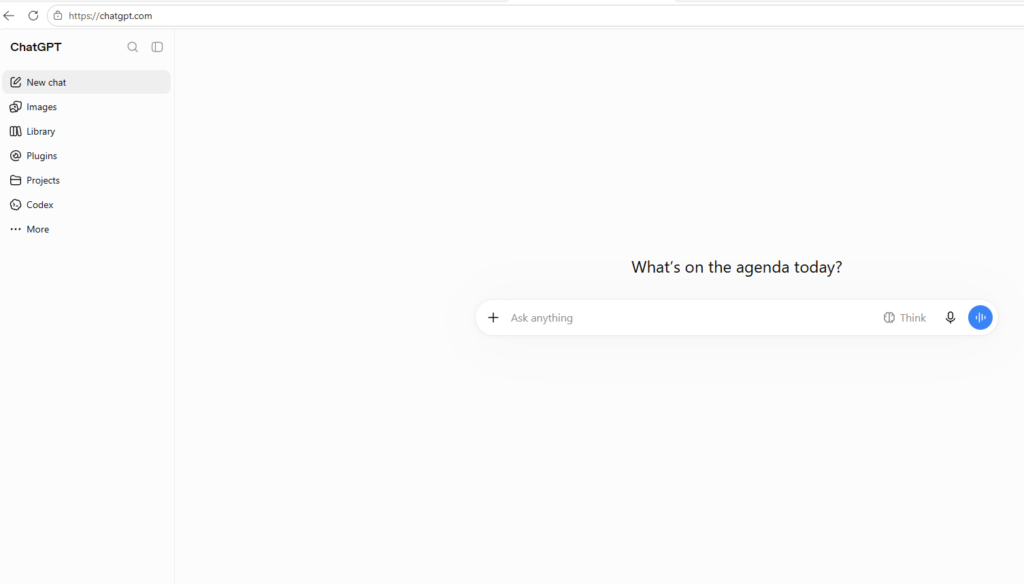
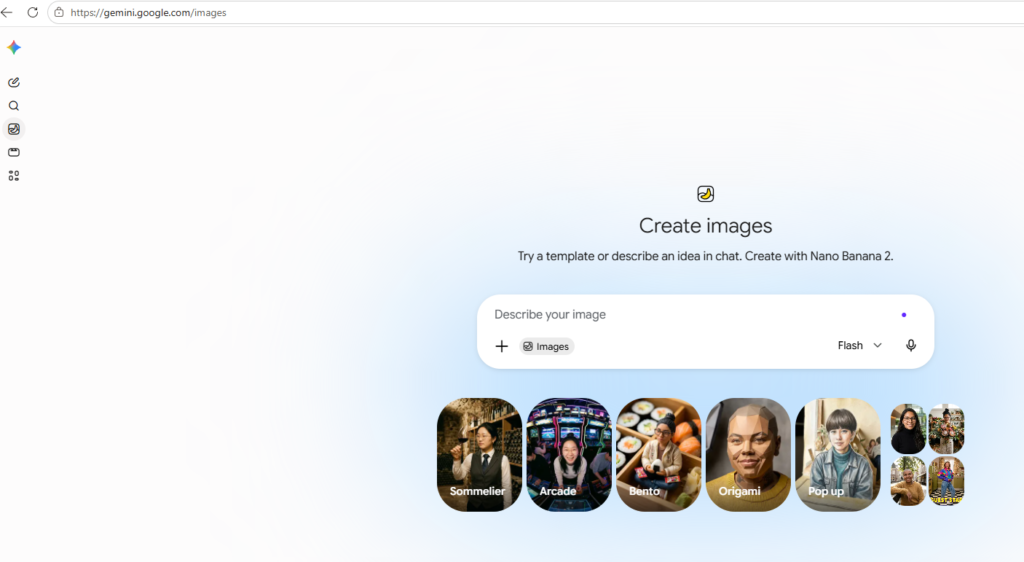
ChatGPT and Gemini are two of the most popular AI assistants in 2026, but they are designed with slightly different strengths. ChatGPT focuses heavily on conversational assistance, writing, coding, research, data analysis, and creative work, while Gemini stands out for its deep integration with Google Search and other Google services.
| Feature | ChatGPT | Gemini |
|---|---|---|
| Developer | OpenAI | |
| Best For | Writing, coding, research, analysis | Google integration, research, multimodal tasks |
| Web Search | Yes | Yes |
| Image Generation | Yes | Yes |
| File Analysis | Yes | Yes |
| Coding | Strong | Strong |
| Google Workspace Integration | Available through connected apps | Excellent |
| Deep Research | Yes | Yes |
| Long-Context Tasks | Strong | Strong |
| Creative Writing | Excellent | Very good |
| Video Creation | Available through OpenAI tools | Gemini offers advanced video capabilities through its ecosystem |
| Personalization | Memory and projects | Personal Intelligence and connected Google apps |
Which One Is Better?
Choose ChatGPT if you primarily need an AI assistant for writing, coding, research, data analysis, brainstorming, and detailed conversations. ChatGPT also supports file analysis, image generation, web search, deep research, voice, and data analysis.
Choose Gemini if you already use Google services heavily and want an AI assistant closely connected with Google Search, Gmail, Photos, YouTube, and other Google products. Gemini’s recent updates also include advanced reasoning, AI video creation, and agent-style features.
Quick Verdict
For writing, coding, research, and general-purpose AI assistance, ChatGPT is an excellent all-round choice. For Google ecosystem integration, multimodal experiences, and Google-powered workflows, Gemini can be the better option.
Ultimately, the best AI assistant depends on the type of work you do most often. Both platforms are evolving quickly, so features and availability can change over time.
What Is ChatGPT?
ChatGPT is an AI-powered conversational assistant developed by OpenAI. It uses advanced language models to understand questions and instructions and generate natural-sounding responses. Users can use ChatGPT for a wide range of tasks, including writing, research, brainstorming, coding, data analysis, summarization, translation, and creative work.
Unlike a traditional search engine that primarily provides a list of webpages, ChatGPT is designed to interact through conversation. You can ask follow-up questions, provide additional instructions, upload files, and refine the response until you get the result you need.
What Can ChatGPT Do?
ChatGPT can help with many everyday and professional tasks, including:
- Writing: Create blog posts, articles, emails, social media content, and other written materials.
- Research: Find and organize information, summarize sources, and help explore complex topics.
- Coding: Write, explain, debug, and improve code in various programming languages.
- Data Analysis: Analyze uploaded datasets and help identify trends, patterns, and insights.
- Image Generation: Create images from text descriptions using supported OpenAI tools.
- File Analysis: Work with documents and other supported files to extract, summarize, or analyze information.
- Brainstorming: Generate ideas for businesses, content, projects, marketing campaigns, and more.
- Learning: Explain difficult concepts in simpler language and provide step-by-step guidance.
Why Is ChatGPT So Popular?
One of ChatGPT’s biggest advantages is its versatility. Instead of using separate tools for writing, brainstorming, coding, and research, users can perform many of these tasks within one AI assistant.
Its conversational interface also makes it easy to refine results. For example, you can ask ChatGPT to rewrite an article, make it more professional, simplify the language, or optimize it for a specific audience.
For users comparing ChatGPT vs Gemini, ChatGPT is particularly strong as a general-purpose AI assistant for writing, coding, research, analysis, and creative tasks. However, Gemini can have an advantage for users who rely heavily on Google’s ecosystem and services.
What Is Google Gemini?
Google Gemini is an AI-powered assistant and family of artificial intelligence models developed by Google. It is designed to understand and work with different types of information, including text, images, audio, video, and code. Gemini can help users with tasks such as writing, research, brainstorming, coding, summarizing information, and solving complex problems.
One of Gemini’s biggest advantages is its connection to Google’s ecosystem. Depending on the version and available features, Gemini can work closely with services such as Google Search, Gmail, Google Docs, Google Drive, YouTube, and other Google products.
What Can Google Gemini Do?
Gemini offers a wide range of AI capabilities, including:
- Writing and Content Creation: Create articles, emails, summaries, social media posts, and other content.
- Research: Help find, understand, and organize information from the web.
- Coding: Generate, explain, debug, and improve code.
- Multimodal Understanding: Analyze and work with text, images, audio, video, and other types of content.
- Document Analysis: Summarize and analyze supported files and documents.
- Brainstorming: Generate ideas for projects, businesses, marketing, and content.
- Google Integration: Work with Google’s ecosystem and supported productivity services.
- Reasoning: Handle complex questions and multi-step tasks using Google’s advanced AI models.
Why Is Google Gemini Popular?
A major reason for Gemini’s popularity is its integration with Google’s products and services. Users who already rely on Google Search, Gmail, Docs, Drive, and YouTube may find Gemini particularly convenient for everyday productivity and research.
Gemini is also designed as a multimodal AI system, meaning it can work across different forms of information rather than focusing only on text.
Gemini vs ChatGPT
When comparing Google Gemini vs ChatGPT, the biggest difference is their ecosystems. ChatGPT is developed by OpenAI and offers a broad range of capabilities for writing, coding, research, analysis, and creative tasks. Gemini, meanwhile, has a strong advantage for users who want AI features integrated with Google’s ecosystem.
Neither tool is automatically the best for every user. The better choice depends on your specific needs, workflow, and the services you already use.
What Is Google Gemini?
Google Gemini is an advanced artificial intelligence (AI) assistant developed by Google. It is powered by Google’s Gemini family of AI models and is designed to understand and generate different types of content, including text, images, audio, video, and code.
Gemini can help users with everyday tasks such as answering questions, writing content, summarizing documents, researching topics, brainstorming ideas, and creating or explaining code. Its multimodal capabilities allow it to work with different types of information within the same interaction.
One of Gemini’s biggest advantages is its connection to the Google ecosystem. Depending on the plan, region, and available features, Gemini can work with Google services such as Search, Gmail, Google Docs, Drive, and YouTube. This makes it particularly useful for people who already use Google’s products for work, study, or personal tasks.
What Can Google Gemini Do?
Some of Gemini’s key capabilities include:
- Content Writing: Create blog posts, emails, summaries, social media content, and other written materials.
- Research: Help users explore topics and understand information from the web.
- Coding: Generate, explain, debug, and improve code.
- Multimodal AI: Understand and work with text, images, audio, video, and code.
- Document Analysis: Analyze and summarize supported files and documents.
- Brainstorming: Generate ideas for businesses, marketing campaigns, projects, and content.
- Google Integration: Connect with supported Google services to help users manage information and complete tasks.
- Problem Solving: Assist with complex questions and multi-step reasoning.
Why Is Google Gemini Popular?
Gemini has become popular because it combines Google’s AI technology with its large ecosystem of online services. For users who regularly use Google Search, Gmail, Google Docs, Drive, or YouTube, this integration can make Gemini a convenient AI assistant.
Gemini is also designed to handle multiple types of information, making it useful for tasks that go beyond traditional text-based conversations.
Gemini vs ChatGPT
When comparing Gemini vs ChatGPT, both are powerful general-purpose AI assistants, but they have different strengths.
ChatGPT is particularly popular for writing, coding, research, data analysis, brainstorming, and conversational tasks. Gemini can be especially appealing to users who want close integration with Google’s ecosystem and multimodal AI capabilities.
The better option ultimately depends on your needs, preferred workflow, and the tools you already use.
ChatGPT vs Gemini: Key Differences
ChatGPT and Google Gemini are two of the leading AI assistants in 2026. Both can help with writing, research, coding, analysis, and everyday tasks, but they differ in their features, ecosystems, and ideal use cases.
The biggest difference is that ChatGPT is built around OpenAI’s AI ecosystem, while Gemini is deeply connected to Google’s ecosystem. This distinction can make one more useful than the other depending on your workflow.
ChatGPT vs Gemini: Feature Comparison
| Feature | ChatGPT | Google Gemini |
|---|---|---|
| Developer | OpenAI | |
| Best For | Writing, coding, research, analysis | Google services, research, multimodal tasks |
| AI Models | GPT family | Gemini family |
| Web Search | Yes | Yes |
| Image Generation | Yes | Yes |
| Coding | Excellent | Excellent |
| Writing | Excellent | Very Good |
| File Analysis | Yes | Yes |
| Multimodal Capabilities | Yes | Yes |
| Google Workspace Integration | Limited/available through supported connections | Strong |
| Deep Research | Yes | Yes |
| Voice Features | Yes | Yes |
| Free Version | Available | Available |
1. AI Model and Reasoning
ChatGPT uses OpenAI’s GPT model family, while Gemini uses Google’s Gemini models. Both platforms offer advanced reasoning capabilities, but their performance can vary depending on the specific task and model being used.
For complex writing, structured explanations, brainstorming, and coding workflows, many users prefer ChatGPT’s conversational approach. Gemini can be particularly useful when a task benefits from Google’s broader ecosystem and multimodal capabilities.
2. Search and Research
Both ChatGPT and Gemini can provide web-based research capabilities.
ChatGPT is useful for turning research into structured reports, summaries, comparisons, and actionable insights. Gemini has a natural advantage for users who frequently use Google Search and other Google services.
For research-heavy work, the quality of the final answer depends not only on the AI model but also on the sources it uses and how effectively the information is verified.
3. Writing and Content Creation
ChatGPT is often a strong choice for content creation. It can help create blog posts, product reviews, outlines, emails, social media content, and marketing copy while following detailed instructions about tone and structure.
Gemini is also capable of producing high-quality written content and can be especially convenient when your content workflow already involves Google Docs or other Google services.
Winner for writing: ChatGPT, for users who prioritize detailed control and conversational editing.
4. Coding
Both platforms are capable coding assistants. They can generate code, explain programming concepts, identify errors, and help improve existing code.
ChatGPT is particularly useful for step-by-step debugging and explaining technical concepts. Gemini can also handle complex programming tasks and benefits from Google’s broader developer ecosystem.
Winner: Tie — the better choice depends on the programming language, project, and specific model being used.
5. Google Ecosystem Integration
This is one of Gemini’s biggest advantages.
Gemini is closely connected with Google’s ecosystem, including services such as Gmail, Google Docs, Drive, YouTube, and Search, depending on the user’s plan and available features.
ChatGPT has its own ecosystem of tools and integrations, but users who spend most of their day inside Google’s services may find Gemini more convenient.
Winner for Google users: Gemini.
6. Multimodal Capabilities
Both ChatGPT and Gemini can work with multiple types of information, including text and images, with support for additional modalities depending on the model and feature.
Gemini has been positioned strongly around multimodal AI, while ChatGPT also provides a broad range of multimodal capabilities.
Winner: Tie.
7. Ease of Use
Both AI assistants are relatively easy to use. You can start by asking a question in natural language and then continue the conversation with follow-up instructions.
ChatGPT’s interface is particularly focused on conversational workflows, while Gemini can feel especially convenient for users already familiar with Google’s products.
Winner: Tie.
Which Is Better: ChatGPT or Gemini?
There is no single winner for everyone.
Choose ChatGPT if you want:
- Strong writing and content creation
- Detailed conversational assistance
- Coding and technical help
- Data analysis and research
- Creative brainstorming
- A broad all-purpose AI assistant
Choose Gemini if you want:
- Strong Google ecosystem integration
- Google Search-focused workflows
- Assistance across Google services
- Multimodal AI capabilities
- AI features integrated into Google’s productivity tools
Final Verdict
ChatGPT vs Gemini is less about finding one universally superior AI and more about choosing the tool that fits your workflow.
For writing, coding, content creation, and general-purpose AI assistance, ChatGPT is an excellent choice. For Google-based productivity, Search, and integration with Google’s ecosystem, Gemini can be the better option.
If you use both, you can also take advantage of their different strengths—for example, using Gemini for Google-focused research and ChatGPT for organizing, writing, and refining the final content.
ChatGPT vs Gemini for Writing
When it comes to writing, both ChatGPT and Google Gemini can create high-quality content, rewrite text, summarize information, and help with brainstorming. However, they have different strengths that may make one better suited to your writing workflow.
ChatGPT vs Gemini for Writing: Quick Comparison
| Writing Task | ChatGPT | Gemini |
|---|---|---|
| Blog Writing | ⭐⭐⭐⭐⭐ | ⭐⭐⭐⭐ |
| Long-Form Content | ⭐⭐⭐⭐⭐ | ⭐⭐⭐⭐ |
| Creative Writing | ⭐⭐⭐⭐⭐ | ⭐⭐⭐⭐ |
| Rewriting & Editing | ⭐⭐⭐⭐⭐ | ⭐⭐⭐⭐ |
| SEO Content | ⭐⭐⭐⭐⭐ | ⭐⭐⭐⭐ |
| Research-Based Writing | ⭐⭐⭐⭐⭐ | ⭐⭐⭐⭐⭐ |
| Summarization | ⭐⭐⭐⭐⭐ | ⭐⭐⭐⭐⭐ |
| Email Writing | ⭐⭐⭐⭐⭐ | ⭐⭐⭐⭐⭐ |
| Brainstorming | ⭐⭐⭐⭐⭐ | ⭐⭐⭐⭐⭐ |
| Google Docs Workflow | ⭐⭐⭐⭐ | ⭐⭐⭐⭐⭐ |
ChatGPT for Writing
ChatGPT is a strong choice for writers, bloggers, marketers, and content creators who need detailed control over the writing process.
You can give ChatGPT specific instructions about tone, word count, structure, target audience, keywords, headings, and formatting. It can then generate or revise content based on those requirements.
For example, you can ask ChatGPT to:
- Create a complete blog post from an outline
- Rewrite content in a professional tone
- Make text easier to understand
- Generate SEO-friendly headings
- Create product reviews and comparisons
- Improve introductions and conclusions
- Write meta titles and meta descriptions
- Expand short sections into detailed explanations
- Edit content for grammar and readability
This level of conversational editing makes ChatGPT particularly useful for long-form content and repeated revisions.
Gemini for Writing
Gemini is also a capable writing assistant and can handle tasks such as drafting articles, rewriting paragraphs, summarizing documents, creating emails, and generating ideas.
One of Gemini’s biggest advantages for writers is its connection with Google’s ecosystem. If your workflow involves Google Docs, Gmail, Drive, or other Google services, Gemini can provide a convenient writing experience within that ecosystem, depending on your plan and available features.
Gemini can be especially useful when you need to work with information from Google’s services or combine writing with research.
Which Is Better for SEO Writing?
For SEO-focused content, ChatGPT has a slight edge for many content creators because it is particularly convenient for building structured articles around specific instructions.
You can use it to create:
- SEO-optimized article outlines
- H1, H2, and H3 headings
- Keyword-focused content
- FAQs
- Meta titles and descriptions
- Internal linking suggestions
- Comparison tables
- Featured-snippet-style answers
However, AI-generated content should still be fact-checked, edited, and improved with original insights and useful information. Simply generating an article with AI does not automatically make it high-quality SEO content.
Which Is Better for Creative Writing?
ChatGPT is generally a strong option for creative writing because you can continuously refine the style through conversation.
For example, you can ask it to make a paragraph more emotional, humorous, professional, dramatic, concise, or conversational without having to start over.
Gemini can also handle creative writing, but ChatGPT may feel more flexible for users who frequently experiment with tone, style, and structure.
Which One Should Writers Choose?
Choose ChatGPT if you primarily want:
- Blog and article writing
- SEO content creation
- Creative writing
- Detailed editing and rewriting
- Long-form content
- Marketing copy
- Conversational content refinement
Choose Gemini if you primarily want:
- Writing inside the Google ecosystem
- Google Docs and Gmail workflows
- Research combined with writing
- Summarizing and working with Google-based information
Final Verdict
For general writing and content creation, ChatGPT is the better overall choice for most writers, especially when detailed instructions, editing, SEO structure, and multiple revisions are important.
Gemini is an excellent alternative, particularly for people who already rely heavily on Google’s productivity ecosystem.
For professional content creation, the best approach may be to use both: Gemini for research and Google-based workflows, and ChatGPT for drafting, editing, and polishing the final content.
ChatGPT vs Gemini for Coding
ChatGPT and Google Gemini are both powerful AI coding assistants that can help developers write, understand, debug, and optimize code. They can work with popular programming languages such as Python, JavaScript, Java, C++, HTML, CSS, and more.
However, their strengths can differ depending on the type of development work you’re doing. ChatGPT is particularly strong for conversational debugging, code explanations, and step-by-step problem solving, while Gemini can be a strong choice for developers working with Google’s ecosystem and large codebases.
ChatGPT vs Gemini for Coding: Quick Comparison
| Coding Task | ChatGPT | Gemini |
|---|---|---|
| Code Generation | ⭐⭐⭐⭐⭐ | ⭐⭐⭐⭐⭐ |
| Debugging | ⭐⭐⭐⭐⭐ | ⭐⭐⭐⭐ |
| Code Explanation | ⭐⭐⭐⭐⭐ | ⭐⭐⭐⭐⭐ |
| Refactoring | ⭐⭐⭐⭐⭐ | ⭐⭐⭐⭐⭐ |
| Problem Solving | ⭐⭐⭐⭐⭐ | ⭐⭐⭐⭐⭐ |
| Large Codebases | ⭐⭐⭐⭐ | ⭐⭐⭐⭐⭐ |
| Documentation | ⭐⭐⭐⭐⭐ | ⭐⭐⭐⭐ |
| Web Development | ⭐⭐⭐⭐⭐ | ⭐⭐⭐⭐⭐ |
| Learning to Code | ⭐⭐⭐⭐⭐ | ⭐⭐⭐⭐⭐ |
| Google Developer Ecosystem | ⭐⭐⭐⭐ | ⭐⭐⭐⭐⭐ |
ChatGPT for Coding
ChatGPT is widely used as an AI programming assistant because it can explain technical concepts in conversational language and help developers work through problems step by step.
You can provide an error message, code snippet, or description of a problem and ask ChatGPT to identify the issue and suggest a solution.
ChatGPT can help with:
- Generating code from natural-language instructions
- Debugging errors
- Explaining unfamiliar code
- Refactoring existing code
- Creating functions and scripts
- Writing SQL queries
- Building HTML, CSS, and JavaScript
- Creating Python programs
- Explaining programming concepts
- Reviewing code for potential problems
For beginners, ChatGPT can be particularly useful because you can ask follow-up questions until you understand why a particular solution works.
Gemini for Coding
Gemini is also a capable coding assistant and can generate, explain, debug, and modify code across many programming languages.
One area where Gemini can be particularly attractive is working with large amounts of code and information. Depending on the model and product you’re using, Gemini can handle large contexts, which can be useful when reviewing larger projects or multiple files.
Gemini is also a natural option for developers who already use Google’s developer tools and services.
Which Is Better for Debugging?
Both ChatGPT and Gemini can help identify bugs and explain error messages.
ChatGPT often works well when debugging requires an interactive conversation. You can provide the error, receive a possible solution, test it, and then return with the new error or result.
Gemini can also handle complex debugging tasks and may be particularly useful when the problem involves a large amount of code or context.
Winner: ChatGPT for conversational debugging; Gemini is also excellent for large-context tasks.
Which Is Better for Learning Programming?
For beginners, ChatGPT is an excellent choice for learning programming.
You can ask questions such as:
“Explain this Python code like I’m a beginner.”
Then you can continue with:
“Give me another example.”
Or:
“Create a simple exercise so I can practice this concept.”
This interactive approach makes it possible to learn programming through a continuous conversation rather than simply copying generated code.
Gemini can provide a similar learning experience, so the choice ultimately comes down to personal preference.
Which Is Better for Web Development?
Both tools are strong for web development. They can help create and troubleshoot:
- HTML
- CSS
- JavaScript
- React
- PHP
- APIs
- Database queries
- WordPress code
- Front-end components
- Back-end applications
ChatGPT may be preferable when you want detailed explanations and iterative development help. Gemini can be useful when working with Google’s developer ecosystem or large amounts of project context.
Winner: Tie.
Which Is Better for Large Projects?
For large projects, context handling becomes increasingly important because developers may need to provide multiple files, lengthy documentation, and complex requirements.
Gemini has traditionally been strong in long-context tasks, while ChatGPT also provides tools and workflows designed for working with larger projects.
The actual experience depends heavily on the specific model, plan, coding environment, and project size.
Winner: Gemini for some large-context workflows, but ChatGPT remains highly competitive.
ChatGPT vs Gemini for Coding: Final Verdict
There is no universal winner for every developer.
Choose ChatGPT if you want:
- Step-by-step coding explanations
- Interactive debugging
- Programming education
- Code generation
- Refactoring and code reviews
- Help with web development
- A general-purpose AI coding assistant
Choose Gemini if you want:
- Large-context coding workflows
- Strong integration with Google’s developer ecosystem
- Assistance with large amounts of code
- Multimodal development workflows
Overall, ChatGPT is an excellent all-around coding assistant, especially for learning, debugging, and interactive problem solving. Gemini is a strong alternative, particularly when large context and Google’s developer ecosystem are important.
For serious development work, it’s also worth testing both tools with your own codebase. The best coding assistant is ultimately the one that produces reliable code, explains its reasoning clearly, and fits naturally into your development workflow.
ChatGPT vs Gemini for Research
ChatGPT and Google Gemini are both powerful AI assistants for research. They can help users find information, summarize sources, compare ideas, analyze documents, and turn complex topics into easy-to-understand explanations.
However, the two platforms approach research differently. ChatGPT is particularly strong at organizing information, analyzing sources, and producing structured research reports, while Gemini can be especially useful for users who rely heavily on Google Search and Google’s ecosystem.
ChatGPT vs Gemini for Research: Quick Comparison
| Research Task | ChatGPT | Gemini |
|---|---|---|
| Web Research | ⭐⭐⭐⭐⭐ | ⭐⭐⭐⭐⭐ |
| Source Summarization | ⭐⭐⭐⭐⭐ | ⭐⭐⭐⭐⭐ |
| Deep Research | ⭐⭐⭐⭐⭐ | ⭐⭐⭐⭐⭐ |
| Complex Questions | ⭐⭐⭐⭐⭐ | ⭐⭐⭐⭐⭐ |
| Report Writing | ⭐⭐⭐⭐⭐ | ⭐⭐⭐⭐ |
| Fact Comparison | ⭐⭐⭐⭐⭐ | ⭐⭐⭐⭐⭐ |
| Document Analysis | ⭐⭐⭐⭐⭐ | ⭐⭐⭐⭐⭐ |
| Academic Research | ⭐⭐⭐⭐⭐ | ⭐⭐⭐⭐ |
| Google Search Integration | ⭐⭐⭐⭐ | ⭐⭐⭐⭐⭐ |
| Research Organization | ⭐⭐⭐⭐⭐ | ⭐⭐⭐⭐ |
ChatGPT for Research
ChatGPT is a strong research assistant because it can combine information gathering with analysis and writing.
Instead of simply providing a list of search results, ChatGPT can help turn information into a structured explanation. You can ask follow-up questions, request comparisons, identify important points, or ask it to organize findings into a report.
ChatGPT can help with:
- Researching a topic
- Summarizing online sources
- Comparing different sources or viewpoints
- Creating research outlines
- Analyzing documents and files
- Explaining complex subjects
- Creating tables and summaries
- Generating research questions
- Organizing findings into reports
Its conversational approach is particularly useful when your research question changes as you learn more.
Gemini for Research
Gemini is also a powerful research tool, especially for users who regularly use Google’s services.
Its connection to Google’s ecosystem can make it convenient for researching topics, finding information, and working with content from Google-based services. Depending on the available features and plan, Gemini can also assist with documents, emails, and other productivity workflows.
Gemini’s multimodal capabilities can also be useful when research involves different types of information, such as text, images, and other media.
Which Is Better for Deep Research?
Both ChatGPT and Gemini offer advanced research capabilities, but the experience can vary depending on the specific model and feature available to you.
ChatGPT is particularly useful when you want to:
- Investigate a complex topic
- Organize information into a structured report
- Compare multiple sources
- Analyze evidence
- Ask detailed follow-up questions
- Turn research into publishable content
Gemini is particularly useful when you want to:
- Combine research with Google Search
- Work within Google’s ecosystem
- Research using different types of media
- Connect research with Google productivity tools
Which Is Better for Academic Research?
Both tools can be useful for students and researchers, but neither should be treated as a replacement for checking original academic sources.
ChatGPT can help explain academic concepts, summarize papers, create research outlines, and identify questions worth investigating.
Gemini can perform similar tasks and may be convenient for researchers who already use Google’s ecosystem.
For academic work, always verify important claims against the original paper, journal, book, or official source rather than relying solely on an AI-generated answer.
Which Is Better for Research-Based Content?
For bloggers, affiliate marketers, and content creators, ChatGPT has a slight advantage for turning research into finished content.
For example, you can research a topic, organize the findings, create an article outline, write the draft, improve the structure, and generate FAQs within the same workflow.
Gemini can also handle this process, particularly if your workflow is already centered around Google Search and Google Docs.
Final Verdict
ChatGPT is the better overall choice for structured research and turning research into high-quality written content. Its conversational workflow makes it easy to investigate a topic, analyze information, and refine the final result.
Gemini is an excellent choice for Google-focused research, especially for users who rely heavily on Google Search and other Google services.
For the best results, consider using both tools when appropriate: Gemini for Google-focused information discovery and ChatGPT for analysis, organization, and content creation.
ChatGPT vs Gemini for Image Generation
AI image generation has become an important feature of modern AI assistants. Both ChatGPT and Google Gemini can help users create images from text prompts, edit visuals, and turn ideas into creative designs.
However, the image-generation experience can differ between the two platforms. ChatGPT is known for its strong prompt-following and creative image workflows, while Gemini benefits from Google’s AI image-generation technology and integration with the broader Google ecosystem.
ChatGPT vs Gemini for Image Generation: Quick Comparison
| Feature | ChatGPT | Google Gemini |
|---|---|---|
| Text-to-Image | ⭐⭐⭐⭐⭐ | ⭐⭐⭐⭐⭐ |
| Image Editing | ⭐⭐⭐⭐⭐ | ⭐⭐⭐⭐⭐ |
| Following Detailed Prompts | ⭐⭐⭐⭐⭐ | ⭐⭐⭐⭐ |
| Creative Designs | ⭐⭐⭐⭐⭐ | ⭐⭐⭐⭐⭐ |
| Photorealistic Images | ⭐⭐⭐⭐⭐ | ⭐⭐⭐⭐⭐ |
| Text in Images | ⭐⭐⭐⭐⭐ | ⭐⭐⭐⭐ |
| Product & Marketing Graphics | ⭐⭐⭐⭐⭐ | ⭐⭐⭐⭐ |
| Conversational Editing | ⭐⭐⭐⭐⭐ | ⭐⭐⭐⭐⭐ |
| Google Ecosystem Integration | ⭐⭐⭐⭐ | ⭐⭐⭐⭐⭐ |
| Ease of Use | ⭐⭐⭐⭐⭐ | ⭐⭐⭐⭐⭐ |
ChatGPT for Image Generation
ChatGPT provides an integrated image-generation experience that allows users to describe an image using natural language and refine the result through conversation.
You don’t necessarily need to understand complicated image-generation terminology. You can describe the subject, style, composition, lighting, colors, background, and desired format in ordinary language.
ChatGPT can be useful for creating:
- Blog and website graphics
- Social media images
- Marketing visuals
- Product concepts
- Illustrations
- Infographics
- Creative artwork
- Thumbnails
- Brand design concepts
One of its biggest strengths is conversational editing. You can generate an image and then ask for specific changes instead of starting from scratch.
Gemini for Image Generation
Gemini also provides AI-powered image-generation capabilities through Google’s AI ecosystem.
Users can describe what they want to create and generate or modify images using natural-language instructions. Gemini can be particularly useful for people who already use Google’s AI and productivity products.
Google’s image-generation technology has also placed a strong emphasis on photorealistic images, creative compositions, and understanding complex prompts.
Which Is Better for Detailed Prompts?
When creating marketing graphics, website images, or other visuals that require many specific instructions, ChatGPT can be particularly effective at following detailed conversational prompts.
For example, you can specify:
- Exact subject placement
- Background style
- Lighting
- Camera angle
- Image dimensions
- Color preferences
- Typography requirements
- Branding elements
You can then refine individual elements through additional instructions.
Winner: ChatGPT for detailed conversational image workflows.
Which Is Better for Photorealistic Images?
Both ChatGPT and Gemini can generate highly realistic images.
The final quality depends on the specific image model, prompt, and type of image you’re creating. For professional-looking photography, product concepts, and realistic scenes, both platforms can produce impressive results.
Winner: Tie.
Which Is Better for Editing Images?
Both platforms support AI-assisted image editing, allowing users to make changes to existing images.
For example, you can ask an AI assistant to change a background, modify an object, adjust the style, or create variations of an existing concept.
ChatGPT can be particularly convenient when you want to make several changes through a natural back-and-forth conversation.
Winner: ChatGPT for conversational editing.
Which Is Better for Marketing and Blog Images?
For bloggers, affiliate marketers, and website owners, ChatGPT is a strong choice for creating custom marketing visuals.
You can create images specifically around an article topic, website branding, social media campaign, or product concept.
For example, instead of using a generic stock image, you could generate a custom hero image for an article such as:
“ChatGPT vs Gemini: Which AI Assistant Is Better?”
You can then adjust the image to match your website’s branding and layout.
Gemini can also create marketing and blog visuals, particularly if your workflow already uses Google’s tools.
ChatGPT vs Gemini for Image Generation: Final Verdict
Both ChatGPT and Gemini are capable AI image-generation platforms, and the best choice depends on what you need.
Choose ChatGPT if you want:
- Detailed prompt control
- Conversational image editing
- Blog and website graphics
- Marketing visuals
- Creative design concepts
- Easy iterative refinement
Choose Gemini if you want:
- Google’s AI image-generation ecosystem
- Photorealistic and creative visuals
- Integration with Google’s broader AI tools
- A simple natural-language image workflow
Overall winner: ChatGPT for users who want a flexible, conversational image-generation and editing workflow. Gemini remains a strong alternative, especially for users already invested in Google’s ecosystem.
Because AI image-generation features and models change quickly, it’s worth testing both platforms with the same prompts before choosing one for your regular workflow.
ChatGPT vs Gemini for Voice Conversations
Voice conversations have become an important part of AI assistants. Instead of typing every question, users can speak naturally and receive spoken responses. Both ChatGPT and Google Gemini offer voice-based interactions, but the overall experience and ecosystem integration can differ.
ChatGPT focuses heavily on natural, back-and-forth conversations, while Gemini can be particularly appealing to users who want voice assistance connected to Google’s ecosystem.
ChatGPT vs Gemini for Voice: Quick Comparison
| Feature | ChatGPT | Google Gemini |
|---|---|---|
| Natural Voice Conversations | ⭐⭐⭐⭐⭐ | ⭐⭐⭐⭐⭐ |
| Voice Response Quality | ⭐⭐⭐⭐⭐ | ⭐⭐⭐⭐⭐ |
| Real-Time Conversation | ⭐⭐⭐⭐⭐ | ⭐⭐⭐⭐⭐ |
| Follow-Up Questions | ⭐⭐⭐⭐⭐ | ⭐⭐⭐⭐⭐ |
| Voice Interruption | ⭐⭐⭐⭐⭐ | ⭐⭐⭐⭐⭐ |
| Multimodal Voice Interaction | ⭐⭐⭐⭐⭐ | ⭐⭐⭐⭐⭐ |
| Google Ecosystem Integration | ⭐⭐⭐⭐ | ⭐⭐⭐⭐⭐ |
| Learning & Explanations | ⭐⭐⭐⭐⭐ | ⭐⭐⭐⭐⭐ |
| Hands-Free Use | ⭐⭐⭐⭐⭐ | ⭐⭐⭐⭐⭐ |
| Ease of Use | ⭐⭐⭐⭐⭐ | ⭐⭐⭐⭐⭐ |
ChatGPT for Voice Conversations
ChatGPT’s voice experience is designed around natural conversation. Users can speak to ChatGPT, ask follow-up questions, interrupt the conversation, and continue discussing a topic without needing to type everything manually.
This makes ChatGPT useful for:
- Practicing conversations
- Learning languages
- Asking quick questions
- Brainstorming ideas
- Getting explanations
- Discussing documents or images
- Practicing interviews
- Hands-free assistance
One of the biggest advantages is the conversational nature of the interaction. You can talk to ChatGPT more like you would talk to another person rather than treating it like a traditional voice command system.
Gemini for Voice Conversations
Gemini also provides voice-based AI interactions through Google’s ecosystem. Its voice capabilities can be useful for asking questions, brainstorming, learning, and completing everyday tasks.
Gemini becomes particularly interesting for users who already rely heavily on Google’s services and devices. Its connection to Google’s broader ecosystem can make it convenient for people who want AI assistance alongside their existing Google workflows.
Which Has More Natural Conversations?
Both ChatGPT and Gemini have made significant improvements in natural voice interaction.
ChatGPT is particularly strong at maintaining a conversational flow and responding to follow-up questions. This can make it feel natural during longer discussions.
Gemini also provides natural voice interactions and can be a strong choice for users who prioritize Google integration.
Winner: ChatGPT for conversational experience.
Which Is Better for Learning?
Both assistants can be useful learning partners.
With ChatGPT, you can have a spoken conversation about a subject, ask it to explain something more simply, and then continue asking questions without switching to text.
Gemini can provide a similar experience and may be especially useful when learning involves information from Google’s ecosystem.
For language learning, interview practice, and interactive explanations, either tool can be effective.
Winner: Tie.
Which Is Better for Hands-Free Use?
Both ChatGPT and Gemini can be used for hands-free conversations, depending on the device, app, account, and available features.
Gemini may have an advantage for users deeply integrated into Google’s Android and Google Assistant ecosystem, while ChatGPT offers a strong standalone conversational experience.
Winner: Gemini for Google/Android ecosystem integration; ChatGPT for standalone AI conversations.
ChatGPT vs Gemini for Voice: Final Verdict
Both platforms provide strong voice conversation experiences, and the difference is less dramatic than it once was.
Choose ChatGPT if you want:
- Natural conversational interactions
- Detailed explanations through voice
- Language and interview practice
- Brainstorming by voice
- A dedicated AI conversation experience
Choose Gemini if you want:
- Google ecosystem integration
- Voice assistance across Google services
- Android-focused AI workflows
- Hands-free AI assistance
Overall Winner
ChatGPT is the better choice for natural, conversational voice interactions, especially when your main goal is to talk with an AI assistant and have detailed back-and-forth conversations.
Gemini is an excellent alternative, particularly for users who already rely heavily on Google’s ecosystem.
For most users, both are worth trying. Your preferred voice, response style, device, and the services you use every day may ultimately determine which assistant feels better.
ChatGPT vs Gemini Pricing
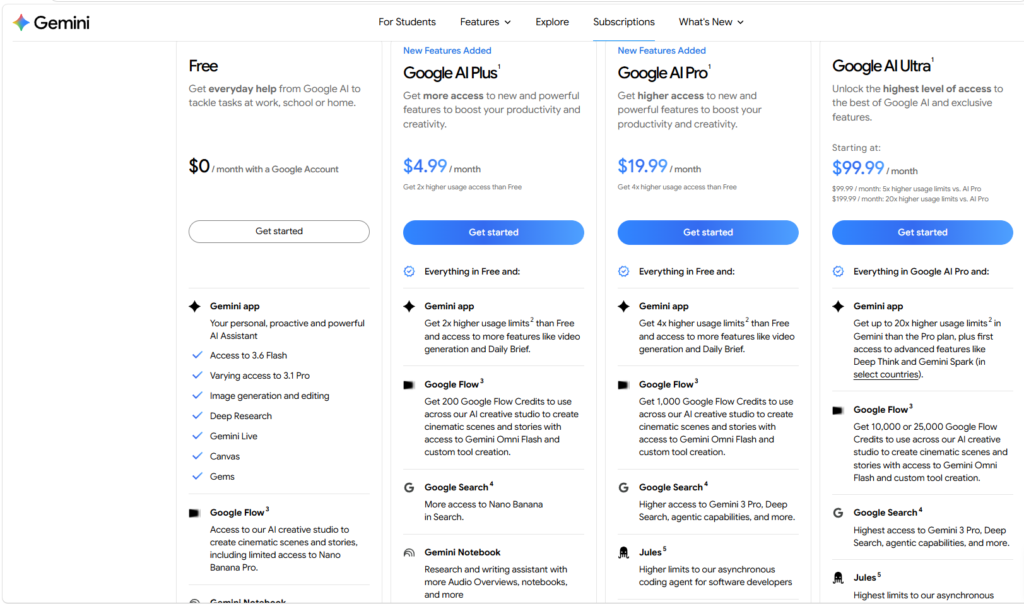
Google Gemini Last updated Pricing
Pricing is an important factor when choosing between ChatGPT and Google Gemini. Both AI assistants offer free options, while their paid plans provide higher usage limits, access to more advanced models, and additional features.
Because pricing and available features can vary by country and change over time, the following comparison focuses on the main consumer plans and current U.S. list prices.
ChatGPT vs Gemini Pricing: Quick Comparison
| Plan | ChatGPT | Google Gemini |
|---|---|---|
| Free | $0/month | Free option available |
| Main Paid Plan | ChatGPT Plus — $20/month | Google AI Pro — $19.99/month |
| Higher-Tier Plan | ChatGPT Pro — higher-tier plan | Google AI Ultra — from $99.99/month |
| Cloud Storage | Not the main focus | 5 TB with Google AI Pro |
| Best For | AI tools, writing, coding, research | Gemini + Google ecosystem |
| Free Version | Yes | Yes |
ChatGPT Plus currently costs $20 per month and provides broader access to models and tools than the Free plan.
Google AI Pro costs $19.99 per month in the U.S. and includes expanded Gemini access along with 5 TB of storage across Google services. Google also offers the higher-end Google AI Ultra plan from $99.99 per month.
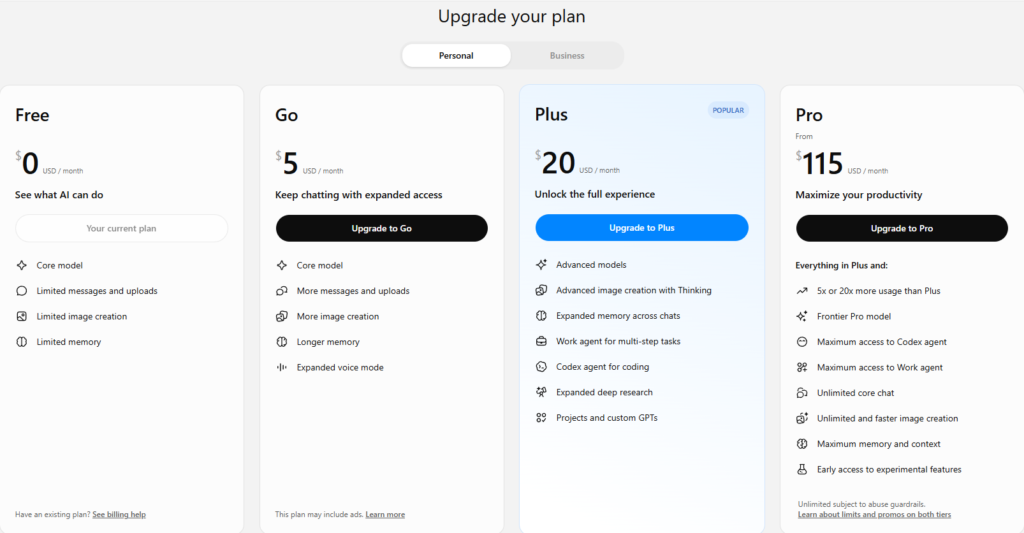
ChatGPT Pricing
ChatGPT offers several plans, including Free, Go, Plus, Pro, Business, and Enterprise.
The Free plan costs $0 and provides access to ChatGPT with limits on features such as uploads, image generation, voice conversations, deep research, memory, and Codex.
ChatGPT Plus costs $20/month and provides expanded access to models and tools. It is generally the most relevant paid option for individual users who want more capabilities without moving to the higher-priced Pro tier.
Google Gemini Pricing
Gemini is available through Google’s AI plans. The Google AI Pro plan costs $19.99/month in the U.S. and includes expanded access to Gemini, 5 TB of Google storage, and additional Google AI features.
Google also offers Google AI Ultra, starting at $99.99/month, aimed at users who want the highest levels of access to Google’s AI capabilities and additional premium benefits.
Which Is Cheaper: ChatGPT or Gemini?
At the main paid tier, the prices are almost identical:
- ChatGPT Plus: $20/month
- Google AI Pro: $19.99/month
That means Google AI Pro is technically cheaper by $0.01 per month, but the difference is insignificant.
The bigger difference is what you get beyond the AI assistant. Google AI Pro includes 5 TB of Google storage, while ChatGPT Plus focuses primarily on expanded AI capabilities.
Which Offers Better Value?
ChatGPT Plus may offer better value if you primarily need:
- Writing and content creation
- Coding assistance
- Research and analysis
- AI image generation
- Conversational AI
- General-purpose AI tools
Google AI Pro may offer better value if you need:
- Gemini’s advanced capabilities
- Google Search and Google ecosystem integration
- Gemini in Gmail and Docs
- 5 TB of Google storage
- Additional Google AI features
Final Verdict
For the basic paid tier, ChatGPT Plus and Google AI Pro are essentially the same price. The better value depends on how you use AI.
If your main priority is writing, coding, research, and general AI assistance, ChatGPT Plus is a strong choice.
If you already use Google Drive, Gmail, Docs, Search, and other Google services, Google AI Pro can provide more overall value because the subscription combines Gemini with Google’s broader ecosystem and 5 TB of storage.
For most individual users, the decision should therefore be based on features and workflow rather than the small difference in monthly price.
ChatGPT Pros and Cons
ChatGPT is one of the most widely used AI assistants, offering tools for writing, research, coding, image generation, data analysis, and everyday productivity. However, like any AI tool, it has both advantages and limitations.
Understanding the pros and cons can help you decide whether ChatGPT is the right AI assistant for your needs.
ChatGPT Pros
1. Excellent for Writing
ChatGPT is particularly useful for creating and editing content. It can write blog posts, product descriptions, emails, social media posts, reports, and other types of content.
You can also give detailed instructions about tone, structure, audience, and length.
2. Strong Coding Capabilities
ChatGPT can generate code, explain programming concepts, debug errors, and help developers improve existing code.
It is also useful for beginners who want programming concepts explained in simple, step-by-step language.
3. Powerful Research and Analysis
ChatGPT can help research topics, summarize information, compare ideas, and organize findings into structured reports.
Its research capabilities can save time when you’re working with large amounts of information.
4. Useful Multimodal Features
ChatGPT can work with more than just text. Depending on the available model and plan, users can work with images, files, voice conversations, and other forms of content.
This makes it useful for a wide variety of personal and professional tasks.
5. Easy to Use
ChatGPT uses a simple conversational interface. You can ask questions naturally without learning complicated commands.
You can also continue a conversation with follow-up instructions instead of starting from scratch.
6. Good for Brainstorming
ChatGPT can quickly generate ideas for articles, businesses, marketing campaigns, projects, videos, social media content, and more.
It can also help improve an idea by suggesting alternatives and pointing out potential problems.
7. Wide Range of Use Cases
One of ChatGPT’s biggest strengths is versatility. It can act as a writing assistant, coding partner, research assistant, tutor, brainstorming partner, and productivity tool in one platform.
ChatGPT Cons
1. AI Can Make Mistakes
ChatGPT can sometimes generate incorrect or misleading information. Even when an answer sounds confident, it may not always be accurate.
Important information should therefore be verified using reliable sources.
2. Some Advanced Features Require a Paid Plan
The free version provides useful capabilities, but some advanced models, higher usage limits, and premium features may require a paid subscription.
This can be a disadvantage for users who want extensive AI usage without paying.
3. Responses Can Sometimes Be Too General
If a prompt is vague, ChatGPT may provide a generic answer.
For better results, users should provide clear instructions, context, examples, and the desired output format.
4. Internet Access and Information Can Vary
Depending on the feature and plan being used, ChatGPT’s access to current web information and certain tools can vary.
For time-sensitive topics, it’s important to verify information against current sources.
5. AI-Generated Content Still Needs Human Review
ChatGPT can produce polished content quickly, but publishing AI-generated content without reviewing it can result in factual errors, repetitive writing, or a lack of original insights.
Human editing and fact-checking remain important, especially for professional and SEO content.
ChatGPT Pros and Cons: Quick Summary
| Pros | Cons |
|---|---|
| Excellent writing assistance | Can make factual mistakes |
| Strong coding capabilities | Some advanced features require payment |
| Useful for research and analysis | Can produce generic responses |
| Supports multimodal tasks | Features and limits can vary by plan |
| Easy conversational interface | AI content needs human review |
| Great for brainstorming | Not always perfect for specialized tasks |
| Wide range of use cases | Requires good prompting for best results |
Final Verdict
ChatGPT is a powerful and versatile AI assistant with significant advantages for writing, coding, research, brainstorming, analysis, and productivity.
Its biggest limitations are that AI-generated answers can sometimes be inaccurate, advanced features may require a subscription, and generated content still needs human review.
Overall, ChatGPT is an excellent choice for users who want one AI assistant that can handle a wide variety of tasks.
Gemini Pros and Cons
Google Gemini is a powerful AI assistant designed to help with writing, research, coding, image generation, analysis, and everyday productivity. Its biggest advantage is its close connection with Google’s ecosystem, but it also has some limitations users should consider.
Gemini Pros
1. Strong Google Ecosystem Integration
One of Gemini’s biggest advantages is its integration with Google’s products and services. Depending on the plan and available features, users can work with services such as Gmail, Google Docs, Drive, Search, and YouTube.
This can make Gemini especially convenient for people who already use Google services regularly.
2. Excellent Research Capabilities
Gemini can help users research topics, summarize information, compare sources, and explain complex subjects.
Its connection to Google’s search ecosystem can be particularly useful when working with current information.
3. Strong Multimodal Capabilities
Gemini is designed to work with multiple types of information, including text, images, audio, video, and code.
This makes it useful for tasks that involve more than simple text-based conversations.
4. Good Coding Performance
Gemini can generate code, explain programming concepts, debug errors, and help developers work with large amounts of code.
It can be especially useful for developers working with Google’s technology ecosystem.
5. Useful for Long Documents and Large Contexts
Gemini’s models have been designed to handle large amounts of context, which can be useful when analyzing lengthy documents, research materials, or large codebases.
This can save time when you need an AI assistant to understand a substantial amount of information at once.
6. Integration With Google Productivity Tools
For users who work extensively with Gmail, Docs, Drive, and other Google services, Gemini can fit naturally into an existing workflow.
Instead of moving information between several different applications, users can access AI assistance within supported Google products.
7. Free Version Available
Gemini offers a free option, allowing users to try Google’s AI capabilities without immediately paying for a subscription.
Paid Google AI plans provide additional features, higher limits, and access to more advanced capabilities.
Gemini Cons
1. Features Can Vary by Region and Plan
Not every Gemini feature is available to every user. Availability can depend on the country, language, device, account type, and subscription plan.
This can make it difficult to know exactly which features you’ll have access to.
2. AI Can Still Make Mistakes
Like other generative AI systems, Gemini can produce inaccurate or misleading information.
Important facts, statistics, technical information, and research claims should always be verified using reliable sources.
3. Some Advanced Features Require a Paid Plan
While Gemini has a free option, some of its more advanced models, higher usage limits, and premium features require a paid Google AI subscription.
This may be a disadvantage for users who want maximum access without paying.
4. Writing Quality Can Vary
Gemini can produce high-quality content, but its writing style may not always match your preferred tone or structure without detailed instructions and editing.
For long-form content, users may still need to refine the generated text before publishing it.
5. Google Ecosystem Dependence
Gemini’s deep Google integration is a major advantage for Google users, but it may be less valuable to people who primarily use non-Google services.
Users who don’t rely on Gmail, Docs, Drive, or other Google products may not benefit as much from these integrations.
6. AI-Generated Content Needs Human Review
Gemini can produce content quickly, but AI-generated text can contain factual errors, repetitive information, or insufficient original insight.
Human editing and fact-checking are still important for professional, academic, and SEO content.
Gemini Pros and Cons: Quick Summary
| Pros | Cons |
|---|---|
| Strong Google ecosystem integration | Features vary by region and plan |
| Excellent research capabilities | Can produce inaccurate information |
| Strong multimodal AI | Some advanced features require payment |
| Good coding capabilities | Writing may need editing |
| Handles large amounts of context | Less useful outside Google’s ecosystem |
| Useful Google productivity integrations | AI-generated content needs review |
| Free option available | Limits can vary by plan |
Final Verdict
Google Gemini is a strong AI assistant, particularly for users who rely heavily on Google Search, Gmail, Docs, Drive, YouTube, and other Google services.
Its biggest strengths are Google ecosystem integration, research, multimodal capabilities, coding, and large-context tasks. However, users should consider limitations such as feature availability, subscription requirements, and the possibility of AI-generated errors.
Overall, Gemini is an excellent alternative to ChatGPT and can be the better choice for users who want their AI assistant closely connected to Google’s ecosystem.
Which Is Better for Bloggers and Content Creators?
For bloggers and content creators, both ChatGPT and Google Gemini can be valuable tools. They can help with content research, article writing, SEO ideas, brainstorming, editing, social media content, and creating images.
However, ChatGPT is the better overall choice for most bloggers and content creators, especially those who need detailed control over their content workflow.
ChatGPT vs Gemini for Bloggers
| Task | ChatGPT | Gemini |
|---|---|---|
| Blog Post Writing | ⭐⭐⭐⭐⭐ | ⭐⭐⭐⭐ |
| SEO Content | ⭐⭐⭐⭐⭐ | ⭐⭐⭐⭐ |
| Content Outlines | ⭐⭐⭐⭐⭐ | ⭐⭐⭐⭐⭐ |
| Keyword Ideas | ⭐⭐⭐⭐⭐ | ⭐⭐⭐⭐ |
| Research | ⭐⭐⭐⭐⭐ | ⭐⭐⭐⭐⭐ |
| Editing & Rewriting | ⭐⭐⭐⭐⭐ | ⭐⭐⭐⭐ |
| Content Ideas | ⭐⭐⭐⭐⭐ | ⭐⭐⭐⭐⭐ |
| Affiliate Content | ⭐⭐⭐⭐⭐ | ⭐⭐⭐⭐ |
| Social Media Content | ⭐⭐⭐⭐⭐ | ⭐⭐⭐⭐⭐ |
| Image Generation | ⭐⭐⭐⭐⭐ | ⭐⭐⭐⭐⭐ |
| Google Docs Workflow | ⭐⭐⭐⭐ | ⭐⭐⭐⭐⭐ |
Why ChatGPT Is Better for Bloggers
ChatGPT is particularly useful for bloggers because it can support almost the entire content creation process.
You can use it to:
- Find article ideas
- Create SEO-focused outlines
- Write introductions and conclusions
- Develop H2 and H3 sections
- Create comparison tables
- Write product reviews
- Generate FAQs
- Improve readability
- Rewrite and edit existing content
- Create meta titles and descriptions
- Generate social media posts
- Brainstorm affiliate content ideas
Another major advantage is its conversational workflow. You can continue refining an article through multiple prompts instead of creating a new response every time you want to make a change.
For example, after generating an article, you can ask ChatGPT to make the introduction stronger, improve the headings, add examples, simplify difficult sections, or make the writing more engaging.
Why Gemini Is Useful for Content Creators
Gemini is also an excellent option for bloggers and content creators, particularly those who already use Google’s ecosystem.
It can be useful for:
- Researching topics
- Summarizing information
- Creating content ideas
- Drafting articles
- Working with Google Docs
- Analyzing information
- Creating and editing images
- Supporting Google-based workflows
If your daily workflow revolves around Google Search, Google Docs, Gmail, and Google Drive, Gemini can be extremely convenient.
Which Is Better for SEO?
For SEO-focused blogging, ChatGPT has a slight advantage because it is highly flexible for creating structured content.
You can use it to build:
Keyword → Search Intent → Outline → Article → FAQs → Meta Description → Internal Links → Social Content
However, AI alone does not guarantee search rankings. High-quality SEO content still needs accurate information, original insights, useful examples, strong structure, and genuine value for readers.
Which Is Better for Affiliate Bloggers?
For affiliate marketers, ChatGPT can be especially useful for creating:
- Product comparisons
- Product reviews
- Buying guides
- “Best X” articles
- Pros and cons sections
- Comparison tables
- FAQ sections
- Call-to-action copy
- Social media content
Gemini can perform many of these tasks as well, but ChatGPT’s conversational editing and structured content workflow can make it easier to develop long-form affiliate articles.
Final Verdict
Winner for most bloggers and content creators: ChatGPT.
ChatGPT is the better all-around choice if your main goal is writing blog posts, creating SEO content, producing affiliate articles, brainstorming ideas, editing content, and managing a complete content workflow.
Gemini is the better choice if your workflow depends heavily on Google’s ecosystem, particularly Google Search, Docs, Drive, and Gmail.
For serious content creation, using both can also be effective: use Gemini for research and Google-based workflows, then use ChatGPT to structure, write, edit, and refine the final content.
Which Is Better for Students?
Both ChatGPT and Google Gemini can be useful study assistants for students. They can explain difficult topics, summarize lessons, help with research, generate practice questions, improve writing, and assist with coding.
However, the better choice depends on how you study and which tools you already use.
ChatGPT vs Gemini for Students
| Student Task | ChatGPT | Gemini |
|---|---|---|
| Explaining Difficult Topics | ⭐⭐⭐⭐⭐ | ⭐⭐⭐⭐⭐ |
| Homework Help | ⭐⭐⭐⭐⭐ | ⭐⭐⭐⭐⭐ |
| Research | ⭐⭐⭐⭐⭐ | ⭐⭐⭐⭐⭐ |
| Summarizing Notes | ⭐⭐⭐⭐⭐ | ⭐⭐⭐⭐⭐ |
| Essay Writing | ⭐⭐⭐⭐⭐ | ⭐⭐⭐⭐ |
| Coding & Programming | ⭐⭐⭐⭐⭐ | ⭐⭐⭐⭐⭐ |
| Brainstorming | ⭐⭐⭐⭐⭐ | ⭐⭐⭐⭐⭐ |
| Practice Questions | ⭐⭐⭐⭐⭐ | ⭐⭐⭐⭐⭐ |
| Language Learning | ⭐⭐⭐⭐⭐ | ⭐⭐⭐⭐⭐ |
| Google Docs Integration | ⭐⭐⭐⭐ | ⭐⭐⭐⭐⭐ |
ChatGPT for Students
ChatGPT can act like a personal study assistant. Instead of simply giving an answer, you can ask it to explain a concept step by step or adjust the explanation to your current level.
For example, students can ask ChatGPT to:
- Explain difficult subjects in simple language
- Summarize chapters and notes
- Create study guides
- Generate practice questions
- Create quizzes
- Explain mathematics and science concepts
- Help with programming
- Improve essays and assignments
- Practice foreign languages
- Brainstorm project ideas
Its conversational nature makes it easy to ask follow-up questions until a topic becomes clear.
Gemini for Students
Gemini offers many of the same educational capabilities. It can explain concepts, summarize information, help with research, generate ideas, and assist with writing and coding.
Its biggest advantage for some students is its connection to Google’s ecosystem. Students who frequently use Google Docs, Drive, Gmail, and Search may find Gemini particularly convenient.
Gemini can also be useful when working with large amounts of information or different types of media.
Which Is Better for Learning?
For interactive learning, ChatGPT has a slight advantage because students can use it as a conversational tutor.
For example, instead of asking:
“What is photosynthesis?”
You can ask:
“Explain photosynthesis like I’m 12 years old, then give me five practice questions.”
After answering the questions, you can ask ChatGPT to explain your mistakes and create another quiz.
Gemini can provide a similar learning experience, so both tools are useful for students.
Which Is Better for Research?
Both platforms can help students research topics and understand complex information.
ChatGPT is particularly useful for organizing research into outlines, summaries, explanations, and study notes.
Gemini can be especially convenient for students who already use Google Search, Docs, and Drive as part of their study workflow.
Winner: Tie.
Which Is Better for Writing Assignments?
ChatGPT is a strong writing assistant for brainstorming, outlining, editing, and improving essays.
However, students should avoid simply submitting AI-generated assignments as their own work. AI should be used as a learning and writing aid while following their school’s or university’s AI policies.
Winner: ChatGPT for writing assistance.
Which Is Better for Coding Students?
Both ChatGPT and Gemini can help programming students understand code, find errors, create examples, and learn programming concepts.
ChatGPT may be particularly helpful for beginners because it can explain code step by step and adapt explanations based on follow-up questions.
Winner: Tie, with ChatGPT having a slight advantage for beginner-friendly explanations.
Final Verdict
ChatGPT is the better overall choice for most students, especially for interactive learning, explanations, writing assistance, coding help, and personalized study sessions.
Gemini is an excellent alternative, particularly for students who already rely heavily on Google’s ecosystem.
The best approach is to use AI as a study partner rather than a replacement for learning. Ask it to explain concepts, test your knowledge, provide feedback, and help you understand difficult material instead of simply copying its answers.
Which Is Better for Business?
Both ChatGPT and Google Gemini can be valuable business AI assistants. They can help companies with content creation, market research, customer communication, data analysis, brainstorming, coding, and productivity.
However, the better choice depends on the size of your business, the tools your team already uses, and the type of work you want AI to handle.
ChatGPT vs Gemini for Business
| Business Task | ChatGPT | Gemini |
|---|---|---|
| Content Creation | ⭐⭐⭐⭐⭐ | ⭐⭐⭐⭐ |
| Business Writing | ⭐⭐⭐⭐⭐ | ⭐⭐⭐⭐⭐ |
| Market Research | ⭐⭐⭐⭐⭐ | ⭐⭐⭐⭐⭐ |
| Data Analysis | ⭐⭐⭐⭐⭐ | ⭐⭐⭐⭐⭐ |
| Coding & Development | ⭐⭐⭐⭐⭐ | ⭐⭐⭐⭐⭐ |
| Marketing Ideas | ⭐⭐⭐⭐⭐ | ⭐⭐⭐⭐⭐ |
| Customer Support | ⭐⭐⭐⭐⭐ | ⭐⭐⭐⭐ |
| Document Analysis | ⭐⭐⭐⭐⭐ | ⭐⭐⭐⭐⭐ |
| Team Collaboration | ⭐⭐⭐⭐⭐ | ⭐⭐⭐⭐⭐ |
| Google Workspace | ⭐⭐⭐⭐ | ⭐⭐⭐⭐⭐ |
| Automation & Workflows | ⭐⭐⭐⭐⭐ | ⭐⭐⭐⭐⭐ |
ChatGPT for Business
ChatGPT is a strong choice for businesses that want a flexible AI assistant capable of handling many different types of work.
Businesses can use ChatGPT for:
- Blog and marketing content
- Email and business communication
- Market research
- Data analysis
- Customer-support drafts
- Product descriptions
- Business plans
- Meeting summaries
- Coding and software development
- Brainstorming
- Document analysis
One of ChatGPT’s biggest advantages is its flexibility. Different teams can use the same AI platform for different tasks without needing a separate tool for every workflow.
Gemini for Business
Gemini can be particularly attractive to businesses that already rely heavily on Google’s productivity ecosystem.
Depending on the business plan and available features, Gemini can work alongside services such as Gmail, Google Docs, Google Drive, Google Meet, and other Google Workspace tools.
This can make Gemini convenient for companies that already use Google Workspace for daily operations.
For example, a marketing team working primarily in Google Docs and Gmail may benefit from having AI assistance directly within its existing workflow.
Which Is Better for Marketing?
For marketing teams, both platforms can help with:
- Content strategies
- Blog posts
- Social media campaigns
- Advertising ideas
- Product descriptions
- Customer research
- Email marketing
- SEO content
ChatGPT is particularly strong for generating and refining marketing copy, while Gemini can be convenient for teams already working extensively with Google’s ecosystem.
Winner: ChatGPT for content-focused marketing; Gemini for Google-centered workflows.
Which Is Better for Data Analysis?
Both ChatGPT and Gemini can help analyze data, summarize findings, identify patterns, and create useful insights.
ChatGPT can be particularly useful for turning raw information into understandable explanations and reports.
Gemini is also capable of analyzing information and can be convenient when business data and documents are already stored within Google’s ecosystem.
Winner: Tie.
Which Is Better for Small Businesses?
For a small business, ChatGPT can be the better all-purpose option because one subscription can support many activities, including writing, marketing, research, coding, brainstorming, and analysis.
A small business can use it as a virtual assistant for a wide variety of tasks without hiring separate tools for each function.
However, a business that already uses Google Workspace extensively may find Gemini more convenient.
Which Is Better for Large Businesses?
For larger organizations, the decision should involve more than just AI response quality.
Businesses should consider:
- Security and privacy
- Administration and user management
- Integration with existing software
- Data governance
- Compliance requirements
- Collaboration features
- Usage limits
- Pricing
- API and automation capabilities
Both OpenAI and Google offer business-focused AI solutions, so organizations should compare the specific enterprise plans and security requirements before making a decision.
Final Verdict
ChatGPT is the better overall choice for many businesses, especially companies looking for a flexible AI assistant for content creation, research, coding, marketing, analysis, and productivity.
Gemini can be the better choice for businesses deeply invested in Google Workspace, where integration with Gmail, Docs, Drive, Meet, and other Google services is a major priority.
In simple terms:
Choose ChatGPT for flexibility and broad AI capabilities.
Choose Gemini for Google Workspace integration.
For businesses with complex needs, testing both platforms with real company workflows is the best way to determine which provides the stronger return on investment.
ChatGPT vs Gemini: Which One Should You Choose?
ChatGPT and Google Gemini are both powerful AI assistants, but they are designed with different strengths. ChatGPT is an excellent all-purpose AI assistant for writing, coding, research, content creation, and productivity. Gemini stands out for its close integration with Google’s ecosystem, including Search and supported Google Workspace services.
So, which one should you choose?
The answer depends on what you need AI to do for you.
Choose ChatGPT If You Want:
- Writing and content creation: ChatGPT is an excellent choice for blog posts, articles, product reviews, marketing copy, and editing.
- Coding assistance: It can help write, explain, debug, and improve code.
- Research and analysis: ChatGPT can help organize complex information and turn research into structured reports.
- Creative work: It is useful for brainstorming, storytelling, image generation, and creative projects.
- Learning: Its conversational approach makes it useful as an interactive tutor.
- All-purpose AI assistance: ChatGPT can handle a wide variety of tasks from one platform.
Choose Gemini If You Want:
- Google ecosystem integration: Gemini is particularly useful if you already rely heavily on Google’s products.
- Google Search workflows: It can be a convenient choice for users who want AI assistance alongside Google’s search ecosystem.
- Google Workspace: Gemini can be useful for workflows involving Gmail, Docs, Drive, and other supported Google services.
- Multimodal AI: Gemini can work with different types of information, including text, images, audio, video, and code.
- Large-context tasks: Gemini can be useful when working with lengthy documents or large amounts of information.
ChatGPT vs Gemini: Quick Decision Guide
| If Your Main Goal Is… | Better Choice |
|---|---|
| Blog Writing | ChatGPT |
| SEO Content | ChatGPT |
| Coding | ChatGPT / Gemini |
| Research | ChatGPT / Gemini |
| Image Generation | ChatGPT / Gemini |
| Voice Conversations | ChatGPT |
| Google Workspace | Gemini |
| Google-Focused Workflows | Gemini |
| Learning & Tutoring | ChatGPT |
| Business Productivity | ChatGPT / Gemini |
| General AI Assistant | ChatGPT |
What About Bloggers and Affiliate Marketers?
For bloggers and affiliate marketers, ChatGPT is generally the better overall choice.
It can help with almost every stage of content creation, including:
Topic Ideas → Keyword Research → Article Outline → Content Writing → Editing → FAQs → Meta Description → Social Media Content
Gemini can still be extremely useful for research and Google-based workflows, so using both tools can be a practical strategy.
What About Students?
Students can benefit from both platforms.
Choose ChatGPT if you want an interactive study partner that can explain concepts, create quizzes, help with writing, and assist with coding.
Choose Gemini if you already use Google Docs, Drive, Search, and other Google services extensively.
What About Businesses?
For businesses, the choice depends heavily on the existing technology stack.
ChatGPT is a strong option for companies that want a flexible AI assistant for writing, marketing, research, coding, data analysis, and customer-support workflows.
Gemini can be particularly attractive to businesses already using Google Workspace and looking for AI capabilities integrated into their existing productivity environment.
Can You Use Both?
Absolutely. You don’t necessarily have to choose only one.
Many users can benefit from using both platforms for different tasks. For example, you could use Gemini for Google-focused research and Workspace tasks, while using ChatGPT for writing, analysis, coding, and content creation.
Testing both with your actual workflow is often the best way to determine which one performs better for you.
Final Verdict
There is no single AI assistant that is perfect for everyone.
ChatGPT is the better overall choice for most users who want a flexible AI assistant for writing, coding, research, learning, content creation, and everyday productivity.
Gemini is the better choice for users who are deeply invested in Google’s ecosystem and want AI integrated with services such as Google Search, Gmail, Docs, and Drive.
If you’re a blogger, content creator, affiliate marketer, student, or general AI user, ChatGPT is likely to be the better starting point.
If you’re heavily dependent on Google Workspace and Google’s ecosystem, Gemini deserves serious consideration.
Ultimately, the best AI assistant is the one that fits your workflow, produces reliable results, and helps you accomplish your goals more efficiently.
Final Verdict
ChatGPT and Google Gemini are both powerful AI assistants, and there is no universal winner for every user. Each platform has its own strengths, and the better choice depends on your specific needs.
ChatGPT is the better overall choice for most users because of its strong performance across writing, coding, research, content creation, learning, brainstorming, and general productivity. It is especially useful for bloggers, content creators, affiliate marketers, developers, and users who want a flexible all-purpose AI assistant.
Gemini is an excellent alternative, particularly for users who are deeply invested in Google’s ecosystem. Its integration with Google Search and supported Google services can make it a convenient option for research and productivity.
Our Overall Pick: ChatGPT
If you want to choose just one AI assistant, ChatGPT gets the overall recommendation for its versatility and broad range of capabilities.
However, Gemini should not be overlooked. For users who rely heavily on Google Workspace and Google’s ecosystem, Gemini may provide better workflow integration.
In the end, the best strategy may be to use both ChatGPT and Gemini when appropriate. Use each platform according to its strengths, verify important information, and choose the tool that consistently helps you work faster and more effectively.
Frequently Asked Questions
Is ChatGPT better than Gemini?
ChatGPT is generally the better all-purpose AI assistant for writing, coding, research, content creation, and general productivity. However, Gemini can be a better choice for users who rely heavily on Google’s ecosystem and Workspace services.
Which is better for writing, ChatGPT or Gemini?
ChatGPT has a slight advantage for writing and content creation. It is particularly useful for blog posts, SEO content, product reviews, editing, rewriting, and long-form articles. Gemini is also capable and can be convenient for users who work primarily in Google Docs.
Which is better for coding, ChatGPT or Gemini?
Both are strong coding assistants. ChatGPT is particularly useful for interactive debugging, code explanations, and learning programming. Gemini can be a strong option for large-context coding tasks and users working within Google’s developer ecosystem.
Which is better for research?
Both ChatGPT and Gemini offer powerful research capabilities. ChatGPT is excellent for organizing research, analyzing information, and creating structured reports, while Gemini can be especially useful for Google-focused research workflows.
Which is better for students?
ChatGPT is an excellent choice for students who want an interactive study assistant. It can explain difficult concepts, create quizzes, summarize lessons, and help with coding and writing. Gemini is also useful, particularly for students who use Google Docs, Drive, and other Google services.
Which is better for bloggers and content creators?
ChatGPT is generally the better choice for bloggers and content creators. It can help with topic ideas, outlines, SEO content, articles, product comparisons, editing, FAQs, and social media content.
Which is better for businesses?
Both platforms can be useful for businesses. ChatGPT is a strong all-purpose option for writing, marketing, research, coding, and analysis. Gemini may be a better fit for businesses that already rely heavily on Google Workspace.
Is Gemini free?
Yes. Gemini offers a free option, although some advanced features, models, and higher usage limits may require a paid Google AI plan.
Is ChatGPT free?
Yes. ChatGPT offers a free plan with access to a range of AI features. Paid plans provide higher limits and access to additional models and capabilities.
Can I use ChatGPT and Gemini together?
Yes. You can use both platforms and take advantage of their different strengths. For example, you might use Gemini for Google-focused research and ChatGPT for writing, analysis, coding, or content creation.
Which AI is better for image generation?
Both ChatGPT and Gemini offer AI image-generation capabilities. ChatGPT can be particularly useful for conversational image creation and editing, while Gemini is also capable of generating and modifying creative and realistic images.
Which AI should I choose in 2026?
If you want a flexible, all-purpose AI assistant, ChatGPT is our overall recommendation. If you rely heavily on Google’s ecosystem, Gemini may be the better fit.
The best option ultimately depends on your workflow, budget, preferred features, and the tasks you perform most often.
My Experience
After using both ChatGPT and Google Gemini for different tasks, I found that each AI assistant has its own strengths. The experience can also vary depending on the type of work, the model being used, and the specific features available.
For writing and content creation, I found ChatGPT more convenient for developing long-form articles, improving paragraphs, creating outlines, and refining content through multiple rounds of editing. Its conversational workflow makes it easy to keep improving an article without starting over.
For research, both tools were useful. Gemini was particularly convenient when working with Google-focused information, while ChatGPT was helpful for organizing research, comparing information, and turning findings into structured content.
For coding, both performed well. ChatGPT felt especially useful when I wanted an explanation of an error or needed to work through a problem step by step. Gemini was also capable of handling complex coding tasks and large amounts of context.
For image generation and creative tasks, both platforms provided useful results. ChatGPT stood out for its conversational approach to creating and refining visuals.
Overall, my experience was that ChatGPT felt like the more versatile all-purpose AI assistant, while Gemini was particularly valuable when Google’s ecosystem was involved.
If I had to choose only one, I would personally choose ChatGPT for general use, blogging, content creation, coding, and research. However, I would still keep Gemini available because it can be extremely useful for Google-based workflows.
The most important lesson is that there is no single AI tool that is best at everything. The best choice depends on your workflow and the type of tasks you perform most often.
Final Recommendation
After comparing ChatGPT and Google Gemini across writing, coding, research, image generation, voice conversations, pricing, education, and business use, both AI assistants prove to be powerful options. However, their strengths are slightly different.
Our overall recommendation is ChatGPT for most users.
ChatGPT is the better all-around choice for bloggers, content creators, affiliate marketers, students, developers, and general users who want one AI assistant for writing, research, coding, brainstorming, analysis, and creative tasks.
Gemini is the better choice for users who are deeply invested in Google’s ecosystem. If you regularly use Google Search, Gmail, Google Docs, Google Drive, and other Google services, Gemini’s integration can make it a very convenient AI assistant.
Our Recommendation at a Glance
- 🏆 Best Overall: ChatGPT
- ✍️ Best for Writing: ChatGPT
- 💻 Best for Coding: ChatGPT / Gemini
- 🔎 Best for Research: ChatGPT / Gemini
- 🎨 Best for Image Generation: ChatGPT / Gemini
- 📚 Best for Students: ChatGPT
- 💼 Best for General Business Use: ChatGPT
- 🔗 Best for Google Ecosystem: Gemini
- 💰 Best Value: Depends on your needs
Should You Use Both?
If you can, using both ChatGPT and Gemini is an excellent strategy. You don’t have to choose one platform for every task.
For example, you can use Gemini for Google-focused research and Workspace tasks, while using ChatGPT for writing, content creation, coding, analysis, and editing.
Ultimately, the best AI assistant is not necessarily the one with the most features. It’s the one that fits your workflow, produces reliable results, saves you time, and helps you accomplish your goals more effectively.
For most users looking for a single, versatile AI assistant in 2026, ChatGPT is our top recommendation, while Gemini remains a strong alternative—especially for Google users.


