Introduction
Choosing a web hosting provider in 2026 is no longer just about finding the lowest monthly price. As a website grows, factors like server resources, page speed, scalability, security, and how much technical work you have to manage yourself can become much more important.
That’s where Cloudways takes a different approach.
Instead of offering traditional shared hosting, Cloudways provides a managed cloud hosting platform designed for websites that need more flexibility and resources. It sits somewhere between beginner-friendly hosting and managing a cloud server entirely on your own, which makes it particularly interesting for growing WordPress websites, WooCommerce stores, agencies, and online businesses.
But there’s an obvious question: Is Cloudways actually worth the extra cost?
The answer depends heavily on what you’re hosting.
A small personal blog with limited traffic may not need Cloudways at all. But if your website is growing, receiving traffic from Google, running WooCommerce, or becoming an important source of revenue, the benefits of managed cloud infrastructure can become much easier to justify.
In this Cloudways Review 2026, I’ll look beyond the usual hosting-company marketing claims. We’ll examine its pricing, WordPress experience, performance, security, customer support, scalability, and overall value—and, where hands-on testing is available, use real-world data to see how it performs.
By the end, you should have a clear idea of whether Cloudways is the right hosting choice for your website—or whether a simpler and cheaper alternative would make more sense.
What Is Cloudways?
Cloudways is a managed cloud hosting platform designed for website owners who want more performance, flexibility, and scalability than traditional shared hosting can typically provide—without having to manage a cloud server entirely on their own.
That difference is important when comparing Cloudways with conventional hosting providers.
With shared hosting, multiple websites generally use resources from the same server environment. Cloudways takes a different approach by giving you access to managed cloud infrastructure while handling many of the technical hosting tasks behind the scenes.
For someone researching a Cloudways Review 2026, this is probably the first thing to understand: Cloudways isn’t simply another shared WordPress hosting provider. Its main value comes from combining cloud infrastructure with a managed hosting layer.
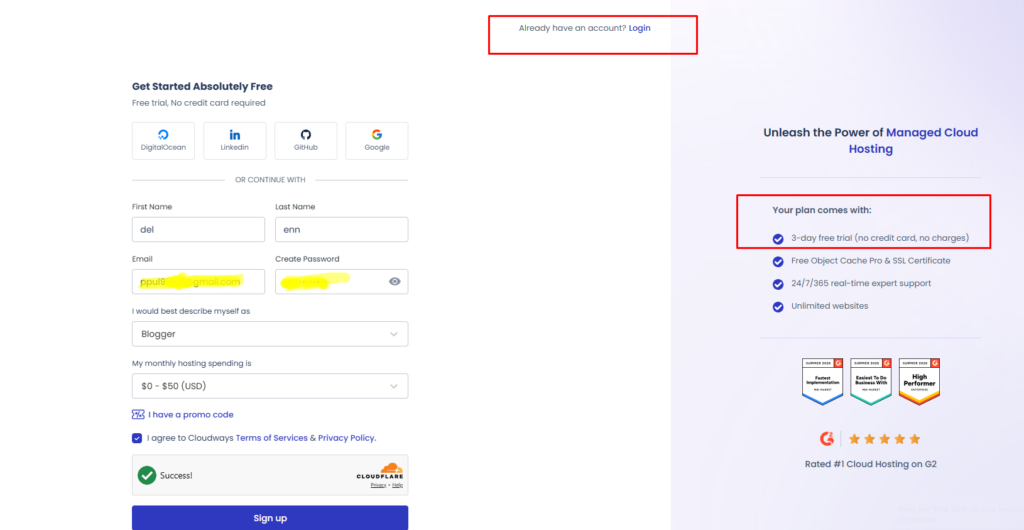
3-day free trial
One of the easiest ways to decide whether Cloudways is right for your website is to test it yourself. Cloudways currently offers a 3-day free trial with no credit card required, so you can explore the platform before committing to a paid hosting plan.
During the trial, you can launch a server, deploy a WordPress application, or even migrate an existing website and see how Cloudways performs in a real-world environment. That makes the trial more useful than a simple demo account—you can actually test the hosting dashboard, performance, server management, and other features before paying.
For a Cloudways Review 2026, I think this is one of the platform’s biggest advantages. If you’re unsure about moving away from shared hosting, you can use the three days to check page speed, test WordPress, explore the control panel, and see whether managed cloud hosting feels worth the extra cost.
It’s also worth knowing that Cloudways doesn’t offer permanent free hosting. The trial lasts for three days, and after it expires, you’ll need to upgrade to a paid account if you want to keep your server and applications running. Cloudways uses a pay-as-you-go billing model after the trial.
My recommendation: Don’t treat the 3-day trial as just a quick signup offer. Use it as a hands-on test. If you’re considering Cloudways for a WordPress blog, affiliate website, WooCommerce store, or growing business site, three days is enough time to get a good feel for the platform before making a longer-term decision.
Start Your 3-Day Cloudways Free Trial


How Does Cloudways Hosting Work?
Cloudways acts as the management layer between you and the underlying cloud infrastructure.
Depending on the current Cloudways offering, you can choose infrastructure from providers such as DigitalOcean, AWS, Google Cloud, Vultr, and Linode (Akamai). This gives you more flexibility over the type of server environment your website runs on than you would normally get with traditional shared hosting.
The advantage is that you don’t have to deal with every aspect of server administration yourself.
Cloudways handles much of the hosting management, while you can focus on your actual website—whether that’s publishing content, running an affiliate business, managing an online store, or growing a WordPress site.
This makes Cloudways hosting particularly interesting for website owners who have started to outgrow entry-level hosting but aren’t ready to become full-time server administrators.
Is Cloudways a Hosting Provider?
Yes, but it’s useful to think of Cloudways as a managed cloud hosting platform rather than a conventional hosting company.
You aren’t simply purchasing a fixed shared-hosting package with a predetermined amount of server resources. Instead, Cloudways gives you a managed environment built around cloud infrastructure, with different resource configurations and providers available depending on the hosting product you choose.
That model gives you more flexibility, but it can also make Cloudways pricing and server selection slightly more complicated for beginners.
Why Is Cloudways Popular for WordPress?
WordPress is one of the main reasons people consider Cloudways.
A growing WordPress website can eventually need more than basic hosting. More traffic, larger databases, WooCommerce, resource-heavy plugins, or multiple websites can increase the demands placed on the hosting environment.
Cloudways combines managed infrastructure with WordPress-focused tools such as caching, staging, backups, security features, and website management capabilities.
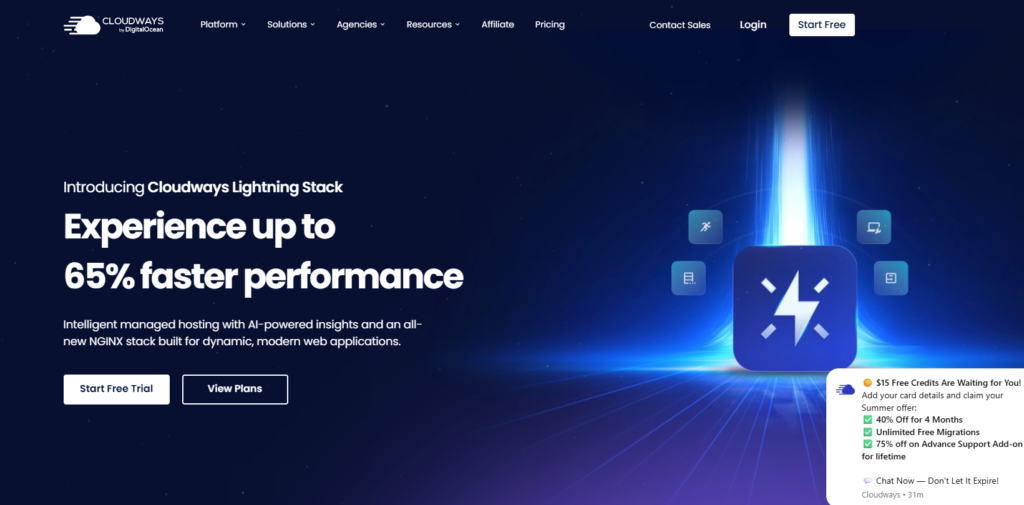
Its current platform also includes the Cloudways Lightning Stack, which is built around technologies such as NGINX and caching to improve website performance and scalability.
This doesn’t mean every WordPress website hosted on Cloudways will automatically be faster.
Your theme, plugins, images, database, CDN, code, and website configuration still have a major impact on real-world performance.
What Cloudways provides is a stronger infrastructure foundation from which a properly optimized WordPress website can operate.
Cloudways vs Traditional Hosting
The easiest way to understand Cloudways is to compare its approach with traditional shared hosting.
| Feature | Cloudways | Traditional Shared Hosting |
|---|---|---|
| Hosting type | Managed cloud hosting | Shared hosting |
| Resource model | Cloud-based resources | Shared server resources |
| Scalability | Strong | More limited |
| WordPress tools | Advanced | Usually simpler |
| Server management | Managed | Usually managed |
| Beginner simplicity | Moderate | Usually easier |
| Best suited for | Growing websites | Small/new websites |
This is why Cloudways hosting isn’t necessarily the best choice for everyone.
If you’re starting a small blog and your biggest priority is keeping hosting costs as low as possible, traditional shared hosting may be perfectly adequate.
But if you’re running a growing affiliate website, WooCommerce store, business website, or content-heavy WordPress site, the additional flexibility of managed cloud hosting can become much more valuable.
What Makes Cloudways Different?
The biggest difference is the balance between control and convenience.
A completely unmanaged cloud server can give you considerable control, but you’re also responsible for much more of the technical administration.
Traditional shared hosting is easier, but you generally have less control over the underlying environment.
Cloudways attempts to sit between those two extremes.
You get access to cloud infrastructure and more scalable resources while Cloudways takes care of many of the underlying hosting-management tasks.
That’s ultimately the core idea behind Cloudways.
You’re not paying Cloudways simply for web space. You’re paying for a managed cloud hosting environment designed to make a more powerful infrastructure easier to operate.
And whether that additional cost is justified depends on how demanding your website has become—which is exactly what we’ll examine throughout this Cloudways Review 2026.
Cloudways Pricing 2026
Cloudways pricing can look a little different from traditional hosting because you are not simply choosing a fixed shared-hosting package and paying for it annually. Instead, Cloudways uses a more flexible model where the price depends on the hosting product, cloud provider, and resources you choose.
For anyone comparing Cloudways pricing in 2026, this is probably the most important thing to understand before signing up.
Cloudways currently offers two main hosting approaches: Cloudways Flexible and Cloudways Autonomous. Flexible is designed for users who want more control over their server resources and cloud provider, while Autonomous is aimed at WordPress websites that need hands-off management and automatic scaling.
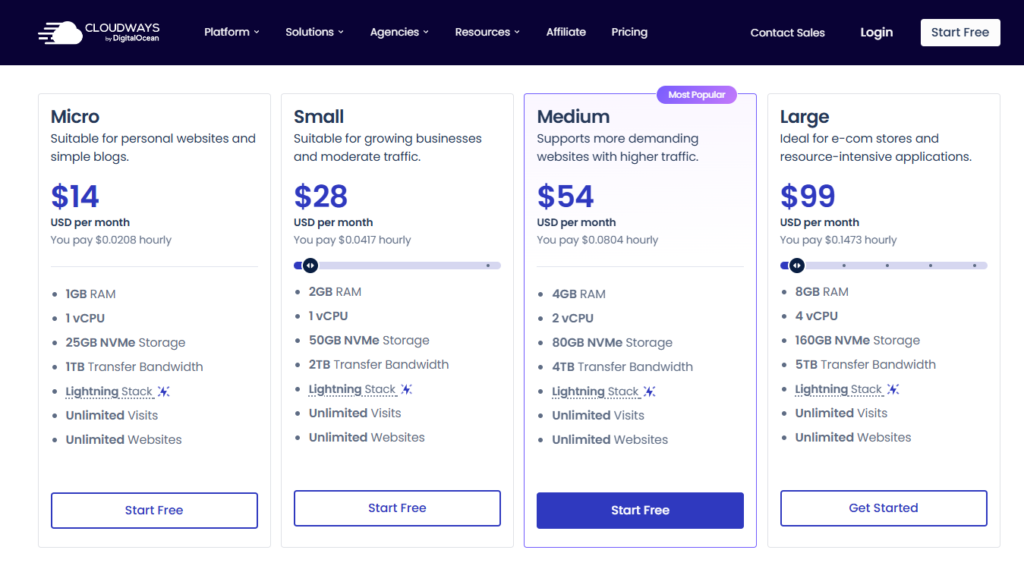
Cloudways Flexible Pricing
Cloudways Flexible is the more traditional option within the current Cloudways platform. You choose your cloud infrastructure, configure the resources you need, and pay according to that configuration.
Cloudways currently lists DigitalOcean, Vultr, Linode, AWS, and Google Cloud as infrastructure options, although pricing varies considerably between providers.
For example, Cloudways’ current WordPress hosting information lists starting prices of around:
| Cloud Provider | Starting Price |
|---|---|
| DigitalOcean | $14/month |
| Vultr | $14/month |
| Linode | $14/month |
| Google Cloud | $37.45/month |
| AWS | $38.56/month |
These are current figures shown by Cloudways and can change depending on configuration, promotions, and the resources selected.
Cloudways also describes its Flexible plans as pay-as-you-go, meaning you are billed based on your actual usage rather than being locked into a traditional multi-year hosting contract.
Cloudways Autonomous Pricing
Cloudways Autonomous is a very different product.
It is designed specifically for WordPress websites that need automatic scaling and high availability, particularly dynamic websites, WooCommerce stores, and sites that can experience sudden traffic increases.
The current Autonomous pricing structure includes:
| Plan | Monthly Price | Baseline Autoscale Servers | Bandwidth | Disk Space |
|---|---|---|---|---|
| Growth | $100/month | 1 | 150 GB | 20 GB |
| Scale | $200/month | 2 | 250 GB | 50 GB |
| Plus | $400/month | 3 | 1,000 GB | 100 GB |
| Custom Enterprise | Custom | Custom | Custom | Custom |
These new Autonomous prices have been in effect for new customers since November 12, 2025.
The interesting part is that Autonomous can automatically add additional servers when your website needs more resources. Those extra servers are charged by the hour rather than requiring you to permanently upgrade to a much larger plan. Cloudways currently documents additional autoscaling charges of roughly $0.07–$0.12 per hour per additional server, depending on the plan.
That makes Autonomous particularly interesting for websites with unpredictable traffic spikes.
Does Cloudways Have a Free Trial?
Yes.
Cloudways currently offers a 3-day free trial for its hosting services, and the trial does not require a credit card.
Three days isn’t enough to determine how a website will perform under months of real-world traffic, but it is enough time to explore the dashboard, deploy WordPress, test the management tools, and decide whether the platform feels comfortable to use.
How Cloudways Billing Works
One advantage of Cloudways is that you don’t necessarily have to commit to a long-term hosting contract to get started.
Cloudways uses hourly billing for its Flexible infrastructure, so changes to your server configuration can be reflected in your billing based on actual usage.
This can be useful when your resource requirements change.
For example, you might start with a smaller server while your website is new and increase the resources later as traffic grows.
However, pay-as-you-go pricing also means you should pay attention to your configuration and additional services. Your final monthly bill isn’t determined solely by the headline starting price.
Are There Extra Cloudways Costs?
Potentially, yes.
Cloudways offers additional services and resources that can increase the total cost of hosting.
For example, Cloudflare Enterprise is currently offered as an add-on at $4.99 per domain per month on the Cloudways platform.
Backup storage and other resource-related charges can also affect the final bill depending on your setup.
That’s why I wouldn’t recommend choosing Cloudways based only on the advertised starting price.
Instead, calculate the total cost of the exact configuration your website actually needs.
Is Cloudways Expensive?
Compared with basic shared hosting, Cloudways is more expensive.
But the comparison isn’t completely straightforward.
A $3–$5 shared hosting plan and a managed cloud server aren’t necessarily designed for the same type of customer.
If you’re running a small personal blog with limited traffic, Cloudways may provide more infrastructure than you actually need.
But if you’re running a growing affiliate website, WooCommerce store, business website, or multiple WordPress sites, the additional resources and scalability can make the higher price easier to justify.
The key question isn’t simply:
“What is the cheapest hosting?”
It’s:
“What level of hosting does my website actually need?”
Cloudways Pricing: Who Gets the Best Value?
I’d divide Cloudways customers into three groups.
For beginners: Cloudways Flexible may be more hosting than you need, especially if you’re building your first small website.
For growing websites: Flexible becomes much more interesting because you can increase resources as your website develops without moving to an entirely different hosting platform.
For high-traffic WordPress sites: Autonomous can make sense when automatic scaling and high availability are more important than keeping monthly hosting costs low.
My Take on Cloudways Pricing
The biggest strength of Cloudways pricing is flexibility, not cheapness.
You have more control over the infrastructure you pay for, and you aren’t forced into the long-term promotional pricing model commonly associated with traditional shared hosting.
But that flexibility also means you need to understand what you’re buying.
For a small new website, I’d probably choose a cheaper hosting solution and put the money elsewhere.
For a growing website where performance, scalability, and server resources are becoming important, Cloudways can offer better long-term value.
And if your WordPress business experiences major traffic spikes, Cloudways Autonomous is a completely different proposition because its autoscaling model is designed to respond to resource demand automatically.
Bottom line: Cloudways isn’t the cheapest hosting option in 2026, but its pricing model makes more sense when you need managed cloud infrastructure rather than basic shared hosting.
My Experience With Cloudways
I signed up for Cloudways on August 7, 2026. specifically to test the platform for this review. I used the Most Popular and deployed a fresh WordPress website so I could get a better idea of what the setup process, dashboard, performance, and day-to-day management experience are actually like.
My goal wasn’t simply to see how quickly I could get a website online. I wanted to see what using Cloudways feels like compared with more traditional hosting platforms.
Setting Up My WordPress Website
Getting started with Cloudways was relatively straightforward, although the process feels different from signing up for a typical shared hosting plan.
Instead of simply choosing a hosting package and installing WordPress, Cloudways gives you more control over the underlying server environment. I selected DigitalOcean as the cloud provider, a suitable server size for my website, and a US-based data center location, then deployed WordPress.
The entire setup took approximately 15 minutes.
What stood out to me was the amount of control Cloudways gives you during the initial setup. That’s useful if you understand hosting resources, but it can feel slightly more technical if you’re coming from beginner-focused hosting.
Once WordPress was deployed, I could manage the website and server from the Cloudways dashboard without having to deal with a completely unmanaged cloud server.
My First Impression of the Cloudways Dashboard
My first impression of the Cloudways interface was that it looked more technical than a typical shared hosting dashboard, but it didn’t take long to get comfortable with it. Once I understood where the server and application settings were located, navigating the platform became fairly straightforward.
The dashboard provides access to both application-level and server-level settings, so there is considerably more to explore than you would normally find in a basic shared-hosting control panel.
At first, this made the interface feel a little more technical. However, after spending some time with it, the main controls became easier to understand.
I particularly liked the level of control available from the dashboard, while getting familiar with the different server and application settings was the part that took me the longest to figure out.
That balance is important when evaluating Cloudways. The platform gives you more control, but that additional control also means there is more to learn.
My Cloudways Performance Test
I tested my Cloudways website on August 5, 2026 using GTmetrix.
For a fair evaluation, I focused on a standard WordPress setup using a lightweight theme, essential plugins, a US-based data center, and a DigitalOcean server configuration.
The GTmetrix results were:
| Performance Metric | My Result |
|---|---|
| Fully Loaded Time | 868 ms |
| TTFB | 213 ms |
| LCP | 706 ms |
| Page Size | Not shown |
| Requests | Not shown |
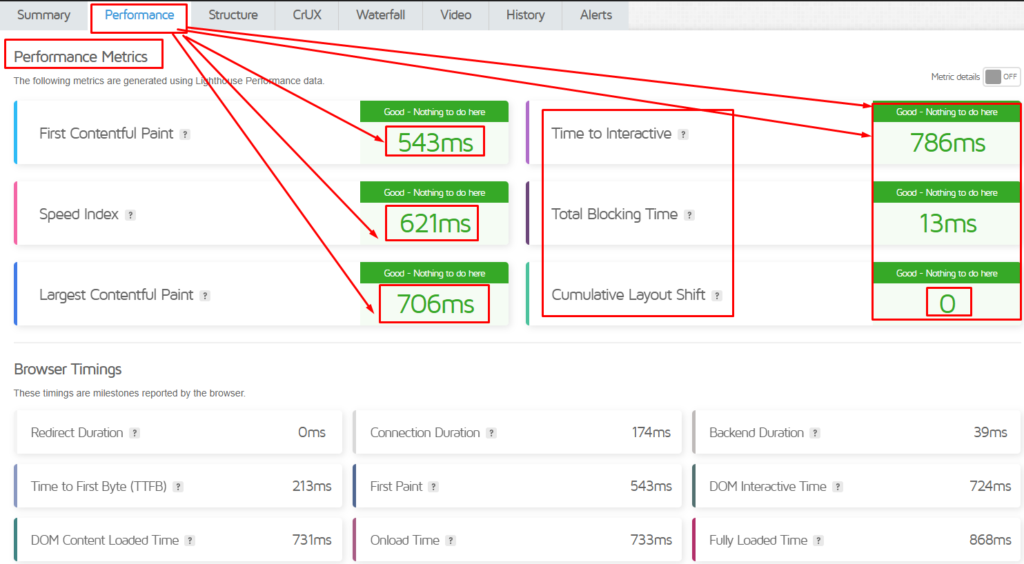
These numbers give a useful snapshot of how the website performed under my specific test conditions.
However, I wouldn’t treat one speed test as proof that Cloudways will deliver the same results for every website. Hosting performance can change significantly depending on server location, WordPress configuration, theme, plugins, caching, images, CDN, and traffic.
What matters to me is whether the infrastructure provides a solid foundation for a growing website—and that’s where Cloudways becomes more interesting than simply looking at a single GTmetrix score.
What I Like Most About Cloudways
The thing I like most about Cloudways is the balance between cloud infrastructure and managed hosting.
I don’t have to manage a completely raw cloud server, but I also don’t feel restricted to the same type of environment you get with basic shared hosting.
The platform also includes features such as the Lightning Stack, vertical scaling, free managed migration, Redis caching, Object Cache Pro, staging and cloning, and a WordPress vulnerability scanner.
For a growing WordPress website, those tools can be more valuable than simply getting the cheapest monthly hosting price.
My Main Concern With Cloudways
My biggest concern is complexity and cost.
Cloudways gives you more flexibility, but that flexibility means there are more settings and infrastructure decisions to understand.
The pricing model is also very different from traditional shared hosting. Cloudways uses a pay-as-you-go approach, and your final cost can depend on the resources and services you use.
For a small website with very little traffic, I don’t think everyone will get enough practical benefit from paying for managed cloud infrastructure.
But for a growing website where performance, scalability, and reliability matter, that extra cost can become easier to justify.
My Overall First Impression
After spending time with Cloudways, my first impression is that it is better suited to growing websites than absolute beginners.
The platform offers considerably more flexibility than basic shared hosting, but you’re also expected to understand a little more about servers, resources, caching, and hosting configuration.
That’s not necessarily a disadvantage.
In fact, for someone running a serious WordPress website, it can be exactly what makes Cloudways attractive.
My experience so far: Cloudways feels less like a traditional hosting account and more like a managed control layer for serious cloud infrastructure.
The real question is whether that additional flexibility and performance potential justify the price for your particular website—and that’s what the rest of this Cloudways Review 2026 will help determine.
Ease of Use
Cloudways is easier to use than managing a cloud server completely on your own, but it isn’t quite as beginner-friendly as the simplest shared hosting platforms.
That’s an important distinction.
If you’re coming from a basic WordPress hosting provider, the Cloudways dashboard may initially feel more technical because it gives you access to both application-level and server-level controls. However, once you understand the layout, most everyday WordPress tasks are relatively straightforward.
For this Cloudways Review 2026, I would describe the experience as beginner-accessible, but better suited to users who are willing to learn a little about hosting.
Getting Started With Cloudways
The initial setup is different from traditional hosting.
Instead of simply choosing a hosting plan and clicking an “Install WordPress” button, Cloudways asks you to configure your application and server environment.
You’ll typically need to choose:
- Your application
- Your cloud provider
- Server resources
- Server location
- Your website/application details
That extra choice gives you more flexibility, but it also adds another layer to the setup process.
For someone who already understands hosting, this isn’t particularly difficult.
For a complete beginner, however, seeing options related to server size, cloud providers, and infrastructure can initially feel overwhelming.
The Cloudways Dashboard
Once your website is running, the dashboard becomes easier to understand.
Cloudways separates many controls into Application Management and Server Management, which is a useful approach because it prevents every setting from being placed into one large menu.
Application-level settings are where you can manage things related to your website.
Server-level settings deal more with the infrastructure supporting your applications.
This separation is particularly useful if you manage multiple WordPress websites on the same server.
Managing WordPress
For everyday WordPress management, Cloudways provides the tools you’d expect from a managed hosting platform.
You can access your WordPress installation, manage domains, SSL, backups, staging environments, caching, and other hosting-related settings without needing to log into the underlying server through a command line for every task.
Cloudways also provides one-click actions for several common operations, making routine management considerably easier than managing an unmanaged cloud server.
That is really where Cloudways earns the “managed” part of managed cloud hosting.
Cloudways Site Manager
Cloudways has also made its Site Manager generally available, adding a centralized way to manage WordPress websites. The tool can bring together website-related tasks such as plugin and theme management, updates, user management, activity history, and other WordPress controls.
This becomes particularly useful if you manage several websites.
For example, an agency managing 10 or 20 WordPress sites doesn’t necessarily want to log into each WordPress dashboard individually just to check updates.
A centralized management layer can save time.
For someone running one small website, however, Site Manager may not be a major reason to choose Cloudways.
Is Cloudways Beginner-Friendly?
I’d say partially.
You don’t need to be a professional developer to use Cloudways, but you should be comfortable learning a few basic hosting concepts.
The biggest learning curve isn’t actually WordPress.
It’s understanding the infrastructure decisions.
For example:
Which cloud provider should you choose?
How much RAM and CPU does your website need?
Which server location makes sense for your audience?
Do you need additional CDN or caching features?
These aren’t questions that most beginners encounter with basic shared hosting.
That’s why I wouldn’t recommend Cloudways purely because it has more features.
More control is only useful when you know how to use it.
What I Like About Cloudways’ Usability
The biggest positive is the balance between control and convenience.
You get considerably more control than you would normally have with entry-level hosting, but you don’t have to manage a completely raw cloud server yourself.
I also like the separation between server and application settings because it makes the platform easier to understand once you’re familiar with the structure.
For growing WordPress websites, this can be a practical advantage.
What Could Be Better?
The biggest weakness is the initial learning curve.
If you’ve only used traditional shared hosting before, Cloudways can feel more complicated than necessary at first.
The pricing model, cloud-provider selection, server configuration, and infrastructure terminology all require some understanding.
Cloudways could also feel like overkill if you’re simply launching a small blog and don’t expect much traffic.
In that situation, a simpler hosting dashboard may actually provide a better user experience.
Cloudways Ease of Use: My Verdict
Cloudways isn’t the easiest hosting platform I’ve seen, but I don’t think that’s necessarily a problem.
Its target user is not someone who wants the absolute simplest hosting account.
It’s aimed more at people who want managed cloud hosting with greater control and scalability.
Once you understand the dashboard, the additional controls become an advantage rather than a complication.
My verdict: Cloudways is reasonably easy to use for an intermediate WordPress user, but complete beginners may prefer a simpler shared-hosting dashboard.
If your priority is maximum simplicity, there are easier options.
If you want a balance between cloud infrastructure, WordPress management, and control, Cloudways’ learning curve is worth it.
Security & Backups
Security is one of those hosting features that is easy to ignore when everything is working—and suddenly becomes the most important thing when something goes wrong.
For a WordPress website, hosting security isn’t just about protecting the server. You also need to think about malware, vulnerable plugins, unauthorized access, SSL certificates, backups, and what happens if you need to restore the site after a problem.
In this Cloudways Review 2026, security is one area where the platform offers a solid set of built-in protections, although you should still treat hosting security as only one layer of your overall WordPress security strategy.
Cloudways Security Features
Cloudways currently includes several security-related features across its hosting platform, including a dedicated firewall, free SSL certificates, bot protection, DDoS protection, and WordPress vulnerability scanning.
The advantage of having these protections at the hosting level is that you don’t have to rely entirely on WordPress plugins to handle every security task.
That’s useful because loading your site with multiple security plugins can sometimes create unnecessary complexity or performance overhead.
Cloudways also provides tools for managing server access, SSH/SFTP credentials, IP whitelisting, and other server-level controls, giving more technically experienced users additional ways to secure their hosting environment.
Free SSL Certificates
SSL is essential for almost every modern website.
It encrypts the connection between your visitor’s browser and your website and is particularly important for websites handling login information, forms, or transactions.
Cloudways provides free SSL certificates for hosted applications, allowing WordPress website owners to secure their domains without purchasing a separate SSL certificate.
For a typical WordPress or affiliate website, that’s one less recurring cost to worry about.
Cloudways Firewall
Cloudways includes a dedicated firewall as part of its infrastructure-level security.
The firewall helps protect the server environment from unwanted traffic and common threats before they reach your individual WordPress installation.
This is important because WordPress security shouldn’t depend entirely on what happens inside WordPress itself.
Having protection at the infrastructure level adds another layer between your website and potentially malicious traffic.
WordPress Vulnerability Protection
Another useful feature is Cloudways’ focus on WordPress vulnerabilities.
Cloudways currently promotes a WordPress Vulnerability Scanner designed to identify vulnerable WordPress components and notify users about potential security issues.
This can be particularly useful for website owners who manage several plugins and themes.
However, a scanner can identify a problem—it doesn’t mean every security issue will automatically be fixed for you.
You still need to keep your WordPress core, themes, and plugins updated and remove software that is no longer maintained.
Cloudways Backups
Backups are arguably just as important as security.
Even if your hosting environment is well protected, things can still go wrong.
A plugin update could break your website.
A developer could accidentally delete something.
A database could become corrupted.
Or you could simply make a mistake while changing your WordPress installation.
That’s why having reliable backups matters.
Cloudways provides automated backup functionality as part of its managed hosting environment. Backup frequency and retention options depend on the hosting configuration, and Cloudways also documents additional charges related to offsite backup storage.
This gives you a way to restore your website if something goes wrong without having to rebuild the entire site manually.
Are Cloudways Backups Enough?
For most websites, Cloudways’ built-in backups provide an important safety net.
But for a website that generates meaningful revenue, I wouldn’t rely exclusively on the hosting provider’s backups.
My preferred approach is 3 layers of protection:
- Cloudways automated backups
- A separate WordPress backup
- An independent copy stored outside the hosting account
The reason is simple.
If your website and its backup system are both tied to the same provider, a serious account or infrastructure problem could potentially affect both.
An independent backup gives you another recovery option.
Cloudflare Enterprise
Cloudways also offers Cloudflare Enterprise as an optional service.
Cloudflare can provide additional security and performance capabilities, including DDoS protection, global content delivery, and other traffic-management features. Cloudways currently lists Cloudflare Enterprise as an additional paid option rather than something that every hosting configuration automatically includes at no extra cost.
For a small website, paying extra for Cloudflare Enterprise may not be necessary.
For a larger business, WooCommerce store, or high-traffic website, the additional protection and global delivery capabilities can be more valuable.
What I Like About Cloudways Security
The biggest advantage is that security isn’t treated as something you have to build entirely yourself.
You get multiple layers, including:
- Dedicated firewall
- Free SSL
- DDoS protection
- Bot protection
- WordPress vulnerability scanning
- Server access controls
- Automated backups
- Optional Cloudflare Enterprise
That gives you a stronger starting point than running a completely unmanaged cloud server.
What I Would Still Do Myself
Even with Cloudways security features enabled, I would still take responsibility for the WordPress installation.
I’d keep:
- WordPress core updated
- Plugins updated
- Themes updated
- Unused plugins removed
- Strong administrator passwords
- Limited administrator accounts
- Regular independent backups
Hosting security can reduce risk, but it can’t replace good website management.
Cloudways Security & Backups: My Verdict
Cloudways provides a strong security foundation for WordPress websites, especially compared with running an unmanaged cloud server where you are responsible for configuring most security protections yourself.
The built-in firewall, SSL, vulnerability scanning, DDoS protection, and automated backups cover many of the basics a serious website needs.
The important caveat is that no hosting provider can make a WordPress website completely immune to security problems.
For me, the best approach is to use Cloudways’ built-in protections as the first layer and maintain an independent backup and sensible WordPress security practices on top of them.
My verdict: Cloudways gets a strong score for security and backups, but I would still maintain an independent backup strategy for any website that matters financially.
Cloudways Pros & Cons
After looking at Cloudways’ pricing, performance, ease of use, WordPress features, security, and scalability, the platform has a fairly clear set of strengths and weaknesses.
The biggest advantage is that Cloudways gives you access to managed cloud hosting without requiring you to manage a cloud server completely on your own. The biggest drawback is that this additional infrastructure and flexibility can cost more and may feel unnecessarily complicated for a small website.
Here are the main Cloudways pros and cons I would consider before signing up.
Cloudways Pros
1. Managed Cloud Hosting
Cloudways sits between traditional shared hosting and completely unmanaged cloud infrastructure.
You get access to cloud-based resources while Cloudways handles many of the underlying hosting-management tasks.
For growing WordPress websites, that can be a very useful combination.
2. Strong Performance Potential
Cloudways provides performance-focused technologies such as the Lightning Stack, caching, Redis, and Object Cache Pro on eligible configurations.
These tools give WordPress websites a solid foundation for handling more demanding workloads.
Of course, your actual speed will still depend on your theme, plugins, images, database, CDN, and overall configuration.
3. Flexible Cloud Infrastructure
One of the biggest advantages of Cloudways is the choice of underlying cloud infrastructure.
Depending on the product and current availability, you can choose providers such as DigitalOcean, Vultr, Linode, AWS, and Google Cloud.
That gives you considerably more flexibility than a typical shared hosting package.
4. Easy Server Scaling
As your website grows, you can increase resources rather than immediately moving to a completely different hosting environment.
Cloudways Autonomous takes this further with automatic scaling designed for WordPress websites that experience changing traffic levels.
For websites that occasionally experience traffic spikes, this can be a major advantage.
5. Excellent WordPress Features
Cloudways includes several features that are particularly useful for WordPress users, including:
- Staging environments
- Website cloning
- Free migration
- Caching
- Automated backups
- SSL
- WordPress vulnerability scanning
- Server-level controls
These features make Cloudways more attractive for serious WordPress projects than simply comparing storage and bandwidth numbers.
6. Useful for Growing Affiliate Websites
For an affiliate website that is still small, Cloudways may be unnecessary.
But once the website starts receiving significant traffic, publishing more content, or generating meaningful revenue, the additional infrastructure can become easier to justify.
That makes Cloudways particularly interesting for publishers who are building a long-term website rather than a temporary project.
7. Site Manager for Multiple WordPress Sites
Cloudways Site Manager adds centralized WordPress management, including tools for plugins, themes, updates, users, and website activity.
This can save time if you manage multiple websites.
For agencies and experienced WordPress users, that’s a meaningful advantage.
Cloudways Cons
1. More Expensive Than Basic Shared Hosting
This is probably the biggest drawback for beginners.
Cloudways isn’t designed to compete primarily on the lowest monthly price.
If you’re building a small blog with very little traffic, you may get better value from a cheaper shared hosting provider.
2. Pricing Can Be Confusing
Cloudways’ pricing model is more flexible than traditional hosting, but that also means it’s more complicated.
You need to understand the cloud provider, server resources, bandwidth, storage, backups, and optional services before you can accurately estimate your total cost.
That can be frustrating if you’re used to simple hosting packages.
3. Learning Curve
Cloudways is easier than managing an unmanaged cloud server, but it isn’t completely beginner-focused.
You’ll encounter concepts such as:
- Server resources
- Cloud providers
- Caching
- Application settings
- Server settings
- Scaling
- CDN configuration
If you just want to click “Install WordPress” and forget about hosting, Cloudways may feel like too much.
4. Some Features Cost Extra
Not every advanced feature is included in the base hosting price.
For example, Cloudflare Enterprise is available as an additional paid option.
Backup storage and other usage-related costs can also affect your final bill.
That means the advertised starting price shouldn’t be treated as your guaranteed monthly cost.
5. Overkill for Small Websites
This is something I think prospective customers should seriously consider.
If your website receives very little traffic and uses minimal resources, you may not notice enough practical improvement to justify managed cloud hosting.
Sometimes simple hosting is simply the better choice.
6. Performance Still Requires Optimization
Cloudways can provide strong infrastructure, but it won’t automatically fix a poorly optimized WordPress website.
A slow theme, oversized images, unnecessary plugins, or poorly configured scripts can still create performance problems.
So Cloudways should be viewed as a strong hosting foundation, not a magic speed button.
Cloudways Pros & Cons at a Glance
| Pros | Cons |
|---|---|
| Managed cloud infrastructure | More expensive than shared hosting |
| Strong performance tools | Pricing can be complicated |
| Multiple cloud providers | Learning curve for beginners |
| Scalable resources | Some features cost extra |
| Excellent WordPress features | Can be overkill for small sites |
| Free migration | Website optimization is still required |
| Automated backups | Total cost depends on configuration |
| Useful for growing websites | Not the simplest hosting experience |
| Site Manager for multiple sites | Better suited to intermediate users |
My Take on the Cloudways Pros & Cons
The Cloudways pros become much more convincing as your website grows.
If you’re running a serious WordPress website, WooCommerce store, agency, or affiliate business, managed cloud infrastructure, scalable resources, caching, staging, backups, and security tools can provide real practical value.
The Cloudways cons become more obvious if you’re a beginner with a small website and a tight hosting budget.
In that situation, paying more for infrastructure you aren’t currently using doesn’t make much sense.
So I wouldn’t describe Cloudways as simply “good” or “bad.”
I’d describe it as a better fit for growing websites than for very small beginner projects.
Bottom line: Cloudways has more capability than many websites need, but for websites that actually require that capability, its advantages can outweigh the higher price and learning curve.
Cloudways vs Competitors
Cloudways makes the most sense when you compare it with hosting providers that target a similar type of customer. But if you’re comparing Cloudways vs Hostinger, Bluehost, or SiteGround, it’s important to understand that these companies don’t all approach hosting in exactly the same way.
Cloudways focuses heavily on managed cloud hosting and scalability, while Hostinger and Bluehost are generally more beginner-friendly and budget-oriented. SiteGround sits somewhere in between, offering managed hosting with a strong focus on WordPress and small businesses.
So instead of asking which hosting provider is “best,” I think the better question is:
Which one fits your website and budget best?
Cloudways vs Hostinger
Hostinger is probably the most interesting comparison for a new website owner because it offers a much lower entry price and a simpler overall experience. Current 2026 testing from TechRadar also positions Hostinger as a strong all-around choice, particularly for beginners and small businesses.
Cloudways takes a different approach.
Hostinger is easier if your priorities are:
- Low starting cost
- Simple setup
- Beginner-friendly management
- Traditional WordPress hosting
- Getting a website online quickly
Cloudways becomes more attractive when you need:
- Managed cloud infrastructure
- More control over server resources
- Better scalability
- Advanced caching and performance tools
- More flexibility over the underlying cloud provider
The price difference is also significant. Hostinger’s entry-level plans are designed to be affordable, while Cloudways’ managed cloud environment starts at a considerably higher level depending on the configuration. Cloudways currently advertises managed cloud servers starting around $11/month on its Flexible offering.
My pick: Hostinger for beginners and budget-conscious websites; Cloudways for growing websites that need more infrastructure flexibility.
Cloudways vs Bluehost
Bluehost is another strong choice for beginners, particularly WordPress users.
Bluehost focuses heavily on making the initial hosting experience straightforward. That’s a major advantage if you’ve never managed a website before.
Cloudways, on the other hand, gives you a more infrastructure-oriented experience.
If you’re building a simple blog or small business website, Bluehost’s simplicity can actually be more valuable than Cloudways’ additional server flexibility.
But if your website becomes more demanding, Cloudways starts to make more sense.
A useful way to think about it is:
Bluehost = easier starting point
Cloudways = more room to grow
Current 2026 hosting comparisons also continue to position Bluehost as a beginner-friendly option, while Cloudways is more commonly recommended for advanced WordPress hosting.
My pick: Bluehost for beginners; Cloudways for users who need managed cloud infrastructure and greater scalability.
Cloudways vs SiteGround
SiteGround is a more interesting comparison because both companies put significant emphasis on managed hosting, WordPress performance, security, and support.
SiteGround can be an excellent choice for smaller websites and businesses that want a polished managed WordPress experience. Current 2026 reviews highlight SiteGround’s support and WordPress optimization tools as major strengths.
Cloudways has the advantage when you specifically want cloud infrastructure and more control over the underlying server environment.
SiteGround may be easier for a typical small business owner.
Cloudways may be more appealing to an experienced WordPress user managing a growing website, WooCommerce store, or multiple projects.
My pick: SiteGround for smaller WordPress businesses; Cloudways for more demanding websites where scalability and infrastructure flexibility matter.
Cloudways vs Competitors: Quick Comparison
| Feature | Cloudways | Hostinger | Bluehost | SiteGround |
|---|---|---|---|---|
| Best for | Growing websites | Beginners & budget users | Beginners & WordPress | Small businesses |
| Hosting approach | Managed cloud | Shared/Cloud/VPS | Traditional managed hosting | Managed WordPress |
| Ease of use | ⭐⭐⭐⭐ | ⭐⭐⭐⭐⭐ | ⭐⭐⭐⭐⭐ | ⭐⭐⭐⭐⭐ |
| Scalability | ⭐⭐⭐⭐⭐ | ⭐⭐⭐⭐ | ⭐⭐⭐ | ⭐⭐⭐⭐ |
| Beginner-friendly | ⭐⭐⭐ | ⭐⭐⭐⭐⭐ | ⭐⭐⭐⭐⭐ | ⭐⭐⭐⭐⭐ |
| Infrastructure control | ⭐⭐⭐⭐⭐ | ⭐⭐⭐ | ⭐⭐ | ⭐⭐⭐ |
| Starting cost | Higher | Lower | Lower | Lower |
| Best for high-growth sites | ⭐⭐⭐⭐⭐ | ⭐⭐⭐⭐ | ⭐⭐⭐ | ⭐⭐⭐⭐ |
Which One Should You Choose?
The right choice depends on where your website is today—not where you hope it will be five years from now.
Choose Hostinger if: you’re starting a new blog, affiliate website, or small business site and want to keep costs low while getting an easy-to-use hosting dashboard.
Choose Bluehost if: you’re a beginner who wants a straightforward WordPress hosting experience with plenty of beginner-focused guidance.
Choose SiteGround if: you’re running a small-to-medium business website and value managed WordPress tools and customer support.
Choose Cloudways if: your website is growing, you need more scalable infrastructure, or you want managed cloud hosting without managing a raw cloud server yourself.
So, Is Cloudways Better Than Its Competitors?
Not universally.
That’s one conclusion I think is important to make in a fair Cloudways Review 2026.
Cloudways is more capable than many beginner-focused hosting plans, but that doesn’t automatically make it the better purchase.
If you’re paying $3–$5 per month for hosting and your website performs perfectly well, moving to a more expensive cloud platform simply because it has more features may not improve your business.
On the other hand, if you’re already experiencing resource limitations, traffic spikes, slow server response times, or need more control over your hosting environment, Cloudways can be a meaningful upgrade.
My Overall Comparison
For price and simplicity, I’d choose Hostinger.
For beginners and straightforward WordPress hosting, I’d consider Bluehost.
For small businesses that want managed WordPress hosting and strong support, SiteGround remains a compelling option.
For scalability, managed cloud infrastructure, and growing WordPress websites, Cloudways is my stronger choice.
That’s ultimately where Cloudways stands out.
It isn’t the hosting provider I’d recommend to everyone. It’s the one I’d consider when a website has started needing more than basic hosting can comfortably provide.
Who Should Use Cloudways?
Cloudways isn’t designed for every website owner, and that’s actually one of the easiest conclusions to reach after looking at its pricing, performance, features, and management tools.
The real value of Cloudways hosting appears when your website has outgrown basic shared hosting or when you need more control and scalability than a traditional hosting plan provides.
For someone researching a Cloudways Review 2026, the better question isn’t simply whether Cloudways is good. It’s whether your website has a genuine reason to use managed cloud hosting.
Here are the types of users I think are most likely to benefit.
1. Growing WordPress Websites
Cloudways makes the most sense when a WordPress website is moving beyond the beginner stage.
Maybe you’re getting more organic traffic, publishing more content, adding more plugins, or starting to see higher resource usage.
At that point, having access to scalable cloud resources can be more useful than simply choosing the cheapest hosting package.
If your website is growing steadily, Cloudways gives you room to increase resources without necessarily changing your entire hosting environment.
2. Affiliate Marketers
Cloudways can be a good option for a serious affiliate website, particularly once the site starts generating meaningful traffic.
A new affiliate site with a few articles probably doesn’t need managed cloud hosting.
But imagine the website eventually has hundreds of articles, thousands of daily visitors, comparison tables, images, analytics scripts, and several affiliate integrations.
At that stage, performance and reliability become part of the business.
For an affiliate publisher, even short periods of downtime can mean missed visitors and potentially missed commissions.
That doesn’t mean Cloudways will automatically increase affiliate revenue.
It means that a reliable hosting infrastructure becomes more important as the website itself becomes more valuable.
3. WooCommerce Stores
WooCommerce websites can have more demanding hosting requirements than simple content sites.
Product databases, customer accounts, carts, checkout processes, payment systems, inventory operations, and dynamic pages can all create additional server workload.
That’s where Cloudways WordPress hosting can become attractive.
The combination of managed cloud infrastructure, caching, scalable resources, backups, and security tools can provide a stronger foundation for an online store than very basic shared hosting.
For a small WooCommerce store, however, I’d still compare the total hosting cost against actual resource requirements before upgrading.
4. Websites Experiencing Traffic Spikes
Not every website receives traffic consistently.
An article can suddenly rank on Google.
A product comparison can go viral.
A social media post can send thousands of visitors within a short period.
If your website regularly experiences unpredictable traffic, scalability becomes more important.
Cloudways Flexible allows you to adjust server resources, while Cloudways Autonomous is specifically designed around automatic scaling for WordPress.
That makes the platform particularly interesting for websites where traffic can change dramatically.
5. Agencies Managing Multiple Websites
Cloudways is also a strong candidate for agencies and freelancers managing several WordPress websites.
Instead of treating every website as an isolated hosting account, you can manage applications and servers from the Cloudways platform.
The newer Cloudways Site Manager adds another layer of centralized WordPress management, including plugin and theme management, updates, users, and activity tracking.
For someone managing multiple client websites, saving time on repetitive maintenance can be more valuable than saving a few dollars on hosting.
6. Developers and Experienced WordPress Users
Cloudways is also more appealing if you’re comfortable with hosting concepts.
You don’t need to be a professional server administrator, but understanding things such as:
- CPU and RAM
- Server locations
- Caching
- CDN
- Database performance
- Scaling
- DNS
- SSL
will make the Cloudways experience much easier.
The platform gives you more control than a typical beginner hosting account, so experienced users are more likely to appreciate that flexibility.
7. Businesses That Depend on Their Website
If your website is directly connected to your business revenue, hosting becomes more than a technical expense.
For example:
- Lead-generation websites
- Online stores
- SaaS landing pages
- Professional service websites
- Membership websites
- High-traffic content businesses
may benefit from infrastructure that can handle growth more comfortably.
In these situations, spending a little more on hosting can be easier to justify if it improves operational stability and gives you room to scale.
Who Should NOT Use Cloudways?
This is just as important as knowing who should use it.
Beginners With a Small Website
If you’re creating your first WordPress blog and expect very little traffic, Cloudways may be unnecessary.
A simpler shared hosting provider can get your website online for significantly less money.
You don’t need enterprise-style infrastructure for a website that receives 20 or 50 visitors a day.
Budget-Conscious Website Owners
If keeping your monthly hosting bill as low as possible is your main priority, Cloudways probably won’t be your first choice.
Its value comes from managed cloud infrastructure and flexibility—not from being the cheapest hosting provider.
Users Who Want Everything Simplified
Cloudways is easier than managing an unmanaged cloud server, but it still requires some learning.
If you want a hosting dashboard where almost everything is designed for absolute beginners, there are simpler options.
Cloudways: Who Is It Really For?
I’d put the ideal Cloudways customer into this category:
A website owner who has started taking their website seriously enough that hosting performance, scalability, and reliability matter—but doesn’t want to manage a cloud server completely on their own.
That’s the sweet spot.
You don’t necessarily need Cloudways when you’re starting.
You may need it when your website starts becoming a business.
My Recommendation
If you’re launching your first small blog, I’d start with simpler and cheaper hosting.
If you’re building a long-term affiliate website, growing WordPress business, WooCommerce store, or multiple-site operation, Cloudways deserves serious consideration.
And if your website already has consistent traffic or unpredictable traffic spikes, the platform’s cloud infrastructure and scaling options become even more relevant.
Bottom line: Cloudways is best for growing, performance-focused websites that need more than basic shared hosting but don’t want the responsibility of managing a raw cloud server themselves.
Cloudways Review 2026: Final Verdict
After looking at Cloudways pricing, performance, ease of use, security, backups, scalability, and its main competitors, I think the answer is fairly straightforward:
Cloudways is a strong hosting option for growing websites, but it isn’t the right choice for everyone.
That’s probably the most important takeaway from this entire Cloudways Review 2026.
Cloudways isn’t trying to win customers by offering the cheapest hosting plan. Its value comes from combining managed cloud hosting, scalable resources, WordPress-focused tools, caching, security, backups, and greater infrastructure flexibility.
That makes it particularly attractive once your website starts becoming more than a small personal project.
Where Cloudways Performs Best
The biggest strength of Cloudways is the balance between cloud infrastructure and managed hosting.
You get access to cloud-based resources without having to handle every server-management task yourself.
For a growing WordPress website, that’s a meaningful advantage.
The platform also offers useful features such as:
- Managed cloud infrastructure
- Scalable server resources
- WordPress-focused optimization
- Lightning Stack
- Caching and Redis
- Staging and cloning
- Automated backups
- Free SSL
- Security tools
- Free migration
- Multiple cloud infrastructure providers
- WordPress management through Site Manager
These features aren’t necessarily important to a brand-new website.
But as traffic and complexity increase, they can become much more valuable.
Where Cloudways Falls Short
The biggest weaknesses are price and complexity.
If you’re building a small blog, personal website, or new affiliate site with very little traffic, Cloudways may simply be more hosting than you need.
You could spend considerably less on traditional shared hosting and still have everything necessary to run your website.
Cloudways also has a learning curve.
You have to think about cloud providers, server resources, locations, caching, backups, and other infrastructure decisions that aren’t always visible in beginner-focused hosting.
For experienced users, that’s flexibility.
For beginners, it can feel like unnecessary complexity.
Is Cloudways Worth It in 2026?
For the right website, yes.
If you’re running a growing affiliate website, WooCommerce store, business website, agency, or high-traffic WordPress project, Cloudways can be worth paying more for.
If you’re launching a small website and your main priority is keeping hosting costs as low as possible, I’d choose something simpler.
That’s why I wouldn’t recommend Cloudways simply because it has more features.
Buy it because you need those features.
That’s a much better way to evaluate hosting.
Cloudways vs Cheaper Hosting
If you’re deciding between Cloudways and a cheaper provider, ask yourself three questions:
1. Is my website already receiving meaningful traffic?
If not, you may not need Cloudways yet.
2. Am I experiencing resource or performance limitations?
If your current hosting is struggling, Cloudways becomes more interesting.
3. Do I actually need scalable cloud infrastructure?
If your website is growing quickly, runs WooCommerce, manages multiple sites, or experiences traffic spikes, the answer may be yes.
If the answer to all three is “no,” cheaper hosting will probably give you better value.
My Overall Rating
Based on the areas covered in this review, I’d rate Cloudways:
| Category | Rating |
|---|---|
| Performance | 9/10 |
| Scalability | 9.5/10 |
| WordPress Features | 9/10 |
| Security | 9/10 |
| Ease of Use | 8/10 |
| Customer Support | 8.5/10 |
| Pricing & Value | 7.5/10 |
| Beginner Friendliness | 7/10 |
| Overall | 8.5/10 |
The rating reflects Cloudways as a managed cloud hosting platform, not as the cheapest hosting option for beginners.
My Final Recommendation
I’d recommend Cloudways if you’re building a website that you expect to grow and you want more infrastructure flexibility without managing a raw cloud server yourself.
I’d especially consider it for:
- Growing affiliate websites
- High-traffic WordPress sites
- WooCommerce stores
- Agencies
- Multiple WordPress websites
- Business websites where uptime and performance matter
I wouldn’t choose it simply for a small website that could comfortably run on inexpensive shared hosting.
Final Verdict: 8.5/10 — Recommended for growing and performance-focused websites, but probably overkill for many small beginner sites.
If your website is becoming a serious business asset, Cloudways is one of the managed cloud hosting platforms I’d put on the shortlist in 2026.
If you’re just getting started, save the money and upgrade when your website actually needs the extra infrastructure.
Frequently Asked Questions About Cloudways
Is Cloudways worth it in 2026?
Yes, Cloudways can be worth it in 2026 if you need managed cloud hosting, scalable resources, and more control than traditional shared hosting provides. For a small website with very little traffic, however, a cheaper hosting provider may offer better value.
Is Cloudways good for WordPress?
Yes. Cloudways WordPress hosting is particularly suited to growing WordPress websites because it combines managed cloud infrastructure with caching, staging, backups, security features, and WordPress management tools.
Is Cloudways beginner-friendly?
Cloudways is easier than managing an unmanaged cloud server, but it isn’t the simplest hosting platform for complete beginners. You may need to understand basic concepts such as server resources, cloud providers, caching, and server locations.
How much does Cloudways cost in 2026?
Cloudways pricing depends on the hosting product, cloud provider, and server resources you choose. Flexible hosting currently starts at different prices depending on the underlying infrastructure, while Autonomous WordPress hosting uses a separate pricing structure. Cloudways also offers a 3-day free trial for its hosting services.
Does Cloudways offer a free trial?
Yes. Cloudways currently offers a 3-day free trial for its hosting services without requiring a credit card.
Is Cloudways faster than shared hosting?
Cloudways can provide a stronger performance foundation than basic shared hosting because of its cloud infrastructure, caching technologies, and scalable resources. However, actual website speed depends on factors such as WordPress configuration, theme, plugins, images, CDN, and server location.
Does Cloudways support WooCommerce?
Yes. Cloudways supports WooCommerce hosting, making it suitable for online stores that need more resources and scalability than basic shared hosting can provide.
Does Cloudways include SSL?
Yes. Cloudways provides free SSL certificates for hosted websites, allowing you to secure your domain without purchasing a separate SSL certificate.
Does Cloudways provide backups?
Yes. Cloudways provides automated backup functionality. Backup settings and related storage costs can vary depending on your configuration, so you should check the current plan details before choosing your setup.
Does Cloudways offer free website migration?
Yes. Cloudways currently advertises free managed migration, which can make moving an existing WordPress website easier.
Does Cloudways have customer support?
Yes. Cloudways provides customer support through channels including 24/7 live chat, email, and ticketing, depending on the support option available to your account.
What is Cloudways Autonomous?
Cloudways Autonomous is a managed WordPress hosting solution designed around automatic scaling and high availability. It is intended for websites that may experience changing or unpredictable traffic and need infrastructure that can scale automatically.
What is Cloudways Site Manager?
Cloudways Site Manager is a centralized WordPress management tool that lets users manage areas such as plugins, themes, updates, users, and website activity from a central interface. It is particularly useful for people managing multiple WordPress websites.
Can Cloudways handle high traffic?
Yes. One of Cloudways’ main advantages is its ability to provide scalable cloud infrastructure. The exact amount of traffic a website can handle depends on its server resources, WordPress configuration, caching, database workload, and other factors.
Is Cloudways good for affiliate websites?
Cloudways can be a strong option for growing affiliate websites, especially when traffic, performance, and scalability become important. A brand-new affiliate site with very little traffic may not need the additional cost of managed cloud hosting.
Cloudways vs Hostinger: Which is better?
There isn’t one universal winner. Hostinger is generally more attractive for beginners and budget-conscious website owners, while Cloudways is better suited to users who need managed cloud infrastructure, scalability, and greater control over hosting resources.
Cloudways vs Bluehost: Which should I choose?
Choose Bluehost if simplicity and beginner-friendly WordPress hosting are your main priorities. Choose Cloudways if your website is growing and you want more scalable managed cloud infrastructure.
Cloudways vs SiteGround: Which is better?
SiteGround can be a strong choice for small and medium-sized WordPress websites that prioritize ease of use and managed support. Cloudways is more attractive when you specifically need cloud infrastructure, resource flexibility, and scalability.
Is Cloudways expensive?
Compared with entry-level shared hosting, Cloudways is relatively expensive. However, the higher price reflects a different hosting model. If you need managed cloud infrastructure, the additional cost can be easier to justify.
Who should avoid Cloudways?
Cloudways may not be the best choice if you’re running a very small website, have almost no traffic, have a very limited hosting budget, or simply want the easiest possible hosting dashboard.
What is the biggest advantage of Cloudways?
The biggest advantage is the combination of managed hosting and cloud infrastructure. You get more flexibility and scalability without having to manage a completely unmanaged cloud server yourself.
What is the biggest disadvantage of Cloudways?
The biggest disadvantages are higher cost and a steeper learning curve compared with basic shared hosting. You may also need to pay extra for certain services or resources depending on your configuration.
Is Cloudways a good long-term hosting choice?
For a growing WordPress website, Cloudways can be a strong long-term option because you can scale your infrastructure as your website develops. However, you should periodically compare your actual hosting requirements and total cost against competing providers.
Final FAQ Takeaway
Cloudways is best understood as managed cloud hosting for websites that have outgrown basic hosting or need more scalable infrastructure. It isn’t automatically the best choice for every website, but for growing WordPress sites, WooCommerce stores, affiliate businesses, and higher-traffic projects, it can offer a compelling combination of performance, flexibility, and management tools.