

Canva AI Review 2026
Our in-depth Canva AI Review 2026 covers Magic Studio,Dream Lab,Magic Write, pricing, pros & cons, and how it compares to Adobe Firefly and Midjourney.
Canva AI is the umbrella name for the artificial intelligence tools built into Canva’s design platform, most of which live inside a feature suite called Magic Studio. Instead of designing graphics, presentations,videos,or social posts entirely by hand, users can now generate images, write copy, remove backgrounds, and resize entire projects using AI-powered prompts — all without leaving Canva’s editor.
Canva launched in 2013 as a simple drag-and-drop design tool. In 2026, it has grown into a full creative platform with more than 15 AI-powered tools covering image generation,video,copywriting, and presentation design, with Canva AI 2.0 arriving as a research preview earlier this year to push the AI capabilities even further.
In short: if you’re a beginner,content creator,freelancer,or small business owner who needs professional-looking design without hiring a designer, Canva AI is built for you.
Canva’s scale is a big part of why its AI tools matter — this isn’t a niche startup experiment, it’s infrastructure used by nearly a third of a billion people:
260M+ monthly active users (up from 220M in 2024),based on late-2025/2026 company reporting
28.5–31 million paying subscribers (roughly 11% of total users)
$4 billion in annual recurring revenue,up sharply from $2.65B in 2024
$42 billion valuation,making Canva one of the most valuable design-tech companies globally
Used across 190 countries
95% of Fortune 500 companies use Canva,including Salesforce,Zoom,and Starbucks
30+ billion designs created on the platform since launch
AI-powered Magic Studio features are now a major driver of that growth,with 40%+ year-over-year revenue growth in 2025.
The information above is based on data available from the official website at the time of writing.However,these details may change or be updated after two days,two months,or at any time in the future.Therefore, the current information may not always match the latest information available on the official website.Always check the official website for the most up-to-date details,including features,pricing, plans,and availability.
Key Canva AI Features (Magic Studio)
Dream Lab is Canva’s text-to-image tool.You type a prompt,choose a style – photorealistic,watercolor,neon,concept art,retrowave -and Canva generates an image directly inside your design canvas. It works well for social media graphics and presentation visuals, though photorealistic outputs are noticeably flatter than dedicated tools like Midjourney.
Key Canva AI Features
Powerful AI tools to design, write, edit, and create content faster— all in one simple workspace.
1. Dream Lab (AI Image Generator)
Dream Lab is Canva’s text-to-image tool. You type a prompt, choose a style — photorealistic, watercolor, neon, concept art, retrowave — and Canva generates an image directly inside your design canvas.It works well for social media graphics and presentation visuals, though photorealistic outputs are noticeably flatter than dedicated tools like Midjourney.
- Magic Write (AI Copywriting)
Magic Write helps generate captions, headlines, blog outlines, and marketing copy directly inside Canva Docs and design templates — useful for creators who need both visuals and text in one workflow.
- Background Remover
One-click background removal for product photos, headshots, and social graphics. Works reliably on most images but can struggle with fine details like hair strands or transparent objects.
- Magic Resize
Automatically resizes a single design into multiple formats (Instagram post, YouTube thumbnail, presentation slide, etc.) while preserving layout — a huge time-saver for multi-platform content.
- Magic Eraser & Magic Edit
Lets users remove unwanted objects from photos or replace parts of an image using text prompts, similar to generative fill in Adobe Photoshop.
- AI Presentation Generator
Generates a full slide deck from a text prompt, complete with layout, imagery, and formatting suggestions — ideal for quick pitch decks or reports.
- AI Video & Audio Tools
Canva can now generate short, prompt-based video clips with synchronized audio, which can then be edited inside Canva’s native video workspace.
- AI Headshot Generator
Turns a clear selfie into a cleaner, more polished profile photo for LinkedIn or resumes. Results are decent but facial details should always be checked closely before use.
Plans and pricing
If you’re considering Canva AI in 2026, pricing is no longer just about getting access to premium templates and stock photos. Canva now separates its AI capabilities into Standard, Premium, and Ultra AI tools, with a shared monthly AI allowance that varies by plan.
For most users, Canva Pro offers the best balance of price, premium features, and AI access. Businesses and agencies that need more AI generation and team features may find Canva Business more suitable.
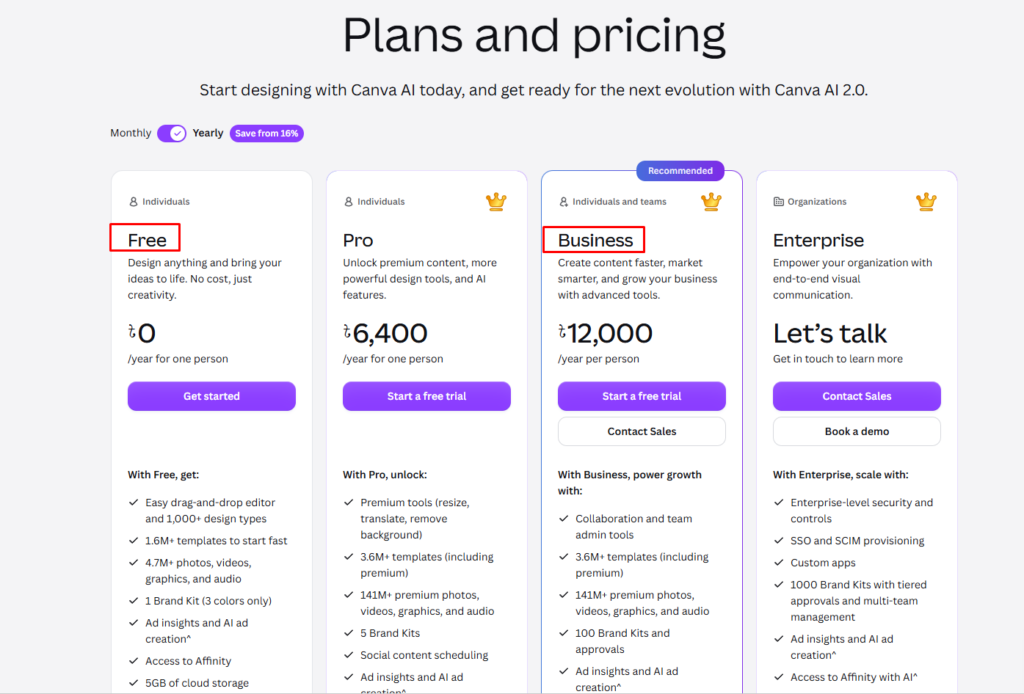
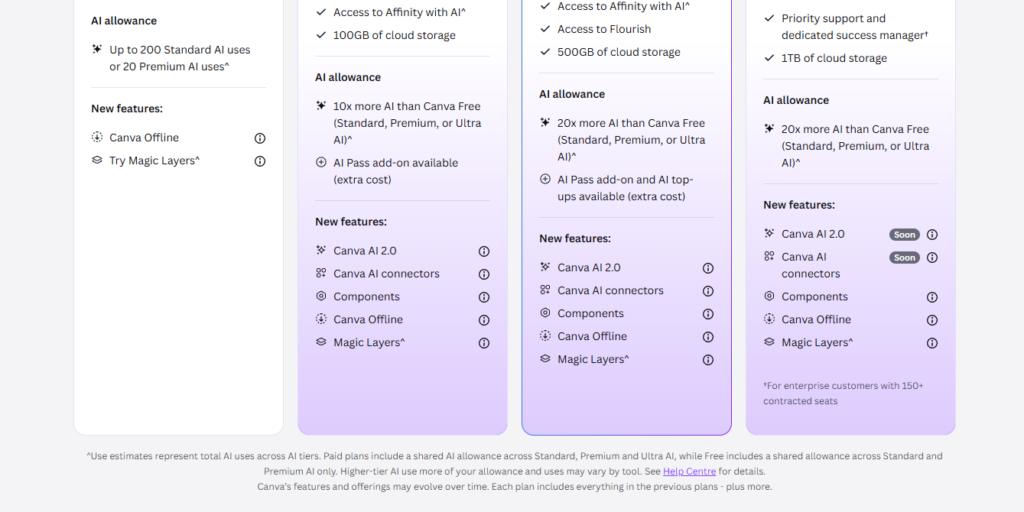
Canva Pricing: Compare Free, Pro, Business and Enterprise plans
Canva AI Pricing 2026
| Plan | Price | AI Access |
|---|---|---|
| Canva Free | $0 | Limited AI credits, basic Magic Studio tools |
| Canva Pro | ~$15/month (billed annually) | Full Magic Studio access, higher AI credit limits |
| Canva Teams | Custom pricing | Pro features + team collaboration & brand controls |
Canva uses a credit-based system to gate access to premium AI features like Dream Lab and Magic Video. Free users get a limited monthly allowance, while Pro and Teams plans unlock significantly higher usage caps.
Canva AI vs Adobe Firefly vs Midjourney
| Feature | Canva AI | Adobe Firefly | Midjourney |
|---|---|---|---|
| Best For | All-in-one design + AI | Adobe ecosystem users | Photorealistic AI art |
| Ease of Use | Beginner-friendly | Moderate | Steeper learning curve |
| Image Quality | Good, not top-tier | Strong, commercially safe | Best-in-class realism |
| Video Generation | Yes (prompt-based) | Limited | No |
| Free Plan | Yes | Limited | No |
| Design Templates | 15,000+ | Fewer, Adobe-focused | None (image-only tool) |
Takeaway: Canva AI wins on convenience and all-in-one workflow. Midjourney wins on raw image quality. Adobe Firefly is the safer choice for commercial/legal use within the Adobe ecosystem.
Pros & Cons
Pros:
- Beginner-friendly, no design skills required
- All AI tools built into one platform (no switching apps)
- Strong free plan for occasional use
- Fast turnaround for social media, presentations, and marketing content
- Regular feature updates (Canva AI 2.0 already in preview)
Cons:
- AI image realism lags behind Midjourney and DALL-E
- Credit system can feel limiting on the free plan
- Headshot/AI edits may alter facial details — needs manual review
- Less suited for complex, professional vector design work
- Some premium templates and assets still require a paid subscription.
Who Should Use Canva AI?
- Content creators & social media managers — fast graphics and video without a design team
- Small business owners — branded marketing materials on a budget
- Students & freelancers — quick presentations and portfolio visuals
- Bloggers & marketers — combining Magic Write and Dream Lab for content + visuals in one place
Less ideal for: advanced designers needing precise vector control or photorealistic AI art for professional print/commercial use.
FAQ
Is Canva AI free? Yes. Canva’s free plan includes limited access to Magic Studio’s AI tools, though usage is capped by a monthly credit system.
What is Canva Magic Studio? Magic Studio is Canva’s AI suite, bundling more than 15 tools including Dream Lab (image generation), Magic Write (copywriting), Background Remover, and Magic Resize into one platform.
How much does Canva AI cost? Canva Pro starts at roughly $15/month when billed annually, unlocking full Magic Studio access and higher AI credit limits.
Is Canva AI worth it in 2026? For beginners, creators, and small businesses who want fast, professional-looking content without separate AI tools, yes. Advanced designers or those needing top-tier photorealism may still need dedicated tools like Midjourney or Adobe Firefly alongside Canva.
Does Canva have AI video generation? Yes. Canva can generate short, prompt-based video clips with synchronized audio, editable within its native video workspace.
Final Verdict
Canva AI in 2026 isn’t trying to be the best AI image generator on the market — it’s trying to be the fastest way to go from idea to finished design. For that goal, Magic Studio succeeds. If your priority is convenience, an all-in-one workflow, and beginner-friendly tools, Canva AI is one of the strongest options available. If your priority is pixel-perfect photorealism or advanced commercial licensing, pair it with a dedicated tool like Adobe Firefly or Midjourney.
How I Currently Use Canva
I’m currently using Canva primarily for **image editing and visual content creation. It has become a very useful tool for creating and editing the images I need for my online projects.
I use Canva to create and edit social media posts, website images, banners, featured images, promotional graphics, and other visual content. Whether I’m preparing an image for a website article or designing a professional banner for a social media platform, Canva makes the process much easier and faster.
Overall, Canva has become one of the tools I regularly use for creating, editing, and improving visual content for both my website and social media presence.


