

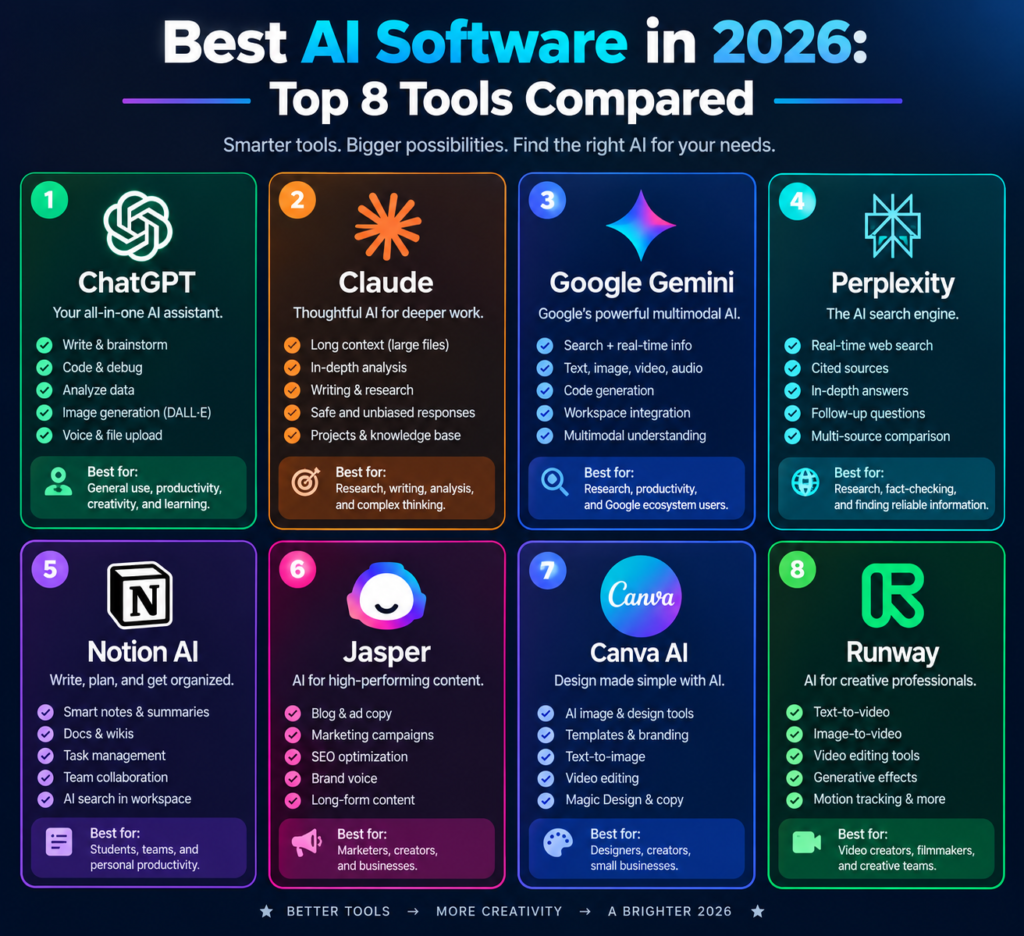
AI software has gone from a novelty to a daily work tool. The problem is that there are now thousands of options, and most “best of” lists just repeat the same names without telling you which one fits your work.
This guide covers the best AI software in 2026, picked by what each tool does well, what it costs, and who should use it. Whether you write content, run a business, or just want to save time, you’ll find a good starting point below.
Quick Comparison: Best AI Software at a Glance (2026)
| Tool | Best For | Free Plan | Starting Price (USD/month) |
|---|---|---|---|
| ChatGPT | All-purpose AI assistant | Yes | $20 |
| Claude | Long-form writing & analysis | Yes | $20 |
| Google Gemini | Google Workspace users | Yes | $4.99 |
| Perplexity | AI-powered research | Yes | $20 |
| Notion AI | Notes & team productivity | Limited AI trial | $20/seat |
| Jasper | Marketing copy & teams | 7-day trial | $49 |
| Canva AI | Design & social media | Yes | $15 |
| Runway | AI video creation | Yes | $15 |
Important pricing notes
ChatGPT: Plus plan is $20/month. ChatGPT+1
Claude: Pro is $20 monthly or $17/month when billed annually. Claude by Anthropic
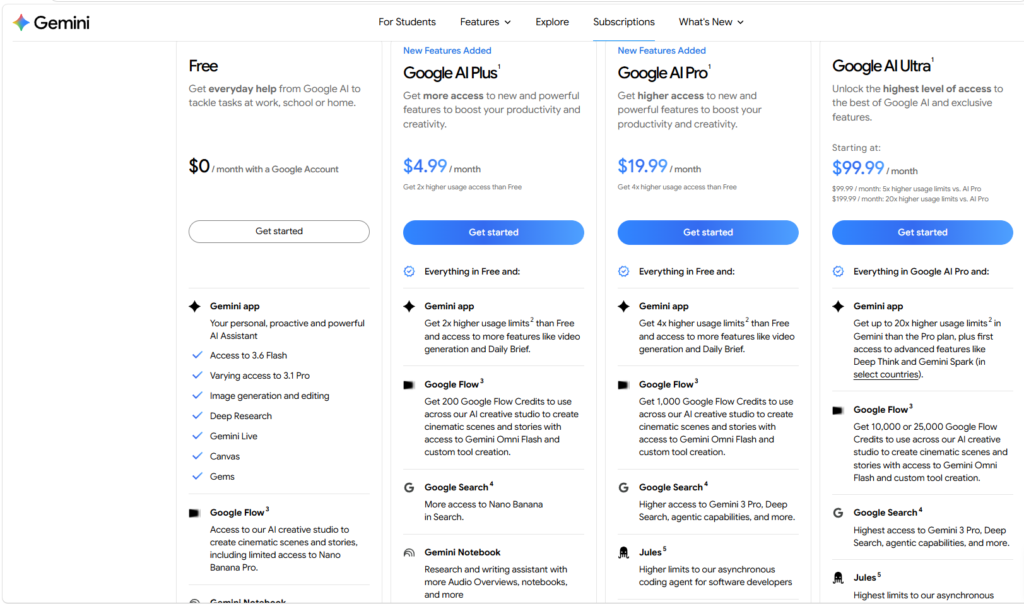
Gemini: Google AI Plus starts at $4.99/month in supported regions. Gemini
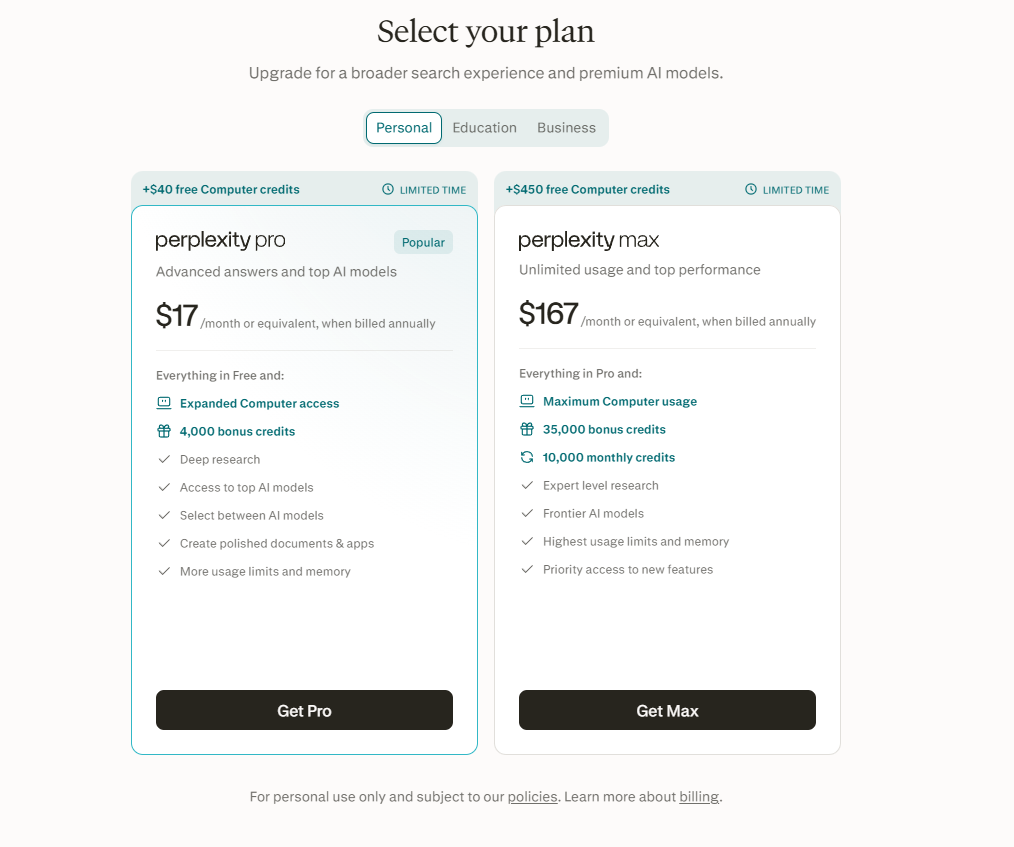
Perplexity: Pro is $20 monthly or $17/month billed annually. AI for the Curious+1
Notion AI: Full AI features are included in eligible Business and Enterprise plans; Business starts at $20/seat/month. Notion+1
Jasper: Creator starts at $49/month; Pro is $69/month. Jasper+1
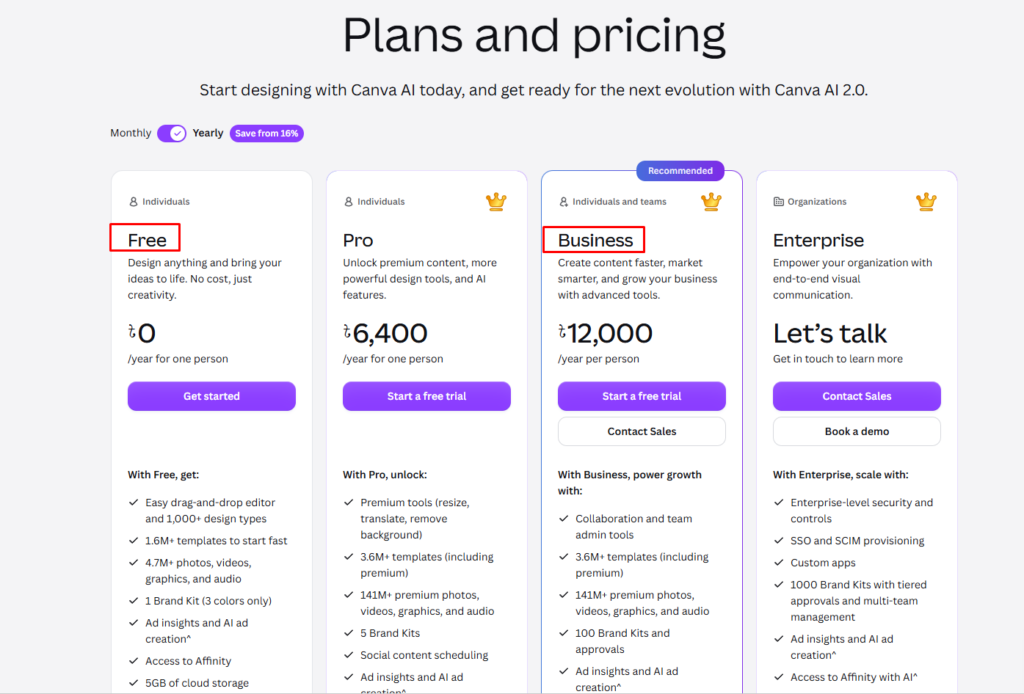
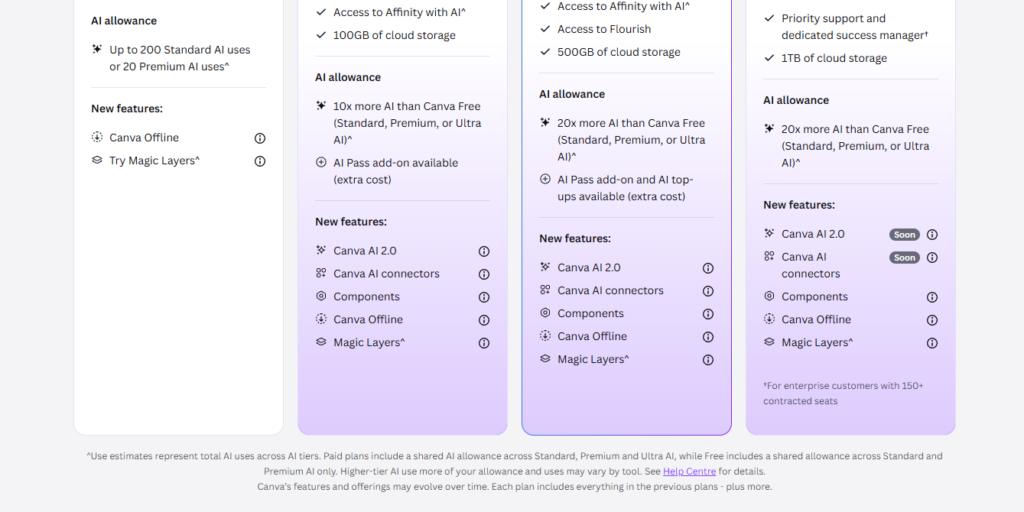
Canva: Pro is $15/month or $144/year ($12/month equivalent). Canva
Runway: Standard is $15 monthly or $12/month billed annually. Runway AI
Prices are US list prices, before applicable taxes. Regional pricing, billing cycles and promotions may differ, including in Bangladesh. Checked October 28, 2026.
Best AI Software
| AI Tool | Best For | Free Plan | Starting Price |
|---|---|---|---|
| ChatGPT | All-purpose AI assistant | Yes | Check Official Pricing |
| Claude | Long-form writing and analysis | Yes | Check Official Pricing |
| Google Gemini | Google Workspace users | Yes | Check Official Pricing |
| Perplexity | AI-powered research | Yes | Check Official Pricing |
| Notion AI | Notes and team productivity | Limited | Check Official Pricing |
| Jasper | Marketing copy and teams | Trial only | Check Official Pricing |
| Canva AI | Design and social media | Yes | Check Official Pricing |
| Runway | AI video creation | Yes | Check Official Pricing |
How We Chose These AI Tools
We looked at five things:
- Output quality: how useful and accurate the results are
- Ease of use: how fast a beginner can get a good result
- Pricing and free plan: whether it’s worth the money
- Features and integrations: what it does beyond the basics
- Real-world use: how it performs on everyday tasks
1. ChatGPT: Best All-Purpose AI Software
ChatGPT is the most widely used AI assistant, and for good reason. It handles writing, brainstorming, coding help, data analysis, and image generation in a single interface.
Key features
- Conversational writing, editing, and summarizing
- File uploads and data analysis
- Image generation and voice mode
- Custom GPTs for repeatable tasks
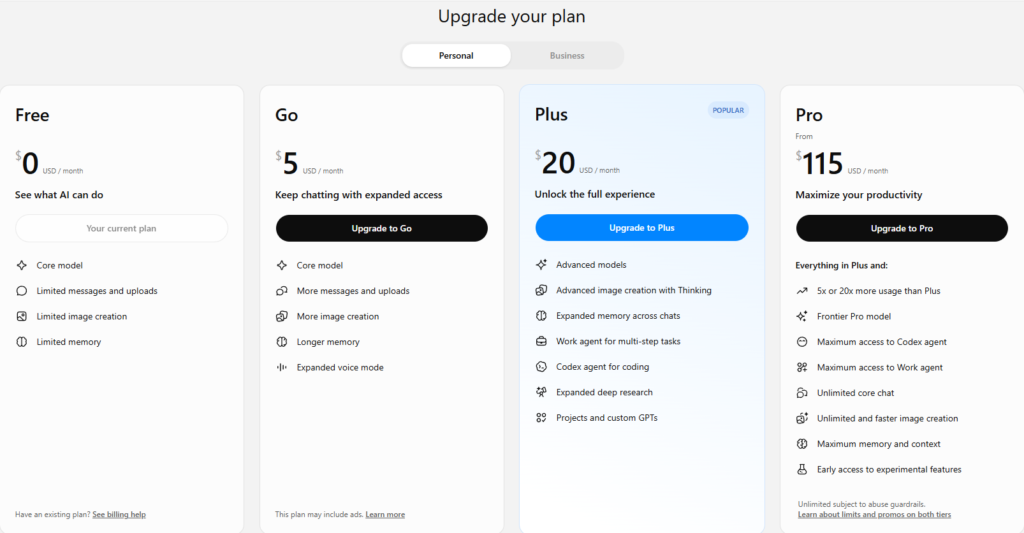
Key features: Best All-Purpose AI Software
ChatGPT is the most widely used AI assistant, and for good reason. It handles writing, brainstorming, coding help, data analysis, and image generation in a single interface.
Key features
✓Conversational writing, editing, and summarizing.
✓File uploads and data analysis.
✓Image generation and voice mode.
✓Custom GPTs for repeatable tasks.
ChatGPT: Pros & Cons
✓ Pros
- Very versatile
- Large ecosystem of plugins and custom GPTs
- Generous free plan
✕ Cons
- Can sound generic without good prompts
- Best features sit behind paid plans
2. Claude: Best for Writing and Long Documents
Claude, made by Anthropic, is known for natural-sounding writing and for handling long documents well. It’s a strong pick if you write articles, reports, or emails, or need to analyze large files.
Key features
❤️Large context window for long documents
❤️Clean, natural writing style
❤️File and image analysis
❤️Projects for organizing ongoing work
Pros
✔️Writing often needs less editing
✔️Strong at summarizing and analyzing long text
✔️Clear, thoughtful responses
Cons
❌Free plan has usage limits
❌Fewer third-party integrations than some rivals
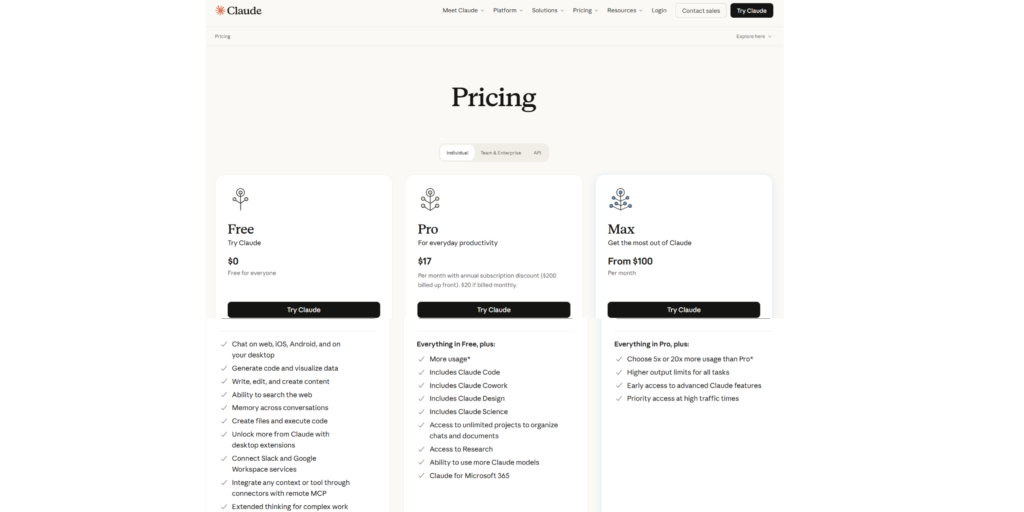
Best for: Writers, researchers, and professionals working with long text.
3. Google Gemini: Best for Google Workspace Users
Gemini works directly with Gmail, Docs, Sheets, and the rest of Google’s apps. If your work already lives in Google’s ecosystem, it saves a lot of copy-pasting.
Pros
✔️Deep Google Workspace integration
✔️Strong multimodal features (text, images, video)
✔️Good free option
Cons
❌Quality varies by task
❌Best features need a paid Google plan
Best for: People who live in Gmail, Docs, and Google Drive.
4. Perplexity: Best AI for Research
Perplexity works like a search engine that answers in plain language and shows its sources. That makes it easy to check where an answer came from.
Pros
✔️Cites sources for its answers
✔️Fast, focused research
✔️Clean and simple interface
Cons
❌Less suited to creative writing
❌Advanced features need a paid plan
Best for: Students, researchers, and anyone who needs fact-checked answers.
5. Notion AI: Best for Notes and Team Productivity
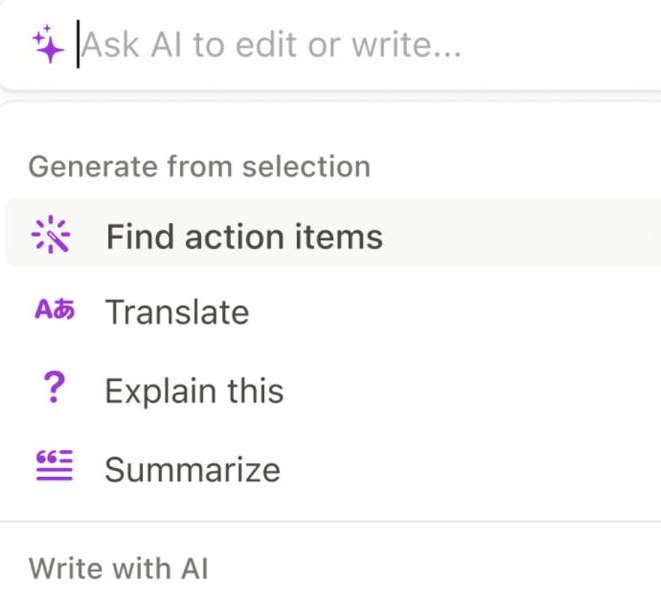
Notion AI adds writing, summarizing, and brainstorming directly inside your notes and project pages. It’s most useful if you already use Notion to organize work.
Pros
✔️Works inside your existing notes and docs
✔️Good for summaries and meeting notes
✔️Helps teams stay organized
Cons
❌Less useful if you don’t use Notion
❌Paid add-on cost
Best for: Teams and individuals already using Notion.
6. Jasper: Best for Marketing Teams
Jasper is built for marketing content: ad copy, product descriptions, blog drafts, and brand-voice consistency across a team.
Pros
✔️Brand voice and style settings
✔️Marketing-focused templates
✔️Team collaboration features
Cons
❌More expensive than general AI assistants
❌Less flexible outside marketing tasks
Best for: Marketing teams and agencies producing content at scale.
Jasper Pricing
7. Canva AI: Best for Design and Social Media
Canva’s AI tools let you generate images, edit photos, and resize designs without any design background. It’s a practical choice for social media and quick marketing visuals.
Pros
✔️Very beginner-friendly
✔️Design, editing, and AI in one place
✔️Large template library
Cons
❌Less control than professional design software
❌Some AI features are limited to paid plans
Best for: Small businesses, creators, and social media managers.
8. Runway: Best for AI Video
Runway turns text and images into short video clips and offers editing tools that used to need a full production team.
Pros
✔️Powerful text-to-video and image-to-video tools
✔️Useful editing features
✔️Free plan to try it
Cons
❌Credits run out quickly
❌Results can need several attempts
Best for: Video creators and marketers who want fast visuals.
How to Choose the Best AI Software for You
- Start with your task. Writing, research, design, and video each have a different best tool.
- Try the free plan first. Most tools on this list let you test before paying.
- Check integrations. The best tool is one that fits the apps you already use.
- Compare real pricing. Watch for usage limits and credits, not just the monthly price.
- Don’t pay for five tools. One or two well-chosen tools beat a pile of subscriptions.
Frequently Asked Questions
What is the best AI software overall?
For most people, ChatGPT or Claude is the best starting point because both handle a wide range of tasks. The right choice depends on your work.
Is there any good free AI software?
Yes. ChatGPT, Claude, Gemini, Perplexity, and Canva all offer free plans that are good enough for light use.
What is the best AI software for beginners?
ChatGPT and Canva AI are the easiest to start with, since they need little setup.
Is AI software safe for business use?
Generally yes, but check each tool’s data and privacy policy before uploading sensitive information.
Do I need to pay for AI software?
Not always. Start free, and upgrade only when you hit limits that slow your work.
Final Verdict
There’s no single best AI software for everyone. Our top picks:
- Best overall: ChatGPT
- Best for writing: Claude
- Best for research: Perplexity
- Best for design: Canva AI
- Best for video: Runway
Pick the one that matches your main task, try its free plan, and add more tools only when you need them.
Affiliate disclosure: Some links on this page may be affiliate links. If you buy through them, we may earn a commission at no extra cost to you. This never affects our reviews.


