

Stable Diffusion AI Review
Stable Diffusion is one of the most talked-about names in AI image generation, and for good reason. It was the first major text-to-image model to put its weights in the public’s hands, which means anyone with a decent graphics card can run it for free. But in 2026 the market looks very different from when it launched. Midjourney, ChatGPT, Google and Ideogram all offer polished image tools that need no setup at all.
So is Stable Diffusion still worth your time? This review covers what it is, what the latest version actually is, how much it costs, who it suits, and where it falls short.
Stable Diffusion AI Quick Verdict
| Best for | Developers, power users and hobbyists who want full control and no monthly fee |
| Latest image model | Stable Diffusion 3.5 (released October 2024) |
| Price | Free to self-host under the Community License; API at about $0.025 to $0.08 per image |
| Difficulty | Moderate to high if you run it locally |
| Our rating | 4/5 for flexibility, 3/5 for beginners |
If you want a quick, no-setup image generator, a hosted tool is easier. If you want freedom, customization and low cost at scale, Stable Diffusion is hard to beat.
Stable Diffusion AI Pros and Cons
Stable Diffusion AI: Pros and Cons
✓ Pros
- Free to self-host for individuals and businesses under $1M in revenue.
- Huge community with thousands of custom models and LoRAs.
- Full control over settings, with no content queue or daily cap when run locally.
- Privacy: your work stays on your machine.
- Cheap per-image API pricing for developers.
- Powerful editing and composition tools.
✕ Cons
- Setup can be confusing for beginners.
- Local use needs a capable GPU.
- Default quality is behind the best hosted tools unless you pick good custom models.
- Text rendering and hands are still hit and miss.
- Licensing rules differ between model versions, so you need to read them.
- The company’s focus has shifted toward audio and enterprise products.
What Is Stable Diffusion?
Stable Diffusion is a family of open-weight text-to-image AI models built by Stability AI. You type a text prompt, and the model generates an image from it. You can also use it to edit existing images, fill in missing parts (inpainting), and guide results with reference images.
The key difference from tools like Midjourney is that Stable Diffusion is not one app. It is a model you can use in several ways:
- Run it locally on your own computer using free interfaces such as ComfyUI or AUTOMATIC1111.
- Use Stability AI’s hosted API and pay per image.
- Use a third-party website or cloud service that runs Stable Diffusion for you.

Which Stable Diffusion Version Is Latest in 2026?
This is where many articles online get it wrong. You may see websites mentioning “Stable Diffusion 4,” but as of mid-2026 Stability AI has not announced or released any such model. The newest image family is still Stable Diffusion 3.5, which launched in October 2024 and comes in three main sizes:
- SD 3.5 Large: the highest quality, about 8.1 billion parameters.
- SD 3.5 Large Turbo: a faster version that produces images in just a few steps.
- SD 3.5 Medium: a lighter model, about 2.5 billion parameters, easier to run on modest hardware.
Older models like SDXL and SD 1.5 are still widely used, mainly because of the huge library of community-made add-ons built for them.
One more thing worth knowing: Stability AI’s 2026 news has focused on other areas, such as Stable Audio 3.0 and its Brand Studio platform for businesses. That does not make Stable Diffusion obsolete, since the models are open and the community keeps building on them. But it does mean you should not expect rapid new image releases from the company.
Key Features
1. Open weights and full control
You can download the model and run it on your own machine. There is no daily limit, no content queue and no subscription. Your prompts and images stay on your computer.
2. Custom models and LoRAs
This is Stable Diffusion’s biggest strength. The community has created thousands of fine-tuned models and small add-ons (called LoRAs) for specific styles, such as anime, product photos, architecture or a particular character. Well-chosen custom models can match paid tools for narrow styles.
3. Image editing tools
Inpainting, outpainting, upscaling and image-to-image generation are all available, either through local interfaces or through Stability AI’s API.
4. ControlNet and pose guidance
With extensions like ControlNet you can steer composition using a sketch, a pose or a depth map. This level of control is something most one-click generators do not offer.
5. Improved text and prompt following (SD 3.5)
SD 3.5 improved how closely images follow your prompt, and it handles text inside images better than older versions. It still is not as reliable at long text as the best hosted tools.
AI Image Generation Review
The generated image looks absolutely stunning and realistic. The AI did an excellent job of creating a beautiful portrait with natural-looking skin texture, expressive eyes, detailed hair, and soft cinematic lighting. The blurred background and overall color combination make the image look professional and visually appealing. The result closely matches the prompt and delivers impressive details. Overall, I am very satisfied with the image generation quality. It is a great experience!
I used the prompt here, what is its result? I have beautifully put the prompt below, and with the screenshot I have presented my opinion, or what result came, in front of you all. You can see it.”
A highly realistic professional portrait of a beautiful young woman with natural skin texture, expressive brown eyes, detailed hair strands, soft cinematic studio lighting, wearing a stylish cream-colored outfit, neutral blurred background, shot on an 85mm lens, shallow depth of field, photorealistic, highly detailed facial features, professional photography, natural colors, 4K quality.

How to Get Started
There are three beginner-friendly routes:
- Easiest: use a hosted website. Many sites run Stable Diffusion for you. You sign up, type a prompt and download the image. Free tiers usually have limits.
- Developer route: use Stability AI’s API. Create an account on the Stability AI developer platform, get an API key, and generate images with a few lines of code. New accounts get a small batch of free starter credits.
- Power-user route: install it locally. Download a model such as SD 3.5 Medium from Hugging Face, install an interface like ComfyUI, and generate on your own GPU.
For local use, you will want a modern NVIDIA graphics card. Larger models need more video memory (VRAM), so SD 3.5 Medium or SDXL are better choices if your GPU is modest.
Stable Diffusion Pricing in 2026
Stable Diffusion is unusual because there is no single price. It depends on how you use it.
Option 1: Self-hosting (free)
The SD 3.5 models are released under the Stability AI Community License. It is free for research, personal projects and businesses or creators with less than $1 million in annual revenue, including commercial use. Larger companies need an Enterprise License with custom pricing. If you use it commercially, check the current license terms on Stability AI’s website before you publish anything.
Your real cost here is hardware and electricity, not a subscription.
Option 2: Stability AI API (pay per image)
The API uses credits, where 1 credit = $0.01. New accounts receive 25 free starter credits. Published rates at the time of writing:
| Model | Credits | Cost per image |
|---|---|---|
| Stable Image Ultra | 8 | $0.08 |
| SD 3.5 Large | 6.5 | $0.065 |
| SD 3.5 Large Turbo | 4 | $0.04 |
| SD 3.5 Medium | 3.5 | $0.035 |
| Stable Image Core | 3 | $0.03 |
| SD 3.5 Flash | 2.5 | $0.025 |
Credits expire one year after purchase, and you are only charged for successful generations.
Option 3: Brand Studio and third-party platforms
Stability AI also offers Brand Studio, a business-focused creative platform, with paid plans. Third-party websites and cloud GPU services each have their own pricing, so compare before you commit.
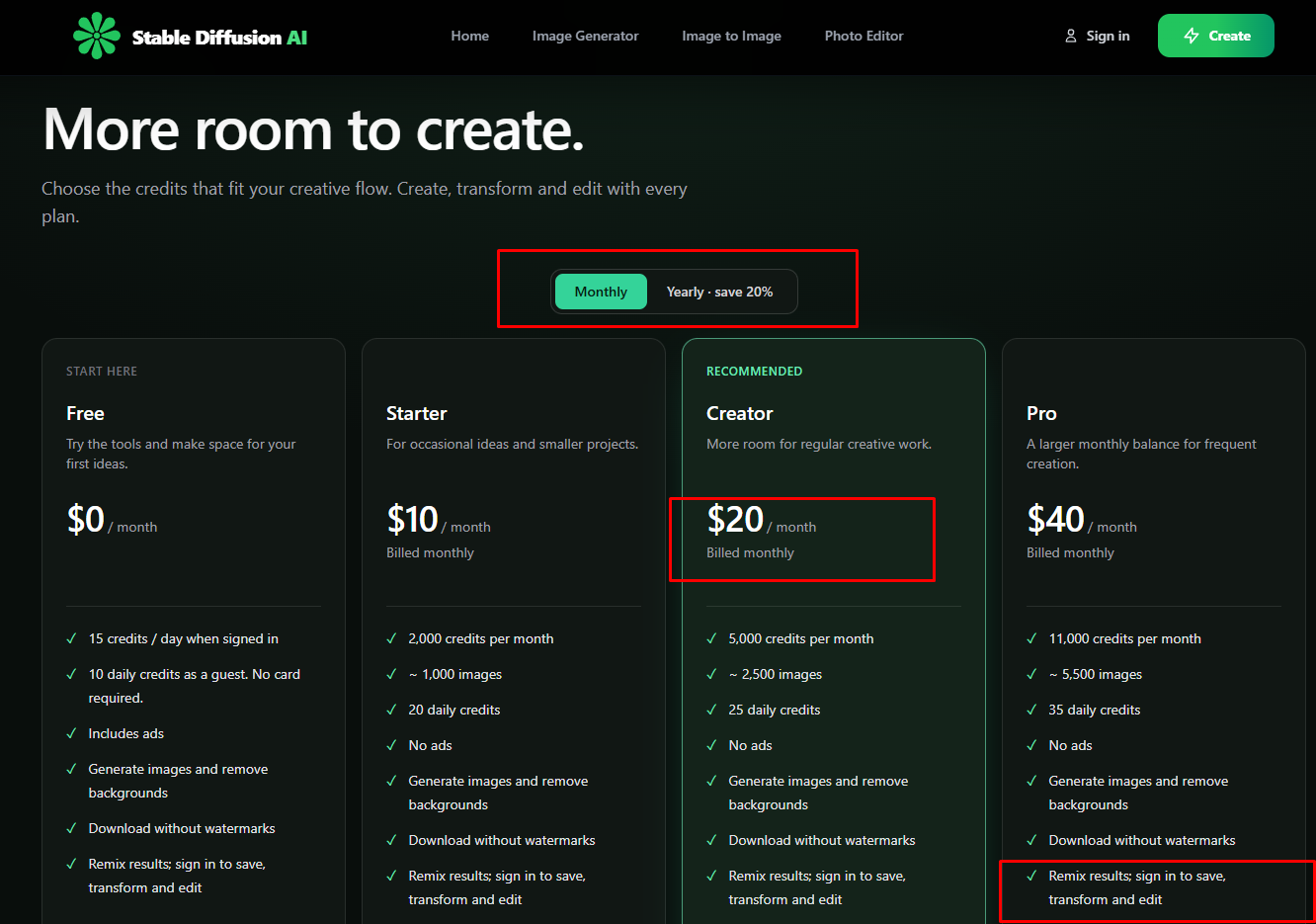
You must definitely check the website regarding the pricing matter, see the update, and then take a decision. I am updating today, on 14th November 2026. This is today’s pricing, maybe in the future the pricing may get updated. I am giving the link of that website for that update, you must check it and then take a decision. And I have shared a screenshot of it, I have shared today’s screenshot
Stable Diffusion vs Alternatives
| Tool | Best for | Ease of use | Cost model |
|---|---|---|---|
| Stable Diffusion | Control, customization, privacy | Harder | Free self-host or pay per image |
| Midjourney | Artistic, polished images | Easy | Monthly subscription |
| ChatGPT image generation | Quick edits and conversational prompts | Very easy | Included with ChatGPT plans (with limits) |
| Ideogram | Text inside images, graphic design | Easy | Subscription or credits |
Who Should Use Stable Diffusion?
It is a great fit if you:
- are a developer or want to build image generation into an app
- enjoy tinkering and want full control over style
- generate a lot of images and want to avoid monthly fees
- care about privacy
Look elsewhere if you:
- want great results in seconds with no setup
- do not have a capable computer and do not want to pay for cloud GPUs
- mainly need clean text inside images
Final Verdict
Stable Diffusion is still one of the best choices for anyone who values control over convenience. The open-weight approach, the huge community and the low costs make it hard to match, especially at high volume. Its weaknesses are real, though: setup takes effort, the company is no longer pushing image models as aggressively, and beginners will find easier tools elsewhere.
Our recommendation: If you are a beginner, start with a hosted tool and try Stable Diffusion through a website or the free API credits. If you like to experiment, install ComfyUI and explore custom models. You will get far more out of it.
FAQ
Is Stable Diffusion free? Yes, you can download and run the models for free. The SD 3.5 models use the Community License, which is free for individuals and organizations under $1M in annual revenue. Using Stability AI’s hosted API costs credits.
What is the latest version of Stable Diffusion? As of 2026 it is Stable Diffusion 3.5 (Large, Large Turbo and Medium), released in October 2024. No official Stable Diffusion 4 has been announced.
Can I use Stable Diffusion images commercially? Generally yes under the Community License if your organization earns under $1M a year, though you should read the current license terms. Older models like SD 1.5 and SDXL have different terms.
Do I need a powerful computer? For local use, a modern NVIDIA GPU is strongly recommended. Smaller models like SD 3.5 Medium need less memory. If your computer is weak, use the API or a hosted website instead.
Is Stable Diffusion better than Midjourney? It depends. Midjourney is easier and tends to give polished results out of the box. Stable Diffusion gives more control, more customization and lower costs for heavy users.
Is Stable Diffusion safe to use? The official models from Stability AI are safe to download from trusted sources like Hugging Face. Be careful with random third-party downloads and always use reputable websites.