

Ideogram AI Review USA
Ideogram AI is an innovative artificial intelligence (AI) image-generation platform that allows users to create high-quality images, graphics, posters, logos, and creative designs using simple text prompts. In 2026, it continues to attract attention from designers, digital creators, marketers, and businesses across the USA who want to produce professional-looking visuals without spending hours on traditional graphic design. The platform is particularly known for its ability to generate images with readable text, making it useful for creating typography-based artwork, promotional graphics, social media posts, and branding concepts.
One of the main reasons Ideogram AI stands out is its user-friendly interface and variety of creative tools. Users can describe their ideas in a text prompt and let the AI transform those instructions into visual designs. It also provides features for image generation, editing, upscaling, vector-related workflows, and other creative tasks. Whether someone is a beginner exploring AI design or a professional looking for a faster creative workflow, Ideogram AI offers an accessible environment for experimenting with different visual styles and design concepts.
For users in the United States, Ideogram AI can be useful for business branding, digital marketing, content creation, print-on-demand products, and personal creative projects. However, before choosing it as a primary design platform, it is important to understand its features, pricing, image quality, performance, limitations, and commercial-use policies. In this review, we will explore Ideogram AI in detail to help you decide whether it is worth using in 2026.
Ideogram AI Pros and Cons
Ideogram AI offers several useful features for AI-powered image generation, graphic design, and creative workflows. However, like any other AI design platform, it has some limitations. Here are the main advantages and disadvantages to consider before using Ideogram AI in 2026.
✓ Pros
- Best-in-class text rendering for most design use cases.
- Strong prompt adherence for generating images based on user instructions.
- Affordable entry-level pricing for creators and beginners.
- Access through web, iOS, API, and MCP integrations.
- Growing editing and customization tools for creative workflows.
✕ Cons
- The free tier is limited, and generated images are public.
- Pricing and credit rules change frequently, which can be confusing.
- Complex editing is less powerful than dedicated tools like Adobe Photoshop.
- Some users report frustration with credit costs and billing. A review aggregator showed a low average rating based on a small number of Trustpilot reviews as of October 2026, so check recent feedback before purchasing an annual plan.
- Long blocks of small text can still contain spelling and rendering mistakes.
Quick Verdict
Ideogram is one of the best choices for anyone who needs images with readable text: posters, logos, social media graphics, thumbnails, book covers, and ads. It is less compelling if you mainly want moody, painterly art or deep photo-editing control. Its free tier is good for testing, but serious use requires a paid plan.
One caution up front: Ideogram’s plans, credit amounts, and model lineup have changed several times this year, and third-party sources disagree on exact numbers. Always confirm current details on Ideogram’s official pricing page before you subscribe.
What Is Ideogram AI?
Ideogram is built by Ideogram Inc, a San Francisco AI lab founded in 2022 by former Google Brain and Google Imagen researchers. You describe an image in plain English, and the model generates it in seconds. What sets it apart is how well it handles words: signs, labels, slogans, and multi-line layouts that most competitors still get wrong.
It is available through:
- The web app at ideogram.ai, which includes community galleries, public profiles, and remixing
- An iOS app
- An API for developers and businesses
- An MCP endpoint, which lets AI assistants and coding tools call Ideogram inside their own workflows
Ideogram AI Apps Review
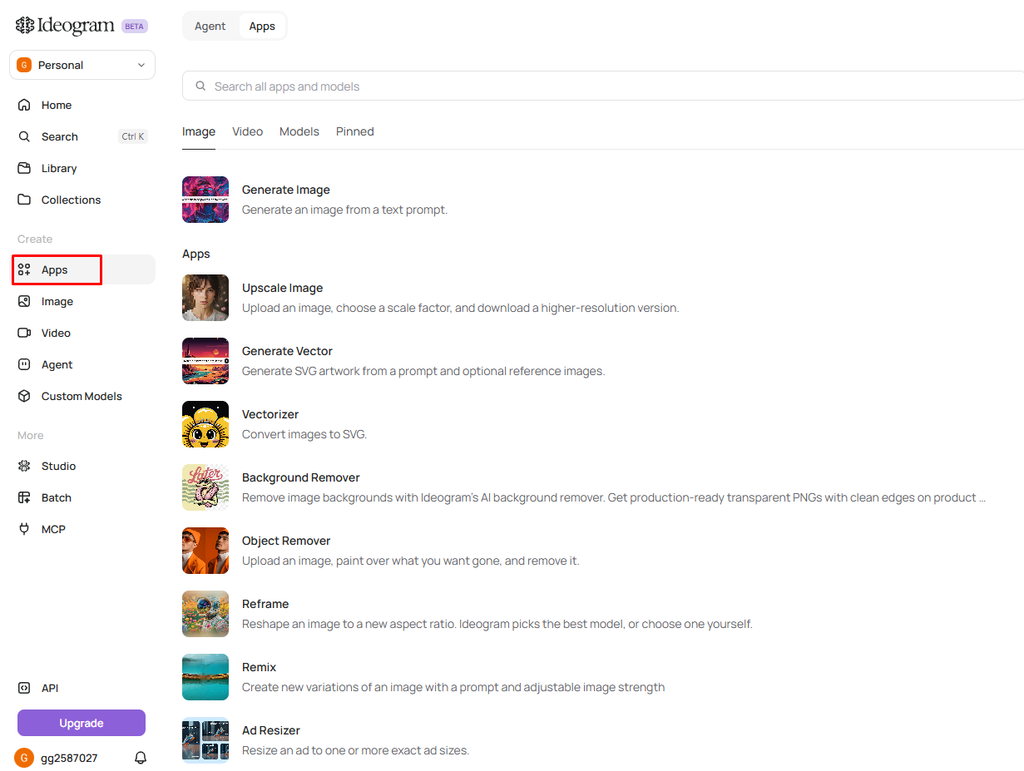
Ideogram AI is not just a platform for creating images, it also has several effective AI apps for image editing and design. With the help of these apps, you can easily enhance the quality of images, remove backgrounds, create new designs, and arrange advertising images in different sizes. The tools in the Apps section of Ideogram AI can make the work of content creators, graphic designers, and digital marketers easier.
Ideogram AI Generate Image Review
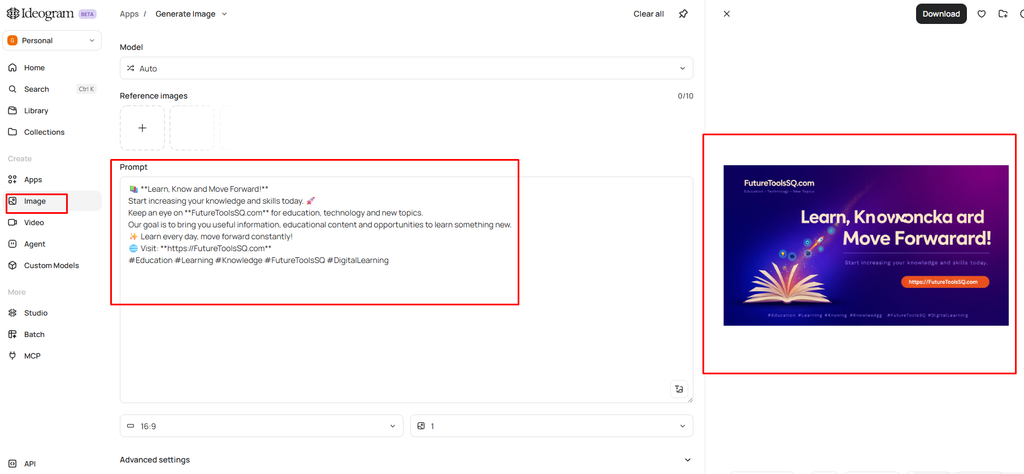
Ideogram AI’s Generate Image feature is one of the platform’s main tools for creating AI-generated images. It allows users to generate images simply by entering a text prompt, with additional options to customize the image generation process.
The interface includes several useful settings that give users greater control over their creations.
Key Features of Generate Image:
- Model: The Auto option automatically selects a suitable AI model for image generation.
- Reference Images: Users can upload up to 10 reference images to guide the AI and maintain visual consistency.
- Prompt: The main text box allows users to describe the image they want to generate.
- Aspect Ratio: Users can select different image dimensions, such as 16:9, depending on their needs.
- Image Quantity: The number of images generated can be adjusted using the available options.
- Advanced Settings: Additional customization options are available for users who want more control over image generation.
- Add to Collection: Users can organize their generated images into collections for easier access.
- Generate: Once the prompt and settings are ready, users can click the Generate button to create their images.
Overall, Ideogram AI’s Generate Image tool offers a straightforward and flexible image-generation experience. Its reference image support, customizable aspect ratios, and prompt-based workflow make it useful for content creators, designers, and anyone interested in creating AI-generated visuals.
I gave a prompt for making a social media post for my business. I have given the prompt below and I have also shared a screenshot with you of what result it gave. But here, for my business, I have just given a simple prompt. But when you go to create an image, the prompt itself is important, a very important thing is the prompt. The better prompt you give, the better image it will generate.
” Learn, Know and Move Forward! Start increasing your knowledge and skills today. Keep an eye on ,FutureToolsSQ.com , for education, technology and new topics.Our goal is to bring you useful information, educational content and opportunities to learn something new.✨ Learn every day, move forward constantly! Visit: https://FutureToolsSQ.com #Education #Learning #Knowledge #FutureToolsSQ #DigitalLearning”
Ideogram AI Generate Video
Ideogram AI’s Generate Video feature allows you to easily create AI videos using text prompts. There are three options for creating videos: Text, Frames, and References. Users can change the video model, duration, aspect ratio, resolution, and audio settings according to their needs. There is also the option to save the video to the Collection once it is finished. Overall, this feature of Ideogram AI is a very simple and effective tool for creating AI videos.

Ideogram AI Pricing and Plans Review
Ideogram AI offers three pricing options: Pay as You Go, Plus, and Pro, making it suitable for users with different image and video generation needs. The Pay as You Go plan allows users to purchase credits on demand, starting at 1¢ per credit. The Plus plan costs $15 per month with annual billing and includes 2,400 priority credits monthly, along with private generation and additional features. For more advanced users, the Pro plan costs $42 per month with annual billing and provides 7,500 priority credits monthly, batch generation, and the largest generation queue. Overall, Ideogram AI offers flexible pricing options for both casual users and professional creators, depending on their creative requirements and budget.

Ideogram AI Agent Review
Ideogram AI’s Agent feature offers a more interactive way to create images and videos. Instead of starting with a detailed prompt, users can simply share their ideas and let the AI help develop them into creative projects. Whether you want to design a coffee label, pitch a movie, or launch a perfume concept, Agent helps shape your ideas and turn them into visual content. Overall, it is a useful feature for users who want creative assistance and a simpler approach to AI-powered design.

Ideogram AI Custom Models Review
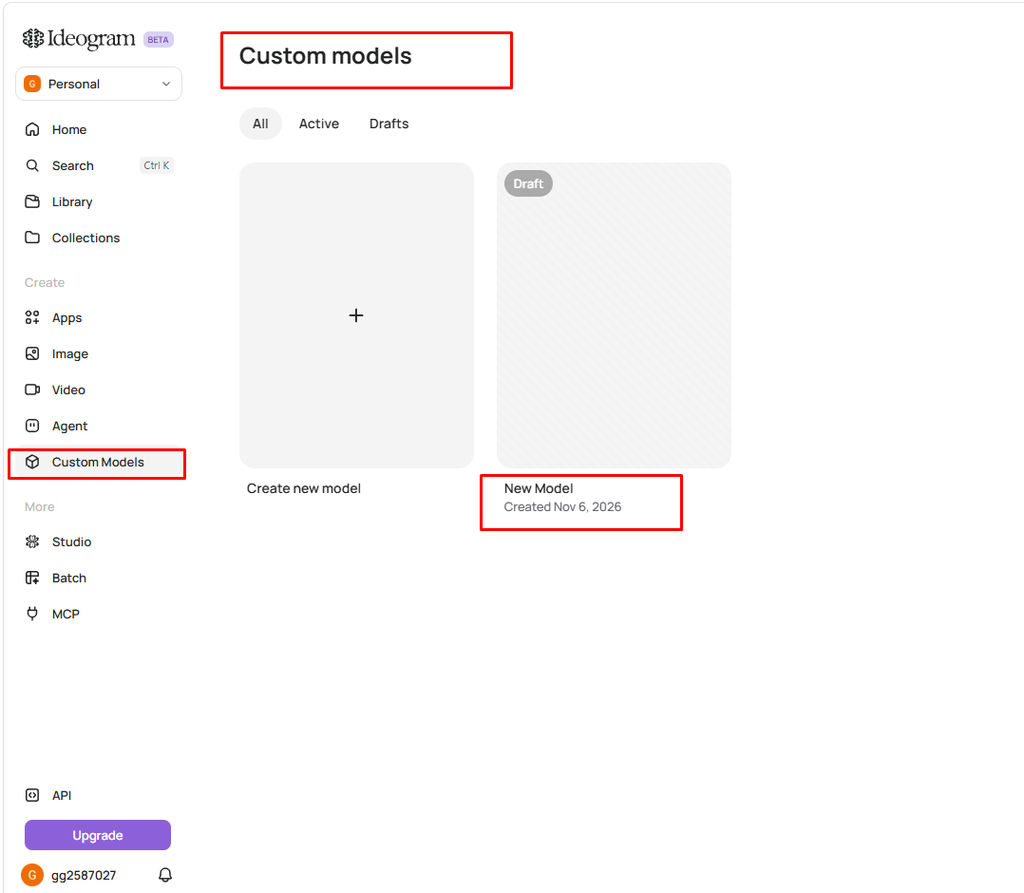
Ideogram AI’s Custom Models feature allows users to create and manage personalized AI models for their creative projects. The interface includes options to view all models, check active models, and access drafts. Users can create a new model and manage their custom model projects in one place. This feature is particularly useful for those who want a more personalized image-generation experience and greater consistency in their creative work.
Ideogram AI MCP Review
Ideogram AI’s MCP feature allows users to connect Ideogram with AI assistants such as ChatGPT, Claude, Cursor, and other compatible agents. Once connected, users can generate, edit, and organize images using simple text instructions directly through their AI agent.
The setup process is straightforward and requires connecting through the provided MCP server URL. Users can sign in with their Ideogram account without needing an API key, while image generation uses credits from their existing Ideogram plan.
Overall, Ideogram MCP is a useful feature for users who want to integrate AI image generation into their existing AI workflows and manage creative tasks more efficiently.

Frequently Asked Questions About Ideogram
| Question | Answer |
|---|---|
| Is Ideogram free? | Yes, Ideogram offers a free plan with limited credits. However, images are public and some features are restricted. |
| Is Ideogram good for logos? | Yes, Ideogram is useful for creating logo concepts and typography. For a professional final logo, you may need to refine the design using a vector editor. |
| Can I use Ideogram images commercially? | Paid plans are generally recommended for commercial use. Always check Ideogram’s latest terms and conditions. |
| What is the latest Ideogram model? | Ideogram 4.0 was reported to have launched in June 2026, following Ideogram 3.0 in March 2025. |
| Does Ideogram have an API? | Yes, Ideogram offers an API with usage-based pricing and enterprise options. |
| Is there an Ideogram app? | Yes, Ideogram has an official iOS app. An official Android app was not listed in the documentation reviewed. |
Final Verdict
Ideogram earns its reputation as the go-to AI image generator for text-heavy visuals. If your work involves posters, thumbnails, ads, or logos, the entry-level paid plan is inexpensive enough to be worth testing. If you only need occasional art without text, the free tier or a different tool may be enough. Before you pay, confirm current plans on ideogram.ai/pricing, start with a monthly plan rather than annual, and test a few of your real use cases first.
Pricing Verify everything on Ideogram’s official website before making a purchase decision.
Adobe Firefly Beginner’s Guide
Affiliate disclosure: This post contains affiliate links. If you click a link and make a purchase, we may earn a commission at no extra cost to you. We only recommend tools we have tested or believe are useful.