
Adobe Firefly Beginner’s Guide
If you want to create AI images without learning complicated software, Adobe Firefly is one of the easiest places to start. You type what you want, pick a model, and get usable images in seconds. This guide walks you through what Firefly is, how to use it step by step, how credits and pricing work, and how to write prompts that get better results.
What Is Adobe Firefly?
Adobe Firefly is Adobe’s family of generative AI tools. You can use it on the web at firefly.adobe.com, in the Firefly mobile app, and inside Adobe apps such as Photoshop, Illustrator, and Adobe Express.
For image generation, Firefly offers several tools in one place:
- Text to image: describe a picture and Firefly creates it.
- Prompt to Edit: change an existing image by describing the edit in plain language.
- Generative Fill and Generative Expand: add, remove, or extend parts of an image (mainly in Photoshop).
- Text to vector: create editable vector graphics, useful for logos and icons.
- Firefly Boards: a collaborative canvas for moodboards and comparing ideas.
Adobe Firefly: Pros and Cons (2026)
✓ Pros
- Beginner-friendly interface
- Commercially safe Adobe models
- Several leading partner models in one app
- Prompt to Edit and Photoshop integration
- Free plan to test it
✕ Cons
- The free plan is limited
- Credit rules and plan names can be confusing
- Premium and partner features use more credits
- Partner models may have different commercial-use terms
Review of Adobe Firefly
Adobe Firefly is an impressive and user-friendly AI-powered creative platform. Its clean, modern interface makes it easy to navigate and explore different creative tools. It offers a wide range of features, including AI image generation, video creation, audio generation, and image editing. The AI assistant and quick actions make the creative process even more convenient. Overall, Adobe Firefly is a powerful and versatile tool for designers, content creators, and anyone interested in AI-powered creativity. Its intuitive design and variety of features make it a great platform for bringing creative ideas to life.

Why Beginners Like Firefly
- Simple interface. You do not need design experience. A text box, a model picker, and a few settings are enough to start.
- Commercially safe Adobe models. Adobe’s own Firefly models are designed for commercial use, which matters if you create images for a business, blog, or client.
- Many models in one place. Besides Adobe’s own models, Firefly includes partner models from companies such as OpenAI, Google, Black Forest Labs, and Ideogram, so you can compare styles without leaving the app.
- Works with Adobe apps. If you already use Photoshop or Express, you can move images between them easily.
Review of Adobe Firefly Generations
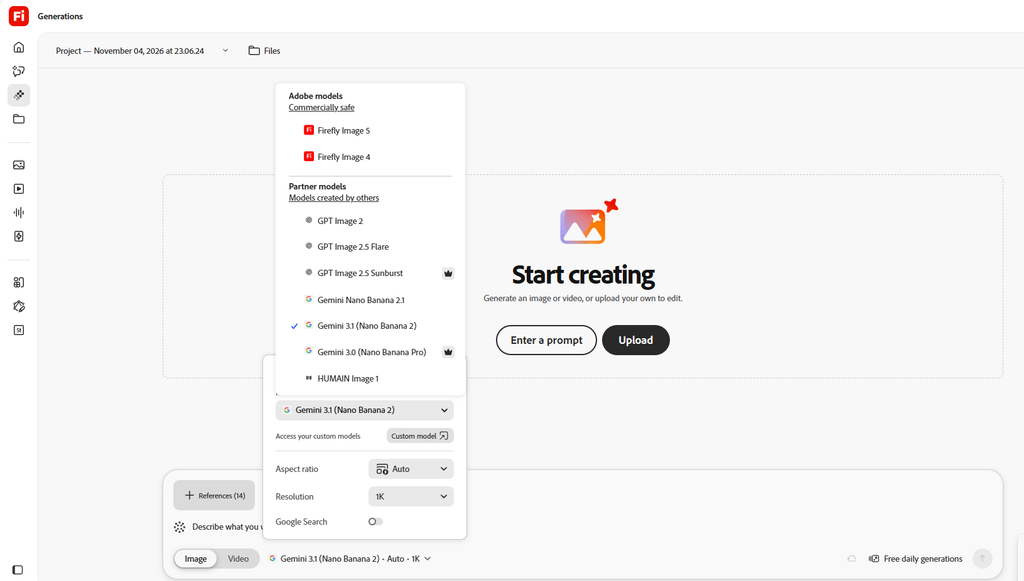
Adobe Firefly Generations offers a powerful and flexible AI-powered creative experience. The platform features a wide selection of AI models, including Adobe Firefly, GPT Image, and Google Gemini, allowing users to choose the model that best suits their creative needs. Its simple interface makes it easy to generate images, explore different models, and customize settings such as aspect ratio and resolution. The option to upload images and use reference materials provides additional creative flexibility. Overall, Adobe Firefly Generations is an excellent tool for designers, artists, and content creators looking for an efficient and versatile AI image-generation platform.
Adobe Firefly Video Tool Review
Adobe Firefly Video Tool is an impressive AI-powered video generation platform that makes video creation easier, faster, and more creative. Its user-friendly interface and advanced AI models allow users to turn their ideas into engaging videos with just a few simple steps.
The video creation process starts by selecting the Video option from the Generation panel. Users can choose from different AI models, such as Firefly Video, Google Veo, Kling, and Gemini, depending on their creative needs. After selecting a model, users can customize various settings, including aspect ratio, resolution, frame rate, video duration, audio, and seed.
One of the most interesting features is the ability to create videos from text prompts or use a first frame as a visual reference. Users simply describe the video they want to create, select their preferred settings, and click the Generate button. The AI then transforms their ideas into a video. This makes the platform suitable for creating cinematic scenes, promotional videos, social media content, and creative visual storytelling.
Overall, Adobe Firefly Video Tool provides a smooth and flexible video generation experience. Its variety of AI models, customizable settings, and simple workflow make it an excellent choice for content creators, designers, filmmakers, and beginners who want to explore AI-powered video creation. It is a powerful tool for turning imagination into reality with minimal effort.

Adobe Firefly Audio Tool Review
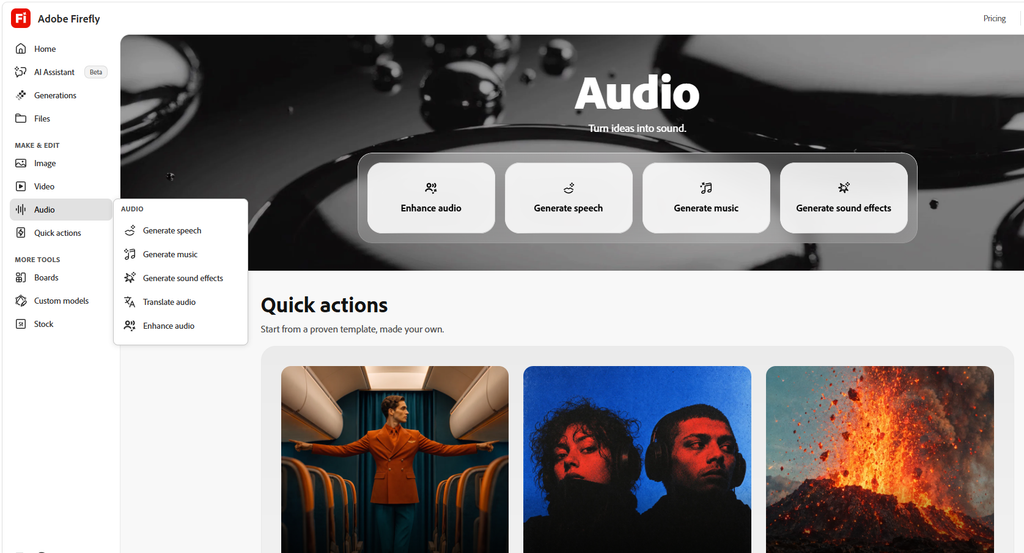
Adobe Firefly Audio is an innovative AI-powered audio creation platform that transforms creative ideas into high-quality sound. Its clean and user-friendly interface makes audio generation simple and accessible for beginners as well as professional content creators.
The platform offers several useful features, including Generate Speech, Generate Music, Generate Sound Effects, Translate Audio, and Enhance Audio. These tools allow users to create realistic speech, produce original music, generate sound effects, translate audio into different languages, and improve existing audio quality.
One of the most impressive aspects of Adobe Firefly Audio is its versatility. Users can easily create background music for videos, generate voiceovers for presentations, produce sound effects for creative projects, and enhance audio recordings. The Quick Actions section also provides convenient templates to help users get started quickly.
Overall, Adobe Firefly Audio is a powerful and convenient tool for modern audio production. Its AI-driven features, simple workflow, and wide range of creative possibilities make it an excellent choice for filmmakers, musicians, designers, and content creators. It helps users turn their imagination into sound while saving time and effort.
Adobe Firefly Pricing Plans Review
Adobe Firefly offers a variety of subscription plans designed to meet the needs of different users, from beginners to professional content creators. Its pricing page features four main plans: Firefly Standard, Firefly Pro, Firefly Pro Plus, and Firefly Premium.
The Firefly Standard plan costs US$11.49 per month and is suitable for beginners who want to explore AI-powered creativity. The Firefly Pro plan costs US$22.99 per month and provides more credits and unlimited generations on selected image models. The Firefly Pro Plus plan, priced at US$57.49 per month, is recommended for users who need extensive image and video creation capabilities. Finally, the Firefly Premium plan costs US$229.99 per month and is designed for high-volume video production and professional creative workflows.
Each plan includes monthly generative credits, access to various AI models, and Adobe Firefly web and mobile applications. Higher-tier plans offer more credits and broader access to advanced AI models, making them suitable for users with greater creative demands.
Overall, Adobe Firefly provides flexible pricing options for different budgets and creative requirements. Its range of subscription plans allows users to choose the most suitable package based on their needs. Whether you are a beginner, designer, or professional video creator, Adobe Firefly offers a convenient way to explore AI-powered creativity and enhance your digital production workflow.
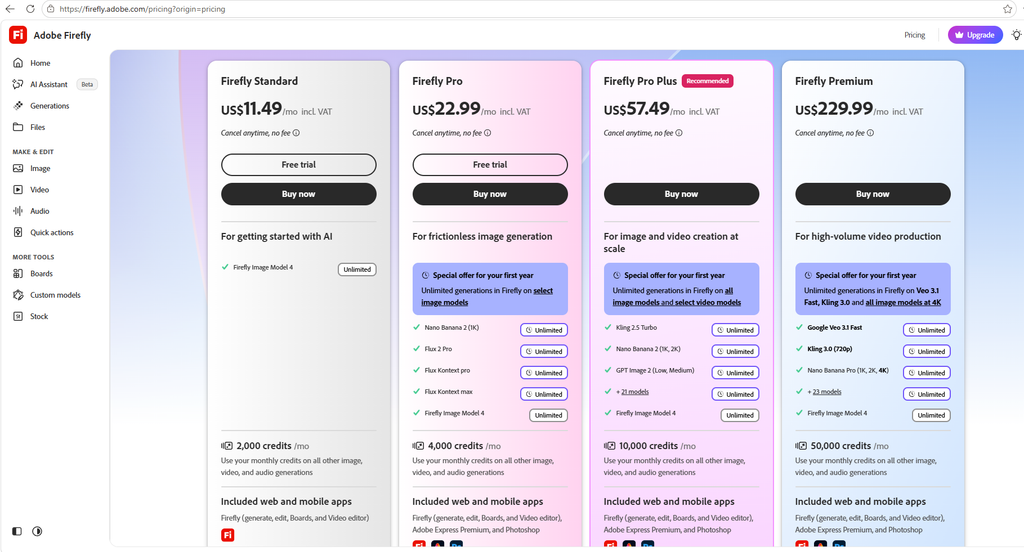
Firefly has a free tier and several paid plans. Reported prices from third-party trackers are:
| Plan | Approx. monthly price | Credits per month |
|---|---|---|
| Free | $0 | 25 |
| Firefly Standard | $11.49 | 2,000 |
| Firefly Pro | $22.99 | 4,000 |
| Firefly Pro Plus | $57.49 | 10,000 |
| Firefly Premium | $229.99 | 50,000 |
Creative Cloud plans also include a monthly credit allowance, and Adobe may adjust plans, credits, and promotions at any time. Always confirm current pricing on Adobe’s official pricing page before you buy.
Adobe Firefly Quick Actions Review
Adobe Firefly Quick Actions is a convenient and powerful feature that brings multiple AI-powered creative tools together in one place. Its simple interface allows users to easily explore different options for image, video, and audio editing.
The Image section offers useful tools such as Generate, Edit, Upscale, Remove Object, Extend, and Generative Fill. These features help users create new images, improve image quality, remove unwanted objects, and modify existing visuals.
The Video section includes video generation, multi-track video editing, and video translation. These features make it easier for content creators to produce and enhance video content efficiently.
The Audio section provides tools for enhancing audio, generating speech, creating sound effects, producing music, translating audio, and converting text into sound effects. These options are especially helpful for filmmakers, designers, and multimedia creators.
Additionally, the Discover section offers creative features such as character generation, cartoonization, headshots, design generation, and pixel art. Users can also explore Adobe Firefly plans, community resources, tutorials, and other Creative Cloud applications.
Overall, Adobe Firefly Quick Actions is an excellent creative workspace that combines a wide range of AI-powered tools into a single platform. Its organized layout, diverse features, and easy navigation make it a valuable solution for beginners and professionals who want to create high-quality digital content efficiently.

Common Beginner Mistakes
- Writing vague prompts. Add subject, style, and lighting.
- Using the wrong aspect ratio. Choose it before generating, not after.
- Spending credits on premium models too early. Test ideas with a standard model first.
- Assuming every model is commercially safe. Check the terms for the model you used.
- Skipping the edit step. A small Prompt to Edit adjustment often beats starting over.
Frequently Asked Questions
Is Adobe Firefly free? Yes, there is a free plan with a small monthly credit allowance. Paid plans unlock more credits and premium features.
Can I use Firefly images commercially? Images from Adobe’s own Firefly models are designed for commercial use. Partner-model images follow separate terms, so check before using them for business work.
Do I need Photoshop to use Firefly? No. You can use Firefly on the web or in the mobile app. Photoshop and other Adobe apps are optional.
Is Firefly good for beginners? Yes. The interface is simple and does not require design skills.
What is the best way to get better results? Write specific prompts, compare models, and refine with small edits instead of rewriting everything.
Final Verdict
Adobe Firefly is a strong choice for beginners who want clean, usable AI images, especially if commercial use and Adobe integration matter to you. Start with the free plan, practice writing specific prompts, and upgrade only when you actually run out of credits.
Affiliate disclosure: This post contains affiliate links. If you click a link and make a purchase, we may earn a commission at no extra cost to you. We only recommend tools we have tested or believe are useful.