
IONOS Momentum Review
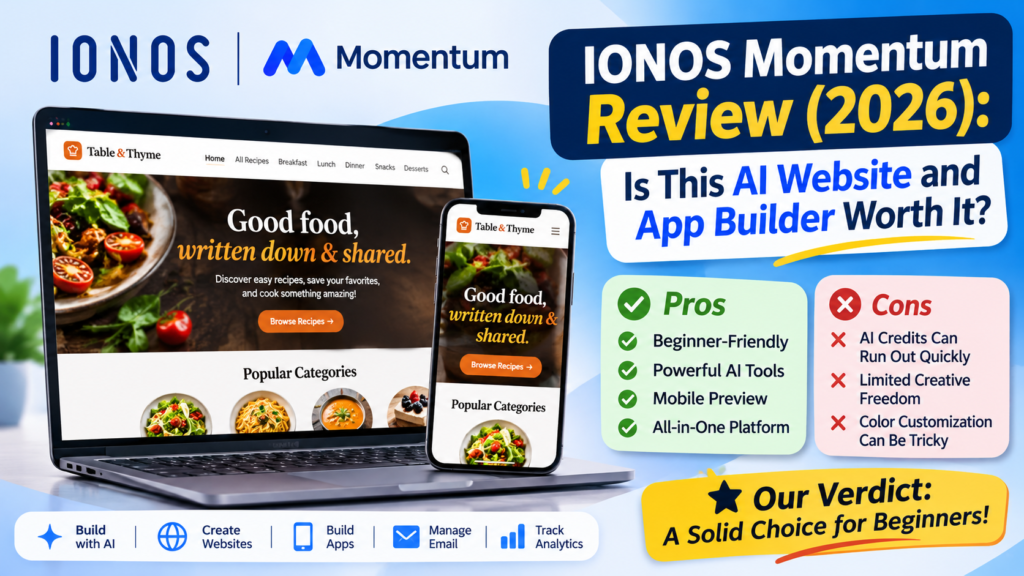
IONOS Momentum is an AI-powered platform that lets you build websites and apps from plain-language prompts. In our testing, it was easy to start, produced a clean and practical design, and gave us useful editing tools, including free manual edits and a feature called Point and Ask.
The main trade-offs are an AI credit system that can drain quickly if you redesign repeatedly, and design flexibility that may feel limited if you want a truly one-of-a-kind look.
Our rating: Good for beginners, small business owners, and solo creators. Not the best match for developers who want full control over backend and architecture.
What Is IONOS Momentum?
AI has changed how people build things online. A few years ago, launching a website or app meant hiring a developer or learning to code. Today, you can describe your idea in a sentence and get a working draft in minutes.
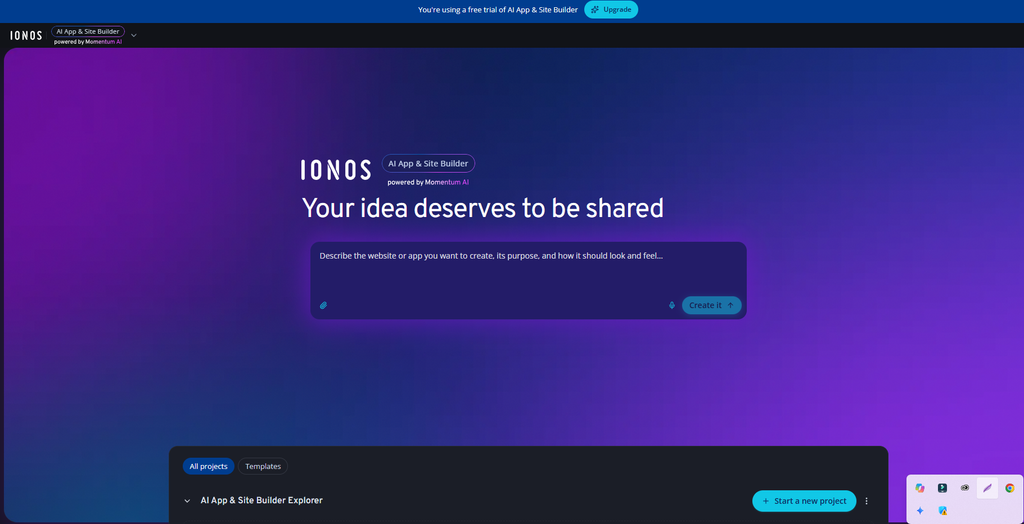
IONOS Momentum is one of the newer platforms built around that idea. Rather than offering only a website builder, it positions itself as a broader AI ecosystem. Within a single subscription, you can build websites and apps, and you also get extras such as email accounts, analytics, business features, and an AI advisor.
The biggest advantage is accessibility. You don’t need programming skills to begin. You describe what you want, the AI generates a project, and you refine it from there.
That raises the real question this review answers: does IONOS Momentum actually stand apart from the crowd of AI website builders, and is it the right choice for you?
IONOS Momentum Pros and Cons
Build websites and apps using simple AI prompts without writing code.
Edit text, replace images, and update content manually without using AI credits.
Select specific elements and tell the AI exactly what you want to change.
Upload existing documents and use their content to create polished layouts.
Give the AI voice commands instead of typing every instruction manually.
Preview your website’s mobile layout and check how it looks on smaller screens.
Access version history, code editing, and database tools for greater control.
Manage websites, apps, email, analytics, business tools, and AI assistance in one subscription.
Complex prompts and repeated design changes can consume credits quickly. Plan your edits carefully to avoid unnecessary usage.
Websites can have a recognizable IONOS design style. This works for standard business projects but may limit highly customized designs.
Finding and applying specific colors can feel tedious, especially if you want precise control over every design detail.
A traditional website builder may be enough for simple sites. Developers who need custom backends, advanced architecture, and complete code control may prefer a more developer-focused platform.
How the AI Builder Works
To test the platform, we asked the AI App Builder to create a personal recipe website, the kind of project a home cook might want for saving and sharing favorite dishes.
The prompt was short and simple. There was no need for a long, technical brief. That is worth highlighting, because many AI tools reward complicated prompt engineering. Here, clear and direct instructions were enough for the AI to produce a usable design.
The result was modern, clean, and easy to use. It isn’t flashy or heavily stylized, but it is practical and well suited to everyday use. For a recipe site, a small business page, or a simple portfolio, that is often exactly what you need.
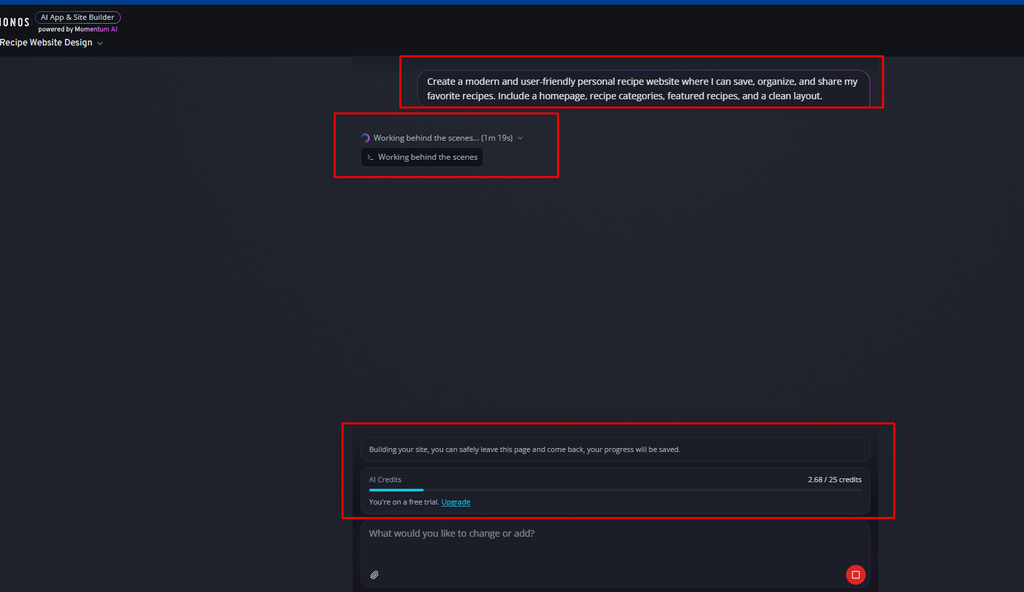
I gave a small prompt, and from that a website is being created. Here it has clearly shown me that I am currently on the free plan, and I am showing you all on the free plan. Here it is currently showing that it will take 25 credits. It’s a small website, just to show you a review, that I am creating. 25 credits are being deducted. Let’s see what kind of view it gives.
It is discussed in the pricing, it is clearly stated in the pricing, but you can create the website for free, but you cannot make it live for free. I mean, the pricing has all the full details, even then I just mentioned it here a little bit.
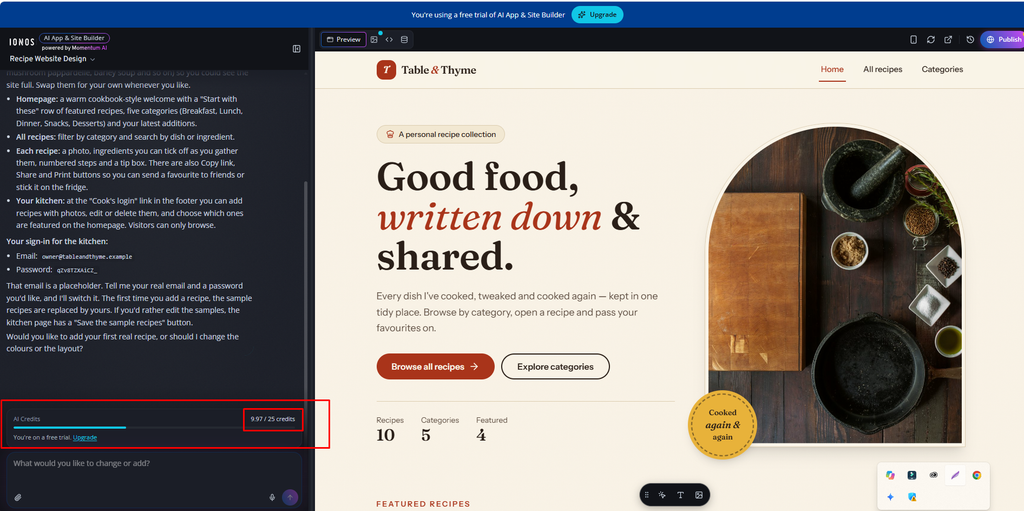
A beautiful website has been created, but how many credits were deducted here? Only about ten credits, 9.97 credits were deducted. I had given a really small prompt, and for a review it created such a beautiful custom website, look.
A practical tip: Be specific about what you want but keep it brief. State the purpose of the site, the type of content, and the general feel. You can always refine later with manual edits, which don’t cost credits.
Editing and Customization
Generating a site is only the first step. The quality of an AI builder often comes down to how easily you can edit the result. IONOS Momentum gives you two paths: manual editing and AI-powered editing.
Manual Edits (No AI Credits Needed)
Some changes can be made by hand without spending any credits. These include:
- Changing text on the page
- Replacing images
- Editing general content
- Adding your own details and information
This is a real advantage. Small fixes, like correcting a headline, swapping a photo, or updating a description, are the most common edits, and they cost nothing.
AI-Powered Edits (Credits Required)
Certain AI-driven changes consume credits. Changing the theme or colors is a good example. In our testing, each of these changes cost roughly 9.97 credits.
9.97 credits may not sound like much, but if you like to experiment with multiple color schemes and themes, the cost adds up. Knowing this in advance helps you plan your edits and avoid burning through your monthly allowance.
Point and Ask
One of the most useful features we tried is Point and Ask.
Instead of describing a change in general terms and hoping the AI finds the right element, you select a specific element on the page and tell the AI what to do with it. For example, you can click a button, type that you want a different color, and the AI applies the change to that element.
This makes editing feel much more precise. You are pointing at exactly what you mean, which reduces misunderstandings and saves time. For anyone who has struggled to explain “the button on the left, below the second image” to an AI, this is a welcome improvement.
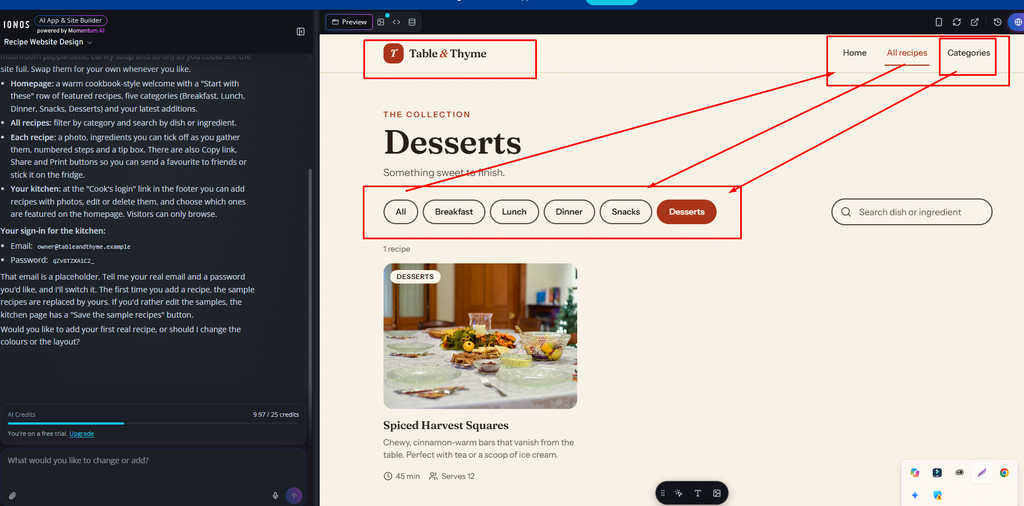
I have checked each and every button here, and every button is working. There is no problem. The website can be created here for free. If you don’t believe it, you can try it yourself. There are free credits here. You write at least one thing, practice a little, test a little, and you will see how much it matches with mine.
Document Upload and Voice Instructions
Two more features stood out in testing.
Document and File Upload
You can upload your own files and ask the AI to build from them. We tested this by uploading a Microsoft Word document containing saved cooking recipes.
The AI read the document, used the information correctly, and arranged the recipes in a clean, attractive layout. It even handled a personal favorite, Grandma’s Chicken Pot Pie, and presented it nicely in the new design.
This is especially useful if you already have content, such as menus, product lists, service descriptions, or written guides, and don’t want to retype everything.
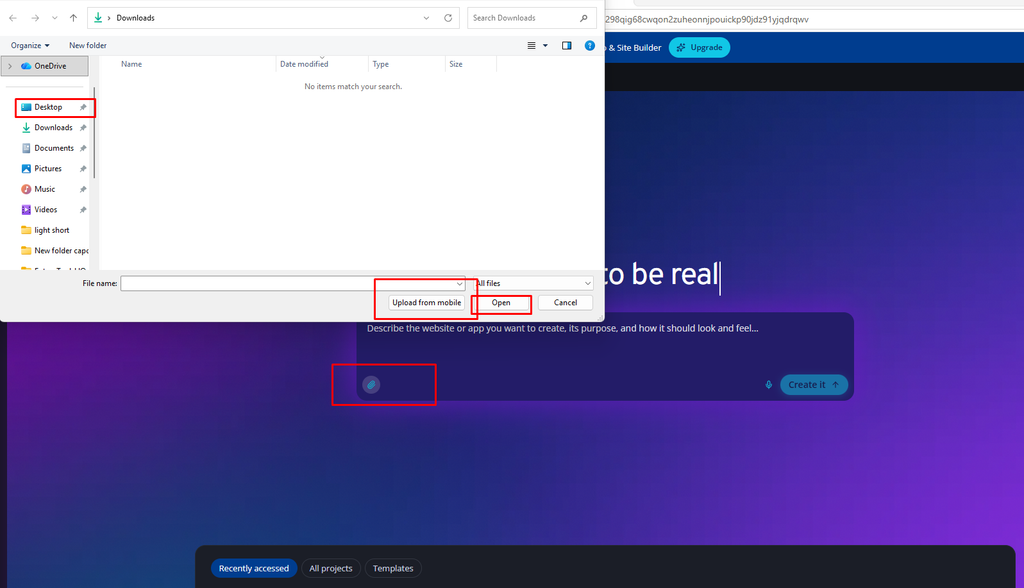
If you have any file, and if you want to create a beautiful website from that file, then you just click there and select the file from your computer, your desktop, your mac and it will be able to create a website for you.
Voice Instructions
Momentum also supports voice instructions, so you can speak your changes instead of typing them. If you prefer to work hands-free or simply find speaking faster, this is a handy option.
Advanced Tools
While the platform is friendly to beginners, it also includes tools for people with more technical experience:
- Database inspection: Check the data your project uses.
- Code editing: Make quick changes directly in the code.
- Version history: Review earlier versions of your project.
- Mobile layout preview: See how your project looks on a phone screen.
In practice, this means a complete beginner and a somewhat experienced user can both find a comfortable way to work. You are not locked into only prompting the AI, and you are not forced to touch code either.
Mobile Preview and Layout Testing
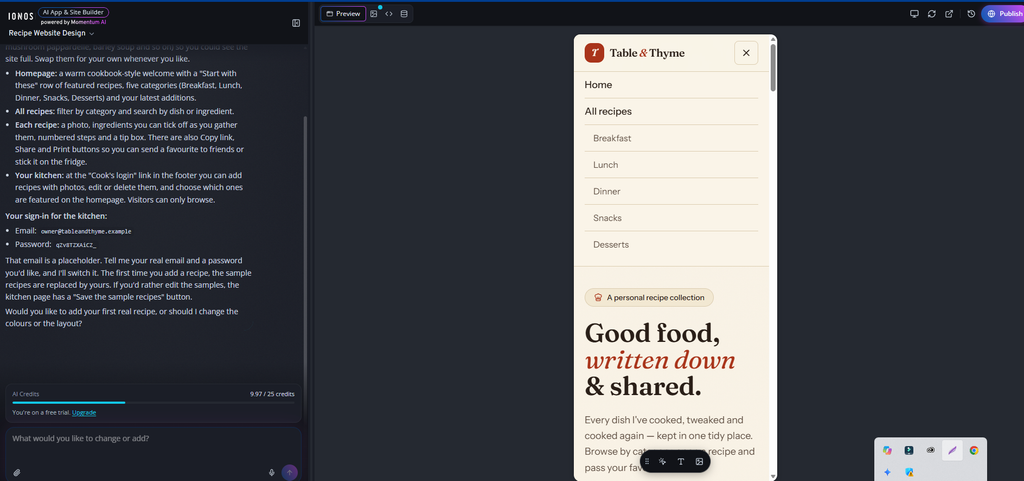
One thing we liked while testing IONOS Momentum was the ability to preview the website in a mobile-sized layout without leaving the editor.
As shown in our screenshot, the recipe website adjusts to a narrow screen, giving it a more phone-friendly appearance. The navigation menu is easy to follow, with clear links for Home, All Recipes, Breakfast, Lunch, Dinner, Snacks, and Desserts. The text is readable, and the overall layout feels clean rather than crowded.
We also liked how the main heading and introductory text remain easy to read in the smaller view. For a recipe website, this matters because visitors may want to browse recipes or look up ingredients while using their phones in the kitchen.
The mobile preview is useful for spotting layout issues before publishing. You can check how the page looks on a smaller screen and make adjustments if something feels too tight or out of place.
Overall, the mobile preview makes it easier to see how your design will work for smartphone visitors. We’d still recommend checking the published website on a real phone before launch, but having this preview built into the editor is a convenient addition.
IONOS Momentum Pricing (November 2026)
IONOS Momentum offers three subscription plans: Starter, Plus, and Unlimited. Each plan is built around a different number of AI credits, projects, and email addresses. All three require a 1-year term and start with a low introductory price for the first month, after which the regular monthly rate applies.
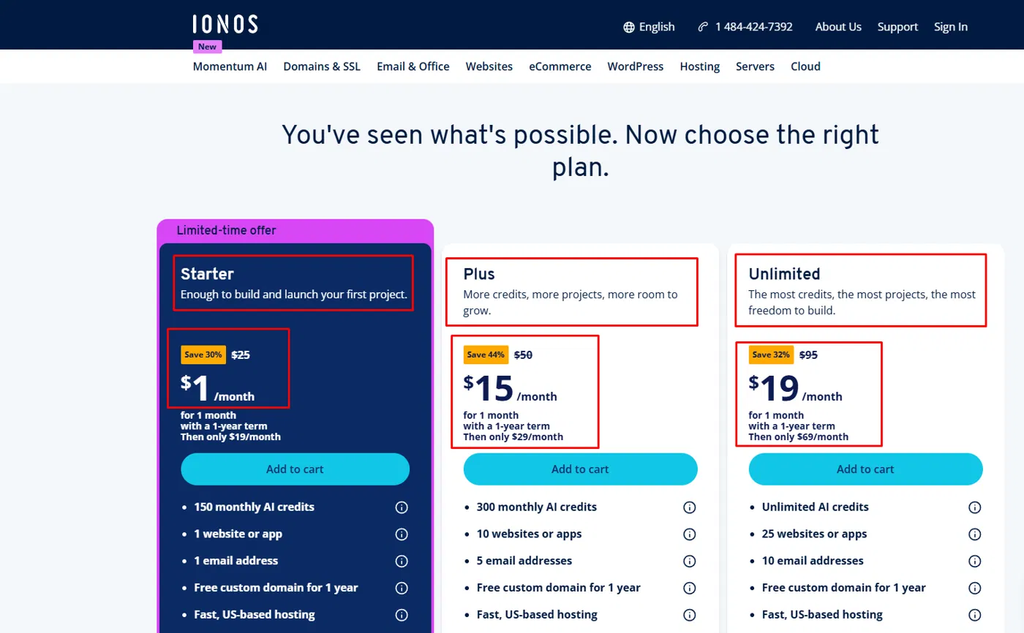
I shared a screenshot and below, with as much as I understand, I tried to explain it to you. I hope you will easily understand the matter.
Plan Comparison
| Starter | Plus | Unlimited | |
|---|---|---|---|
| Best for | Your first project | Growing creators and small businesses | Agencies and multi-project builders |
| Intro price (first month) | $1/month | $15/month | $19/month |
| Regular price after month 1 | $19/month | $29/month | $69/month |
| List price (crossed out) | $25/month | $50/month | $95/month |
| Monthly AI credits | 150 | 300 | Unlimited |
| Websites or apps | 1 | 10 | 25 |
| Email addresses | 1 | 5 | 10 |
| Free custom domain | 1 year | 1 year | 1 year |
| US-based hosting | Yes | Yes | Yes |
| Term required | 1 year | 1 year | 1 year |
Pricing is based on IONOS’s website at the time of writing. A limited-time offer was shown on the Starter plan. Prices and promotions can change, so check IONOS’s official site before buying.
Starter: Enough to Build and Launch Your First Project
Starter is the entry point, and the first month costs just $1. It includes 150 AI credits per month, one website or app, one email address, a free custom domain for the first year, and fast US-based hosting. After the first month, the price rises to $19/month.
Who it’s for: Beginners, solo creators, and anyone launching a single project, such as a portfolio, a recipe site, or a small business page.
Plus: More Credits, More Projects, More Room to Grow
Plus doubles the monthly AI credits to 300 and lets you run 10 websites or apps with 5 email addresses. It costs $15 for the first month, then $29/month.
Who it’s for: Small business owners and creators who manage several projects and expect to make frequent AI-powered edits.
Unlimited: The Most Credits, the Most Projects, the Most Freedom
Unlimited removes the credit cap with unlimited AI credits, and supports 25 websites or apps and 10 email addresses. The first month is $19, then $69/month.
Who it’s for: Agencies, freelancers, and heavy users who build and redesign often and don’t want to watch a credit counter.
What Is Included in Every Plan
- Free custom domain for the first year
- Fast, US-based hosting
- AI website and app builder
- A 1-year subscription term
What Will You Really Pay?
The intro price lasts only one month, so judge each plan by its regular price. If you are billed monthly across the 1-year term, the approximate first-year cost is:
| Plan | Month 1 | Months 2 to 12 | Approx. first-year total |
|---|---|---|---|
| Starter | $1 | $19 × 11 | ~$210 |
| Plus | $15 | $29 × 11 | ~$334 |
| Unlimited | $19 | $69 × 11 | ~$778 |
Estimates only. Taxes, billing options, and renewal terms may differ, so confirm them at checkout.
Which Plan Should You Choose?
- Choose Starter if you are building one project and plan to edit most text and images manually, which costs no credits.
- Choose Plus if you manage multiple sites or apps, or if you often use AI for theme, color, and design changes (about 3 credits each in our testing).
- Choose Unlimited if you build many projects and want to experiment freely without worrying about credits.
Our take: For most beginners, Starter offers the lowest-risk way to try Momentum. Move up to Plus once your projects or credit usage outgrow it.
How It Compares to Other Options
Rather than naming specific competitors and quoting prices that may have changed, here is a simple way to think about where Momentum fits.
| If you want… | Best fit |
|---|---|
| A basic site with minimal setup | A traditional website builder or standard hosting plan |
| A fast AI-generated site or app with easy editing | IONOS Momentum |
| Full control over backend, architecture, and code | A developer-focused platform |
Momentum’s strongest selling point is the combination of AI generation, free manual editing, and bundled business tools under one subscription. Its main limitation is that it is not built for people who need to control every technical detail.
Who Should Use IONOS Momentum?
It’s a Good Fit If You:
- Are a beginner or non-coder who wants a website or app quickly
- Run a small business and need a modern online presence
- Want to turn an app idea into a working prototype with AI
- Prefer one subscription that bundles several tools
- Already have content in documents and want it turned into a finished layout
Look Elsewhere If You:
- Need complete control over code, backend, and architecture
- Want a highly custom, one-of-a-kind design
- Only need a very simple site, where a basic builder or hosting plan may be cheaper and simpler
Tips to Save AI Credits
Because AI actions use credits, a few habits can help you get more from your plan:
- Start with a clear prompt. A well-defined first prompt reduces the need for repeated regeneration.
- Edit text and images manually. These changes are free.
- Use Point and Ask for small fixes. Targeted edits are more efficient than rebuilding the whole design.
- Be careful with theme and color experiments. Each AI-driven change can cost around 3 credits in our testing.
- Test the Explorer Plan first. Learn how the tool behaves before committing to a paid plan.
- Check the mobile preview early. Catching layout problems early avoids repeated fixes later.
FAQ
Is IONOS Momentum good for beginners?
Yes. You can start with a simple prompt and don’t need coding skills. Manual editing and Point and Ask make it easy to refine the result.
Can I build both websites and apps with IONOS Momentum?
Yes. The platform is designed for building both websites and apps with AI.
Do I need AI credits for every edit?
No. Basic changes such as text, images, and general content can be edited manually without credits. AI-driven changes, such as theme and color updates, use credits.
How many credits does the Starter Plan include?
The Starter Plan includes 150 AI credits per month.
Can I publish my site on the Explorer Plan?
No. The Explorer Plan lets you build and preview projects, but live publishing is not included.
Does IONOS Momentum have a mobile preview?
Yes. You can preview your site’s mobile layout inside the editor.
Can I upload my own documents?
Yes. In our test, we uploaded a Microsoft Word document of recipes, and the AI used it to build a clean layout.
Is IONOS Momentum good for advanced developers?
It includes code editing, database inspection, and version history. However, if you need full control over backend and architecture, a developer-focused platform may suit you better.
Final Verdict: Is IONOS Momentum Worth It?
IONOS Momentum makes building a website or app much simpler, especially for people without technical skills. The prompt-based builder works well with simple instructions, manual editing is free, Point and Ask makes changes precise, and the bundled extras add real value.
The drawbacks are real but manageable. Credits can run out quickly if you redesign often, and creative freedom is more limited than on a fully custom platform.
Our recommendation: Start with the Explorer Plan to test the platform. If it fits your needs, move to the Starter Plan or a higher tier. To get the most from your credits, make small text and image edits manually and save AI prompts for larger changes.
For beginners, small business owners, and creators who want a fast, low-friction way to launch a website or app, IONOS Momentum is well worth trying.
Affiliate disclosure: This article may contain affiliate links. If you buy through them, we may earn a commission at no extra cost to you. Our opinions are based on our own testing.