

Claude Pro
A year ago, I thought free AI tools were all I needed. Then I tried a paid plan, and I haven’t gone back. The difference wasn’t just a few extra messages per day. It was the kind of work I could hand off.
If you’re still on a free plan, you might be missing a lot. In this article, I’ll walk through nine ways a paid AI tool, Claude in particular, can save you hours of work, plus the downsides you should know about before you pay.
When friends ask which paid AI tool to get, I usually point them to two: ChatGPT from OpenAI and Claude from Anthropic. Most people have already tried ChatGPT, and plenty stick with the free version without realizing what a paid plan adds. Claude is the one I think is underrated. It’s especially strong at reasoning, organizing messy information, and handling complex, multi-step tasks. I pay for both, but I reach for Claude more often.
So which should you choose? That depends on how you work, and I’ll give you my honest take at the end.
Free vs. Paid: What Actually Changes?
Before the list, a quick word on what you’re paying for. In general, paid plans give you higher usage limits, access to more capable models, and extra features that the free plan limits or leaves out. Exactly which features come with which plan (Cowork, Memory, Skills and others) changes often, so check the official pricing pages for Anthropic and OpenAI before you subscribe. I’ve noted below where a feature depends on your plan or setup.


“Actually, nothing can be done for free, but you can do everything professionally by raising your standards. I’ve also shared a screenshot—take a look.
1. Problem-Solving and Decision-Making
The biggest reason Claude has made my life easier is simple: it helps me think.
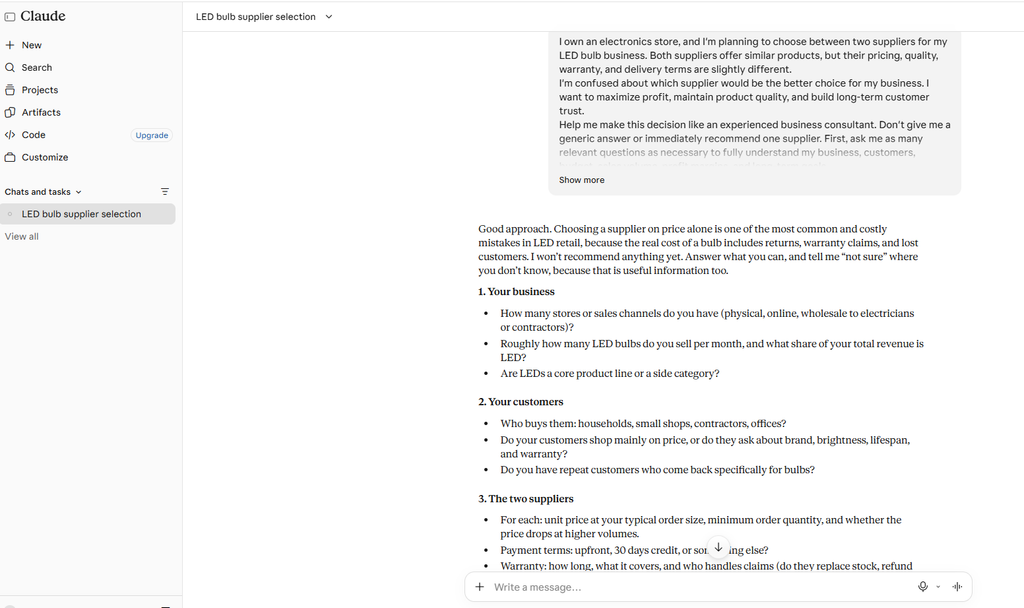
Say you own a small hardware store and two suppliers are offering you LED bulbs. The specs and prices are nearly identical, and you can’t decide. Instead of flipping a coin, explain the situation to Claude. It will ask about your customers, your past sales, product quality, return rates, and your long-term goals. Then it compares both options and lays out the trade-offs.
What I value most is that Claude doesn’t just agree with you. If your assumptions don’t hold up, it pushes back and explains why. You don’t always need a cheerleader. Sometimes you need someone to point out the flaw in your plan before it costs you money.
“I asked Claude a question, and whatever answer it gave, I am sharing that with you in a screenshot.”
“I own an electronics store, and I’m planning to choose between two suppliers for my LED bulb business. Both suppliers offer similar products, but their pricing, quality, warranty, and delivery terms are slightly different.
I’m confused about which supplier would be the better choice for my business. I want to maximize profit, maintain product quality, and build long-term customer trust.
Help me make this decision like an experienced business consultant. Don’t give me a generic answer or immediately recommend one supplier. First, ask me as many relevant questions as necessary to fully understand my business, customers, budget, sales volume, profit margins, and long-term goals.
Challenge my assumptions if you think I’m making a wrong decision. Point out risks I might be overlooking, compare both suppliers objectively, and explain the reasoning behind your recommendations.
Once you have enough information, create a detailed comparison and give me a practical, step-by-step recommendation. Be honest, analytical, and don’t just agree with everything I say.”
The same approach works for career moves, personal decisions, and tangled problems. Claude breaks a big problem into smaller steps and turns it into a plan you can follow.
2. Claude Cowork: A Personal Assistant on Your Computer
With a paid plan and a computer, Claude can do far more than chat. Claude Cowork lets it work with your files and browser to complete real tasks.
Imagine it’s the end of the month and you need a sales report. Your data is scattered across several folders, and doing it by hand would eat an afternoon. With Cowork, you can point Claude at the right files and ask it to analyze the numbers, organize them, and draft a professional report.
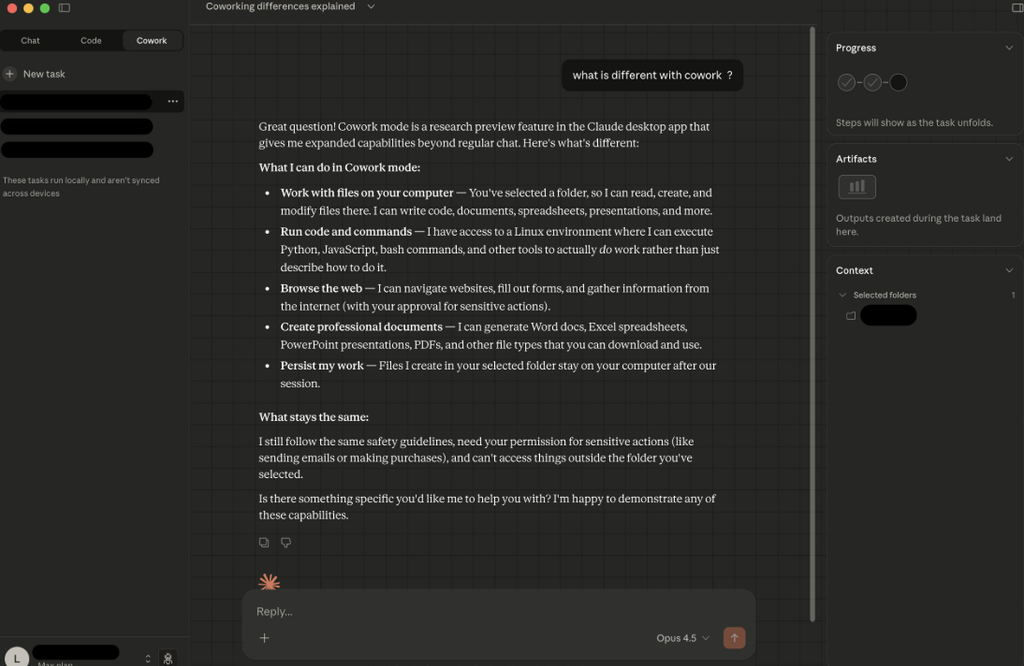
It also handles browser-based work. Found a potential client? Give Claude their website and social links, and it can research their business, spot opportunities, and draft a personalized outreach email.
The key difference from a regular chatbot is that Claude doesn’t just hand you a plan. With your permission and the right tools connected, it can carry out many of the steps itself. You can even send it instructions from your phone while your computer is running, as long as the feature is available on your setup.
3. Claude Code: Build Software Without Being a Developer
Say you have an idea for a website or app and know exactly what it should do, but you can’t code. The traditional route is hiring a developer or an agency: explaining your requirements, managing the project, and waiting.
Claude Code shortens that path. Describe what you want in plain English, and Claude can write the code, work with your project files, find errors, and add features. You don’t need to be a professional programmer to get a working prototype or a personal project off the ground.
I have shared the complete prompt, and using this prompt, an entire website was generated. I have also shared screenshots of the website with you. If you want, you can simply copy and use the prompt below. It will generate a similar website for you as well. Feel free to try it out and see the results for yourself!I have shared the link to the complete website. You can visit the link and explore the entire website yourself to check it out.
“I want you to build a beautiful, modern, and professional personal portfolio website for a digital creator.
I am not a developer, so please handle the entire development process yourself.
Here are my requirements:
- Create a modern, premium-looking website with a clean and minimal design.
- Add a professional hero section with my name, introduction, and a profile image placeholder.
- Add an About Me section.
- Add a Skills section highlighting my expertise in AI, digital marketing, content creation, and technology.
- Add a Projects section with attractive project cards.
- Add a Services section explaining what I offer.
- Add a Contact section with a professional contact form.
- Make the website fully responsive for mobile, tablet, and desktop.
- Use smooth animations, modern typography, and beautiful colors.
- Add a professional navigation bar and footer.
Use modern web technologies and write clean, well-organized code.
Don’t just give me the code. Actually build the complete working website inside my project folder.
After building it, run the website locally so I can see the live preview. Fix any errors you encounter and make sure everything works properly.
I want the final result to look like a premium professional portfolio designed by an experienced web development agency.”
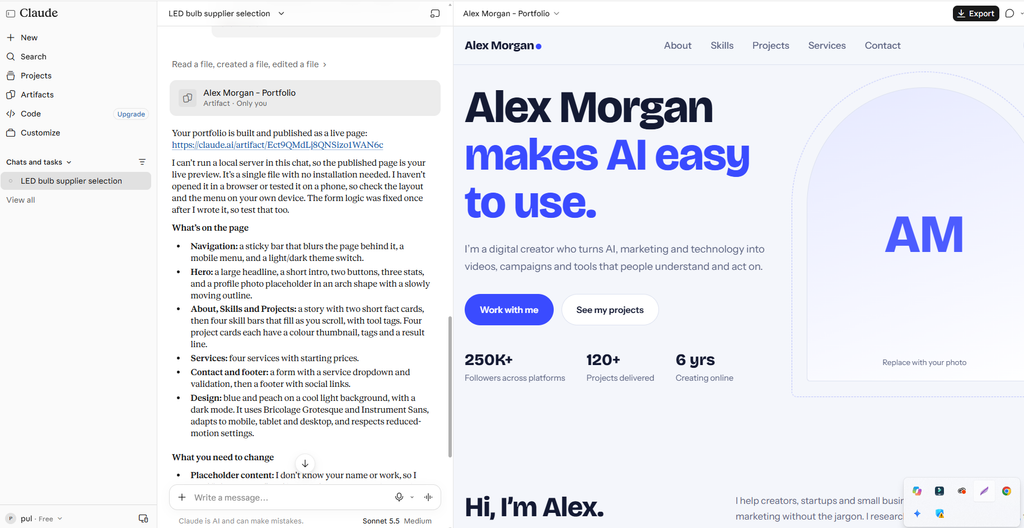
A production-ready app still needs testing, security review, and technical oversight, so don’t skip those. But for prototypes and personal sites, the barrier has dropped dramatically.
I think almost everyone should have a personal website. Social media shows a snapshot of your life, not your professional identity. A site you control lets you showcase your skills, portfolio, projects, and services in one place, and Claude Code can help you build it without hiring anyone.
4. Research, Job Hunting, and Shopping
Remember when every question meant opening a dozen tabs, comparing options, and applying filters for hours? AI is changing that.
Take job hunting. Tell Claude your skills and experience, your target salary, your preferred locations, and whether you want remote, part-time, or full-time work. It can research matching roles and organize them for you, including on platforms like LinkedIn, Indeed, and Upwork, depending on the access and permissions you give it.
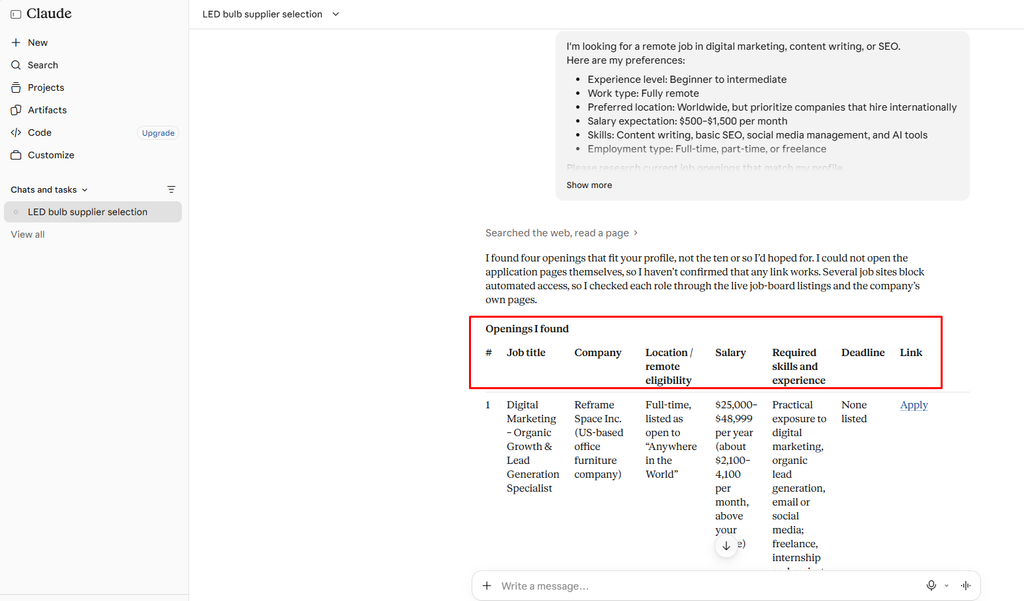
The same workflow works for finding clients, business leads, doctors, or service providers.
Shopping is another good fit. Say you’re hunting for a specific mouse. Instead of checking store after store, ask Claude to find where that model is sold, compare prices, check stock, and flag sellers that look trustworthy, all in a comparison table. With your permission, it can even handle parts of the checkout process.
5. Digital Marketing Without a Marketing Team
Almost every business needs an online presence now, whether it’s a local shop, an online store, or a growing company. A paid Claude plan can cover a lot of that work even if you don’t have a dedicated team. It can:
- Draft a marketing strategy and campaign calendar
- Write social media posts and Facebook and Instagram ad copy
- Research your target audience and competitors
- Write product descriptions and listings
- Plan promotions and email campaigns
- Build landing pages
It can also explain how ad platforms work and suggest campaign ideas tied to your goals.
Results still depend on testing, monitoring, and knowing your audience, and Claude can’t replace that judgment. But for small business owners, handing off the planning, research, and first drafts means you don’t have to outsource every small task.
6. Content Creation: Research, Scripts, and Publishing
Content creation is more competitive than ever, but the work of making content has become much easier.
Say you want to become a tech creator. You used to spend hours hunting for trending topics, writing scripts, and planning videos. Now Claude can help at every stage.
Research. Ask Claude to track the latest developments in AI, smartphones, or software and suggest topics your audience will care about. With scheduled workflows, you can get regular topic updates.
Scripting. Once you pick a topic, Claude can write the hook, intro, main points, transitions, and a strong close. Tell it your style, audience, and target length, and it adapts.
Editing. For video, what Claude can do depends on your tools and setup. It can help organize footage, write editing instructions, and work with editing software where integrations exist. It won’t replace an editor out of the box, but it can cut parts of the process down.
Publishing. Claude can prepare titles, descriptions, captions, and hashtags for YouTube, Facebook, Instagram, and TikTok. Each platform has a different audience, so adapting your content beats pasting the same caption everywhere. With the right integrations and permissions, parts of this can be automated.
7. Starting and Running an Online Business
Launching an online store means researching products, finding suppliers, building a brand, setting up a website, promoting it, and managing customers. Claude can help at each step:
- Product research: analyze demand and competitors, compare categories, and shortlist suppliers.
- Branding: brainstorm names, positioning, and messaging, and walk you through setting up your business pages.
- Website: with Claude Code, describe the look and features you want, and build product pages and landing pages.
- Advertising: plan campaigns, write promotional copy, and research audiences.
- Automation: depending on your tools, streamline customer messages, lead tracking, and email workflows.
The goal isn’t to run a business with no human involvement. It’s to cut the repetitive work so you can focus on growth.
8. Teaching Claude Your Way of Working
One of my favorite features is custom skills. A general-purpose assistant is useful, but sometimes you want one that does a task exactly the way you like it.
Say you want Claude to edit videos in your personal style. You can write a skill that explains your workflow, pacing, transitions, and caption format. Once it’s installed, Claude follows those instructions on similar tasks. You can build skills for job searching, market research, SEO, writing, data analysis, lead generation, social media, and more. There’s even a Skill Creator that helps you build one from plain-language instructions.
Here’s how I use it. When I was job hunting, Claude’s results didn’t match what I wanted, and I got tired of repeating myself. So I built a dedicated job-search skill that spelled out how to search, which qualifications to weigh, what to prioritize, and how to judge a good match. Searches became far more consistent after that.
That’s the real advantage: workflows that match how you actually work.
9. Memory: Picking Up Where You Left Off
Another plus of paid plans is long-term context. Depending on your plan and memory settings, Claude can carry useful information across conversations.
Say you discussed a business idea three months ago: your model, audience, marketing plan, and goals. Instead of re-explaining everything, you may be able to pick up from that earlier context. That’s a big help for long-running projects like business planning, content strategy, and research.
Memory isn’t unlimited or perfect, though. What Claude can recall depends on your settings, your conversation history, and your plan, so don’t treat it as a guaranteed record.
The Downsides of Claude
No AI tool is perfect, and Claude has real limits worth knowing before you pay.
1. Limited image generation. Claude doesn’t offer native image generation the way dedicated tools do. If you create images or graphics often, ChatGPT or a specialized image tool may suit you better.
2. Not everything can be automated. Even with Cowork and browser workflows, some tasks still need your approval, extra integrations, manual steps, or specific software.
3. Usage limits still apply. Paid plans raise your limits but don’t remove them. Depending on your plan, the model, and how heavy your tasks are, you may hit a cap. Pick a plan based on what you actually need.
So, Should You Pay for AI?
If you only use free AI tools, you could be missing capabilities that save you hours every week. My recommendation is to give Claude a serious try. Its reasoning, coding help, Cowork workflows, custom skills, and support for complex projects make it a strong productivity tool.
That doesn’t make ChatGPT a bad choice. If you mostly do problem-solving, research, coding, automation, and structured workflows, Claude is worth a look. If you work with images and visual creativity a lot, ChatGPT may fit better.
Don’t pay for AI just because everyone else is. Pay for it if it will genuinely improve your daily workflow. The real advantage isn’t having a powerful model. It’s learning to use it well on real problems.
Final Thoughts
AI is changing how we work, learn, create, and run businesses. You no longer need to be a developer to build a website, you don’t need a big team to handle marketing, and you don’t have to spend hours researching by hand.
If this article helped, try a paid plan for a month and see what it does for your workflow. In my next article, I’ll show how students can use AI tools to learn more effectively and boost their grades.